1. ആമുഖം
The dollarfix OBD2 Scanner EF18 is a diagnostic tool designed to help users identify and understand issues within their vehicle's engine and related systems. This manual provides detailed instructions for the proper setup, operation, and maintenance of your diagnostic scanner, ensuring accurate readings and effective use.

Image 1.1: The dollarfix OBD2 Scanner EF18 device and its packaging, highlighting its compact design and user interface.
2. സജ്ജീകരണം
Setting up your dollarfix OBD2 Scanner EF18 is a straightforward process. The device is designed for ease of use, even for beginners.
- OBD2 പോർട്ട് കണ്ടെത്തുക: Identify your vehicle's 16-pin OBD2 diagnostic port. This port is typically located under the dashboard on the driver's side, but its exact position may vary by vehicle model and manufacturer. Refer to your vehicle's owner's manual if you have difficulty locating it.
- സ്കാനർ ബന്ധിപ്പിക്കുക: Firmly plug the dollarfix OBD2 Scanner EF18's cable connector into your vehicle's OBD2 port. Ensure a secure connection.
- പവർ ഓൺ: Turn your vehicle's ignition to the "ON" position (do not start the engine). The scanner will automatically power on, drawing power directly from the vehicle's OBD2 port. No external batteries are required for operation.
- പ്രാരംഭ പ്രദർശനം: The scanner's LCD screen will illuminate, displaying the main menu or a welcome screen. You are now ready to begin diagnostics.

Image 2.1: The dollarfix OBD2 Scanner EF18 connected to a vehicle, illustrating the device's display and its ability to read and clear Diagnostic Trouble Codes (DTCs).
3. പ്രവർത്തന നിർദ്ദേശങ്ങൾ
The dollarfix OBD2 Scanner EF18 offers a range of diagnostic functions. Navigate through the menus using the arrow keys and confirm selections with the 'OK' button.
3.1. പ്രധാന രോഗനിർണയ പ്രവർത്തനങ്ങൾ
- കോഡുകൾ വായിക്കുക: Retrieves Diagnostic Trouble Codes (DTCs) from the vehicle's computer. These codes indicate specific issues detected by the vehicle.
- മായ്ക്കൽ കോഡുകൾ: വാഹനത്തിന്റെ കമ്പ്യൂട്ടറിൽ നിന്ന് ഡിടിസികൾ മായ്ക്കുകയും മാൽഫങ്ഷൻ ഇൻഡിക്കേറ്റർ എൽ ഓഫാക്കുകയും ചെയ്യുന്നു.amp (MIL), also known as the 'Check Engine' light. Ensure the underlying issue is resolved before clearing codes.
- I/M സന്നദ്ധത: Checks the status of the emission-related monitoring systems. This function helps determine if your vehicle is ready for an emissions test.
- ഡാറ്റ സ്ട്രീം: Displays real-time data from the vehicle's sensors, such as engine RPM, vehicle speed, oxygen sensor readings, and more.
- ഫ്രീസ് ഫ്രെയിം: Records a snapshot of operating conditions at the moment a DTC was set. This data can help diagnose intermittent problems.
- O2 സെൻസർ ടെസ്റ്റ്: വാഹനത്തിന്റെ ഓൺ-ബോർഡ് കമ്പ്യൂട്ടറിൽ നിന്ന് ഏറ്റവും പുതിയ പരിശോധനകളുടെ O2 സെൻസർ മോണിറ്ററിംഗ് പരിശോധനാ ഫലങ്ങൾ വീണ്ടെടുക്കുന്നു.
- ഓൺ-ബോർഡ് മോണിറ്റർ ടെസ്റ്റ്: തുടർച്ചയായി നിരീക്ഷിക്കപ്പെടാത്ത എമിഷനുമായി ബന്ധപ്പെട്ട പവർട്രെയിൻ ഘടകങ്ങളുടെയും സിസ്റ്റങ്ങളുടെയും ഫലങ്ങൾ വീണ്ടെടുക്കുന്നു.
- EVAP സിസ്റ്റം ടെസ്റ്റ്: വാഹനത്തിന്റെ ബാഷ്പീകരണ എമിഷൻ നിയന്ത്രണ സംവിധാനത്തിനായുള്ള ഒരു ചോർച്ച പരിശോധന ആരംഭിക്കുന്നു.
- വാഹന വിവരം: Displays the vehicle's Vehicle Identification Number (VIN), Calibration ID (CID), and Calibration Verification Number (CVN).
- DTC ലുക്ക്അപ്പ്: ഒരു ഡിടിസി സ്വമേധയാ നൽകാൻ നിങ്ങളെ അനുവദിക്കുന്നു view അതിന്റെ പൊതുവായ വിവരണം.
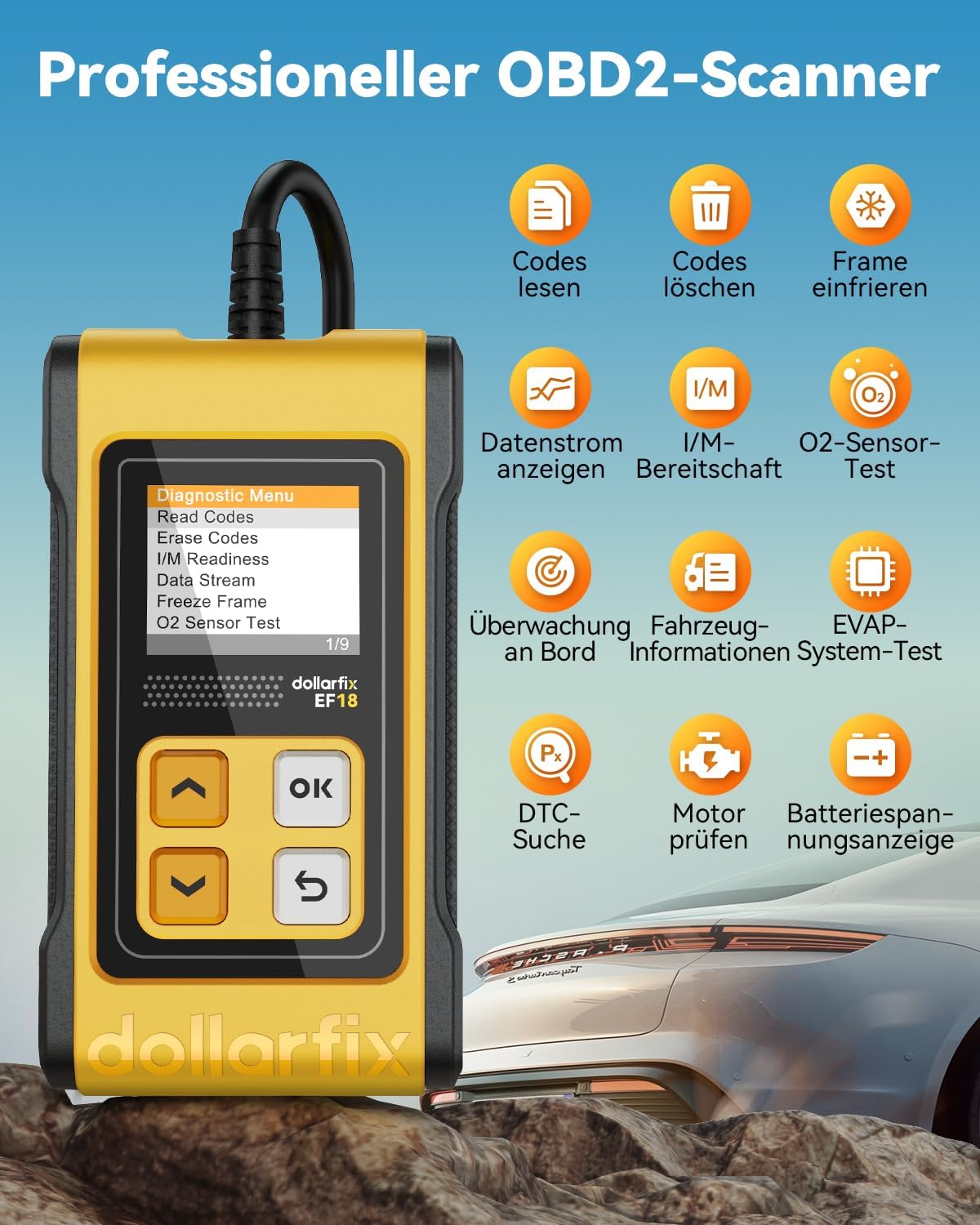
ചിത്രം 3.1: കഴിഞ്ഞുview of the dollarfix OBD2 Scanner EF18's professional diagnostic capabilities, including reading and clearing codes, viewing data streams, and performing O2 sensor tests.

Image 3.2: The scanner displaying I/M Readiness results, indicating the status of emission monitors for a smog check.

Image 3.3: The device conducting an O2 sensor test and an EVAP system test, crucial for exhaust efficiency and emission control.

Image 3.4: The scanner displaying vehicle information, including the Vehicle Identification Number (VIN).
3.2. ഭാഷാ ക്രമീകരണങ്ങൾ
The dollarfix OBD2 Scanner EF18 supports 8 languages for user convenience. To change the language:
- From the main menu, navigate to 'Settings' or 'Einrichtung' (if in German).
- Select 'Language' or 'Sprache'.
- Choose your desired language from the list: English, German, Spanish, French, Italian, Portuguese, Russian, Polish.
4. പരിപാലനം
Proper maintenance ensures the longevity and reliable performance of your dollarfix OBD2 Scanner EF18.
- വൃത്തിയാക്കൽ: Use a soft, dry cloth to clean the scanner's screen and casing. Avoid abrasive cleaners or solvents that could damage the device.
- സംഭരണം: Store the scanner in a cool, dry place, away from direct sunlight and extreme temperatures. Keep it protected from dust and moisture.
- കേബിൾ കെയർ: Avoid bending or twisting the diagnostic cable excessively. Store the cable neatly to prevent damage to the wires or connectors.
- സോഫ്റ്റ്വെയർ അപ്ഡേറ്റുകൾ: The device supports free lifetime software updates. Regularly check for and install updates to ensure compatibility with newer vehicle models and access to the latest diagnostic features. Refer to the dollarfix support website for update instructions.
5. പ്രശ്നപരിഹാരം
If you encounter issues while using your dollarfix OBD2 Scanner EF18, refer to the following common problems and solutions:
- സ്കാനർ ഓണാകുന്നില്ല:
- Ensure the scanner is securely plugged into the vehicle's OBD2 port.
- Verify that the vehicle's ignition is in the 'ON' position (engine off).
- Check the vehicle's fuse for the OBD2 port. Consult your vehicle's owner's manual for fuse box location and relevant fuse.
- Communication Error / Link Error:
- Confirm the scanner is correctly connected to the OBD2 port.
- Ensure the vehicle's ignition is 'ON'.
- Verify that your vehicle is OBD2 compliant (most vehicles manufactured after 1996 are). Some older or specific vehicle models, even if OBD2 compliant, might have unique communication protocols that the scanner may not fully support.
- Try the scanner on a different OBD2 compliant vehicle to rule out a scanner malfunction.
- Codes Cannot Be Cleared:
- DTCs can only be cleared if the underlying fault has been resolved. If the fault persists, the codes will reappear immediately or after a short driving cycle.
- Ensure the ignition is 'ON' and the engine is off when attempting to clear codes.
- കൃത്യമല്ലാത്ത വായനകൾ:
- Ensure the vehicle's engine is at normal operating temperature for certain tests (e.g., O2 sensor tests).
- Verify that the scanner's software is up to date.
6 സ്പെസിഫിക്കേഷനുകൾ
| ഫീച്ചർ | വിശദാംശങ്ങൾ |
|---|---|
| ബ്രാൻഡ് | ഡോളർഫിക്സ് |
| മോഡൽ | EF18 (YHDE-FBA3.03.01.0022-EF18-ZL-C1) |
| അനുയോജ്യത | OBD2 Protocol Cars (most vehicles manufactured after 1996) |
| പ്രദർശിപ്പിക്കുക | LCD screen with backlight, 2.8 Inches |
| പവർ ഉറവിടം | Vehicle's OBD2 port (no external batteries required) |
| പിന്തുണയ്ക്കുന്ന ഭാഷകൾ | English, German, Spanish, French, Italian, Portuguese, Russian, Polish |
| ഇനത്തിൻ്റെ ഭാരം | 240 ഗ്രാം |
| പാക്കേജ് അളവുകൾ | 17 x 7.2 x 7.2 സെ.മീ |
| യു.പി.സി | 768534533677 |
7. വാറൻ്റിയും പിന്തുണയും
dollarfix is committed to providing high-quality products and excellent customer service.
- വാറൻ്റി: The dollarfix OBD2 Scanner EF18 comes with a 5-year warranty from the date of purchase, covering manufacturing defects.
- പണം തിരികെ നൽകാനുള്ള ഗ്യാരണ്ടി: A 30-day money-back guarantee is offered, allowing you to return the product if you are not satisfied.
- സാങ്കേതിക സഹായം: 24/7 technical support is available to assist you with any questions or concerns regarding the product's operation or functionality.
- സോഫ്റ്റ്വെയർ അപ്ഡേറ്റുകൾ: Enjoy free lifetime software updates to ensure your scanner remains compatible and up-to-date with the latest vehicle protocols and features.
- ഞങ്ങളെ സമീപിക്കുക: For support, warranty claims, or any inquiries, please contact dollarfix customer service through the official webസൈറ്റ് അല്ലെങ്കിൽ നിങ്ങളുടെ വാങ്ങൽ പ്ലാറ്റ്ഫോം.

Image 7.1: Visual representation of the comprehensive support and warranty offered for the dollarfix OBD2 Scanner EF18.


