1. ഉൽപ്പന്നം കഴിഞ്ഞുview
The Baseus Qpow 2 Dual Cable Power Bank is a versatile and portable charging solution designed to keep your devices powered on the go. With a high capacity of 10,000 mAh and 22.5W fast charging capabilities, it can charge multiple devices simultaneously using its integrated Lightning and USB-C cables, as well as additional USB-A and USB-C ports.
This power bank features advanced multi-layer protection against overcurrent, overvoltage, overcharge, high temperatures, and electromagnetic interference, ensuring safe and reliable charging for your devices. Its compact and lightweight design, coupled with an easy-to-read battery status display, makes it an ideal companion for daily use and travel.
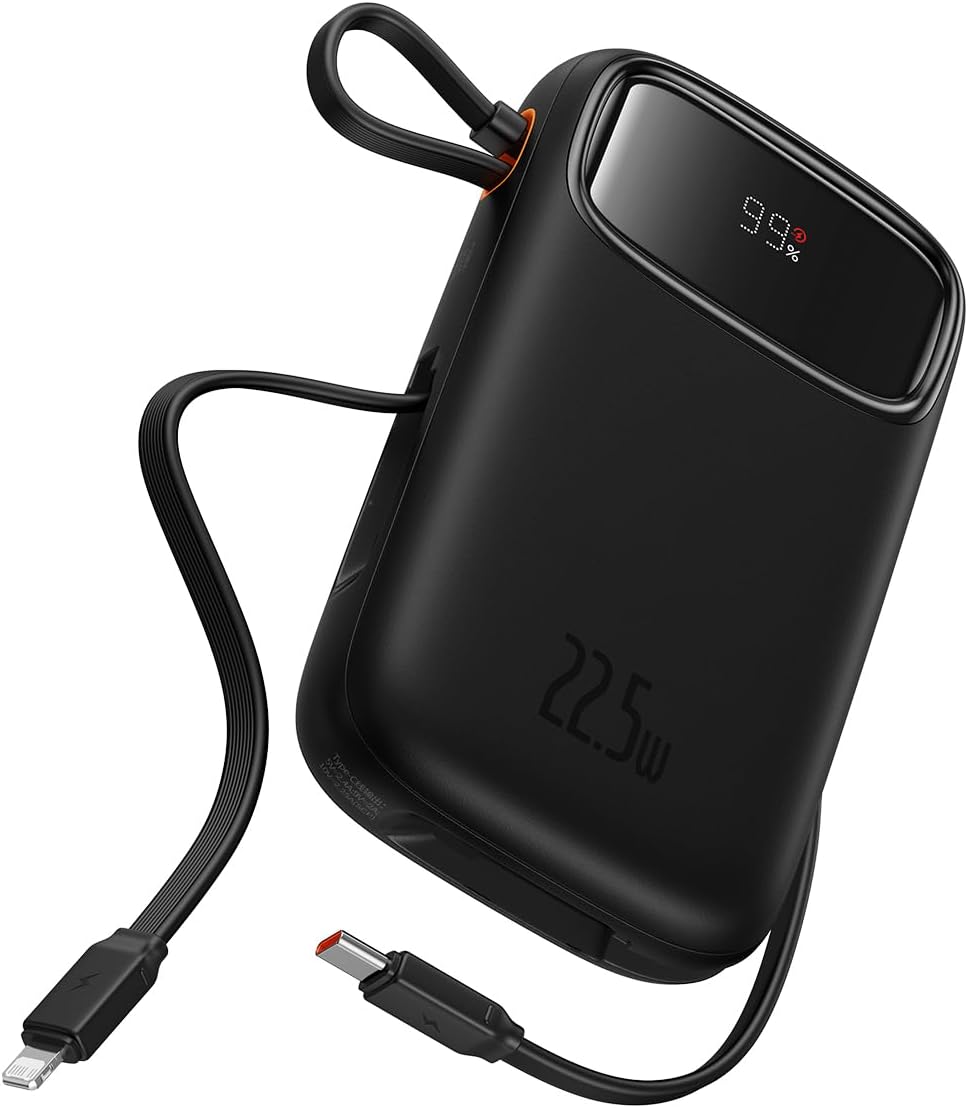
Figure 1: The Baseus Qpow 2 Dual Cable Power Bank, showcasing its compact design, integrated cables, and digital battery percentagഇ ഡിസ്പ്ലേ.

Figure 2: The power bank's slim and pocket-friendly dimensions (4.52*2.83*0.78 inches, 8.5 oz) compared to a standard soda can.

Figure 3: The portable lanyard-cable design, allowing users to pull out the cable for charging and pull it back for easy carrying.
2. സജ്ജീകരണ ഗൈഡ്
2.1 പവർ ബാങ്കിന്റെ പ്രാരംഭ ചാർജിംഗ്
Before first use, it is recommended to fully charge your Baseus Qpow 2 Power Bank.
- Connect the integrated USB-C cable or an external USB-C cable to the power bank's USB-C input port.
- Connect the other end of the cable to a compatible USB wall charger (not included).
- The digital display on the power bank will show the charging progress. Charge until the display shows "100%".

Figure 4: The power bank supports two-way USB-C charging, with 20W output and 18W input capabilities.
3. പ്രവർത്തന നിർദ്ദേശങ്ങൾ
3.1 നിങ്ങളുടെ ഉപകരണങ്ങൾ ചാർജ് ചെയ്യുന്നു
The Baseus Qpow 2 Power Bank offers multiple ways to charge your devices:
- Using Integrated Cables:
- For Apple devices: Pull out the integrated Lightning cable and connect it to your iPhone, iPad, or AirPods.
- For USB-C devices: Pull out the integrated USB-C cable and connect it to your Android phone, tablet, or other USB-C compatible device.
- ബാഹ്യ പോർട്ടുകൾ ഉപയോഗിക്കുന്നു:
- Connect your device's charging cable to the USB-A output port or the USB-C output port on the power bank.
The power bank can charge up to four devices simultaneously. Charging will begin automatically once a device is connected.

Figure 5: The power bank's capability to charge four devices at once using its integrated USB-C and Lightning cables, and external USB-C and USB-A ports.
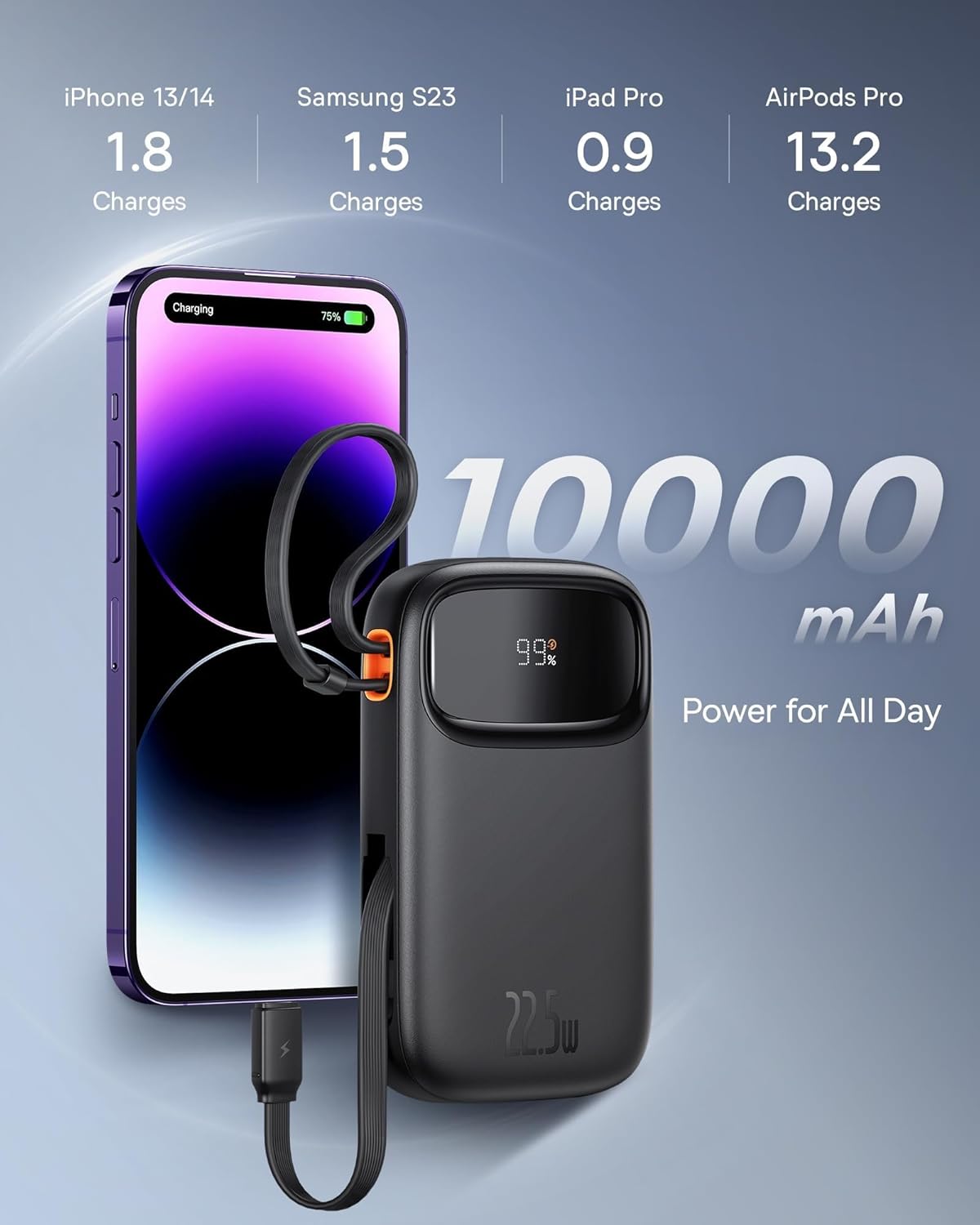
Figure 6: Illustrates the 10,000 mAh capacity, capable of charging an iPhone 13/14 approximately 1.8 times, Samsung S23 1.5 times, iPad Pro 0.9 times, and AirPods Pro 13.2 times.

Figure 7: The power bank features two built-in fast charging cables: one Lightning and one USB-C, supporting PD 22.5W fast charging.
3.2 ബാറ്ററി നില പരിശോധിക്കുന്നു
The digital display on the power bank shows the remaining battery percentage, allowing you to easily monitor its charge level.
4. പരിപാലനം
- പവർ ബാങ്ക് തീവ്രമായ താപനിലയിൽ നിന്നും, നേരിട്ടുള്ള സൂര്യപ്രകാശത്തിൽ നിന്നും, ഈർപ്പമുള്ള ചുറ്റുപാടുകളിൽ നിന്നും അകറ്റി നിർത്തുക.
- ശക്തമായ ആഘാതങ്ങൾക്ക് പവർബാങ്ക് വീഴ്ത്തുകയോ വിധേയമാക്കുകയോ ചെയ്യരുത്.
- മൃദുവായതും ഉണങ്ങിയതുമായ തുണി ഉപയോഗിച്ച് ഉപരിതലം വൃത്തിയാക്കുക. കഠിനമായ രാസവസ്തുക്കളോ ഉരച്ചിലുകളോ ഉള്ള വസ്തുക്കൾ ഉപയോഗിക്കരുത്.
- പവർ ബാങ്ക് ദീർഘനേരം ഉപയോഗിക്കാത്തപ്പോൾ തണുത്തതും വരണ്ടതുമായ സ്ഥലത്ത് സൂക്ഷിക്കുക. ദീർഘകാല സംഭരണത്തിന് മുമ്പ് ഏകദേശം 50% വരെ ചാർജ് ചെയ്യാൻ ശുപാർശ ചെയ്യുന്നു.
5. പ്രശ്നപരിഹാരം
| പ്രശ്നം | സാധ്യമായ കാരണം | പരിഹാരം |
|---|---|---|
| പവർ ബാങ്ക് ചാർജ് ചെയ്യുന്നില്ല | Cable not properly connected; Wall charger not working; Power bank faulty. | Ensure cables are securely connected. Try a different wall charger or cable. If issue persists, contact support. |
| പവർ ബാങ്കിൽ നിന്ന് ഉപകരണം ചാർജ് ചെയ്യുന്നില്ല | Power bank battery low; Device cable faulty; Device not compatible; Power bank in protection mode. | Check power bank battery level. Try a different charging cable. Ensure device is compatible. Disconnect and reconnect the device. |
| സ്ലോ ചാർജിംഗ് | Using a non-fast charging cable/port; Device not supporting fast charging; High ambient temperature. | Ensure you are using the integrated fast charging cables or a compatible fast charging port. Check device's charging specifications. Charge in a cooler environment. |
| ഡിജിറ്റൽ ഡിസ്പ്ലേ പ്രവർത്തിക്കുന്നില്ല | Power bank is off; Display malfunction. | Press the power button (if any) to activate the display. If it remains off, contact support. |
6 സ്പെസിഫിക്കേഷനുകൾ
| ബ്രാൻഡ് | ബേസിയസ് |
| മോഡൽ | Qpow 2 |
| ബാറ്ററി ശേഷി | 10,000 mAh |
| ഔട്ട്പുട്ട് പവർ | 22.5W (പരമാവധി) |
| ഇൻപുട്ട് പവർ (USB-C) | 18W |
| നിറം | കറുപ്പ് |
| പ്രത്യേക ഫീച്ചർ | Lightweight, Integrated Dual Cables (Lightning & USB-C) |
| വാല്യംtage | 5 വോൾട്ട് |
| ബാറ്ററി കോമ്പോസിഷൻ | ലിഥിയം-അയൺ |
| ശുപാർശ ചെയ്യുന്ന ഉപയോഗങ്ങൾ | Charging mobile phones, tablets, and other portable electronic devices. |
| പവർ ഉറവിടം | ബാറ്ററി പവർ |
| ഇനത്തിൻ്റെ ഭാരം | 320 ഗ്രാം |
| Ampഉന്മേഷം | 3 എ |
7. വാറൻ്റിയും പിന്തുണയും
7.1 വാറൻ്റി വിവരങ്ങൾ
Baseus products typically come with a limited warranty. Please refer to the warranty card included with your product or visit the official Baseus webനിങ്ങളുടെ പ്രദേശത്തിനും വാങ്ങൽ തീയതിക്കും പ്രത്യേകമായുള്ള വിശദമായ വാറന്റി നിബന്ധനകൾക്കും വ്യവസ്ഥകൾക്കും സൈറ്റ് സന്ദർശിക്കുക. വാറന്റി ക്ലെയിമുകൾക്കായി നിങ്ങളുടെ വാങ്ങിയതിന്റെ തെളിവ് സൂക്ഷിക്കുക.
7.2 ഉപഭോക്തൃ പിന്തുണ
For technical assistance, troubleshooting, or any inquiries regarding your Baseus Qpow 2 Power Bank, please contact Baseus customer support through their official website or the contact information provided in your product packaging. When contacting support, please have your product model and purchase details ready.


