1. ആമുഖം
The Cleyver Talk 54 is a robust, license-free PMR446 walkie-talkie designed for reliable communication in various environments. This manual provides essential information for the safe and effective use of your device, covering setup, operation, maintenance, and troubleshooting.
2. ഉൽപ്പന്നം കഴിഞ്ഞുview
2.1 പാക്കേജ് ഉള്ളടക്കം
നിങ്ങളുടെ പാക്കേജിൽ എല്ലാ ഇനങ്ങളും ഉണ്ടെന്ന് ഉറപ്പാക്കുക:
- 2 x Cleyver Talk 54 Walkie Talkies
- 2 x Belt Clips (Motorola-compatible)
- 2 x Micro-USB Charging Cables (charging cable only, no desktop charger)
- 2 x Rechargeable Li-ion Battery Packs
- ഉപയോക്തൃ ഡോക്യുമെൻ്റേഷൻ
2.2 പ്രധാന സവിശേഷതകൾ
- PMR446 License-Free Communication: Operates on 16 channels for free calls.
- IP54 സംരക്ഷണം: Dust and splash water resistant for use in challenging conditions.
- നീണ്ട ബാറ്ററി ലൈഫ്: 1800mAh Li-ion battery provides up to 12 hours of average use.
- SOS എമർജൻസി ബട്ടൺ: അടിയന്തര സാഹചര്യങ്ങൾക്ക്.
- സംയോജിത ഫ്ലാഷ്ലൈറ്റ്: Provides illumination when needed.
- CTCSS/DCS: Continuous Tone-Coded Squelch System / Digital Coded Squelch for interference reduction.
- സ്കാൻ പ്രവർത്തനം: സജീവ ചാനലുകൾക്കായി യാന്ത്രികമായി സ്കാൻ ചെയ്യുന്നു.
- VOX പ്രവർത്തനം: Voice Operated Exchange for hands-free communication.
- കുറഞ്ഞ ബാറ്ററി അലേർട്ട്: Notifies you when the battery is low.
- കണക്റ്റിവിറ്റി: Micro-USB for charging and 2.5mm jack for audio accessories.
- ആക്സസറി അനുയോജ്യത: Compatible with Motorola T82 accessories.

ചിത്രം 1: മുൻഭാഗം view of two Cleyver Talk 54 walkie-talkies, showing the display and main control buttons.
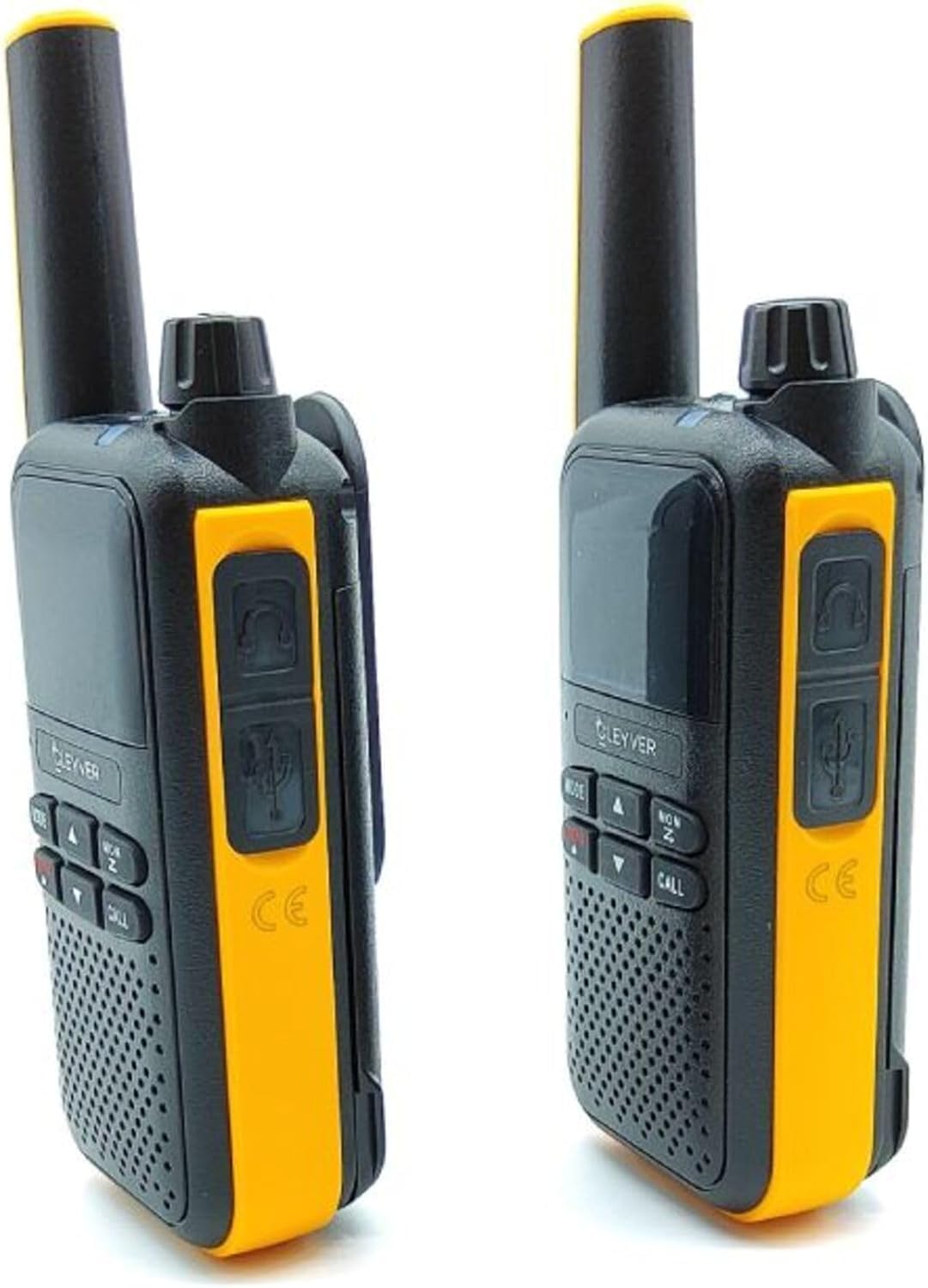
ചിത്രം 2: വശം view of two Cleyver Talk 54 walkie-talkies, highlighting the headset and USB charging ports.

Figure 3: Other side view of two Cleyver Talk 54 walkie-talkies, showing the Push-to-Talk (PTT) and SOS buttons.
3. സജ്ജീകരണം
3.1 ബാറ്ററി ഇൻസ്റ്റാളേഷൻ
- വാക്കി-ടോക്കി ഓഫാക്കിയിട്ടുണ്ടെന്ന് ഉറപ്പാക്കുക.
- ഉപകരണത്തിന്റെ പിൻഭാഗത്ത് ബാറ്ററി കമ്പാർട്ട്മെന്റ് കവർ കണ്ടെത്തുക.
- Slide the cover down or unclip it to open the compartment.
- Insert the Li-ion battery pack, ensuring the contacts align correctly.
- ബാറ്ററി കമ്പാർട്ട്മെന്റ് കവർ മാറ്റി സുരക്ഷിതമാക്കുക.
3.2 ബാറ്ററി ചാർജ് ചെയ്യുന്നു
- Connect the Micro-USB charging cable to the charging port on the side of the walkie-talkie.
- കേബിളിന്റെ മറ്റേ അറ്റം അനുയോജ്യമായ ഒരു USB പവർ അഡാപ്റ്ററുമായി (ഉൾപ്പെടുത്തിയിട്ടില്ല) അല്ലെങ്കിൽ ഒരു കമ്പ്യൂട്ടർ USB പോർട്ടുമായി ബന്ധിപ്പിക്കുക.
- ചാർജ് ചെയ്യുമ്പോൾ ചാർജിംഗ് ഇൻഡിക്കേറ്റർ ലൈറ്റ് പ്രകാശിക്കും, സാധാരണയായി ചുവപ്പ് നിറത്തിൽ.
- Once fully charged, the indicator light may change color (e.g., green) or turn off. A full charge takes approximately 3-4 hours.
3.3 ബെൽറ്റ് ക്ലിപ്പ് അറ്റാച്ചുചെയ്യുന്നു
- Align the belt clip with the designated slots on the back of the walkie-talkie.
- Slide the clip upwards until it locks securely into place.
- To remove, press the release tab (if present) and slide the clip downwards.

Figure 4: Cleyver Talk 54 walkie-talkies shown with the included belt clips, Micro-USB charging cables, and battery packs.
4. ഓപ്പറേഷൻ
4.1 പവർ ഓൺ/ഓഫ്
- പവർ ഓണാക്കാൻ: ഒരു ക്ലിക്ക് കേൾക്കുകയും ഡിസ്പ്ലേ പ്രകാശിക്കുകയും ചെയ്യുന്നതുവരെ ഓൺ/ഓഫ്/വോളിയം നോബ് ഘടികാരദിശയിൽ തിരിക്കുക.
- പവർ ഓഫ് ചെയ്യാൻ: Rotate the On/Off/Volume knob counter-clockwise until you hear a click and the display turns off.
4.2 വോളിയം ക്രമീകരണം
വോളിയം കൂട്ടാൻ ഓൺ/ഓഫ്/വോളിയം നോബ് ഘടികാരദിശയിലും കുറയ്ക്കാൻ എതിർ ഘടികാരദിശയിലും തിരിക്കുക.
4.3 ചാനൽ തിരഞ്ഞെടുക്കൽ
- അമർത്തുക മോഡ്/മെനു button to enter channel selection mode. The channel number on the display will flash.
- ഉപയോഗിക്കുക യുപി (▲) ഒപ്പം ഡൗൺ (▼) arrow buttons to select one of the 16 available PMR446 channels.
- അമർത്തുക മോഡ്/മെനു വീണ്ടും ബട്ടൺ അമർത്തുക അല്ലെങ്കിൽ തിരഞ്ഞെടുപ്പ് സ്ഥിരീകരിക്കാൻ കുറച്ച് നിമിഷങ്ങൾ കാത്തിരിക്കുക.
4.4 കൈമാറ്റം ചെയ്യലും സ്വീകരിക്കലും
- കൈമാറാൻ: അമർത്തിപ്പിടിക്കുക PTT (പുഷ്-ടു-ടോക്ക്) button located on the side of the walkie-talkie. Speak clearly into the microphone. Release the PTT button when finished speaking.
- സ്വീകരിക്കാൻ: Ensure the PTT button is not pressed. The walkie-talkie will automatically receive transmissions on the selected channel.
4.5 ഫ്ലാഷ്ലൈറ്റ് പ്രവർത്തനം
സമർപ്പിച്ചിരിക്കുന്നത് അമർത്തുക ഫ്ലാഷ്ലൈറ്റ് button (often marked with a lightbulb icon) to turn the flashlight on or off.
4.6 SOS അടിയന്തര ബട്ടൺ
അമർത്തിപ്പിടിക്കുക SOS button (usually located on the side, near the PTT button) to activate the emergency alert. This will transmit an audible alarm signal to other walkie-talkies on the same channel.
4.7 VOX (വോയ്സ് ഓപ്പറേറ്റഡ് എക്സ്ചേഞ്ച്)
VOX allows for hands-free transmission. When activated, the walkie-talkie will transmit automatically when it detects your voice.
- അമർത്തുക മോഡ്/മെനു button repeatedly until the VOX setting appears on the display.
- ഉപയോഗിക്കുക യുപി (▲) ഒപ്പം ഡൗൺ (▼) arrow buttons to select the VOX sensitivity level (e.g., 1-3, with 3 being most sensitive) or to turn VOX off.
- അമർത്തുക മോഡ്/മെനു സ്ഥിരീകരിക്കാൻ.
4.8 സ്കാൻ ഫംഗ്ഷൻ
The scan function allows the walkie-talkie to automatically search for active channels.
- അമർത്തുക MON/സ്കാൻ button to activate the scan function. The walkie-talkie will cycle through channels.
- ഒരു സജീവ സിഗ്നൽ കണ്ടെത്തുമ്പോൾ, ആ ചാനലിൽ സ്കാൻ താൽക്കാലികമായി നിർത്തും.
- അമർത്തുക MON/സ്കാൻ സ്കാനിംഗ് നിർത്താൻ വീണ്ടും ബട്ടൺ.
4.9 CTCSS/DCS ടോണുകൾ
CTCSS (Continuous Tone-Coded Squelch System) and DCS (Digital Coded Squelch) tones help filter out unwanted conversations on a busy channel. Only transmissions with the same tone setting will be heard.
- അമർത്തുക മോഡ്/മെനു button repeatedly until the CTCSS or DCS setting appears.
- ഉപയോഗിക്കുക യുപി (▲) ഒപ്പം ഡൗൺ (▼) arrow buttons to select a tone code. Ensure all walkie-talkies in your group use the same channel and tone code.
- അമർത്തുക മോഡ്/മെനു സ്ഥിരീകരിക്കാൻ.

ചിത്രം 5: ക്ലോസപ്പ് view of the Cleyver Talk 54 display, showing channel number and icons, along with the MODE, UP, DOWN, MON/SCAN, and CALL buttons.
5. പരിപാലനം
5.1 വൃത്തിയാക്കൽ
- സോഫ്റ്റ്, ഡി ഉപയോഗിച്ച് ഉപകരണം തുടയ്ക്കുകamp തുണി. കഠിനമായ രാസവസ്തുക്കളോ ഉരച്ചിലുകളുള്ള ക്ലീനറുകളോ ഉപയോഗിക്കരുത്.
- Ensure the charging port and accessory jacks are free from dust and debris.
5.2 ബാറ്ററി കെയർ
- ബാറ്ററി ലൈഫ് വർദ്ധിപ്പിക്കാൻ, ബാറ്ററി ഇടയ്ക്കിടെ പൂർണ്ണമായും ഡിസ്ചാർജ് ചെയ്യുന്നത് ഒഴിവാക്കുക.
- Charge the battery regularly, even if the device is not in use for extended periods.
- ബാറ്ററികൾ തീവ്രമായ താപനിലയിലേക്ക് തുറന്നുകാട്ടരുത്.
5.3 സംഭരണം
- നേരിട്ടുള്ള സൂര്യപ്രകാശവും ഉയർന്ന താപനിലയും ഏൽക്കാത്ത തണുത്തതും വരണ്ടതുമായ സ്ഥലത്ത് വാക്കി-ടോക്കി സൂക്ഷിക്കുക.
- ദീർഘനേരം സൂക്ഷിക്കുകയാണെങ്കിൽ, ബാറ്ററി പായ്ക്ക് നീക്കം ചെയ്യുക.
6. പ്രശ്നപരിഹാരം
| പ്രശ്നം | സാധ്യമായ കാരണം | പരിഹാരം |
|---|---|---|
| ശക്തിയില്ല | ബാറ്ററി ചാർജ് കുറവാണ് അല്ലെങ്കിൽ ശരിയായി ഇൻസ്റ്റാൾ ചെയ്തിട്ടില്ല. | ബാറ്ററി ചാർജ് ചെയ്യുക. ബാറ്ററി ശരിയായി ചേർത്തിട്ടുണ്ടെന്ന് ഉറപ്പാക്കുക. |
| കൈമാറാനോ സ്വീകരിക്കാനോ കഴിയില്ല | Incorrect channel or tone code. Out of range. Battery low. | Verify both walkie-talkies are on the same channel and tone code. Move closer to the other unit. Charge the battery. |
| മോശം ഓഡിയോ നിലവാരം | Weak signal. Obstructions. Volume too low. | Move to an open area. Adjust volume. Check for interference. |
| ഫ്ലാഷ്ലൈറ്റ് പ്രവർത്തിക്കുന്നില്ല | Battery low. Faulty button. | Charge the battery. If problem persists, contact support. |
| VOX സജീവമാകുന്നില്ല | VOX sensitivity too low. Background noise. | Increase VOX sensitivity. Reduce background noise. |
7 സ്പെസിഫിക്കേഷനുകൾ
| ഫീച്ചർ | സ്പെസിഫിക്കേഷൻ |
|---|---|
| ബ്രാൻഡ് | Cleyver |
| മോഡൽ | ODTALK54 |
| ട്യൂണർ ടെക്നോളജി | PMR446 |
| ചാനലുകൾ | 16 |
| IP റേറ്റിംഗ് | IP54 (Dust and Splash Water Resistant) |
| ബാറ്ററി തരം | Lithium-ion (1800mAh) |
| ശരാശരി ബാറ്ററി ലൈഫ് | 12 മണിക്കൂർ |
| ഉൽപ്പന്ന അളവുകൾ | 4 x 6 x 13 സെ.മീ |
| ഉൽപ്പന്ന ഭാരം | 500 ഗ്രാം (ജോഡിക്ക് ഏകദേശം) |
| ചാർജിംഗ് പോർട്ട് | മൈക്രോ-യുഎസ്ബി |
| ഓഡിയോ ജാക്ക് | 2.5 മി.മീ |
8. വാറൻ്റിയും പിന്തുണയും
The Cleyver Talk 54 walkie-talkies come with a 2 വർഷത്തെ വാറൻ്റി. For technical support, warranty claims, or further assistance, please refer to the contact information provided in your purchase documentation or visit the official Cleyver webസൈറ്റ്.
