1. ആമുഖം
This user manual provides comprehensive instructions for the installation, operation, and maintenance of your AMPIRE CPM 101 Smartphone Monitor. Please read this manual thoroughly before using the device to ensure proper functionality and safety.
2 സുരക്ഷാ വിവരങ്ങൾ
ഉപകരണത്തിന് കേടുപാടുകൾ സംഭവിക്കാതിരിക്കാനോ സ്വയം പരിക്കേൽക്കാതിരിക്കാനോ ഇനിപ്പറയുന്ന സുരക്ഷാ മുൻകരുതലുകൾ എപ്പോഴും പാലിക്കുക:
- ഉപകരണം ഡിസ്അസംബ്ലിംഗ് ചെയ്യാനോ പരിഷ്ക്കരിക്കാനോ ശ്രമിക്കരുത്.
- പവർ ഓണാക്കുന്നതിന് മുമ്പ് എല്ലാ കണക്ഷനുകളും സുരക്ഷിതമാണെന്ന് ഉറപ്പാക്കുക.
- ഉപകരണത്തെ തീവ്രമായ താപനില, നേരിട്ടുള്ള സൂര്യപ്രകാശം അല്ലെങ്കിൽ ഈർപ്പം എന്നിവയ്ക്ക് വിധേയമാക്കുന്നത് ഒഴിവാക്കുക.
- Install the monitor in a location that does not obstruct the driver's view or interfere with vehicle safety systems.
- നൽകിയിരിക്കുന്ന കേബിളുകളും അനുബന്ധ ഉപകരണങ്ങളും മാത്രം ഉപയോഗിക്കുക.
3. ഉൽപ്പന്നം കഴിഞ്ഞുview
ദി AMPIRE CPM 101 is a 10-inch high-resolution touchscreen monitor designed to integrate smartphone functionalities like Apple CarPlay and Android Auto into your vehicle. It also supports the display of an optional rearview ക്യാമറ.
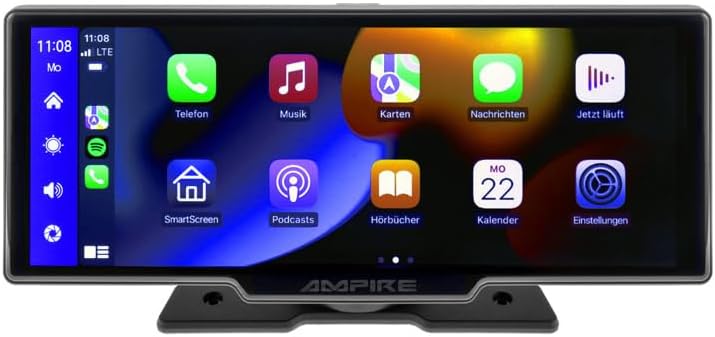
ചിത്രം 3.1: മുൻഭാഗം view യുടെ AMPIRE CPM 101 monitor showing the user interface with various app icons.

ചിത്രം 3.2: ദി AMPIRE CPM 101 monitor with its base, highlighting key features such as Bluetooth, Apple CarPlay, Android Auto, 1080p Full HD, Wi-Fi, and 10-inch display.

Figure 3.3: Contents of the AMPIRE CPM 101 package, including the monitor, rearview camera, and various connection cables.

ചിത്രം 3.4: ദി AMPIRE CPM 101 monitor displaying a split screen with navigation on one side and a rearview camera feed on the other.
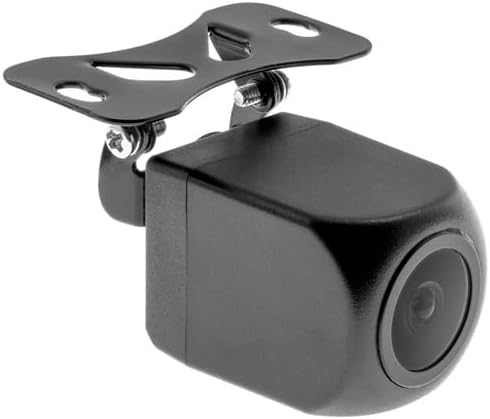
ചിത്രം 3.5: ക്ലോസപ്പ് view of the compact rearview camera with its mounting bracket.
4. സജ്ജീകരണവും ഇൻസ്റ്റാളേഷനും
ദി AMPIRE CPM 101 is designed for easy integration into most vehicles. Professional installation is recommended for optimal performance and safety.
4.1. പാക്കേജ് ഉള്ളടക്കം
ഇൻസ്റ്റാളേഷൻ ആരംഭിക്കുന്നതിന് മുമ്പ്, എല്ലാ ഘടകങ്ങളും ലഭ്യമാണെന്ന് ഉറപ്പാക്കുക:
- AMPIRE CPM 101 Monitor
- Power Cable Set
- പിൻഭാഗംview Camera (optional, if included in your package)
- ക്യാമറ കണക്ഷൻ കേബിൾ
- മൌണ്ടിംഗ് ബ്രാക്കറ്റ്
- ഉപയോക്തൃ മാനുവൽ
4.2. മോണിറ്റർ മൌണ്ട് ചെയ്യുന്നു
- നിങ്ങളുടെ ഡാഷ്ബോർഡിൽ തടസ്സമില്ലാത്ത അനുയോജ്യമായ ഒരു സ്ഥലം തിരഞ്ഞെടുക്കുക view അല്ലെങ്കിൽ എയർബാഗുകളിൽ ഇടപെടുക.
- മൗണ്ടിംഗ് ഉപരിതലം നന്നായി വൃത്തിയാക്കുക.
- Attach the mounting bracket to the monitor.
- Securely mount the monitor to the dashboard using the provided adhesive or screws, ensuring it is stable.
4.3. വയറിംഗ് കണക്ഷനുകൾ
Connect the power cable set to your vehicle's power source (ACC, B+, GND). If installing a rearview camera, connect its video cable to the monitor's camera input and its power cable to the vehicle's reverse light circuit for automatic activation.
- റെഡ് വയർ: Connect to ACC (Accessory Power).
- മഞ്ഞ വയർ: Connect to B+ (Constant Power).
- ബ്ലാക്ക് വയർ: Connect to GND (Ground).
- Reverse Trigger Wire (if applicable): Connect to the vehicle's reverse light positive wire.
5. പ്രവർത്തന നിർദ്ദേശങ്ങൾ
5.1. പവർ ഓൺ/ഓഫ്
The monitor will power on automatically when the vehicle's ignition is turned on (ACC power). To manually turn off, press and hold the power button (if available) or turn off the vehicle's ignition.
5.2. Connecting to Apple CarPlay / Android Auto
The CPM 101 supports wireless connection to Apple CarPlay and Android Auto. കുറിപ്പ്: Devices with only 2.4 GHz Wi-Fi are not supported. iPhone 5 or newer is required for Apple CarPlay.
- നിങ്ങളുടെ സ്മാർട്ട്ഫോണിലെ ബ്ലൂടൂത്തും വൈ-ഫൈയും പ്രവർത്തനക്ഷമമാക്കിയിട്ടുണ്ടെന്ന് ഉറപ്പാക്കുക.
- On the CPM 101 monitor, navigate to the "Phone" or "Connect" menu.
- Select "Pair New Device" or similar option.
- On your smartphone, search for and select the CPM 101 in the Bluetooth device list.
- രണ്ട് ഉപകരണങ്ങളിലും ജോടിയാക്കൽ കോഡ് സ്ഥിരീകരിക്കുക.
- Once paired via Bluetooth, the monitor will automatically establish a Wi-Fi connection for CarPlay or Android Auto.
5.3. Using the Rearview ക്യാമറ
ഒരു പിൻഭാഗമാണെങ്കിൽview camera is connected, the monitor will automatically switch to the camera view when the vehicle is put into reverse gear. The image will revert to the previous screen when taken out of reverse.
5.4. സിസ്റ്റം ക്രമീകരണങ്ങൾ
Access the system settings menu on the monitor to adjust display brightness, audio output, language, and other preferences. Refer to the on-screen prompts for specific setting options.
6. പരിപാലനം
നിങ്ങളുടെ ദീർഘായുസ്സും ഒപ്റ്റിമൽ പ്രകടനവും ഉറപ്പാക്കാൻ AMPIRE CPM 101 monitor, follow these maintenance guidelines:
- സ്ക്രീൻ വൃത്തിയാക്കൽ: സ്ക്രീൻ മൃദുവായി തുടയ്ക്കാൻ മൃദുവായ, ലിന്റ് രഹിത തുണി ഉപയോഗിക്കുക. കഠിനമായ കറകൾക്ക്, ചെറുതായി dampen the cloth with water or a screen-cleaning solution. Do not use abrasive cleaners or solvents.
- പൊതുവായ ശുചീകരണം: Keep the monitor and its surroundings free from dust and debris. Use a soft brush or compressed air to clean vents and connectors.
- താപനില: Avoid exposing the device to extreme hot or cold temperatures for prolonged periods.
- സംഭരണം: If storing the vehicle for an extended period, consider disconnecting the monitor's power to prevent battery drain.
7. പ്രശ്നപരിഹാരം
നിങ്ങളുടെ ഉപകരണത്തിൽ പ്രശ്നങ്ങൾ നേരിടുകയാണെങ്കിൽ AMPIRE CPM 101 monitor, refer to the following common problems and solutions:
| പ്രശ്നം | സാധ്യമായ കാരണം | പരിഹാരം |
|---|---|---|
| മോണിറ്റർ പവർ ഓണാക്കുന്നില്ല. | വൈദ്യുതി ഇല്ല; കണക്ഷൻ നഷ്ടപ്പെട്ടു; ഫ്യൂസ് പൊട്ടി. | Check power cable connections. Verify vehicle's fuse box. Ensure ignition is on. |
| Cannot connect to Apple CarPlay/Android Auto. | Smartphone Wi-Fi/Bluetooth off; incompatible phone; 2.4 GHz Wi-Fi only. | Ensure Bluetooth and Wi-Fi are on. Check phone compatibility (iPhone 5+). Confirm phone supports 5 GHz Wi-Fi. Re-pair device. |
| പിൻഭാഗംview ക്യാമറ പ്രദർശിപ്പിക്കുന്നില്ല. | Camera not connected; reverse trigger wire not connected; faulty camera. | Check camera video and power connections. Ensure vehicle is in reverse. Test camera if possible. |
| ഓഡിയോ ഇല്ല. | Volume too low; incorrect audio output setting; Bluetooth not connected. | Increase volume. Check audio output settings on monitor. Ensure Bluetooth is connected to your vehicle's audio system. |
ഈ പരിഹാരങ്ങൾ പരീക്ഷിച്ചതിന് ശേഷവും പ്രശ്നം നിലനിൽക്കുകയാണെങ്കിൽ, ദയവായി ഉപഭോക്തൃ പിന്തുണയുമായി ബന്ധപ്പെടുക.
8 സ്പെസിഫിക്കേഷനുകൾ
Below are the technical specifications for the AMPIRE CPM 101 Smartphone Monitor:
| ഫീച്ചർ | സ്പെസിഫിക്കേഷൻ |
|---|---|
| ബ്രാൻഡ് | Ampദേഷ്യം |
| ഡിസ്പ്ലേ വലിപ്പം | 10 ഇഞ്ച് |
| ഡിസ്പ്ലേ തരം | എൽസിഡി, കളർ സ്ക്രീൻ |
| കണക്റ്റിവിറ്റി ടെക്നോളജി | ബ്ലൂടൂത്ത്, വൈഫൈ |
| അനുയോജ്യമായ ഉപകരണങ്ങൾ | Smartphones with Apple CarPlay or Android Auto (wireless connection) |
| പ്രത്യേക സവിശേഷതകൾ | Wireless Apple CarPlay & Android Auto, Optional Rearview ക്യാമറ ഡിസ്പ്ലേ |
| ഓഡിയോ put ട്ട്പുട്ട് മോഡ് | സ്റ്റീരിയോ |
| ഔട്ട്പുട്ട് പവർ | 50 വാട്ട്സ് |
| ഉൽപ്പന്ന അളവുകൾ | 29 x 15 x 10 സെ.മീ |
| ASIN | B0CKLSWGY7 |
| ആദ്യം ലഭ്യമായ തീയതി | ഒക്ടോബർ 6, 2023 |
9. വാറൻ്റിയും പിന്തുണയും
For warranty information and technical support, please refer to the documentation included with your purchase or visit the official Ampദേഷ്യം webസൈറ്റ്. വാറന്റി ക്ലെയിമുകൾക്കായി നിങ്ങളുടെ വാങ്ങലിന്റെ തെളിവ് സൂക്ഷിക്കുക.
ഓൺലൈൻ പിന്തുണ: www.ampire.de


