1. ആമുഖം
The aigo Smart Watch UM98 is a versatile wearable device designed to enhance your daily life with smart features and comprehensive health monitoring. This manual provides essential information for setting up, operating, and maintaining your smartwatch to ensure optimal performance and longevity.
2. ബോക്സിൽ എന്താണുള്ളത്?
- aigo Smartwatch UM98
- മാഗ്നെറ്റിക് ചാർജിംഗ് കേബിൾ
- ഫോക്സ് ലെതർ സ്ട്രാപ്പ്
- സ്പോർട്സ് ബാൻഡ്
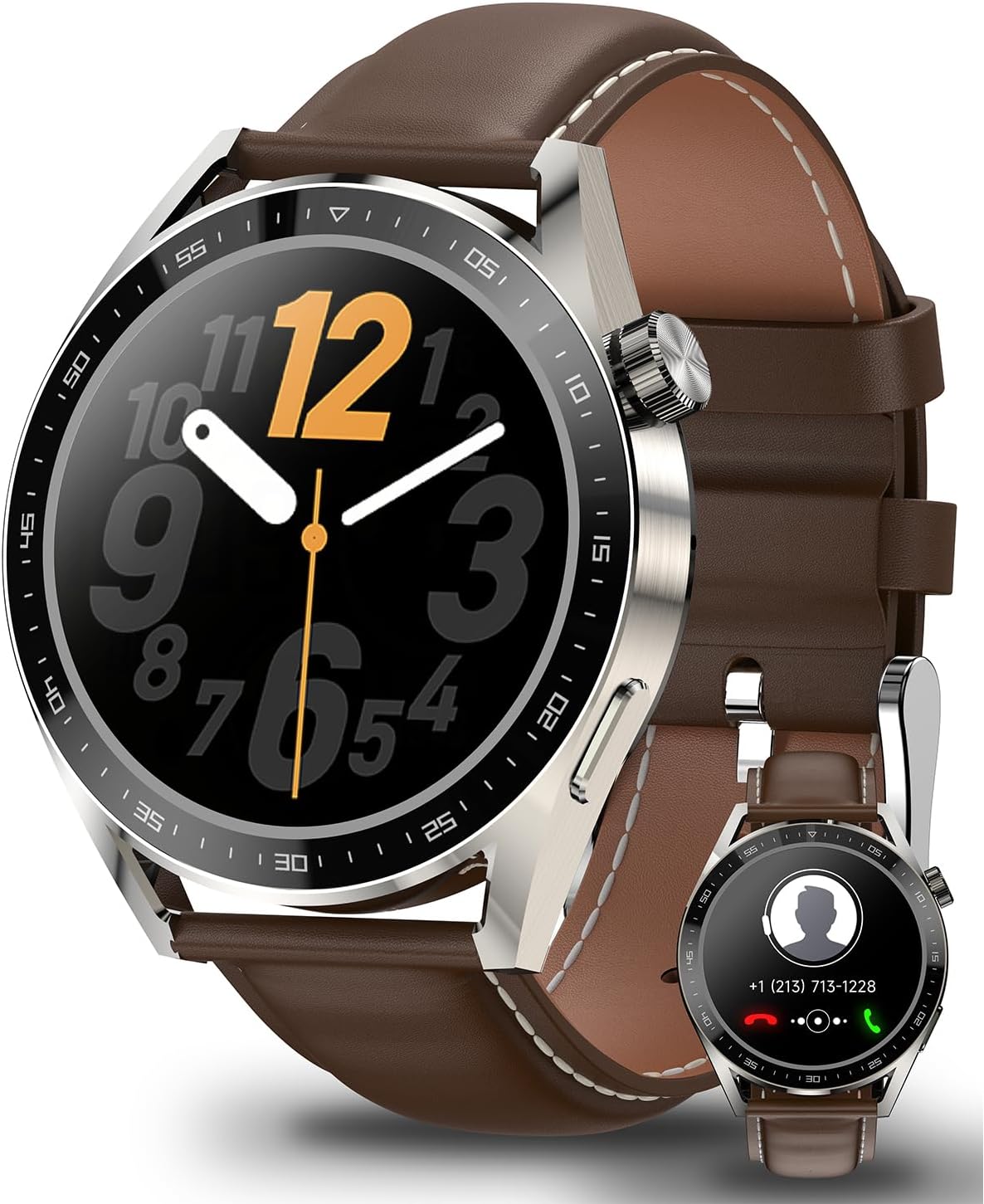
Image: The aigo Smart Watch UM98, showcasing its elegant design with a brown leather strap. An inset image displays the watch's call interface, highlighting its communication capabilities.

Image: The aigo Smart Watch UM98 displayed alongside its two included strap options: a classic brown leather strap and a durable black sports band, offering versatility for different occasions.
3. സജ്ജീകരണം
3.1 അപ്ലിക്കേഷൻ ഇൻസ്റ്റാളേഷൻ
To unlock the full potential of your aigo Smart Watch UM98, download and install the companion application on your smartphone. The app is compatible with iOS 11.0+ and Android 5.0+ devices. ഇതിനായി തിരയുക "Wearfit Pro" in your device's app store.
3.2 ഉപകരണ ജോടിയാക്കൽ
- നിങ്ങളുടെ സ്മാർട്ട് വാച്ച് ചാർജ് ചെയ്തിട്ടുണ്ടെന്നും ഓണാക്കിയിട്ടുണ്ടെന്നും ഉറപ്പാക്കുക.
- നിങ്ങളുടെ സ്മാർട്ട്ഫോണിൽ ബ്ലൂടൂത്ത് പ്രവർത്തനക്ഷമമാക്കുക.
- Open the "Wearfit Pro" app and follow the on-screen instructions to add a new device.
- Select "UM98" from the list of available devices.
- നിങ്ങളുടെ വാച്ചിലും സ്മാർട്ട്ഫോണിലും ജോടിയാക്കൽ അഭ്യർത്ഥന സ്ഥിരീകരിക്കുക.
4. നിങ്ങളുടെ സ്മാർട്ട് വാച്ച് പ്രവർത്തിപ്പിക്കുക
4.1 അടിസ്ഥാന നാവിഗേഷൻ
The aigo Smart Watch UM98 features a 1.45-inch full touchscreen display for intuitive navigation. Swipe across the screen to access different functions and menus. The physical crown on the side can be rotated to scroll and pressed to select or return to the home screen.
4.2 ബ്ലൂടൂത്ത് കോളിംഗ്
Once paired with your smartphone, the UM98 allows you to manage calls directly from your wrist.
- ഒരു കാൾ ചെയ്യുക: Access the dialer or contacts list on your watch.
- ഒരു കോൾ എടുക്കുക: Answer incoming calls with a tap on the screen.
- ഒരു കോൾ നിരസിക്കുക: Decline incoming calls from your watch.

Image: The aigo Smart Watch UM98 showing its connectivity features, including the ability to make, take, or refuse phone calls, and receive notifications from various social media applications.
4.3 Intelligent Voice Assistant (IVA)
Seamlessly access your smartphone's voice assistant by long-pressing the designated button on your watch. This feature supports multilingual translation, making it convenient for various communication needs.

Image: The aigo Smart Watch UM98 demonstrating its Intelligent Voice Assistant (IVA) feature, with a prompt "Hello, do you need help?" on the screen. Smaller insets show weather and camera control interfaces.
ഇഷ്ടാനുസൃതമാക്കാവുന്ന 4.4 വാച്ച് ഫെയ്സുകൾ
Personalize your UM98 with a wide variety of watch face options available through the "Wearfit Pro" app. Choose from over 100 dials to match your style and preferences.

Image: A selection of diverse watch face designs available for the aigo Smart Watch UM98, illustrating the extensive customization options through the companion app.
5. ആരോഗ്യ നിരീക്ഷണം
The UM98 provides comprehensive health tracking features to help you monitor your well-being.
5.1 ഹൃദയമിടിപ്പ്, രക്തത്തിലെ ഓക്സിജൻ നിരീക്ഷണം
Continuously track your heart rate and blood oxygen levels throughout the day. View real-time data and historical trends in the companion app.

Image: The aigo Smart Watch UM98 showing real-time health monitoring data, specifically blood oxygen saturation (SpO2) and heart rate (BPM) readings with corresponding graphs.
5.2 സ്ലീപ്പ് ട്രാക്കിംഗ്
The watch automatically monitors your sleep patterns, recording light sleep, deep sleep, and duration. Analyze your sleep quality in the app to improve your rest.

Image: The aigo Smart Watch UM98 in 'Sleep Mode', illustrating its ability to record sleep throughout the night. The image shows individuals sleeping with the watch, and a phone screen displaying detailed sleep analysis including light and deep sleep percentages.
6. Exercise Modes
The UM98 supports 11+ exercise modes to track your physical activities accurately. Select the appropriate mode before starting your workout to record data such as steps, distance, calories burned, and heart rate during exercise.

Image: A man at the gym wearing the aigo Smart Watch UM98, highlighting its 'Sporting Moments' feature with a choice of 11 motion modes. Icons at the bottom represent various activities like running, swimming, cycling, and more.
7. ബാറ്ററി ലൈഫും ചാർജിംഗും
The UM98 is equipped with a 270mAh battery, providing extended usage of up to 7 days on a single charge, depending on usage patterns. The watch uses a magnetic charging cable for convenient power replenishment.

Image: The aigo Smart Watch UM98 being charged via its magnetic charging cable, illustrating the 270mAh battery capacity and IP68 waterproof rating.
8. ജല പ്രതിരോധം
The aigo Smart Watch UM98 features an IP68 water resistance rating, meaning it is protected against dust ingress and can withstand immersion in water up to 1.5 meters for 30 minutes. It is suitable for daily use, including hand washing and light rain, but not recommended for hot showers, saunas, or diving.

Image: The aigo Smart Watch UM98 being worn on a wrist partially submerged in water, demonstrating its water resistance capabilities.
9. പരിപാലനം
- വൃത്തിയാക്കൽ: Regularly wipe your watch and straps with a soft, dry cloth. For stubborn dirt, use a slightly damp തുണി നന്നായി ഉണക്കുക.
- രാസവസ്തുക്കൾ ഒഴിവാക്കുക: വാച്ചിന്റെ ഫിനിഷിനോ ആന്തരിക ഘടകങ്ങള്ക്കോ കേടുവരുത്തിയേക്കാവുന്നതിനാല്, കഠിനമായ രാസവസ്തുക്കളോ, ക്ലീനിംഗ് ലായകങ്ങളോ, വീര്യം കൂടിയ ഡിറ്റര്ജന്റുകളോ ഉപയോഗിക്കരുത്.
- സംഭരണം: ഉപയോഗത്തിലില്ലാത്തപ്പോൾ വാച്ച് തണുത്തതും വരണ്ടതുമായ സ്ഥലത്ത് സൂക്ഷിക്കുക.
- ചാർജിംഗ്: നൽകിയിരിക്കുന്ന മാഗ്നറ്റിക് ചാർജിംഗ് കേബിൾ മാത്രം ഉപയോഗിക്കുക. ചാർജ് ചെയ്യുന്നതിന് മുമ്പ് ചാർജിംഗ് കോൺടാക്റ്റുകൾ വൃത്തിയുള്ളതും ഉണങ്ങിയതുമാണെന്ന് ഉറപ്പാക്കുക.
10. പ്രശ്നപരിഹാരം
- വാച്ച് ഓണാകുന്നില്ല: വാച്ച് പൂർണ്ണമായും ചാർജ് ചെയ്തിട്ടുണ്ടെന്ന് ഉറപ്പാക്കുക. കുറഞ്ഞത് 30 മിനിറ്റെങ്കിലും ചാർജറുമായി ബന്ധിപ്പിക്കുക.
- ഫോണുമായി ജോടിയാക്കാൻ കഴിയില്ല: Ensure Bluetooth is enabled on your phone and the watch. Restart both devices and try pairing again. Check if the "Wearfit Pro" app is updated to the latest version.
- കൃത്യമല്ലാത്ത ആരോഗ്യ ഡാറ്റ: വാച്ച് നിങ്ങളുടെ കൈത്തണ്ടയിൽ നന്നായി ധരിച്ചിട്ടുണ്ടെന്ന് ഉറപ്പാക്കുക, അധികം ഇറുകിയതോ അധികം അയഞ്ഞതോ അല്ല. വാച്ചിന്റെ പിൻഭാഗത്തുള്ള സെൻസർ വൃത്തിയാക്കുക.
- ഹ്രസ്വ ബാറ്ററി ലൈഫ്: സ്ക്രീൻ തെളിച്ചം കുറയ്ക്കുക, അനാവശ്യ അറിയിപ്പുകൾ പ്രവർത്തനരഹിതമാക്കുക, ആവശ്യമില്ലെങ്കിൽ തുടർച്ചയായ ഹൃദയമിടിപ്പ് നിരീക്ഷണം പരിമിതപ്പെടുത്തുക.
- സ്ക്രീൻ പ്രതികരിക്കുന്നില്ല: Try restarting the watch by pressing and holding the crown button until it powers off, then power it back on.
11 സ്പെസിഫിക്കേഷനുകൾ
| ഫീച്ചർ | വിശദാംശങ്ങൾ |
|---|---|
| മോഡലിൻ്റെ പേര് | Smartwatch UM98 |
| ബ്രാൻഡ് | ഐഗോ |
| സ്ക്രീൻ വലിപ്പം | 1.45 ഇഞ്ച് |
| കണക്റ്റിവിറ്റി ടെക്നോളജി | ബ്ലൂടൂത്ത് |
| വയർലെസ് കമ്മ്യൂണിക്കേഷൻ സ്റ്റാൻഡേർഡ് | ബ്ലൂടൂത്ത് |
| പ്രത്യേക സവിശേഷതകൾ | Audio Recording, Blood Pressure Monitor, Breath Monitor, Camera, Heart Rate Monitor |
| ജല പ്രതിരോധം | IP68 |
| ബാറ്ററി ശേഷി | 270mAh |
| ഇനത്തിൻ്റെ ഭാരം | 7.8 ഔൺസ് |
| പാക്കേജ് അളവുകൾ | 9.21 x 3.94 x 1.54 ഇഞ്ച് |
| ആദ്യം ലഭ്യമായ തീയതി | നവംബർ 10, 2023 |
12. വാറൻ്റിയും പിന്തുണയും
For warranty information and technical support, please refer to the warranty card included with your product or visit the official aigo website. You may also contact aigo customer service through the contact details provided on their website for assistance with any issues or inquiries.


