1. ആമുഖം
The Lenco SCD-860 is a versatile portable audio device featuring DAB+ and FM radio reception, Bluetooth connectivity for wireless audio streaming, and a top-loading CD player. It includes a 2.4-inch TFT color display, dual alarm functions, and stereo speakers. This manual provides essential information for the safe and efficient operation of your device.
2 സുരക്ഷാ വിവരങ്ങൾ
ഉപകരണം ഉപയോഗിക്കുന്നതിന് മുമ്പ് ദയവായി ഈ സുരക്ഷാ നിർദ്ദേശങ്ങൾ ശ്രദ്ധാപൂർവ്വം വായിക്കുക, ഭാവിയിലെ റഫറൻസിനായി അവ സൂക്ഷിക്കുക. തെറ്റായ ഉപയോഗം വൈദ്യുതാഘാതം, തീപിടുത്തം അല്ലെങ്കിൽ മറ്റ് അപകടങ്ങൾക്ക് കാരണമായേക്കാം.
- തീയോ വൈദ്യുതാഘാതമോ തടയാൻ യൂണിറ്റ് മഴയിലോ ഈർപ്പത്തിലോ തുറന്നുകാട്ടരുത്.
- യൂണിറ്റിന് ചുറ്റും ശരിയായ വായുസഞ്ചാരം ഉറപ്പാക്കുക. വെന്റിലേഷൻ ദ്വാരങ്ങൾ തടയരുത്.
- യൂണിറ്റിനൊപ്പം നൽകിയിട്ടുള്ള പവർ അഡാപ്റ്റർ മാത്രം ഉപയോഗിക്കുക.
- യൂണിറ്റ് തുറക്കരുത് casing. എല്ലാ സേവനങ്ങളും യോഗ്യതയുള്ള ഉദ്യോഗസ്ഥർക്ക് റഫർ ചെയ്യുക.
- പ്രാദേശിക നിയന്ത്രണങ്ങൾ അനുസരിച്ച് ബാറ്ററികൾ ഉത്തരവാദിത്തത്തോടെ സംസ്കരിക്കുക.
3. പാക്കേജ് ഉള്ളടക്കം
പായ്ക്ക് അൺപാക്ക് ചെയ്യുമ്പോൾ എല്ലാ ഇനങ്ങളും ഉണ്ടെന്ന് ഉറപ്പാക്കുക:
- Lenco SCD-860 Unit
- എസി പവർ കേബിൾ
- ഉപയോക്തൃ മാനുവൽ (ഈ പ്രമാണം)
4. ഉൽപ്പന്നം കഴിഞ്ഞുview
Familiarize yourself with the main components and controls of your Lenco SCD-860.
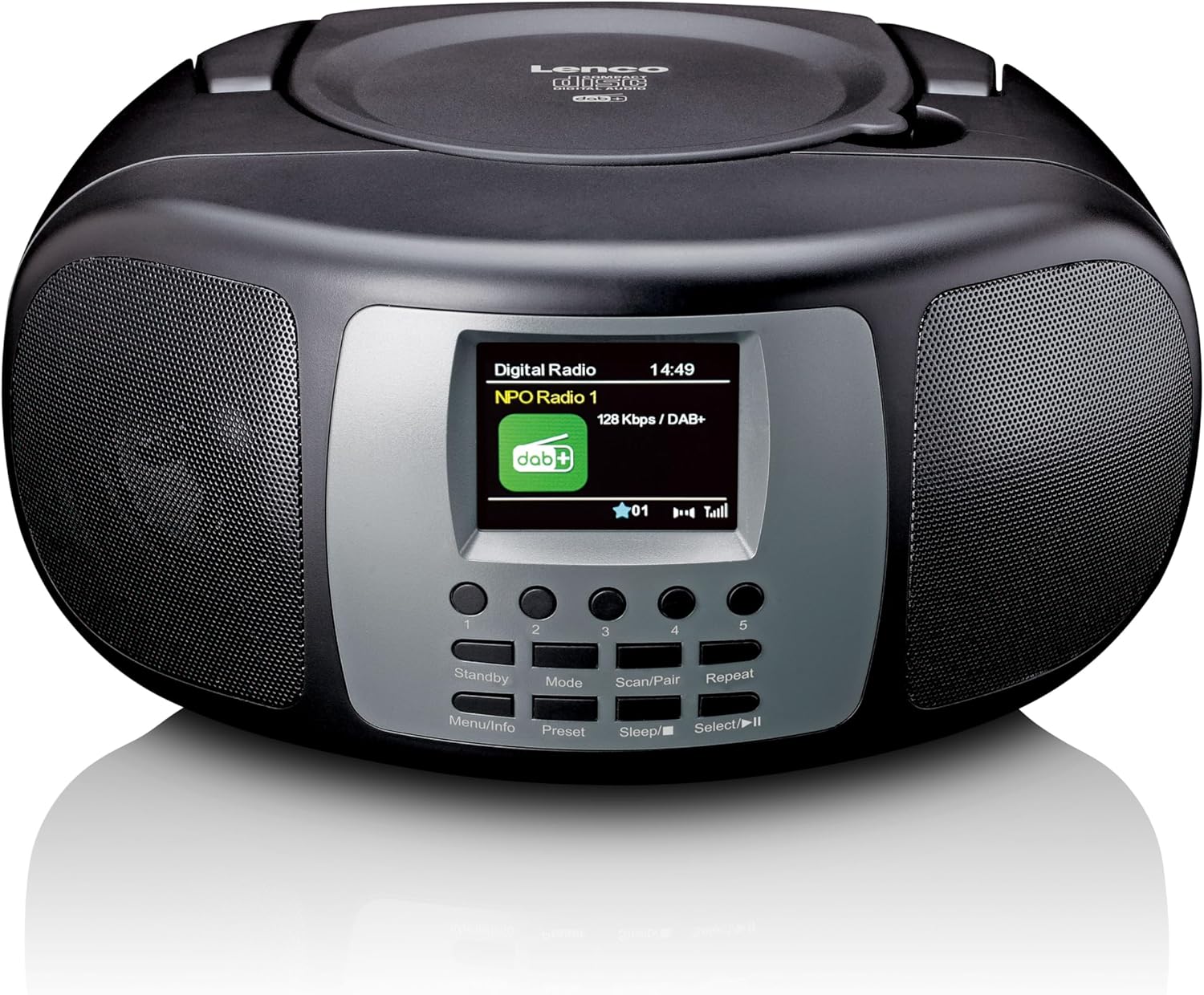
ചിത്രം 4.1: മുൻഭാഗം View. This image displays the front of the Lenco SCD-860, highlighting the central 2.4-inch TFT color display, the array of control buttons below it, and the two integrated speakers on either side. The top-loading CD compartment is visible on the upper surface.

Figure 4.2: CD Compartment Open. This image shows the Lenco SCD-860 with its top-loading CD compartment lid open, revealing a compact disc placed inside, ready for playback. The display and control buttons are also visible.

Figure 4.3: Left Side Controls. This image illustrates the left side of the Lenco SCD-860, featuring the headphone output jack, the power ON/OFF switch, and the rotary volume control knob.
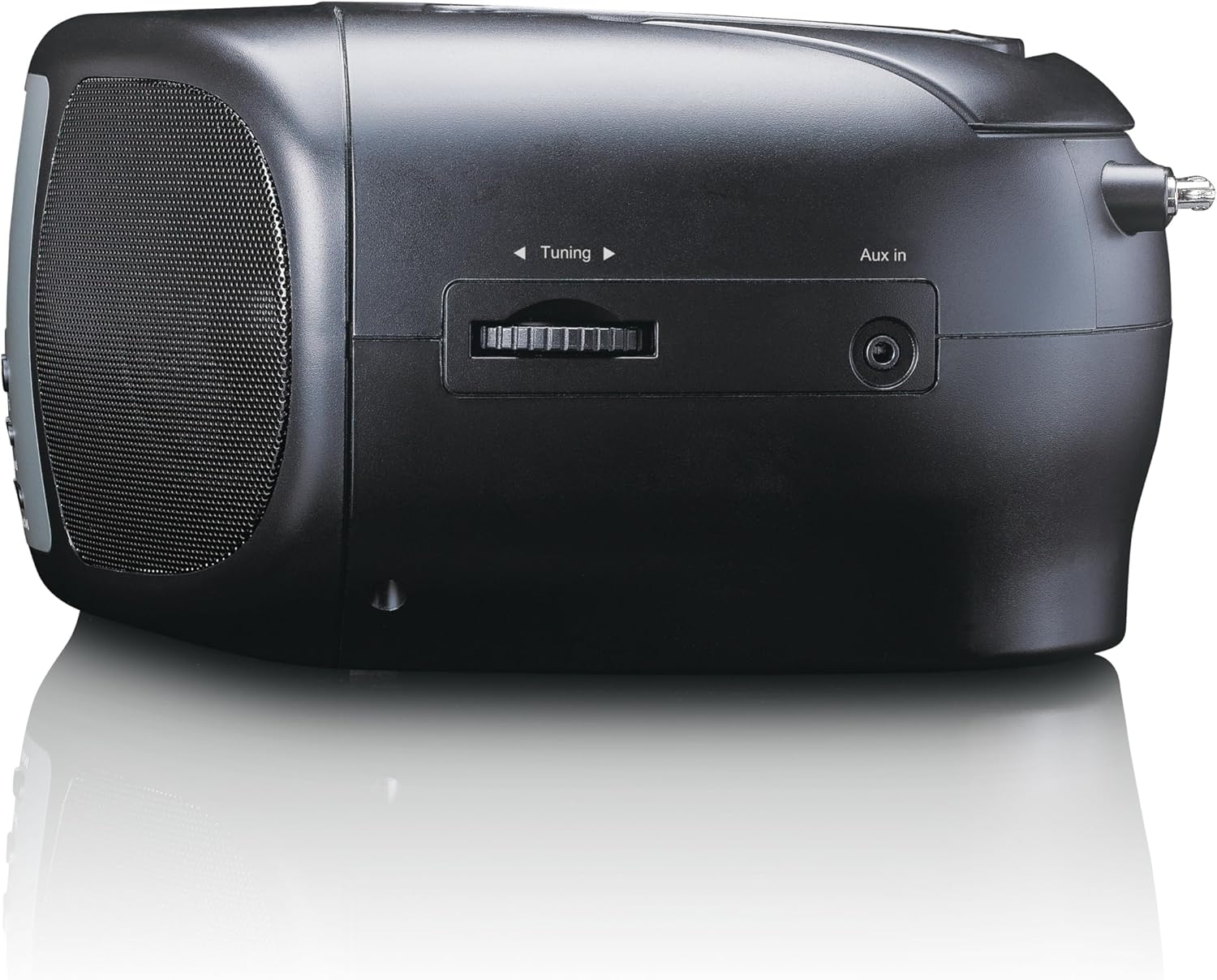
Figure 4.4: Right Side Controls. This image shows the right side of the Lenco SCD-860, highlighting the rotary tuning knob for radio frequency selection and the AUX input jack for connecting external audio devices.

ചിത്രം 4.5: പിൻഭാഗം View. This image displays the rear of the Lenco SCD-860, featuring the AC power input socket and the fully extended telescopic antenna for improved radio reception.
4.1 നിയന്ത്രണ ബട്ടണുകൾ
- Standby/Menu/Info: Power on/off, access menu, display information.
- Mode/Preset: Switch between modes (DAB+, FM, CD, Bluetooth, AUX), save/recall radio presets.
- Scan/Pair/Sleep: Scan for radio stations, pair Bluetooth devices, activate sleep timer.
- Repeat/Select/Play/Pause: Repeat CD track/all, confirm selection, play/pause CD/Bluetooth.
- ട്യൂണിംഗ് നോബ്: Adjust radio frequency, navigate menus.
- വോളിയം നോബ്: ഓഡിയോ ഔട്ട്പുട്ട് ലെവൽ ക്രമീകരിക്കുക.
- 1-5 ബട്ടണുകൾ: Direct access to preset radio stations.
5. സജ്ജീകരണം
5.1. ഉപകരണം പവർ ചെയ്യുന്നു
The SCD-860 can be powered by AC mains or batteries.
5.1.1. എസി പവർ
- Connect the supplied AC power cable to the AC IN socket on the rear of the unit (refer to Figure 4.5).
- കേബിളിൻ്റെ മറ്റേ അറ്റം ഒരു സാധാരണ മതിൽ ഔട്ട്ലെറ്റിലേക്ക് പ്ലഗ് ചെയ്യുക.
5.1.2. ബാറ്ററി പവർ
For portable use, the unit requires 6 x 'C' size batteries (not included).
- യൂണിറ്റിന്റെ അടിയിലുള്ള ബാറ്ററി കമ്പാർട്ട്മെന്റ് കവർ തുറക്കുക.
- Insert 6 'C' size batteries, ensuring correct polarity (+/-).
- ബാറ്ററി കമ്പാർട്ട്മെൻ്റ് കവർ സുരക്ഷിതമായി അടയ്ക്കുക.
5.2. ആൻ്റിന സജ്ജീകരണം
For optimal DAB+ and FM radio reception, fully extend the telescopic antenna located at the rear of the unit (refer to Figure 4.5). Adjust its position for the best signal quality.
6. പ്രവർത്തന നിർദ്ദേശങ്ങൾ
6.1. പവർ ഓൺ/ഓഫ്
സ്ലൈഡ് ചെയ്യുക ശക്തി switch on the left side of the unit to the ON position. Press the സ്റ്റാൻഡ് ബൈ button on the front panel to turn the unit on or put it into standby mode.
6.2. മോഡ് തിരഞ്ഞെടുക്കൽ
അമർത്തുക മോഡ് button repeatedly to cycle through available modes: DAB+, FM, CD, Bluetooth, AUX.
6.3. DAB+ റേഡിയോ പ്രവർത്തനം
- ഉപയോഗിച്ച് DAB+ മോഡിലേക്ക് മാറുക മോഡ് ബട്ടൺ.
- The unit will automatically scan for available DAB+ stations upon first use or if no stations are found. To initiate a manual scan, press the സ്കാൻ ചെയ്യുക ബട്ടൺ.
- ഉപയോഗിക്കുക ട്യൂബ് നോബ് to scroll through the list of available stations. Press തിരഞ്ഞെടുക്കുക (often integrated with Repeat/Select/Play/Pause button) to confirm your selection.
- ഒരു സ്റ്റേഷൻ പ്രീസെറ്റായി സംരക്ഷിക്കാൻ, അമർത്തിപ്പിടിക്കുക പ്രീസെറ്റ് button (often integrated with Mode button), then use the ട്യൂബ് നോബ് ഒരു പ്രീസെറ്റ് നമ്പർ (1-5) തിരഞ്ഞെടുത്ത് അമർത്താൻ തിരഞ്ഞെടുക്കുക സ്ഥിരീകരിക്കാൻ.
- To recall a preset, briefly press the corresponding numbered button (1-5).
6.4. എഫ്എം റേഡിയോ പ്രവർത്തനം
- ഉപയോഗിച്ച് FM മോഡിലേക്ക് മാറുക മോഡ് ബട്ടൺ.
- സ്റ്റേഷനുകൾക്കായി യാന്ത്രികമായി സ്കാൻ ചെയ്യാൻ, അമർത്തിപ്പിടിക്കുക സ്കാൻ ചെയ്യുക button. The radio will scan and stop at the next strong station.
- For manual tuning, rotate the ട്യൂബ് നോബ് ആവൃത്തി ക്രമീകരിക്കാൻ.
- Saving and recalling presets works similarly to DAB+ mode, using the പ്രീസെറ്റ് button and numbered buttons (1-5).
6.5. ബ്ലൂടൂത്ത് പ്രവർത്തനം
- ഉപയോഗിച്ച് ബ്ലൂടൂത്ത് മോഡിലേക്ക് മാറുക മോഡ് ബട്ടൺ. ഡിസ്പ്ലേ "ബ്ലൂടൂത്ത് ജോടിയാക്കൽ" അല്ലെങ്കിൽ സമാനമായത് കാണിക്കും.
- Activate Bluetooth on your external device (smartphone, tablet, etc.).
- ഇതിനായി തിരയുക "SCD-860" in your device's Bluetooth list and select it to pair.
- Once paired, you can stream audio from your device to the SCD-860. Use the പ്ലേ/താൽക്കാലികമായി നിർത്തുക button on the unit or your external device to control playback.
6.6. സിഡി പ്ലെയർ പ്രവർത്തനം
- Switch to CD mode using the മോഡ് ബട്ടൺ.
- Open the top-loading CD compartment cover (refer to Figure 4.2).
- ലേബൽ വശം മുകളിലേക്ക് അഭിമുഖീകരിക്കുന്ന തരത്തിൽ ഒരു സിഡി വയ്ക്കുക.
- Close the CD compartment cover. The unit will read the CD and begin playback automatically.
- ഉപയോഗിക്കുക പ്ലേ/താൽക്കാലികമായി നിർത്തുക പ്ലേബാക്ക് താൽക്കാലികമായി നിർത്തുന്നതിനോ പുനരാരംഭിക്കുന്നതിനോ ഉള്ള ബട്ടൺ.
- അമർത്തുക ആവർത്തിക്കുക button to cycle through repeat modes (repeat one track, repeat all tracks).
- The unit supports programmable CD playback for up to 20 tracks. Refer to the full manual for detailed programming instructions.
6.7. AUX ഇൻപുട്ട്
ഒരു ബാഹ്യ ഓഡിയോ ഉപകരണം (ഉദാ. MP3 പ്ലെയർ) ഇതിലേക്ക് ബന്ധിപ്പിക്കുക ഓക്സ് ഇൻ jack on the right side of the unit (refer to Figure 4.4) using a 3.5mm audio cable (not included). Switch to AUX mode using the മോഡ് button. Audio will play through the SCD-860 speakers.
6.8 അലാറം പ്രവർത്തനം
The SCD-860 features a dual alarm function. Detailed instructions for setting and managing alarms are typically found in the full product manual. Generally, you will access the alarm settings via the മെനു (long press Standby/Menu/Info) and use the ട്യൂബ് നോബ് ഒപ്പം തിരഞ്ഞെടുക്കുക button to configure alarm times, sources (buzzer, radio, CD), and volume.
6.9. ഹെഡ്ഫോൺ ഉപയോഗം
Connect headphones to the 3.5mm headphone jack on the left side of the unit (refer to Figure 4.3) for private listening. The internal speakers will be muted automatically.
7. പരിപാലനം
- വൃത്തിയാക്കൽ: മൃദുവായതും ഉണങ്ങിയതുമായ തുണി ഉപയോഗിച്ച് യൂണിറ്റ് തുടയ്ക്കുക. അബ്രാസീവ് ക്ലീനറുകളോ ലായകങ്ങളോ ഉപയോഗിക്കരുത്.
- സിഡി കെയർ: സിഡികൾ അവയുടെ അരികുകളിൽ പിടിക്കുക. മലിനമായ സിഡികൾ മൃദുവായ, ലിന്റ് രഹിത തുണി ഉപയോഗിച്ച് വൃത്തിയാക്കുക, മധ്യഭാഗത്ത് നിന്ന് പുറത്തേക്ക് തുടയ്ക്കുക.
- സംഭരണം: If not used for extended periods, remove batteries and store the unit in a cool, dry place.
8. പ്രശ്നപരിഹാരം
| പ്രശ്നം | സാധ്യമായ കാരണം | പരിഹാരം |
|---|---|---|
| ശക്തിയില്ല | പവർ കേബിൾ ബന്ധിപ്പിച്ചിട്ടില്ല; ബാറ്ററികൾ തീർന്നു അല്ലെങ്കിൽ തെറ്റായി ചേർത്തിരിക്കുന്നു. | എസി കേബിൾ കണക്ഷൻ പരിശോധിക്കുക; ബാറ്ററികൾ മാറ്റിസ്ഥാപിക്കുക അല്ലെങ്കിൽ ശരിയായ പോളാരിറ്റി ഉറപ്പാക്കുക. |
| ശബ്ദമില്ല | ശബ്ദം വളരെ കുറവാണ്; ഹെഡ്ഫോണുകൾ കണക്റ്റുചെയ്തു; തെറ്റായ മോഡ് തിരഞ്ഞെടുത്തു. | Increase volume; Disconnect headphones; Select correct mode (DAB+, FM, CD, Bluetooth, AUX). |
| മോശം റേഡിയോ സ്വീകരണം | Antenna not extended or poorly positioned; Weak signal area. | ടെലിസ്കോപ്പിക് ആന്റിന പൂർണ്ണമായും നീട്ടി ക്രമീകരിക്കുക; യൂണിറ്റ് മറ്റൊരു സ്ഥലത്തേക്ക് മാറ്റാൻ ശ്രമിക്കുക. |
| സിഡി പ്ലേ ചെയ്യുന്നില്ല | CD inserted incorrectly; CD is dirty or scratched; Incorrect mode. | Ensure CD is label-side up; Clean or replace CD; Select CD mode. |
| ബ്ലൂടൂത്ത് ജോടിയാക്കൽ പരാജയപ്പെട്ടു | Bluetooth not enabled on external device; SCD-860 not in pairing mode; Devices too far apart. | Enable Bluetooth on your device; Ensure SCD-860 is in Bluetooth mode; Move devices closer (within 10m). |
9 സ്പെസിഫിക്കേഷനുകൾ
| ഫീച്ചർ | വിവരണം |
|---|---|
| മോഡൽ നമ്പർ | SCD-860BK |
| ബ്രാൻഡ് | ലെൻകോ |
| കണക്റ്റിവിറ്റി ടെക്നോളജി | ബ്ലൂടൂത്ത് |
| പ്രത്യേക സവിശേഷതകൾ | Bluetooth, DAB+/FM Radio, CD Player, Color Display, Dual Alarm |
| അനുയോജ്യമായ ഉപകരണങ്ങൾ | Headphones, Earphones, MP3 Player, Smartphone, Laptop, Speaker, Tablet, USB Stick |
| ഔട്ട്പുട്ട് പവർ | 2 x 2 W RMS |
| പ്രദർശിപ്പിക്കുക | 2.4-ഇഞ്ച് TFT LCD കളർ ഡിസ്പ്ലേ |
| CD Memory | Programmable for 20 tracks |
| റേഡിയോ ബാൻഡുകൾ പിന്തുണയ്ക്കുന്നു | DAB+ (Band III 174-240 MHz), FM |
| പവർ ഉറവിടം | AC Mains, 6 x 'C' Batteries (not included) |
| കണക്ഷനുകൾ | AUX Input, 3.5mm Audio Output (Headphone) |
| അളവുകൾ (L x W x H) | 24 സെ.മീ x 22 സെ.മീ x 11.5 സെ.മീ (ഏകദേശം) |
| നിറം | കറുപ്പ് |
10. വാറൻ്റിയും പിന്തുണയും
For warranty information and technical support, please refer to the warranty card included with your product or visit the official Lenco webസൈറ്റ്. ഏതെങ്കിലും വാറന്റി ക്ലെയിമുകൾക്ക് നിങ്ങളുടെ വാങ്ങലിന്റെ തെളിവ് സൂക്ഷിക്കുക.
For further assistance, please contact Lenco customer service through their official channels.


