1. ആമുഖം
The XGP Bluetooth 5.2 Motorcycle Intercom is designed to provide clear communication and audio entertainment for motorcycle riders. This manual will guide you through the installation, operation, and maintenance of your intercom system, ensuring a safe and enjoyable riding experience.
2. ഉൽപ്പന്നം കഴിഞ്ഞുview
2.1. ഘടകങ്ങൾ
The XGP Motorcycle Intercom package includes the following items:

Image: XGP Motorcycle Intercom Package Contents. This image displays the main unit, instruction manual, USB-C data cable, metal bracket, 3M adhesive bracket, speaker sponges, gift box packaging, 40mm Hi-Fi speakers, soft microphone, and boom microphone.
- XGP Main Unit
- ഇൻസ്ട്രക്ഷൻ മാനുവൽ
- USB-C ഡാറ്റ കേബിൾ
- മെറ്റൽ ബ്രാക്കറ്റ്
- 3M Adhesive Bracket
- Speaker Sponges
- 40mm Hi-Fi Speakers
- Soft Microphone
- ബൂം മൈക്രോഫോൺ
2.2 പ്രധാന സവിശേഷതകൾ
- Ultra-thin and Lightweight Design: Weighs approximately 39g with a thickness of 15mm for minimal helmet burden.
- അഡ്വാൻസ്ഡ് ബ്ലൂടൂത്ത് 5.2: Equipped with a Qualcomm Bluetooth 5.2 chip for stable connection and improved audio quality.
- Long-Range Intercom: Up to 1200 meters communication range, supporting 2-person simultaneous talk.
- വിപുലീകരിച്ച ബാറ്ററി ലൈഫ്: 1000mAh battery provides up to 30 hours of music playback, 35 hours of talk time, and 360 hours of standby on a 2-hour charge.
- IP67 വാട്ടർപ്രൂഫ്: Designed for all-weather use, effectively preventing water ingress.
- സംഗീതം പങ്കിടൽ: Share music with a fellow rider to enhance the riding experience.
- ഉയർന്ന വിശ്വാസ്യതയുള്ള ഓഡിയോ: 40mm speakers deliver clear sound with powerful bass, clear mids, and crisp highs.
- CVC/DSP Noise Cancellation: Reduces engine noise and wind noise for clear communication, even at speeds over 120 km/h.
- Voice Command Support: Compatible with Google Assistant and Siri for hands-free control of navigation, calls, and music.
- വിശാലമായ അനുയോജ്യത: Connects with most motorcycle intercoms, GPS navigators, and smartphones.
3. സജ്ജീകരണം
3.1. ഇൻസ്റ്റലേഷൻ
The XGP intercom is designed for easy and secure installation on most helmets without the need for complex tools.
- മൗണ്ടിംഗ് രീതി തിരഞ്ഞെടുക്കുക: Select either the metal clamp bracket or the 3M adhesive bracket based on your helmet type and preference.
- ബ്രാക്കറ്റ് അറ്റാച്ചുചെയ്യുക: Securely attach the chosen bracket to the side of your helmet.
- സ്പീക്കറുകൾ ഇൻസ്റ്റാൾ ചെയ്യുക: Place the 40mm Hi-Fi speakers inside the helmet, aligning them with your ears. Use the provided speaker sponges for optimal fit and comfort.
- മൈക്രോഫോൺ ഇൻസ്റ്റാൾ ചെയ്യുക: Choose between the boom microphone (suitable for open-face helmets) or the soft microphone (suitable for full-face helmets) and position it near your mouth for clear voice pickup.
- മൗണ്ട് മെയിൻ യൂണിറ്റ്: Slide the XGP main unit onto the installed bracket until it clicks into place.

Image: XGP Intercom installed on a helmet. This image shows the XGP intercom unit mounted on the side of a motorcycle helmet, demonstrating its low-profile ഡിസൈൻ.
3.2. ജോടിയാക്കൽ
Follow these steps to pair your XGP intercom with another device (e.g., another XGP intercom, smartphone, or GPS):
- പവർ ഓൺ: Ensure both XGP intercom units are powered on.
- ജോടിയാക്കൽ മോഡ് നൽകുക: On one XGP unit, press and hold the Bluetooth talk button for approximately 2 seconds. The indicator light will flash red and blue, indicating it is in pairing mode.
- ബന്ധിപ്പിക്കുക: If pairing with another XGP intercom, repeat step 2 on the second unit. If pairing with a smartphone or GPS, enable Bluetooth on your device and select "XGP" from the list of available devices.
- സ്ഥിരീകരണം: A single flash of the blue light and an audible alert will confirm a successful connection.

Image: Two riders pairing XGP intercoms. This image illustrates two motorcyclists on their bikes, with their XGP intercoms wirelessly connected, indicating successful pairing for communication.
4. പ്രവർത്തന നിർദ്ദേശങ്ങൾ
4.1. അടിസ്ഥാന പ്രവർത്തനങ്ങൾ
- പവർ ഓൺ/ഓഫ്: ഉപകരണം ഓണാക്കാനോ ഓഫാക്കാനോ പവർ ബട്ടൺ 3 സെക്കൻഡ് അമർത്തിപ്പിടിക്കുക.
- വോളിയം ക്രമീകരണം: Use the volume up (+) and volume down (-) buttons to adjust the audio level.
4.2. ഇന്റർകോം ആശയവിനിമയം
Once paired, you can initiate intercom communication with another rider:
- ഇന്റർകോം ആരംഭിക്കുക: Briefly press the Bluetooth talk button to initiate a conversation with the paired intercom.
- ഇന്റർകോം അവസാനിപ്പിക്കുക: Briefly press the Bluetooth talk button again to end the intercom conversation.
4.3. സംഗീത പ്ലേബാക്കും പങ്കിടലും
Enjoy music from your connected smartphone and share it with a paired rider:

Image: Riders sharing music via XGP intercom. This image shows two motorcyclists riding together, with a visual representation of music being shared between their XGP intercom units from a smartphone.
- പ്ലേ/താൽക്കാലികമായി നിർത്തുക: Briefly press the multi-function button to play or pause music.
- അടുത്ത ട്രാക്ക്: Press the volume up (+) button for 2 seconds to skip to the next track.
- മുമ്പത്തെ ട്രാക്ക്: Press the volume down (-) button for 2 seconds to go to the previous track.
- സംഗീതം പങ്കിടൽ: With two XGP units paired, activate the music sharing function to listen to the same music simultaneously. This function is effective within a range of approximately 50 meters.
4.4. ഫോൺ കോളുകൾ
Manage phone calls hands-free while riding:
- മറുപടി കോൾ: Briefly press the multi-function button when a call comes in.
- കോൾ അവസാനിപ്പിക്കുക: Briefly press the multi-function button during a call.
- കോൾ നിരസിക്കുക: ഒരു കോൾ വരുമ്പോൾ മൾട്ടി-ഫംഗ്ഷൻ ബട്ടൺ 2 സെക്കൻഡ് അമർത്തിപ്പിടിക്കുക.
- അവസാന നമ്പർ വീണ്ടും ഡയൽ ചെയ്യുക: മൾട്ടി-ഫംഗ്ഷൻ ബട്ടൺ രണ്ടുതവണ അമർത്തുക.
4.5. വോയ്സ് കമാൻഡുകൾ
Activate your smartphone's voice assistant for hands-free control:
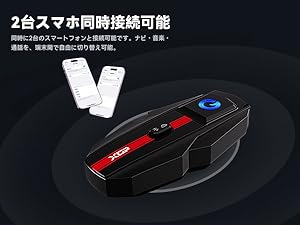
Image: Rider using voice commands with XGP intercom. This image depicts a motorcyclist using voice commands, with visual cues indicating activation of Google Assistant or Siri for tasks like navigation, music playback, and making calls.
- വോയ്സ് അസിസ്റ്റന്റിനെ സജീവമാക്കുക: Briefly press the voice command button (often the multi-function button or a dedicated button, refer to specific button layout on your device) to activate Google Assistant or Siri.
- You can then use voice commands for navigation, making calls, checking weather, and controlling music.
4.6. Dual Smartphone Connection
The XGP intercom supports simultaneous connection to two smartphones, allowing you to switch between navigation, music, and calls seamlessly.
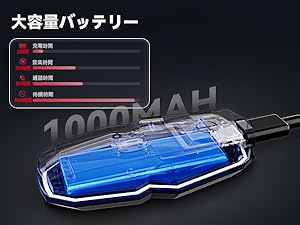
Image: XGP intercom connected to two smartphones. This image shows the XGP intercom unit wirelessly connected to two separate smartphones, illustrating its dual device connectivity feature.
5. ചാർജിംഗും ബാറ്ററി ലൈഫും
The XGP intercom is equipped with a 1000mAh lithium battery, offering extended usage times:
- ചാർജിംഗ് സമയം: ഏകദേശം 2 മണിക്കൂർ.
- സംഗീത പ്ലേബാക്ക് സമയം: 30 മണിക്കൂർ വരെ.
- സംസാര സമയം: 35 മണിക്കൂർ വരെ.
- സ്റ്റാൻഡ്ബൈ സമയം: 360 മണിക്കൂർ വരെ.
5.1 ചാർജിംഗ് മുൻകരുതലുകൾ

Image: XGP intercom charging with 5W adapter. This image shows the XGP intercom unit connected via a USB-C cable to a 5W power adapter, emphasizing the importance of using the correct charger.
പ്രധാനപ്പെട്ടത്:
- Always use a standard 5W (5V/1A) power adapter for charging.
- Using an incompatible or higher wattage adapter may damage the battery or prevent the device from starting.
- If the device cannot be charged, try charging it from a computer's USB port.
6. പരിപാലനം
- വൃത്തിയാക്കൽ: Regularly wipe the device with a soft, dry cloth to remove dust and dirt. Avoid using harsh chemicals or abrasive cleaners.
- വാട്ടർപ്രൂഫിംഗ്: The device is IP67 waterproof. Ensure the USB-C charging port cover is securely closed when not charging to maintain its waterproof integrity.
- സംഭരണം: Store the intercom in a cool, dry place away from direct sunlight and extreme temperatures.
- ബാറ്ററി കെയർ: For prolonged storage, charge the battery to about 50% every few months to prevent deep discharge.
7. പ്രശ്നപരിഹാരം
If you encounter issues with your XGP intercom, refer to the following common problems and solutions:
| പ്രശ്നം | സാധ്യമായ കാരണം | പരിഹാരം |
|---|---|---|
| ഉപകരണം പവർ ഓണാക്കുന്നില്ല | ബാറ്ററി കുറവാണ്; ഉപകരണത്തിന്റെ തകരാറ് | Charge the device fully; Contact support if issue persists |
| Cannot pair with another device | Not in pairing mode; Devices too far apart; Already connected to another device | Ensure both devices are in pairing mode; Reduce distance; Disconnect from other devices |
| Poor audio quality / Noise interference | Improper speaker/mic placement; High wind/engine noise; Obstacles | Adjust speaker/mic position; Ensure mic is not obstructed; Noise cancellation is active; Reduce speed if necessary |
| ഇന്റർകോം ഇടയ്ക്കിടെ വിച്ഛേദിക്കപ്പെടുന്നു | Out of range; Obstacles between riders; Low battery | Stay within 1200m range; Avoid large obstacles; Charge battery |
| Voice commands not responding | Voice assistant not activated; Microphone issue; Poor network connection (for some commands) | Ensure voice assistant is active on smartphone; Check mic connection; Ensure good network coverage |
8 സ്പെസിഫിക്കേഷനുകൾ
| ഫീച്ചർ | വിശദാംശങ്ങൾ |
|---|---|
| ബ്രാൻഡ് | XGP |
| മോഡലിൻ്റെ പേര് | XGP |
| കണക്റ്റിവിറ്റി ടെക്നോളജി | വയർലെസ് (ബ്ലൂടൂത്ത്) |
| വയർലെസ് കമ്മ്യൂണിക്കേഷൻ ടെക്നോളജി | ബ്ലൂടൂത്ത് 5.2 |
| ശബ്ദ നിയന്ത്രണം | Noise Cancellation (CVC/DSP) |
| ഫ്രീക്വൻസി പ്രതികരണം | 2402 MHz |
| ഇന്റർകോം റേഞ്ച് | 1200 മീറ്റർ വരെ |
| ബാറ്ററി ശേഷി | 1000 mAh |
| തുടർച്ചയായ ഉപയോഗ സമയം | 35 Hours (Talk), 30 Hours (Music) |
| സ്റ്റാൻഡ്ബൈ സമയം | 360 മണിക്കൂർ |
| ചാർജിംഗ് സമയം | 2 മണിക്കൂർ |
| ജല പ്രതിരോധ നില | IP67 വാട്ടർപ്രൂഫ് |
| സ്പീക്കർ വ്യാസം | 40 മില്ലിമീറ്റർ |
| പ്രതിരോധം | 1 ഓം |
| ഉൽപ്പന്ന അളവുകൾ | 8.3 x 4.2 x 1.3 സെ.മീ |
| ഉൽപ്പന്ന ഭാരം | 350 ഗ്രാം |
9. വാറൻ്റിയും പിന്തുണയും
XGP is committed to providing reliable products. Your XGP Motorcycle Intercom comes with the following warranty and support:

Image: XGP Logo. The official logo for the XGP brand.
- വാറൻ്റി കാലയളവ്: വാങ്ങിയ തീയതി മുതൽ 2 വർഷത്തെ വാറന്റി നൽകുന്നു.
- പ്രാരംഭ വൈകല്യങ്ങൾ: For initial defects, a 30-day return/exchange service is available from the date of purchase.
- ഉപഭോക്തൃ പിന്തുണ: If you have any questions or require assistance, please contact our customer support team. We are dedicated to ensuring your satisfaction.


