1. ആമുഖം
This manual provides essential information for setting up, operating, and maintaining your SAMSUNG Galaxy Tab S9 (Model SM-X710). Please read this manual thoroughly to ensure proper use and to maximize the performance of your device.
The Galaxy Tab S9 features an 11-inch AMOLED display, a powerful Snapdragon 8 Gen 2 processor, 128GB of storage, and runs on the Android operating system. It supports Wi-Fi 6E and Bluetooth 5.3 connectivity.
2. സജ്ജീകരണം
2.1 അൺബോക്സിംഗും പ്രാരംഭ ചാർജും
Carefully remove all components from the packaging. The box should contain the SAMSUNG Galaxy Tab S9 and a charging cable. Before first use, fully charge the tablet using the provided charging cable and a compatible power adapter (sold separately).

ചിത്രം: മുൻഭാഗം view of the SAMSUNG Galaxy Tab S9 tablet.
2.2 പവർ ഓൺ/ഓഫ്
- പവർ ഓണാക്കാൻ: സാംസങ് ലോഗോ ദൃശ്യമാകുന്നതുവരെ ടാബ്ലെറ്റിന്റെ വശത്തുള്ള പവർ ബട്ടൺ അമർത്തിപ്പിടിക്കുക.
- പവർ ഓഫ് ചെയ്യാൻ: Press and hold the Power button, then tap "Power off" on the screen. Alternatively, swipe down from the top of the screen to open the Quick Settings panel, tap the Power icon, and select "Power off".
- പുനരാരംഭിക്കാൻ: Press and hold the Power button, then tap "Restart" on the screen.
2.3 പ്രാരംഭ സജ്ജീകരണ വിസാർഡ്
ആദ്യമായി പവർ-ഓൺ ചെയ്യുമ്പോൾ, ടാബ്ലെറ്റ് ഒരു പ്രാരംഭ സജ്ജീകരണ പ്രക്രിയയിലൂടെ നിങ്ങളെ നയിക്കും. ഓൺ-സ്ക്രീൻ നിർദ്ദേശങ്ങൾ പാലിക്കുക:
- നിങ്ങൾ ഇഷ്ടപ്പെടുന്ന ഭാഷ തിരഞ്ഞെടുക്കുക.
- ഒരു Wi-Fi നെറ്റ്വർക്കിലേക്ക് കണക്റ്റുചെയ്യുക.
- നിങ്ങളുടെ Google അക്കൗണ്ട് ഉപയോഗിച്ച് സൈൻ ഇൻ ചെയ്യുക അല്ലെങ്കിൽ പുതിയൊരെണ്ണം സൃഷ്ടിക്കുക.
- സുരക്ഷാ സവിശേഷതകൾ (ഉദാ: പിൻ, പാറ്റേൺ, വിരലടയാളം) സജ്ജമാക്കുക.
- Review നിബന്ധനകളും വ്യവസ്ഥകളും അംഗീകരിക്കുക.
3. ടാബ്ലെറ്റ് പ്രവർത്തിപ്പിക്കൽ
3.1 അടിസ്ഥാന നാവിഗേഷൻ
- ഹോം സ്ക്രീൻ: Swipe left or right to navigate between home screens. Tap an app icon to open it.
- ആപ്പ് ഡ്രോയർ: ഇൻസ്റ്റാൾ ചെയ്ത എല്ലാ ആപ്ലിക്കേഷനുകളും ആക്സസ് ചെയ്യാൻ ഹോം സ്ക്രീനിന്റെ താഴെ നിന്ന് മുകളിലേക്ക് സ്വൈപ്പ് ചെയ്യുക.
- അറിയിപ്പുകളും ദ്രുത ക്രമീകരണങ്ങളും: സ്ക്രീനിന്റെ മുകളിൽ നിന്ന് താഴേക്ക് സ്വൈപ്പ് ചെയ്യുക view notifications and access quick settings toggles (Wi-Fi, Bluetooth, brightness, etc.).
- സമീപകാല ആപ്പുകൾ: Swipe up from the bottom of the screen and hold, then release to view അടുത്തിടെ തുറന്ന ആപ്ലിക്കേഷനുകൾ.
3.2 വൈ-ഫൈ, ബ്ലൂടൂത്ത് കണക്റ്റിവിറ്റി
- വൈഫൈ: പോകുക ക്രമീകരണങ്ങൾ > കണക്ഷനുകൾ > വൈ-ഫൈ. വൈഫൈ ഓണാക്കി നിങ്ങൾക്ക് ആവശ്യമുള്ള നെറ്റ്വർക്ക് തിരഞ്ഞെടുക്കുക. ആവശ്യപ്പെടുകയാണെങ്കിൽ പാസ്വേഡ് നൽകുക.
- ബ്ലൂടൂത്ത്: പോകുക ക്രമീകരണങ്ങൾ > കണക്ഷനുകൾ > ബ്ലൂടൂത്ത്. Turn Bluetooth on and select a device from the list to pair.
3.3 Using the S Pen
The Galaxy Tab S9 is compatible with the S Pen (sold separately or included with some bundles). The S Pen allows for precise writing, drawing, and navigation. It magnetically attaches to the back of the tablet for charging and storage.

Image: SAMSUNG Galaxy Tab S9 with S Pen.

ചിത്രം: പിന്നിലേക്ക് view of the SAMSUNG Galaxy Tab S9, highlighting the S Pen storage area.
- എയർ കമാൻഡ്: Hover the S Pen over the screen and press the S Pen button to open the Air Command menu for quick access to S Pen features like Create note, Smart select, and Screen write.
- ചാർജിംഗ്: Attach the S Pen to the magnetic strip on the back of the tablet to charge it.
4. പരിപാലനം
4.1 ഉപകരണം വൃത്തിയാക്കുന്നു
നിങ്ങളുടെ ടാബ്ലെറ്റ് വൃത്തിയാക്കാൻ, മൃദുവായ, ലിന്റ് രഹിത തുണി ഉപയോഗിക്കുക. കഠിനമായ പാടുകൾക്ക്, ചെറുതായി dampഇലക്ട്രോണിക് ഉപകരണങ്ങൾക്കായി പ്രത്യേകം രൂപകൽപ്പന ചെയ്ത ഒരു സ്ക്രീൻ ക്ലീനർ അല്ലെങ്കിൽ വെള്ളം ഉപയോഗിച്ച് തുണി വൃത്തിയാക്കുക. കഠിനമായ രാസവസ്തുക്കൾ, ഉരച്ചിലുകൾ ഉള്ള വസ്തുക്കൾ അല്ലെങ്കിൽ അമിതമായ ഈർപ്പം എന്നിവ ഉപയോഗിക്കുന്നത് ഒഴിവാക്കുക.
4.2 സോഫ്റ്റ്വെയർ അപ്ഡേറ്റുകൾ
Keep your tablet's software up to date to ensure optimal performance, security, and access to new features. Go to ക്രമീകരണങ്ങൾ > സോഫ്റ്റ്വെയർ അപ്ഡേറ്റ് > ഡൗൺലോഡ് ചെയ്ത് ഇൻസ്റ്റാൾ ചെയ്യുക to check for and apply updates.
4.3 ബാറ്ററി കെയർ
To prolong battery life, avoid extreme temperatures. It is recommended to keep the battery charge between 20% and 80% for long-term health. Use only Samsung-approved charging accessories.
5. പ്രശ്നപരിഹാരം
If you encounter issues with your Galaxy Tab S9, refer to the following common solutions:
- ഉപകരണം പ്രതികരിക്കുന്നില്ല: ഉപകരണം റീസ്റ്റാർട്ട് ചെയ്യാൻ നിർബന്ധിതമായി പവർ ബട്ടണും വോളിയം ഡൗൺ ബട്ടണും ഒരേസമയം 7-10 സെക്കൻഡ് അമർത്തിപ്പിടിക്കുക.
- വൈഫൈ കണക്റ്റിവിറ്റി പ്രശ്നങ്ങൾ: Try restarting your Wi-Fi router and the tablet. Ensure you are within range of the Wi-Fi signal.
- എസ് പെൻ പ്രവർത്തിക്കുന്നില്ല: Ensure the S Pen is properly charged by attaching it to the magnetic strip on the back of the tablet. Check if the S Pen features are enabled in Settings > Advanced features > S Pen.
- ആപ്പുകൾ ക്രാഷാകുന്നു: Clear the cache of the problematic app via ക്രമീകരണങ്ങൾ > ആപ്പുകൾ > [ആപ്പ് നാമം] > സംഭരണം > കാഷെ മായ്ക്കുക. If the issue persists, try reinstalling the app.
- മന്ദഗതിയിലുള്ള പ്രകടനം: Close unnecessary background apps. Check for available software updates. Consider freeing up storage space.
- ഫാക്ടറി റീസെറ്റ് (അവസാന ആശ്രയം): പ്രശ്നങ്ങൾ നിലനിൽക്കുകയാണെങ്കിൽ, നിങ്ങൾ ഒരു ഫാക്ടറി റീസെറ്റ് നടത്തേണ്ടി വന്നേക്കാം. മുന്നറിയിപ്പ്: ഇത് നിങ്ങളുടെ ടാബ്ലെറ്റിലെ എല്ലാ ഡാറ്റയും മായ്ക്കും. തുടരുന്നതിന് മുമ്പ് പ്രധാനപ്പെട്ട ഡാറ്റയുടെ ബാക്കപ്പ് എടുക്കുക. പോകുക ക്രമീകരണങ്ങൾ > ജനറൽ മാനേജ്മെന്റ് > റീസെറ്റ് > ഫാക്ടറി ഡാറ്റ റീസെറ്റ്.
6 സ്പെസിഫിക്കേഷനുകൾ
Below are the key technical specifications for the SAMSUNG Galaxy Tab S9 (SM-X710):
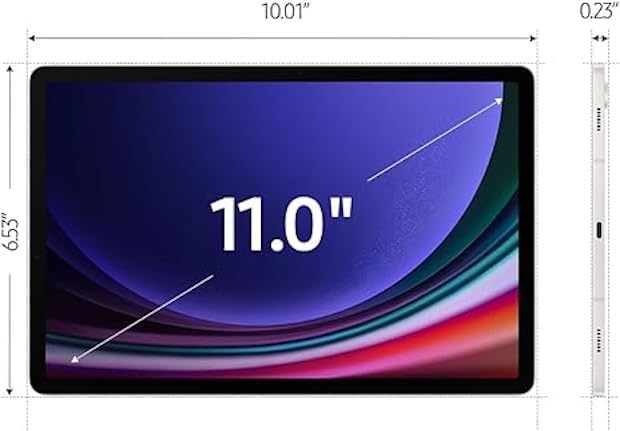
Image: Dimensions of the SAMSUNG Galaxy Tab S9.
| ഫീച്ചർ | വിശദാംശങ്ങൾ |
|---|---|
| മോഡലിൻ്റെ പേര് | Galaxy Tab S9 |
| മോഡൽ നമ്പർ | SM-X710 |
| സ്ക്രീൻ വലിപ്പം | 11 ഇഞ്ച് |
| ഡിസ്പ്ലേ തരം | അമോലെഡ് |
| ഡിസ്പ്ലേ റെസല്യൂഷൻ | 2560 x 1600 പിക്സലുകൾ |
| പ്രോസസ്സർ | Qualcomm Snapdragon 8 Gen 2 (up to 3.2 GHz) |
| റാം മെമ്മറി | 8 ജിബി |
| സംഭരണ ശേഷി | 128 ജിബി |
| ഓപ്പറേറ്റിംഗ് സിസ്റ്റം | ആൻഡ്രോയിഡ് |
| വയർലെസ് ടെക്നോളജി | WiFi 6E (802.11ax), Bluetooth 5.3 |
| ബാറ്ററി ശേഷി | 8000 മില്ലിamp Hours (14 Hours Average Life) |
| ക്യാമറ | Front, Rear (FHD 1080p Video Capture) |
| ഓഡിയോ | Quad speakers with Dolby Atmos technology |
| അളവുകൾ (L x W x Th) | 8.3"L x 4.9"W x 0.3"Th |
| ഇനത്തിൻ്റെ ഭാരം | 1.1 പൗണ്ട് |
| ബോക്സിൽ ഉൾപ്പെടുത്തിയിട്ടുണ്ട് | ചാർജിംഗ് കേബിൾ |
7. വാറൻ്റിയും പിന്തുണയും
7.1 വാറൻ്റി വിവരങ്ങൾ
This SAMSUNG Galaxy Tab S9 (SM-X710) comes with a 90- ദിവസത്തെ വാറന്റി. Please retain your proof of purchase for warranty claims. The warranty covers manufacturing defects and malfunctions under normal use conditions.
For detailed warranty terms and conditions, please refer to the documentation provided with your purchase or visit the official Samsung support webസൈറ്റ്.
7.2 ഉപഭോക്തൃ പിന്തുണ
For further assistance, technical support, or service inquiries, please contact Samsung Customer Service. You can find contact information and additional resources on the official Samsung support webസൈറ്റ്:
https://www.samsung.com/us/support/
When contacting support, please have your model number (SM-X710) and serial number ready.


