1. ഓവർview
The SingularXYZ SC200 Data Collector is a robust and high-precision surveying instrument designed for various terrain measurement and engineering survey tasks. It integrates an Android 8.1 operating system with a powerful processor and ample storage, ensuring compatibility with a wide range of third-party field software. Its durable, waterproof design and long-lasting battery make it ideal for demanding outdoor environments.

ഫ്രണ്ട് view of the SingularXYZ SC200 Data Collector, showing its screen and physical keypad.
2. പാക്കേജ് ഉള്ളടക്കം
Verify that all items are present in your SC200 Data Collector package:
- SC200 data collector *1
- USB കേബിൾ *1
- ബാറ്ററി *1
3 പ്രധാന സവിശേഷതകൾ
- High-Precision Data Collection: Equipped with Android 8.1 OS, 64GB internal storage, external TF card support, and multiple sensors for diverse user requirements.
- Clear High-Definition Screen: Features a 5-inch sunlight-readable large touchscreen and a backlit keypad for clear and convenient operation.
- പരുക്കൻ ഡിസൈൻ: IP67 rated for water and dust resistance, ensuring durability in harsh environments.
- Seamless Data Transmission: Integrated 4G/WiFi/Bluetooth capabilities for effortless connection to external GNSS devices and smooth GNSS data transmission.
- നീണ്ട ബാറ്ററി ലൈഫ്: High-capacity 7000mAh battery provides over 15 hours of operation and supports PE fast charging (less than 4 hours).
- ബഹുമുഖ പ്രയോഗങ്ങൾ: Suitable for high-precision surveying tasks such as measurement engineering, topographic surveying, and cadastral surveying.

Visual representation of the SC200's core features, including Android OS, expandable storage, 5-inch touch screen, Type-C interface, 4G/WiFi/Bluetooth, and 15-hour battery life.
4. സജ്ജീകരണം
4.1 പ്രാരംഭ ചാർജിംഗ്
Before first use, fully charge the SC200 Data Collector using the provided USB cable and a compatible power adapter. The 7000mAh battery supports PE fast charging, allowing a full charge in less than 4 hours.
4.2 പവർ ഓൺ/ഓഫ്
- പവർ ഓണാക്കാൻ: സ്ക്രീൻ പ്രകാശിക്കുന്നത് വരെ ഉപകരണത്തിന്റെ വശത്തുള്ള പവർ ബട്ടൺ അമർത്തിപ്പിടിക്കുക.
- പവർ ഓഫ് ചെയ്യാൻ: പവർ ബട്ടൺ അമർത്തിപ്പിടിക്കുക, തുടർന്ന് സ്ക്രീനിൽ ദൃശ്യമാകുന്ന ഓപ്ഷനുകളിൽ നിന്ന് 'പവർ ഓഫ്' തിരഞ്ഞെടുക്കുക.
4.3 ഉപകരണ കണക്ഷൻ
The SC200 can connect to various GNSS devices. Follow these steps to establish a connection:
Official SingularXYZ tutorial demonstrating the process of connecting the SC200 Data Collector to a GNSS device via Bluetooth for data communication.
- Turn on your GNSS device.
- On the SC200, navigate to Device >> Communication.
- For SingularXYZ RTK Receivers (e.g., Y1 GNSS receiver): Select SingularXYZ >> RTK >> Bluetooth. ഇതിനായി തിരയുക your device's serial number (SN) and connect.
- For GNSS NMEA Devices (other brands): Select Other >> RTK(NMEA0183) >> Bluetooth. Search and connect the device.
- For SingularXYZ GNSS Tablets (e.g., T8 Pro GNSS tablet): Select Other >> Internal GPS >> Internal GPS and connect the device.
- After connection, you can go to Device >> Device Information വരെ view current device information.
5. പ്രവർത്തന നിർദ്ദേശങ്ങൾ
5.1 പ്രോജക്ട് മാനേജ്മെന്റ്
To begin any surveying task, you must first create a new project within the SingularPad software.
Official SingularXYZ tutorial on creating a new project in SingularPad, including setting coordinate systems.
- പോകുക Project >> Project Manager.
- ക്ലിക്ക് ചെയ്യുക പുതിയത് to create a new project.
- Enter your project name. You can also click കൂടുതൽ for unit settings.
- Method 1 – Choose Predefined Projected Coordinate System: Click the list icon to enter the predefined projected coordinate systems interface. Click ടെംപ്ലേറ്റ്, select the projected coordinate system you need, and click അപേക്ഷിക്കുക. SingularPad includes different projected coordinate systems of most countries and regions.
- Method 2 – Define Your Projected Coordinate System: ക്ലിക്ക് ചെയ്യുക Ellipsoid Parameter, select the ellipsoid you need and click OK. ക്ലിക്ക് ചെയ്യുക Projections Parameter, select the projection you need and click OK. If you need to add a geoid model, please click Vertical Adjustment Parameter ചേർക്കാൻ.
- After creating a new project, you can go to കോർഡിനേറ്റ് സിസ്റ്റം വരെ view and modify current projected coordinate system information.
5.2 ഡാറ്റ ഇറക്കുമതി
Importing existing data is crucial for many surveying tasks. The SC200 supports various file ഫോർമാറ്റുകൾ.
Official SingularXYZ tutorial demonstrating how to import data into SingularPad, including selecting file തരങ്ങളും ഫോർമാറ്റുകളും.
- പോകുക Project >> Import Data and select the data type you need to import, including points, lines, and code library.
- അനുയോജ്യമായത് തിരഞ്ഞെടുക്കുക file format for your import file. You can also create a new format for your import file.
- Edit the custom format based on your import file. If the data type of your import file is not included in the Options, select (null) instead.
- ക്ലിക്ക് ചെയ്യുക അടുത്തത് to select the import file പാത.
- നിങ്ങൾക്ക് ക്ലിക്ക് ചെയ്യാനും കഴിയും പ്രീview to see if the import file is in the correct format.
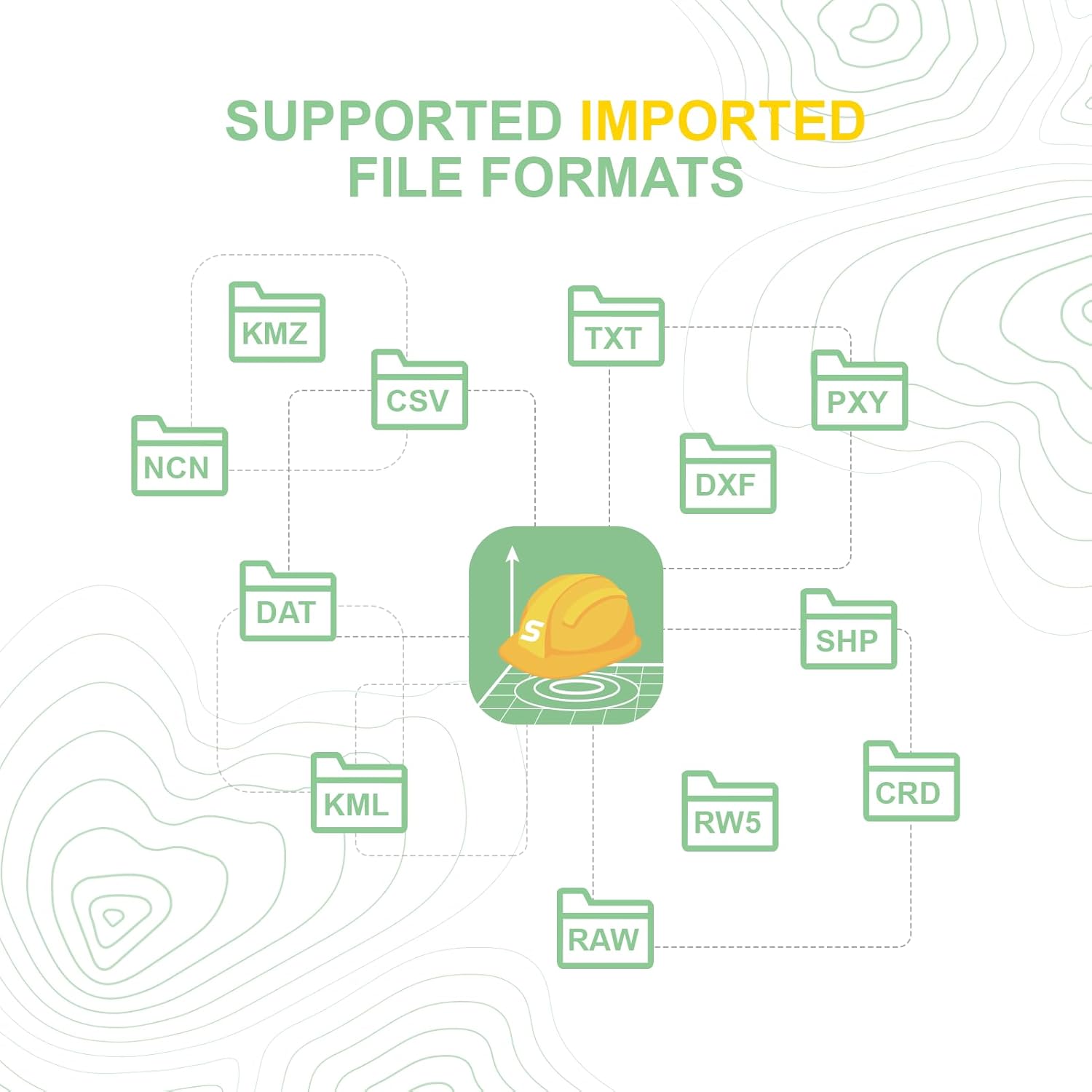
Supported imported file formats include KMZ, CSV, TXT, PXY, NCN, DXF, SHP, DAT, KML, RW5, and CRD.

Supported exported file formats include XLS, CSV, NCN, CSX, JPG, TXT, DXF, DAT, GPX, KMZ, SHP, HTML, KML, PXY, and CRD.
5.3 പൊതു പ്രവർത്തനം
The SC200's Android 8.1 operating system allows for intuitive navigation and use of various surveying applications. The 5-inch sunlight-readable touchscreen and backlit keypad provide a convenient operating experience in diverse lighting conditions.

Screenshots of the SingularPad software interface, showing various functions like Project Manager, Localization, Calibrate Point, Coordinate System, Points Database, Code Library Manager, Export Data, Software Settings, and About Software.

കഴിഞ്ഞുview of SingularPad Field Surveying Software, highlighting its multi-language, multi-functional, and multi-device capabilities, with icons for Point Survey, Point Stakeout, CAD Mapping, DSM Stakeout, Stake Road, Volume Calculation, Perimeter and Area, Localization, and Survey Range Settings.
6. പരിപാലനം
6.1 വൃത്തിയാക്കലും സംഭരണവും
- സോഫ്റ്റ്, ഡി ഉപയോഗിച്ച് ഉപകരണം തുടയ്ക്കുകamp തുണി. കഠിനമായ രാസവസ്തുക്കളോ ഉരച്ചിലുകളോ ഉള്ള വസ്തുക്കൾ ഒഴിവാക്കുക.
- സൂക്ഷിക്കുന്നതിനുമുമ്പ് ഉപകരണം ഉണങ്ങിയെന്ന് ഉറപ്പാക്കുക.
- നേരിട്ടുള്ള സൂര്യപ്രകാശത്തിൽ നിന്നും കടുത്ത താപനിലയിൽ നിന്നും മാറി തണുത്തതും വരണ്ടതുമായ സ്ഥലത്ത് ഉപകരണം സൂക്ഷിക്കുക.
6.2 വെള്ളത്തിനും പൊടിക്കും പ്രതിരോധം
The SC200 is rated IP67, meaning it is protected from dust ingress and can withstand immersion in water up to 1 meter for 30 minutes. While robust, avoid prolonged submersion or exposure to high-pressure water jets.
6.3 ബാറ്ററി കെയർ
- ബാറ്ററി ലൈഫ് പരമാവധിയാക്കാൻ, ബാറ്ററി ഇടയ്ക്കിടെ പൂർണ്ണമായും ഡിസ്ചാർജ് ചെയ്യുന്നത് ഒഴിവാക്കുക.
- ഉപകരണം പതിവായി ചാർജ് ചെയ്യുക, പ്രത്യേകിച്ചും അത് ദീർഘനേരം സൂക്ഷിക്കുകയാണെങ്കിൽ.
- നൽകിയിരിക്കുന്നതോ അംഗീകൃതമോ ആയ ചാർജിംഗ് ആക്സസറികൾ മാത്രം ഉപയോഗിക്കുക.
7. പ്രശ്നപരിഹാരം
If you encounter issues with your SC200 Data Collector, consider the following basic troubleshooting steps:
- ഉപകരണം ഓണാക്കുന്നില്ല: Ensure the battery is charged. Connect the device to the charger and try again.
- Connection issues with GNSS device: Verify Bluetooth is enabled on both devices. Ensure the correct device type and manufacturer are selected in the Communication settings. Try restarting both devices.
- Software not responding: Close and reopen the application. If the issue persists, restart the SC200 Data Collector.
- Data import errors: രണ്ടുതവണ പരിശോധിക്കുക file format and ensure it matches the selected import format in SingularPad. Use the Preview function to verify data integrity.
For more complex issues, refer to the official SingularXYZ support resources or contact customer service.
8 സ്പെസിഫിക്കേഷനുകൾ
| ഫീച്ചർ | വിശദാംശങ്ങൾ |
|---|---|
| ഉൽപ്പന്ന അളവുകൾ | 0.27 x 0.06 x 0.68 ഇഞ്ച് |
| ഇനം മോഡൽ നമ്പർ | SC200 data collector |
| ഓപ്പറേറ്റിംഗ് സിസ്റ്റം | ആൻഡ്രോയിഡ് 8.1 |
| ആന്തരിക സംഭരണം | 64GB (with external TF card support) |
| സ്ക്രീൻ | 5-inch sunlight-readable large touchscreen, backlit keypad |
| കണക്റ്റിവിറ്റി | 4G/WiFi/Bluetooth |
| ബാറ്ററി ശേഷി | 7000mAh |
| ബാറ്ററി ലൈഫ് | 15 മണിക്കൂറിലധികം |
| ചാർജിംഗ് | PE fast charging (less than 4 hours) |
| വെള്ളവും പൊടിയും പ്രതിരോധം | IP67 |
| നിർമ്മാതാവ് | SingularXYZ |
| ആദ്യ തീയതി ലഭ്യമാണ് | ഒക്ടോബർ 13, 2023 |
9. വാറണ്ടിയും പിന്തുണയും
9.1 വാറൻ്റി വിവരങ്ങൾ
The SingularXYZ SC200 Data Collector comes with a 1 വർഷത്തെ നിർമ്മാതാവിന്റെ വാറന്റിവാറന്റി ക്ലെയിമുകൾക്കായി നിങ്ങളുടെ വാങ്ങിയതിന്റെ തെളിവ് സൂക്ഷിക്കുക.
9.2 സാങ്കേതിക പിന്തുണ
SingularXYZ Intelligent Technology Ltd. is committed to providing reliable and stable professional products and solutions. We have a skilled and professional after-sales team ready to help you resolve any after-sales problems promptly and effectively.

Image of the SingularXYZ after-sales technical support team, emphasizing their commitment to customer assistance.
For further assistance, please visit the official SingularXYZ store on Amazon: SingularXYZ Amazon Store.


