ചൈം യൂസർ മാനുവൽ ഉള്ള മോറെക്യാം വയർലെസ് വീഡിയോ ഡോർബെൽ ക്യാമറ
Model: J9X
1. ആമുഖം
This manual provides detailed instructions for the installation, operation, and maintenance of your Morecam Wireless Video Doorbell Camera with Wireless Chime. Please read this manual thoroughly before use to ensure proper functionality and safety.

Image 1.1: Morecam Wireless Video Doorbell Camera and Wireless Chime. The image displays the black doorbell unit on the left, a compact black wireless chime on the top right, and a smartphone screen on the bottom right showing a delivery person.
2. പാക്കേജ് ഉള്ളടക്കം
പാക്കേജിൽ എല്ലാ ഇനങ്ങളും ഉണ്ടെന്ന് ഉറപ്പാക്കുക:
- മോറെക്യാം വയർലെസ് വീഡിയോ ഡോർബെൽ ക്യാമറ
- വയർലെസ് മണിനാദം
- മൌണ്ടിംഗ് ബ്രാക്കറ്റ്
- മൗണ്ടിംഗ് സ്ക്രൂകളും ആങ്കറുകളും
- യുഎസ്ബി ചാർജിംഗ് കേബിൾ
- ഉപയോക്തൃ മാനുവൽ (ഈ പ്രമാണം)
3. ഉൽപ്പന്നം കഴിഞ്ഞുview
The Morecam Wireless Video Doorbell Camera features a 1080P HD camera, PIR human detection, two-way audio, and night vision. The wireless chime provides audible alerts indoors.

Image 3.1: Morecam WiFi Video Doorbell Camera Features. This image highlights key features such as 100% wire-free operation, super night vision, PIR motion detection, two-way audio, 1080P FHD, IP66 waterproof rating, anti-theft siren, and multi-device sharing.
Doorbell Camera Components:
- ക്യാമറ ലെൻസ്: വീഡിയോ ക്യാപ്ചർ ചെയ്യുന്നു.
- പിഐആർ സെൻസർ: ചലനം കണ്ടുപിടിക്കുന്നു.
- മൈക്രോഫോൺ: Captures audio for two-way communication.
- സ്പീക്കർ: Outputs audio for two-way communication.
- ഡോർബെൽ ബട്ടൺ: Activates the doorbell and initiates video call.
- സ്റ്റാറ്റസ് ഇൻഡിക്കേറ്റർ ലൈറ്റ്: ഉപകരണ നില കാണിക്കുന്നു.
- യുഎസ്ബി ചാർജിംഗ് പോർട്ട്: ആന്തരിക ബാറ്ററി റീചാർജ് ചെയ്യുന്നതിന്.
- റീസെറ്റ് ബട്ടൺ: For factory reset or pairing.
- മൈക്രോ എസ്ഡി കാർഡ് സ്ലോട്ട്: For local video storage (card not included).
Wireless Chime Components:
- സ്പീക്കർ: ഡോർബെൽ ശബ്ദം പുറപ്പെടുവിക്കുന്നു.
- സ്റ്റാറ്റസ് ഇൻഡിക്കേറ്റർ ലൈറ്റ്: Shows chime status.
- ജോടിയാക്കൽ ബട്ടൺ: For connecting with the doorbell.
- വോളിയം നിയന്ത്രണം: മണിനാദത്തിന്റെ ശബ്ദം ക്രമീകരിക്കുന്നു.
- മെലഡി തിരഞ്ഞെടുക്കൽ: Changes chime tune.
4. സജ്ജീകരണവും ഇൻസ്റ്റാളേഷനും
Follow these steps to set up your Morecam Wireless Video Doorbell Camera and Chime.
4.1 ഡോർബെൽ ചാർജ് ചെയ്യുന്നു
Before installation, fully charge the doorbell camera using the provided USB cable. Connect the cable to the doorbell's charging port and a 5V USB power adapter (not included). The indicator light will show charging status.
4.2 ആപ്പ് ഇൻസ്റ്റാളേഷനും ഉപകരണ ജോടിയാക്കലും
- Download the "CloudEdge" app from the Google Play Store or Apple App Store.
- ഒരു അക്കൗണ്ട് രജിസ്റ്റർ ചെയ്ത് ലോഗിൻ ചെയ്യുക.
- Tap the "+" icon in the app to add a new device. Select "Video Doorbell".
- Follow the on-screen instructions to connect the doorbell to your 2.4GHz Wi-Fi network. Ensure your phone is connected to a 2.4GHz network during setup.
- Pair the wireless chime: Insert batteries into the chime. Press and hold the pairing button on the chime until its indicator light flashes. Then, press the doorbell button on the camera. The chime will ring, indicating successful pairing.
4.3 ഫിസിക്കൽ ഇൻസ്റ്റലേഷൻ
The doorbell is 100% wireless and designed for easy installation without drilling, suitable for apartments or homes.
- Choose a suitable location for your doorbell, typically near your front door, ensuring a clear view.
- Attach the mounting bracket to the wall using the provided screws and anchors. Alternatively, use strong adhesive tape (not included) for drill-free installation on smooth surfaces.
- Slide the doorbell camera onto the mounting bracket until it clicks securely into place.
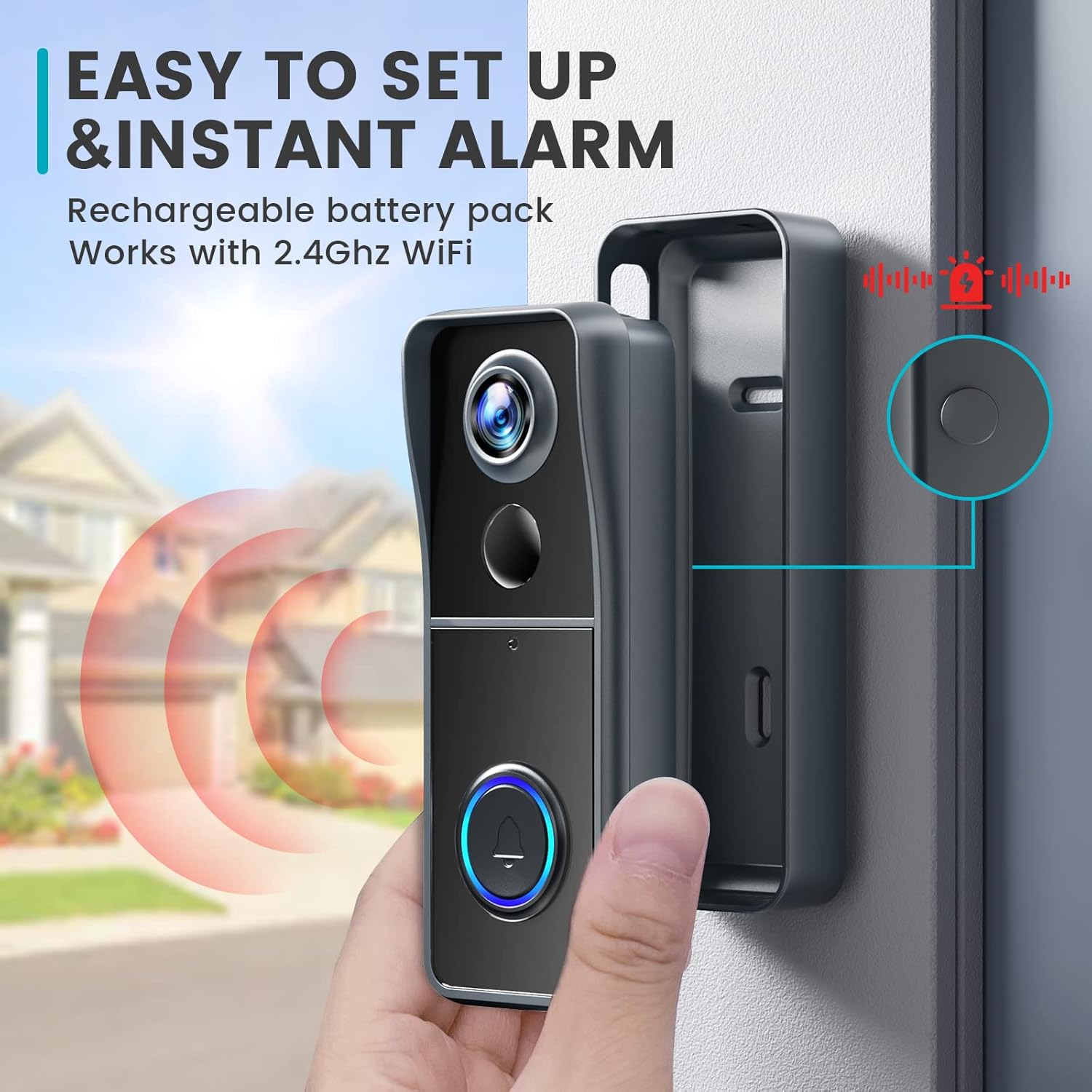
Image 4.1: Easy Setup and Instant Alarm. This image illustrates the simple installation process of the doorbell camera onto its mounting bracket, highlighting its wireless nature and instant alarm capabilities.
5. പ്രവർത്തന നിർദ്ദേശങ്ങൾ
Understand the various functions of your Morecam Video Doorbell Camera.
5.1 തത്സമയം View ഒപ്പം ടു-വേ ഓഡിയോയും
Open the CloudEdge app to access the live video feed from your doorbell. When a visitor presses the doorbell or motion is detected, you will receive a notification on your smartphone. Tap the notification to view the live feed and engage in two-way communication.

Image 5.1: Instant Messages from App. A smartphone displays an alert message from the CloudEdge app, indicating motion detection at the front door, allowing users to see who is approaching.

Image 5.2: Two-Way Audio and Voice Changer. This image illustrates the two-way audio function, allowing real-time interaction, and the voice changer feature for privacy, showing options like "Original," "Clown," and "Uncle" voices.
5.2 Voice Changer Function
The doorbell includes a voice changer feature to modify your voice during two-way communication, enhancing privacy. Select from available voice options within the CloudEdge app during a call.
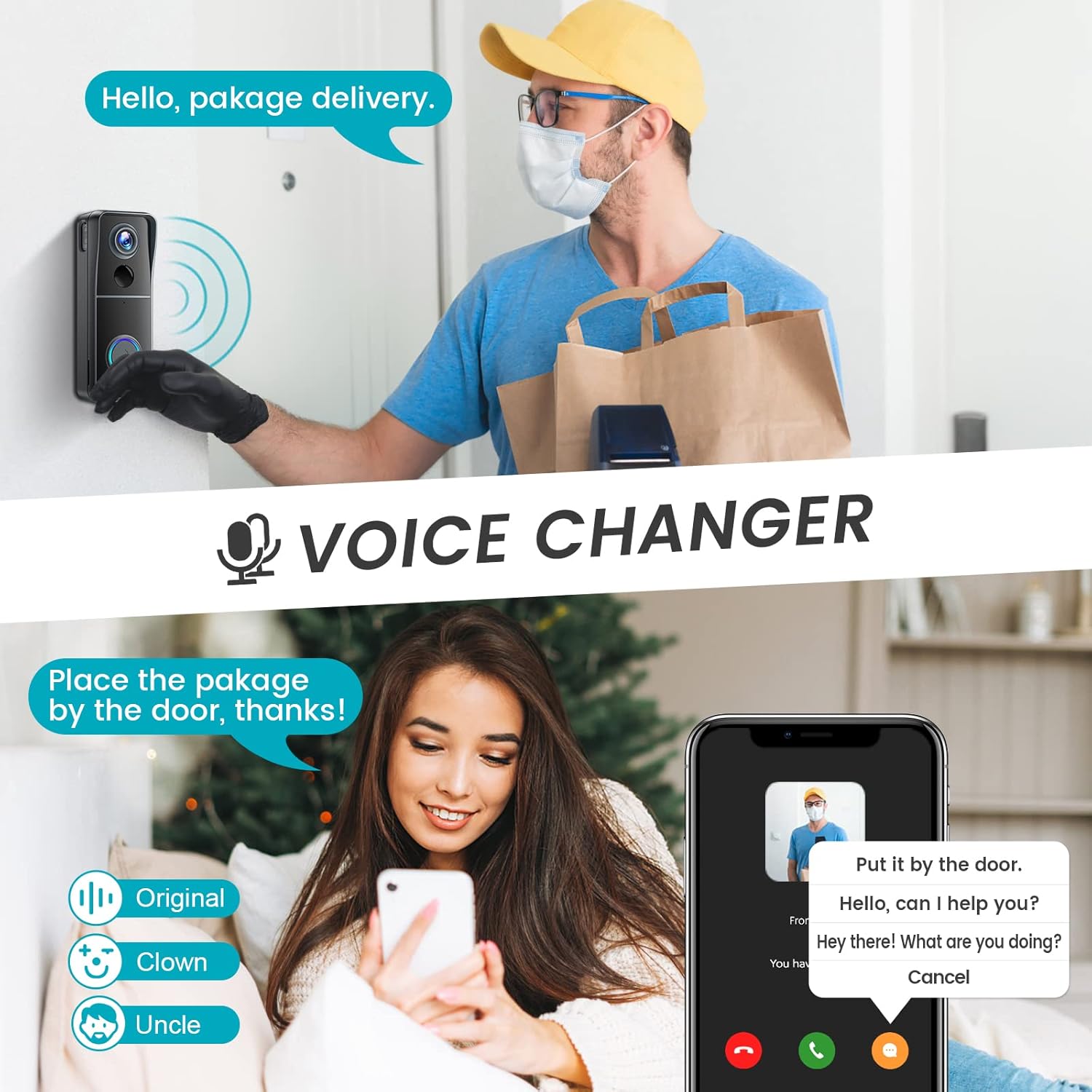
Image 5.3: Voice Changer. This image demonstrates the voice changer feature, showing a user interacting with a delivery person while using a modified voice.
5.3 PIR Human Detection and Motion Zones
The built-in PIR sensor detects human motion and sends instant notifications to your phone. You can customize motion detection zones within the app to reduce unnecessary alerts and focus on specific areas.

Image 5.4: PIR Human Detection. A smartphone displays an alert message from the CloudEdge app, indicating a detected person (e.g., a child on roller skates) within the camera's view.

Image 5.5: Customizable Motion Zones. This image shows a smartphone screen overlaying a house and yard, with a green dashed line indicating a user-defined motion detection zone to reduce false alarms.
5.4 നൈറ്റ് വിഷൻ
The doorbell camera is equipped with IR lights that automatically activate in low-light conditions, providing clear video footage പൂർണ്ണ ഇരുട്ടിൽ പോലും.
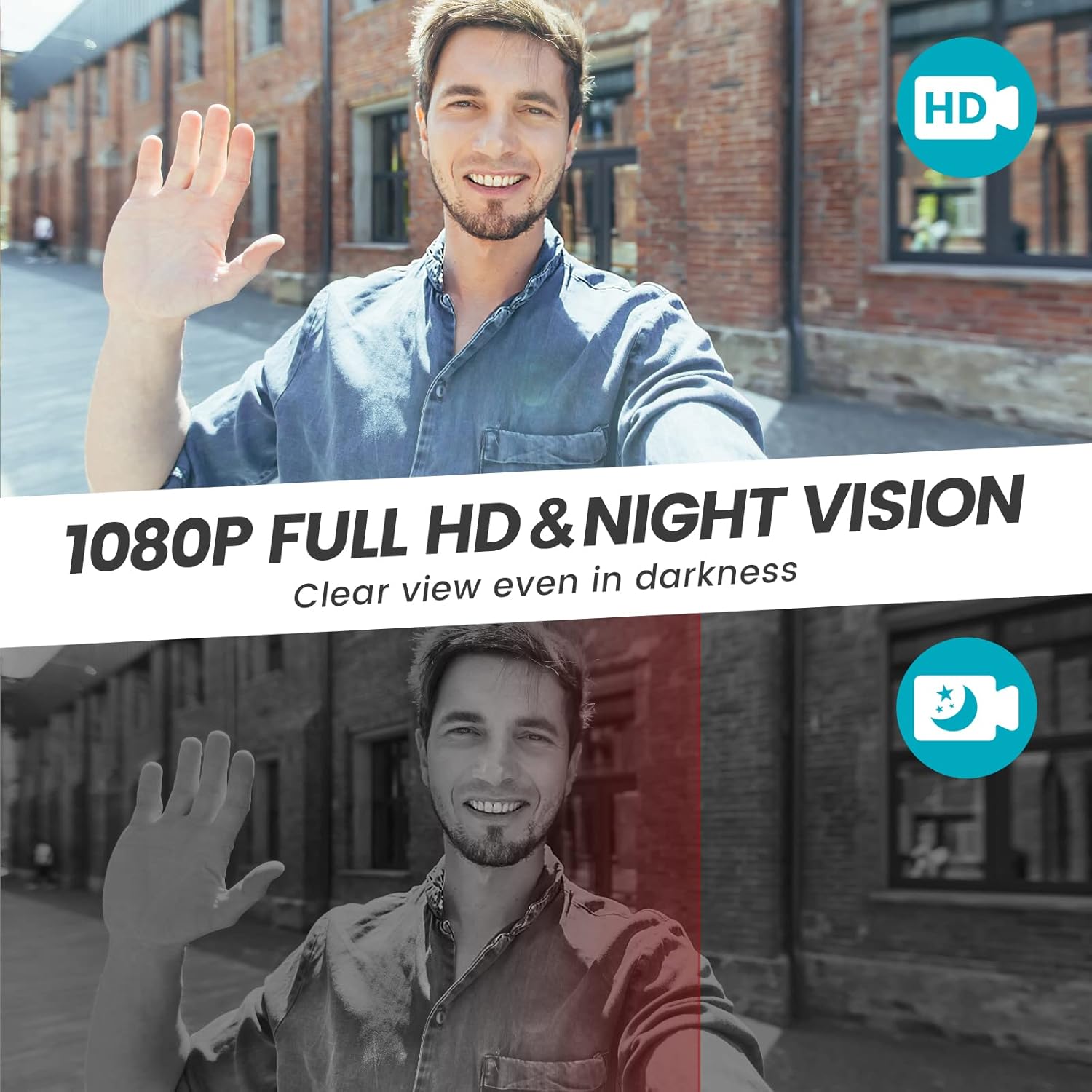
Image 5.6: 1080P Full HD and Night Vision. This image compares daytime 1080P HD video with nighttime IR night vision, demonstrating clear visibility in both conditions.

Image 5.7: 1080P Live Video and IR Night Vision. This image shows a wide-angle view (120 degrees) of a hallway with a delivery person, demonstrating both 1080P HD video and IR night vision capabilities.
5.5 Video Storage and Family Sharing
The doorbell supports local storage via a Micro SD card (up to 16GB, not included) and offers 7-day free cloud storage. Video recordings will loop, overwriting older files when the storage is full. You can share access to the doorbell feed with up to 5 family members through the CloudEdge app.

Image 5.8: No Monthly Fees. A smartphone screen displays the CloudEdge app interface with icons for screenshot, intercom, record, and motion detection, emphasizing the availability of SD card storage (not included) and 7-day free cloud storage.
6. പരിപാലനം
- വൃത്തിയാക്കൽ: ഒരു സോഫ്റ്റ് ഉപയോഗിക്കുക, ഡിamp ക്യാമറ ലെൻസും ഡോർബെല്ലിന്റെ പ്രതലവും വൃത്തിയാക്കാൻ തുണി ഉപയോഗിക്കുക. അബ്രസിവ് ക്ലീനറുകൾ ഒഴിവാക്കുക.
- ബാറ്ററി ലൈഫ്: The doorbell is powered by a rechargeable battery. Recharge it when the app indicates low battery. Battery life varies based on usage and environmental factors.
- കാലാവസ്ഥ പ്രതിരോധം: The doorbell has an IP66 weather resistance rating, protecting it from rain, snow, and dust. However, avoid submerging it in water.

Image 6.1: IP66 Weather Resistance. This image shows the doorbell camera installed outdoors during various weather conditions (rain, snow, sun) and temperature extremes, illustrating its IP66 rating for protection against elements like rain, snow, shine, temperature, and dust.
7. പ്രശ്നപരിഹാരം
If you encounter issues with your Morecam Video Doorbell, refer to the following common problems and solutions:
| പ്രശ്നം | സാധ്യമായ കാരണം / പരിഹാരം |
|---|---|
| Doorbell does not power on or hold charge. |
|
| Cannot connect to Wi-Fi or app. |
|
| Chime does not ring. |
|
| Frequent false motion alerts. |
|
| Poor video quality or night vision. |
|
8 സ്പെസിഫിക്കേഷനുകൾ
| ഫീച്ചർ | വിശദാംശങ്ങൾ |
|---|---|
| ബ്രാൻഡ് | മോറെക്യാം |
| മോഡൽ | J9X |
| കണക്റ്റിവിറ്റി ടെക്നോളജി | വയർലെസ്സ് (വൈ-ഫൈ 2.4GHz) |
| വീഡിയോ ക്യാപ്ചർ റെസല്യൂഷൻ | 1080p ഫുൾ എച്ച്ഡി |
| പ്രത്യേക സവിശേഷതകൾ | Night Vision, PIR Human Detection, Two-Way Audio, Voice Changer |
| ഇൻഡോർ/ഔട്ട്ഡോർ ഉപയോഗം | Indoor, Outdoor (IP66 Weather Resistance) |
| അനുയോജ്യമായ ഉപകരണങ്ങൾ | Smartphone, Tablet (CloudEdge App) |
| പവർ ഉറവിടം | Rechargeable Battery (Corded Electric for charging) |
| പ്രാദേശിക സംഭരണം | മൈക്രോ എസ്ഡി കാർഡ് (16GB വരെ, ഉൾപ്പെടുത്തിയിട്ടില്ല) |
| ക്ലൗഡ് സംഭരണം | 7-ദിവസത്തെ സൗജന്യ ക്ലൗഡ് സംഭരണം |
| മെറ്റീരിയൽ | ലോഹം |
| ഇനത്തിൻ്റെ ഭാരം | 430 ഗ്രാം |
| പാഴ്സൽ അളവുകൾ | 18 x 9.9 x 7.7 സെ.മീ |
9. വാറൻ്റിയും പിന്തുണയും
For warranty information and technical support, please refer to the contact details provided with your purchase or visit the official Morecam webസൈറ്റ്. വാങ്ങിയതിന്റെ തെളിവായി നിങ്ങളുടെ വാങ്ങൽ രസീത് സൂക്ഷിക്കുക.


