1. ആമുഖം
വാങ്ങിയതിന് നന്ദി.asing the Goldair GRPF-1632 Rechargeable Pedestal Fan. This manual provides essential information for the safe and efficient operation, assembly, maintenance, and troubleshooting of your fan. Please read these instructions thoroughly before use and retain them for future reference.
2. പ്രധാന സുരക്ഷാ നിർദ്ദേശങ്ങൾ
- ഫാൻ ടിപ്പിംഗ് തടയാൻ എപ്പോഴും സ്ഥിരതയുള്ളതും നിരപ്പായതുമായ ഒരു പ്രതലത്തിലാണ് സ്ഥാപിച്ചിരിക്കുന്നതെന്ന് ഉറപ്പാക്കുക.
- Do not insert fingers or any objects through the fan grille when the fan is operating.
- Keep the fan away from water or other liquids. Do not use in wet environments.
- Unplug the fan from the power source before cleaning, maintenance, or when not in use.
- Do not operate the fan with a damaged cord or plug. Contact qualified service personnel for repair.
- ഈ ഉപകരണം, അവരുടെ സുരക്ഷയ്ക്ക് ഉത്തരവാദിയായ ഒരു വ്യക്തി ഉപകരണത്തിൻ്റെ ഉപയോഗത്തെ സംബന്ധിച്ച മേൽനോട്ടമോ നിർദ്ദേശമോ നൽകിയിട്ടില്ലെങ്കിൽ, ശാരീരികമോ ഇന്ദ്രിയപരമോ മാനസികമോ ആയ കഴിവുകൾ കുറഞ്ഞതോ അനുഭവത്തിൻ്റെയും അറിവിൻ്റെയും അഭാവം ഉള്ള വ്യക്തികൾക്ക് (കുട്ടികൾ ഉൾപ്പെടെ) ഉപയോഗിക്കാൻ ഉദ്ദേശിച്ചുള്ളതല്ല.
- കുട്ടികൾ ഉപകരണം ഉപയോഗിച്ച് കളിക്കുന്നില്ലെന്ന് ഉറപ്പാക്കാൻ മേൽനോട്ടം വഹിക്കണം.
- Use only the charging adapter supplied with the fan.
- എയർ ഓപ്പണിംഗുകൾ തടയരുത്.
3. ഉൽപ്പന്നം കഴിഞ്ഞുview
The Goldair GRPF-1632 is a 16-inch rechargeable pedestal fan designed for versatile cooling. It features a robust construction, multiple speed settings, and an adjustable head for directional airflow. Its rechargeable battery provides cordless operation, enhancing portability.
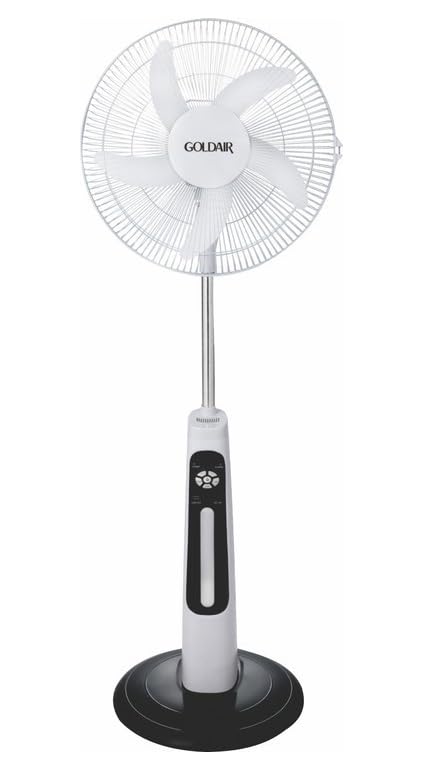
This image displays the complete Goldair Rechargeable Pedestal Fan. It features a white fan head with a protective grille and five blades, an adjustable silver-colored pole, a white and black control panel housing the fan's functions, and a stable black round base.
4. പാക്കേജ് ഉള്ളടക്കം
- Fan Head Assembly (including blades and grilles)
- Adjustable Pedestal Pole
- റൗണ്ട് ബേസ്
- അടിസ്ഥാന ഫിക്സിംഗ് സ്ക്രൂ
- പവർ അഡാപ്റ്റർ/ചാർജർ
- ഉപയോക്തൃ മാനുവൽ
5. സജ്ജീകരണവും അസംബ്ലിയും
Follow these steps to assemble your Goldair Pedestal Fan:
- അടിസ്ഥാനം അറ്റാച്ചുചെയ്യുക: Place the pedestal pole onto the round base. Align the holes and secure the pole to the base using the provided fixing screw from underneath the base. Tighten securely.
- ഫാൻ ഹെഡ് മൌണ്ട് ചെയ്യുക: Carefully slide the fan head assembly onto the top of the pedestal pole. Ensure it clicks into place or is secured according to the specific design (some models may have a screw or locking mechanism).
- സ്ഥിരത പരിശോധിക്കുക: Once assembled, gently test the fan's stability on a flat surface.
6. പ്രവർത്തന നിർദ്ദേശങ്ങൾ
Familiarize yourself with the control panel on the fan body:
- പവർ ബട്ടൺ: ഫാൻ ഓണാക്കാനോ ഓഫാക്കാനോ അമർത്തുക.
- വേഗത ക്രമീകരണങ്ങൾ: Press the speed button repeatedly to cycle through different fan speeds (e.g., Low, Medium, High). Indicator lights will show the current speed.
- ഓസിലേഷൻ ബട്ടൺ: Press to activate or deactivate the oscillation function, which allows the fan head to sweep from side to side.
- ടൈമർ ബട്ടൺ: If available, press to set a timer for automatic shutdown (e.g., 1 hour, 2 hours, 4 hours).
- ടിൽറ്റ് അഡ്ജസ്റ്റ്മെന്റ്: Manually adjust the angle of the fan head up or down to direct airflow as desired. Hold the fan head firmly and tilt it to the desired position.
7 ബാറ്ററി ചാർജ് ചെയ്യുന്നു
The Goldair GRPF-1632 fan is equipped with a rechargeable battery for cordless operation. To charge the fan:
- Ensure the fan is turned OFF.
- Connect the power adapter to the charging port on the fan body.
- അഡാപ്റ്റർ ഒരു സാധാരണ ഇലക്ട്രിക്കൽ ഔട്ട്ലെറ്റിലേക്ക് പ്ലഗ് ചെയ്യുക.
- The charging indicator light will illuminate (e.g., red for charging, green for fully charged).
- Allow the fan to charge completely before its first cordless use. Charging time may vary.
The fan can also operate while connected to the power adapter.
8. പരിപാലനവും ശുചീകരണവും
Regular cleaning ensures optimal performance and extends the life of your fan.
- വൃത്തിയാക്കുന്നതിന് മുമ്പ്: Always unplug the fan from the power outlet and ensure it is turned off.
- ബാഹ്യ ശുചീകരണം: ഫാനിന്റെ പുറംഭാഗങ്ങൾ മൃദുവായ, d തുണി ഉപയോഗിച്ച് തുടയ്ക്കുക.amp തുണി. അബ്രാസീവ് ക്ലീനറുകളോ, ലായകങ്ങളോ, കഠിനമായ രാസവസ്തുക്കളോ ഉപയോഗിക്കരുത്, കാരണം ഇവ ഫിനിഷിന് കേടുവരുത്തും.
- ഗ്രില്ലും ബ്ലേഡുകളും: To clean dust from the fan blades and inside the grilles, you may need to carefully remove the front grille. Refer to the assembly instructions in reverse for safe removal. Use a soft brush or vacuum cleaner with a brush attachment to remove accumulated dust. Ensure all parts are dry before reassembling.
- സംഭരണം: ദീർഘനേരം ഉപയോഗിക്കാത്തപ്പോൾ, ഫാൻ തണുത്തതും വരണ്ടതുമായ സ്ഥലത്ത് സൂക്ഷിക്കുക, പൊടിയിൽ നിന്നും കേടുപാടുകളിൽ നിന്നും സംരക്ഷിക്കുന്നതിന്, അതിന്റെ യഥാർത്ഥ പാക്കേജിംഗിൽ തന്നെ സൂക്ഷിക്കുക.
9. പ്രശ്നപരിഹാരം
നിങ്ങളുടെ ഫാനിൽ പ്രശ്നങ്ങൾ നേരിടുകയാണെങ്കിൽ, പൊതുവായ പ്രശ്നങ്ങളും പരിഹാരങ്ങളും അറിയാൻ താഴെ കൊടുത്തിരിക്കുന്ന പട്ടിക പരിശോധിക്കുക:
| പ്രശ്നം | സാധ്യമായ കാരണം | പരിഹാരം |
|---|---|---|
| ഫാൻ ഓണാകുന്നില്ല. | No power supply or low battery. | Ensure the power adapter is securely plugged in and the outlet is functional. Charge the fan battery if operating wirelessly. |
| ദുർബലമായ വായുസഞ്ചാരം. | Fan speed is too low or grilles are obstructed. | Increase the fan speed setting. Clean any dust or debris from the front and rear grilles and blades. |
| ഫാൻ മുഴങ്ങുന്നു. | Loose parts or dust accumulation. | Ensure all assembly screws are tightened. Clean the fan blades and grilles to remove any dust buildup. |
| ഓസിലേഷൻ പ്രവർത്തിക്കുന്നില്ല. | Oscillation function is not activated. | Press the oscillation button to activate the function. |
10 സ്പെസിഫിക്കേഷനുകൾ
- ബ്രാൻഡ്: ഗോൾഡെയർ
- മോഡൽ നമ്പർ: GRPF-1632
- ഇലക്ട്രിക് ഫാൻ ഡിസൈൻ: ഫ്ലോർ ഫാൻ
- ബ്ലേഡ് നീളം: 16 ഇഞ്ച്
- ബ്ലേഡുകളുടെ എണ്ണം: 3
- മെറ്റീരിയൽ: അലുമിനിയം
- കൺട്രോളർ തരം: ബട്ടൺ നിയന്ത്രണം
- ഇനത്തിൻ്റെ ഭാരം: 4 കി.ഗ്രാം
- ഉൽപ്പന്ന അളവുകൾ: 62.8D x 13W x 56.5H സെൻ്റീമീറ്റർ
- നിറം: Multicolor (as per product specifications)
11. വാറണ്ടിയും ഉപഭോക്തൃ പിന്തുണയും
Goldair products are manufactured to high standards and are warranted against defects in materials and workmanship. For specific warranty terms and conditions, please refer to the warranty card included with your purchase or visit the official Goldair website. For technical support, spare parts, or service inquiries, please contact Goldair customer support through their official channels.


