1. ആമുഖം
This manual provides comprehensive instructions for the VINABTY MX04 Replacement Remote Control. Designed as a direct replacement, this remote offers seamless compatibility with various Smart MX and Digiquest models without the need for complex programming. Please read this manual carefully to ensure proper setup and operation of your new remote control.
2. ഉൽപ്പന്നം കഴിഞ്ഞുview
The VINABTY MX04 is an infrared replacement remote control, engineered for ease of use and broad compatibility. Its ergonomic design ensures comfortable handling.
2.1 അനുയോജ്യമായ മോഡലുകൾ
This remote control is compatible with the following models:
- Smart MX04
- Smart MX03
- Smart MX02
- Mobilo 6400 Digiquest HDMI
- Smart MX 04+
- Smart MX 04L
- Smart Mobilo II
- Smart MX 04 CI 6400 Digiquest
- And other similar Smart and Digiquest models.
2.2 പ്രധാന സവിശേഷതകൾ
- പകരം വയ്ക്കാവുന്ന സമർപ്പിത റിമോട്ട് കൺട്രോൾ.
- Ergonomic and elegant design for comfortable grip.
- No programming or configuration required.
- Operates by simply inserting batteries.
- Infrared connectivity.
3. സജ്ജീകരണം
3.1 ബാറ്ററി ഇൻസ്റ്റാളേഷൻ
The VINABTY MX04 remote control requires two AAA batteries (not included). Follow these steps to install them:
- റിമോട്ട് കൺട്രോളിൻ്റെ പിൻഭാഗത്ത് ബാറ്ററി കമ്പാർട്ട്മെൻ്റ് കവർ കണ്ടെത്തുക.
- കമ്പാർട്ട്മെന്റ് തുറക്കാൻ കവർ താഴേക്ക് സ്ലൈഡ് ചെയ്യുക അല്ലെങ്കിൽ ലാച്ച് (ഉണ്ടെങ്കിൽ) അമർത്തുക.
- രണ്ട് AAA ബാറ്ററികൾ ഇടുക, കമ്പാർട്ടുമെന്റിനുള്ളിലെ ഡയഗ്രമുകളുമായി പോസിറ്റീവ് (+) ഉം നെഗറ്റീവ് (-) ടെർമിനലുകളും പൊരുത്തപ്പെടുന്നുണ്ടെന്ന് ഉറപ്പാക്കുക.
- സുരക്ഷിതമായി ക്ലിക്ക് ചെയ്യുന്നതുവരെ ബാറ്ററി കമ്പാർട്ട്മെന്റ് കവർ തിരികെ സ്ഥലത്തേക്ക് സ്ലൈഡ് ചെയ്യുക.

Image: Back of the remote control with the battery compartment open, illustrating correct AAA battery placement.
Once batteries are installed, the remote is ready for immediate use with compatible devices. No additional programming is required.
4. പ്രവർത്തന നിർദ്ദേശങ്ങൾ
The VINABTY MX04 remote control functions identically to your original remote. Point the remote directly at the device you wish to control. Ensure there are no obstructions between the remote and the device's infrared receiver.
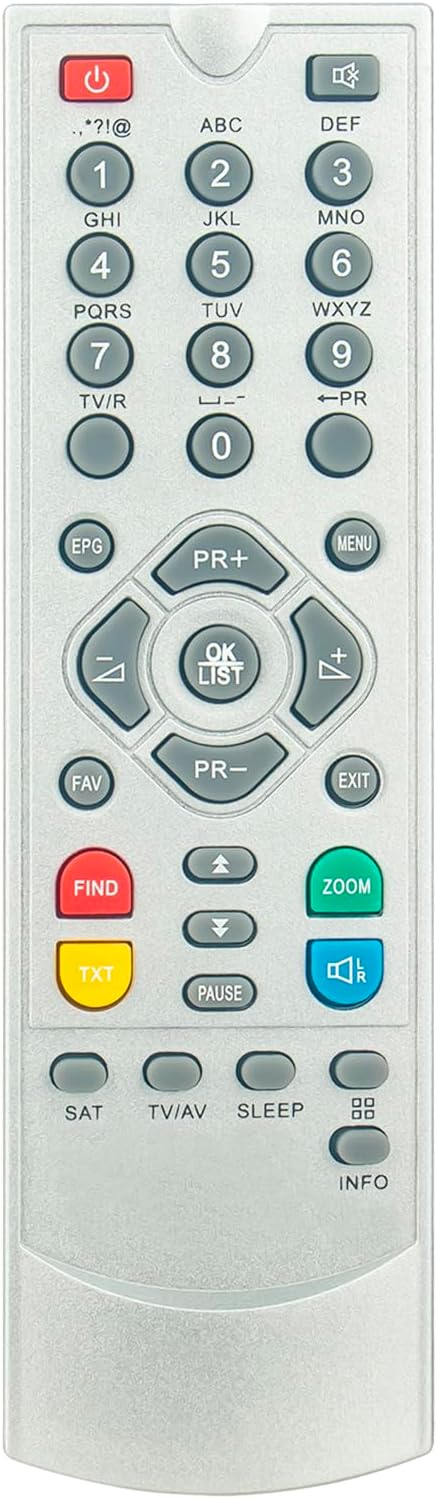
ചിത്രം: മുൻഭാഗം view of the VINABTY MX04 remote control, displaying the button layout.
4.1 അടിസ്ഥാന പ്രവർത്തനങ്ങൾ
- പവർ ബട്ടൺ (⏻): ഉപകരണം ഓണാക്കുകയോ ഓഫാക്കുകയോ ചെയ്യുന്നു.
- നമ്പർ ബട്ടണുകൾ (0-9): For direct channel selection or inputting numbers.
- Channel Up/Down (PR+, PR-): Navigates through channels.
- വോളിയം കൂട്ടുക/താഴ്ത്തുക (+, -): വോളിയം ലെവൽ ക്രമീകരിക്കുന്നു.
- നിശബ്ദ ബട്ടൺ (🔇): ഓഡിയോ മ്യൂട്ട് ചെയ്യുകയോ അൺമ്യൂട്ട് ചെയ്യുകയോ ചെയ്യുന്നു.
- Navigation Pad (Up, Down, Left, Right, OK/List): For menu navigation and selection.
- മെനു ബട്ടൺ: ഉപകരണത്തിന്റെ പ്രധാന മെനു ആക്സസ് ചെയ്യുന്നു.
- എക്സിറ്റ് ബട്ടൺ: Exits current menu or function.
- EPG ബട്ടൺ: Displays the Electronic Program Guide.
- FAV ബട്ടൺ: പ്രിയപ്പെട്ട ചാനലുകൾ ആക്സസ് ചെയ്യുന്നു.
- FIND Button: Initiates search functions.
- TXT Button: Activates Teletext.
- ബട്ടൺ ഇടുക: പ്ലേബാക്ക് താൽക്കാലികമായി നിർത്തുന്നു.
- സൂം ബട്ടൺ: Adjusts screen zoom.
- SAT ബട്ടൺ: Switches to satellite input.
- TV/AV Button: Switches between TV and AV input sources.
- ഉറങ്ങുക ബട്ടൺ: Sets a sleep timer.
- വിവര ബട്ടൺ: പ്രോഗ്രാം വിവരങ്ങൾ പ്രദർശിപ്പിക്കുന്നു.
Refer to your device's original manual for specific functions of each button if they differ from standard operations.
5. പരിപാലനം
5.1 വൃത്തിയാക്കൽ
നിങ്ങളുടെ റിമോട്ട് കൺട്രോൾ വൃത്തിയാക്കാൻ, മൃദുവായതും ഉണങ്ങിയതുമായ ഒരു തുണി ഉപയോഗിക്കുക. കഠിനമായ അഴുക്കിന്, ചെറുതായി dampതുണിയിൽ വെള്ളം അല്ലെങ്കിൽ നേരിയതും ഉരച്ചിലുകൾ ഇല്ലാത്തതുമായ ഒരു ക്ലീനർ ഉപയോഗിക്കുക. കഠിനമായ രാസവസ്തുക്കളോ ഉരച്ചിലുകളുള്ള വസ്തുക്കളോ ഉപയോഗിക്കുന്നത് ഒഴിവാക്കുക, കാരണം ഇവ റിമോട്ടിന്റെ ഉപരിതലത്തിനോ ആന്തരിക ഘടകങ്ങളോ കേടുവരുത്തും.
5.2 ബാറ്ററി കെയർ
- Replace batteries when the remote's performance degrades or it stops responding.
- Always replace both batteries at the same time with new ones of the same type (AAA Alkaline).
- പഴയതും പുതിയതുമായ ബാറ്ററികളോ വ്യത്യസ്ത തരം ബാറ്ററികളോ മിക്സ് ചെയ്യരുത്.
- റിമോട്ട് ദീർഘനേരം ഉപയോഗിക്കുന്നില്ലെങ്കിൽ, ചോർച്ചയും സാധ്യതയുള്ള കേടുപാടുകളും തടയാൻ ബാറ്ററികൾ നീക്കം ചെയ്യുക.
- ഉപയോഗിച്ച ബാറ്ററികൾ പ്രാദേശിക നിയന്ത്രണങ്ങൾ അനുസരിച്ച് ഉത്തരവാദിത്തത്തോടെ നീക്കം ചെയ്യുക.
6. പ്രശ്നപരിഹാരം
If you experience issues with your VINABTY MX04 remote control, please refer to the following common solutions:
| പ്രശ്നം | സാധ്യമായ കാരണം | പരിഹാരം |
|---|---|---|
| റിമോട്ട് പ്രതികരിക്കുന്നില്ല. | ഡെഡ് അല്ലെങ്കിൽ തെറ്റായി ചേർത്ത ബാറ്ററികൾ. | ബാറ്ററികൾ പുതിയ AAA ആൽക്കലൈൻ ബാറ്ററികൾ ഉപയോഗിച്ച് മാറ്റിസ്ഥാപിക്കുക, ശരിയായ പോളാരിറ്റി ഉറപ്പാക്കുക. |
| റിമോട്ട് ഇടയ്ക്കിടെ പ്രവർത്തിക്കുന്നു. | Weak batteries or obstruction between remote and device. | Replace batteries. Ensure a clear line of sight to the device's infrared receiver. |
| Remote does not control the device. | Remote is not compatible with the device. | Verify your device model is listed in the "Compatible Models" section (Section 2.1). |
7 സ്പെസിഫിക്കേഷനുകൾ
| ഫീച്ചർ | വിശദാംശങ്ങൾ |
|---|---|
| മോഡൽ നമ്പർ | MX04 |
| ബ്രാൻഡ് | വിനാബ്റ്റി |
| കണക്റ്റിവിറ്റി ടെക്നോളജി | ഇൻഫ്രാറെഡ് |
| കൺട്രോളർ തരം | ബട്ടൺ നിയന്ത്രണം |
| ബട്ടണുകളുടെ എണ്ണം | 25 |
| പരമാവധി പരിധി | 10 മീറ്റർ (ഏകദേശം 33 അടി) |
| ബാറ്ററികൾ ആവശ്യമാണ് | 2 x AAA (ആൽക്കലൈൻ ശുപാർശ ചെയ്യുന്നത്) |
| മെറ്റീരിയൽ | എബിഎസ് |
8. പിന്തുണ
For any questions or issues regarding your VINABTY MX04 Replacement Remote Control, please do not hesitate to contact the seller or manufacturer. We are committed to providing a satisfactory response and assistance within 24 hours.


