1. ഉൽപ്പന്നം കഴിഞ്ഞുview
The MONOKEI Standard Keyboard is a mechanical keyboard designed for a versatile typing experience. It features a durable construction, hot-swappable switches, and multiple connectivity options.
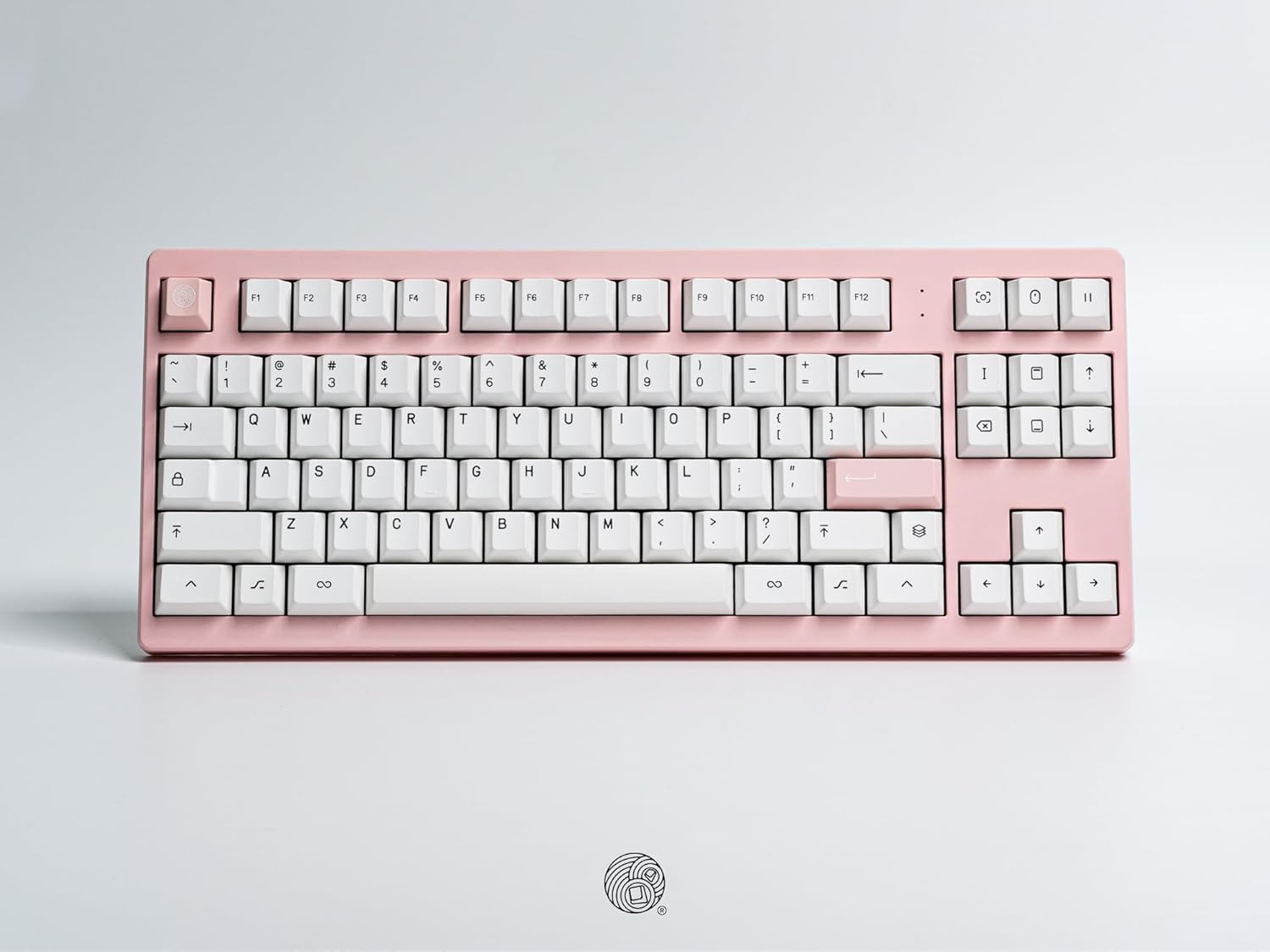
ഒരു ഓവർഹെഡ് view of the MONOKEI Standard Keyboard, showcasing its full layout in a blush pink casing with white PBT keycaps. The keyboard features a standard 87-key layout, including function keys, arrow keys, and a navigation cluster.
2. സജ്ജീകരണം
2.1 അൺബോക്സിംഗും ഉള്ളടക്കവും
Carefully remove the keyboard and accessories from the packaging. The box should contain:
- MONOKEI Standard Keyboard
- യുഎസ്ബി-സി കേബിൾ
- കീക്യാപ് പുള്ളർ
2.2 പ്രാരംഭ കണക്ഷൻ
The MONOKEI Standard Keyboard supports both wired and wireless (Bluetooth) connectivity.
വയർഡ് കണക്ഷൻ:
- Connect the provided USB-C cable to the port on the keyboard.
- USB-C കേബിളിന്റെ മറ്റേ അറ്റം നിങ്ങളുടെ കമ്പ്യൂട്ടറിൽ ലഭ്യമായ ഒരു USB പോർട്ടിലേക്ക് ബന്ധിപ്പിക്കുക.
- നിങ്ങളുടെ ഓപ്പറേറ്റിംഗ് സിസ്റ്റം കീബോർഡ് യാന്ത്രികമായി തിരിച്ചറിയും.
വയർലെസ് (ബ്ലൂടൂത്ത്) കണക്ഷൻ:
- Ensure the keyboard is charged or connected via USB-C for initial setup.
- Turn on the keyboard's Bluetooth mode (refer to the Operating section for specific key combinations).
- On your device (PC, laptop, smartphone, tablet), navigate to Bluetooth settings.
- ഇതിനായി തിരയുക available devices and select 'MONOKEI Standard' to pair.
- ജോടിയാക്കൽ പ്രക്രിയ പൂർത്തിയാക്കാൻ ഏതെങ്കിലും ഓൺ-സ്ക്രീൻ നിർദ്ദേശങ്ങൾ പാലിക്കുക.
2.3 ചാർജിംഗ്
Connect the USB-C cable to the keyboard and a power source (e.g., computer USB port, wall adapter). The keyboard can operate for up to 30 days on a full charge in wireless mode.
3. പ്രവർത്തന നിർദ്ദേശങ്ങൾ
3.1 അടിസ്ഥാന കീ പ്രവർത്തനങ്ങൾ
The MONOKEI Standard Keyboard features a standard 87-key layout. All alphanumeric keys, symbols, and basic modifiers (Shift, Ctrl, Alt, Fn) function as expected.
3.2 പ്രത്യേക ഫംഗ്ഷൻ കീകൾ
The F1-F12 keys may have secondary functions when pressed in combination with the 'Fn' key. Refer to the keycap legends for specific media controls or system functions.
3.3 ഓപ്പറേറ്റിംഗ് സിസ്റ്റം മോഡ് സ്വിച്ചിംഗ്
The keyboard may default to a specific operating system layout (e.g., Mac). To switch between operating system modes (e.g., Windows/Mac), use the designated hotkey combination. Consult the included quick start guide for the specific key sequence.
3.4 ജോടിയാക്കിയ ഉപകരണങ്ങൾക്കിടയിൽ മാറൽ
If multiple devices are paired via Bluetooth, use the designated function keys (often Fn + 1, 2, or 3) to switch between them quickly.
4. പരിപാലനം
4.1 കീബോർഡ് വൃത്തിയാക്കൽ
To clean the keyboard, power it off and disconnect it from your device. Use a soft, lint-free cloth lightly dampവെള്ളം അല്ലെങ്കിൽ നേരിയ ക്ലീനിംഗ് ലായനി ഉപയോഗിച്ച് നനയ്ക്കുക. കീബോർഡിലേക്ക് നേരിട്ട് ദ്രാവകങ്ങൾ സ്പ്രേ ചെയ്യുന്നത് ഒഴിവാക്കുക. കീക്യാപ്പുകൾക്കിടയിൽ വൃത്തിയാക്കാൻ, കംപ്രസ് ചെയ്ത വായു അല്ലെങ്കിൽ ഒരു ചെറിയ ബ്രഷ് ഉപയോഗിക്കുക.
4.2 കീക്യാപ്പും സ്വിച്ചും മാറ്റിസ്ഥാപിക്കൽ
The MONOKEI Standard Keyboard features hot-swappable sockets, allowing for easy replacement of switches without soldering. To replace keycaps or switches:
- നൽകിയിരിക്കുന്ന കീക്യാപ്പ് പുള്ളർ ഉപയോഗിച്ച് കീക്യാപ്പ് സൌമ്യമായി നീക്കം ചെയ്യുക.
- Once the keycap is removed, use a switch puller (not included, but often bundled with replacement switches) to carefully extract the switch from its socket.
- പുതിയ സ്വിച്ചിന്റെ പിന്നുകൾ പിസിബിയിലെ ദ്വാരങ്ങളുമായി വിന്യസിക്കുക, അത് സ്ഥലത്ത് ക്ലിക്ക് ആകുന്നതുവരെ ദൃഢമായി അമർത്തുക.
- പുതിയ സ്വിച്ച് സ്റ്റെമിൽ ആവശ്യമുള്ള കീക്യാപ്പ് വയ്ക്കുക.
കുറിപ്പ്: Opening the keyboard casing may void the warranty. Exercise caution if considering internal modifications.
5. പ്രശ്നപരിഹാരം
5.1 കണക്റ്റിവിറ്റി പ്രശ്നങ്ങൾ
- കീബോർഡ് ബ്ലൂടൂത്ത് വഴി ബന്ധിപ്പിക്കുന്നില്ല: Ensure Bluetooth is enabled on both the keyboard and your device. Try unpairing and re-pairing the keyboard. Ensure the keyboard is sufficiently charged.
- വയർ കണക്ഷൻ തിരിച്ചറിഞ്ഞില്ല: Try a different USB port or cable. Ensure the cable is fully inserted into both the keyboard and the computer.
5.2 കീകൾ പ്രതികരിക്കുന്നില്ല
- Individual keys: If a single key is not responding, the switch may be faulty or improperly seated. Try removing the keycap and switch, then re-inserting the switch firmly. If the issue persists, consider replacing the switch.
- Multiple keys: Ensure the keyboard is properly connected (wired or wireless). Restart your computer or device. If using wireless, check battery level.
5.3 ചാർജിംഗ് പ്രശ്നങ്ങൾ
- Ensure the USB-C cable is securely connected to both the keyboard and a working power source.
- മറ്റൊരു USB-C കേബിളോ പവർ അഡാപ്റ്ററോ പരീക്ഷിച്ചുനോക്കൂ.
6 സ്പെസിഫിക്കേഷനുകൾ
| ഫീച്ചർ | വിശദാംശങ്ങൾ |
|---|---|
| ഉൽപ്പന്ന അളവുകൾ | 14.3 x 5.9 x 1.5 ഇഞ്ച് (14.3"L x 5.9"W x 1.5"H) |
| ഇനത്തിൻ്റെ ഭാരം | 2.1 പൗണ്ട് |
| മെറ്റീരിയൽ | Polybutylene Terephthalate (PBT Keycaps) |
| കണക്റ്റിവിറ്റി ടെക്നോളജി | ബ്ലൂടൂത്ത്, USB-C |
| പ്രത്യേക സവിശേഷതകൾ | Hot-Swappable, Long-lasting PBT keycaps, Wired, Wireless |
| ഉൾപ്പെടുത്തിയ ഘടകങ്ങൾ | Keycap Puller, USB Cable |
| അനുയോജ്യമായ ഉപകരണങ്ങൾ | ലാപ്ടോപ്പ്, പിസി, സ്മാർട്ട്ഫോൺ, ടാബ്ലെറ്റ് |
7. വാറൻ്റിയും പിന്തുണയും
7.1 വാറൻ്റി വിവരങ്ങൾ
MONOKEI products are manufactured to high-quality standards. For specific warranty terms and conditions, please refer to the warranty card included with your product or visit the official MONOKEI webസൈറ്റ്. വാറന്റി ക്ലെയിമുകൾക്കായി നിങ്ങളുടെ വാങ്ങലിന്റെ തെളിവ് സൂക്ഷിക്കുക.
7.2 ഉപഭോക്തൃ പിന്തുണ
If you encounter any issues or have questions not covered in this manual, please contact MONOKEI customer support. You can find more information and contact details on the official MONOKEI store page:

