1. ഉൽപ്പന്നം കഴിഞ്ഞുview
The aonus A7 480W Cordless Vacuum Cleaner is designed for efficient and versatile cleaning of various surfaces, including carpets and hard floors. It features a powerful brushless motor, intelligent dust detection, and a user-friendly touchscreen display.

Image: The aonus A7 vacuum cleaner showcasing its main unit, extension wand, floor brush, and various attachments, along with a detailed view of its intelligent touchscreen display.
2. സുരക്ഷാ നിർദ്ദേശങ്ങൾ
ഉപകരണം ഉപയോഗിക്കുന്നതിന് മുമ്പ് എല്ലാ സുരക്ഷാ നിർദ്ദേശങ്ങളും ശ്രദ്ധാപൂർവ്വം വായിക്കുക. ഈ നിർദ്ദേശങ്ങൾ പാലിക്കുന്നതിൽ പരാജയപ്പെടുന്നത് വൈദ്യുതാഘാതം, തീപിടുത്തം അല്ലെങ്കിൽ ഗുരുതരമായ പരിക്കിന് കാരണമായേക്കാം.
- പുറത്തോ നനഞ്ഞ പ്രതലങ്ങളിലോ വാക്വം ക്ലീനർ ഉപയോഗിക്കരുത്.
- കുട്ടികളെ വാക്വം ക്ലീനർ പ്രവർത്തിപ്പിക്കാൻ അനുവദിക്കരുത്. കുട്ടികളുടെ അടുത്ത് ഉപയോഗിക്കുമ്പോൾ അടുത്ത മേൽനോട്ടം ആവശ്യമാണ്.
- ഗ്യാസോലിൻ പോലുള്ള കത്തുന്നതോ കത്തുന്നതോ ആയ വസ്തുക്കൾ എടുക്കരുത്, അല്ലെങ്കിൽ അവ ഉണ്ടാകാൻ സാധ്യതയുള്ള സ്ഥലങ്ങളിൽ ഉപയോഗിക്കരുത്.
- കത്തുന്നതോ പുകവലിക്കുന്നതോ ആയ സിഗരറ്റ്, തീപ്പെട്ടി, ചൂടുള്ള ചാരം എന്നിവയൊന്നും എടുക്കരുത്.
- Ensure the filter is properly installed before use.
- ഈ മാനുവലിൽ വിവരിച്ചിരിക്കുന്നതുപോലെ മാത്രം ഉപയോഗിക്കുക. നിർമ്മാതാവ് ശുപാർശ ചെയ്യുന്ന അറ്റാച്ചുമെന്റുകൾ മാത്രം ഉപയോഗിക്കുക.
- Turn off the appliance before making any adjustments, changing accessories, or storing the vacuum cleaner.
3. പാക്കേജ് ഉള്ളടക്കം
പാക്കേജിൽ എല്ലാ ഘടകങ്ങളും ഉണ്ടെന്ന് ഉറപ്പാക്കുക:
- പ്രധാന വാക്വം യൂണിറ്റ്
- വിപുലീകരണ വാൻഡ്
- Floor Brush with Anti-Tangle Roller
- നീളമുള്ള ഫ്ലാറ്റ് നോസൽ
- 2-ഇൻ-1 ബ്രഷ്
- വാൾ ചാർജർ
- മതിൽ മൗണ്ട്
- ഉപയോക്തൃ മാനുവൽ

Image: All components of the aonus A7 vacuum cleaner, including the main unit, various attachments, wall mount, and charger, laid out with the product packaging.
4. അസംബ്ലിയും സജ്ജീകരണവും
4.1 അസംബ്ലി
- Insert the extension wand into the main vacuum unit until it clicks into place.
- Attach the floor brush to the other end of the extension wand, ensuring it locks securely.
- For handheld use, attach desired accessories (long flat nozzle or 2-in-1 brush) directly to the main vacuum unit.
4.2 ബാറ്ററി ചാർജ് ചെയ്യുന്നു
Before first use, fully charge the vacuum cleaner's battery. The battery can be charged while attached to the main unit or separately.
- Connect the wall charger to a power outlet and to the charging port on the main vacuum unit or the wall mount.
- The touchscreen display will indicate the charging status. A full charge typically takes approximately 4-5 hours.

Image: The aonus A7 vacuum cleaner mounted on its wall charging station, illustrating the charging process and battery capacity details.
5. പ്രവർത്തന നിർദ്ദേശങ്ങൾ
5.1 പവർ ഓൺ/ഓഫ്, മോഡ് തിരഞ്ഞെടുക്കൽ
- Press the power button on the handle to turn the vacuum cleaner on or off.
- Use the touchscreen display to switch between different suction modes (e.g., Eco, Standard, Max) or activate the Automatic Mode.

ചിത്രം: ക്ലോസ്-അപ്പ് view of the aonus A7's all-in-one LED touchscreen, displaying battery level, current mode, and warnings for blockages.
5.2 Automatic Dust Detection
In Automatic Mode, the intelligent dust sensor automatically adjusts the suction power based on the amount and size of dust detected on the surface, optimizing cleaning efficiency and battery life.

Image: Illustration of the aonus A7's automatic mode, showing how the vacuum adjusts suction power (20KPa, 30KPa, 40KPa) based on the detected dust level on the floor.
5.3 വ്യത്യസ്ത അറ്റാച്ചുമെന്റുകൾ ഉപയോഗിക്കുന്നു
The aonus A7 comes with various attachments for different cleaning needs:
- ഫ്ലോർ ബ്രഷ്: Ideal for both hard floors and carpets, featuring an anti-tangle roller and LED lights to illuminate dust.
- Long Flat Nozzle: ഇടുങ്ങിയ വിടവുകൾ, കോണുകൾ, ഇടുങ്ങിയ ഇടങ്ങൾ എന്നിവയിലേക്ക് എത്താൻ അനുയോജ്യം.
- 2-ഇൻ-1 ബ്രഷ്: Suitable for cleaning upholstery, keyboards, car interiors, and delicate surfaces.

Image: A collage demonstrating the versatility of the aonus A7, showing it used with the extension wand for high areas, as a floor vacuum, and with handheld attachments for furniture and electronics.
6. പരിപാലനം
6.1 ഡസ്റ്റ്ബിൻ ശൂന്യമാക്കൽ
Empty the dustbin regularly to maintain optimal suction power. The dustbin features a one-click release mechanism.
- പ്രധാന യൂണിറ്റ് ഒരു ചവറ്റുകുട്ടയ്ക്ക് മുകളിൽ പിടിക്കുക.
- താഴെയുള്ള ഫ്ലാപ്പ് തുറന്ന് ഉള്ളടക്കങ്ങൾ ശൂന്യമാക്കാൻ ഡസ്റ്റ്ബിൻ റിലീസ് ബട്ടൺ അമർത്തുക.
- ശൂന്യമാക്കിയ ശേഷം ഫ്ലാപ്പ് സുരക്ഷിതമായി അടയ്ക്കുക.

Image: A hand demonstrating the one-click dust removal feature of the aonus A7, showing the dustbin being emptied directly into a trash can.
6.2 ക്ലീനിംഗ് ഫിൽട്ടറുകൾ
The aonus A7 features a multi-stage filtration system, including a HEPA filter, for 99.9% filtration efficiency. Regular cleaning of filters is crucial for performance.
- പ്രധാന യൂണിറ്റിൽ നിന്ന് ചവറ്റുകുട്ട നീക്കം ചെയ്യാൻ വളച്ചൊടിച്ച് വലിക്കുക.
- Remove the internal filters (cyclone, steel mesh, HEPA, and foam filters).
- Tap off loose dust. For washable filters, rinse under cold running water until the water runs clear.
- വീണ്ടും കൂട്ടിച്ചേർക്കുന്നതിന് മുമ്പ് എല്ലാ ഫിൽട്ടർ ഘടകങ്ങളും കുറഞ്ഞത് 24 മണിക്കൂറെങ്കിലും വായുവിൽ പൂർണ്ണമായും ഉണങ്ങാൻ അനുവദിക്കുക. ഡ്രയർ അല്ലെങ്കിൽ നേരിട്ടുള്ള ചൂട് ഉപയോഗിക്കരുത്.
- Reassemble the filters and dustbin in reverse order.
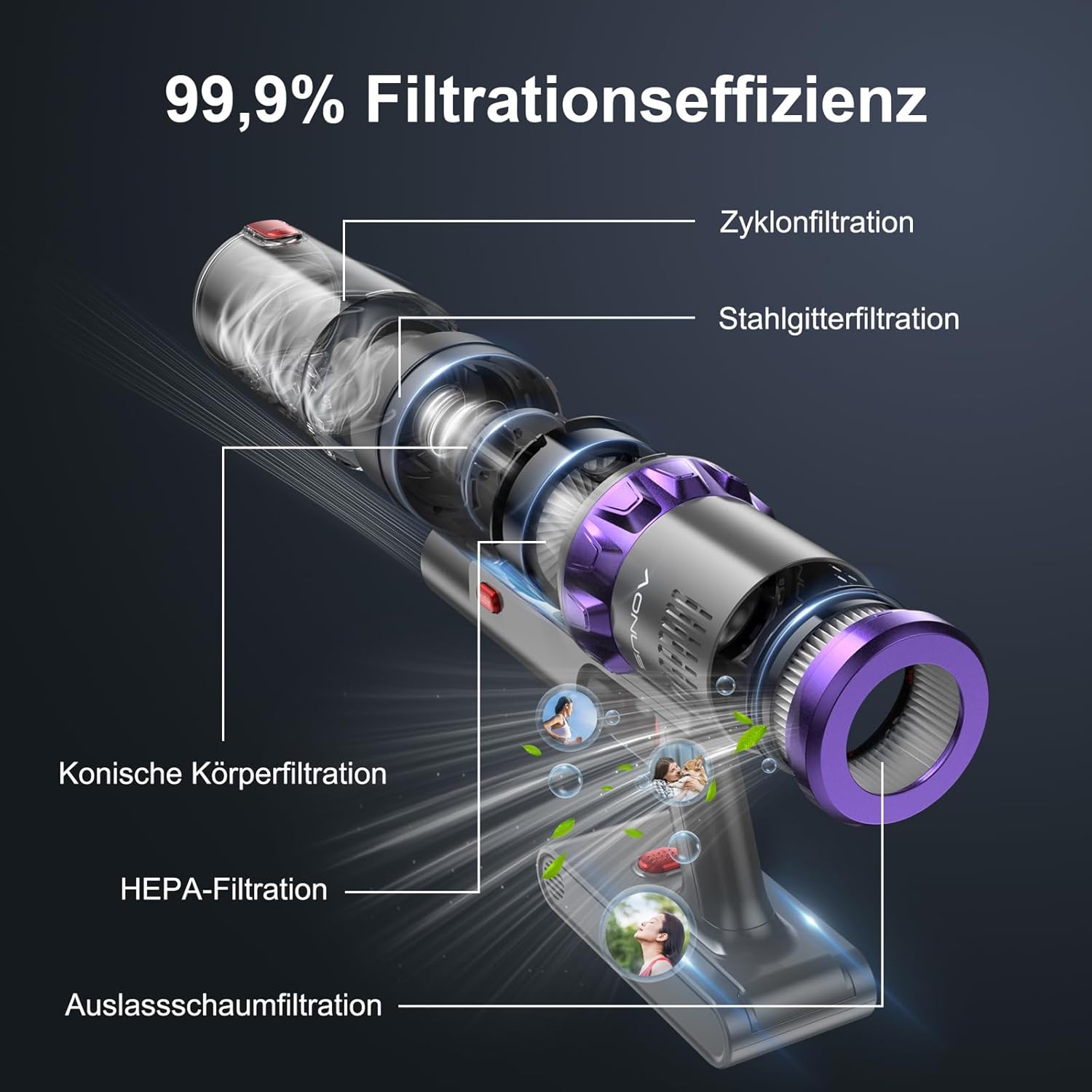
ചിത്രം: പൊട്ടിത്തെറിച്ച ഒരു view of the aonus A7's multi-stage filtration system, highlighting the cyclone, steel mesh, conical, HEPA, and outlet foam filters, designed for 99.9% filtration efficiency.
6.3 ബ്രഷ് റോൾ വൃത്തിയാക്കൽ
Periodically check the brush roll for tangled hair or debris. While the brush roll is designed to be anti-tangle, occasional cleaning may be necessary.
- വാക്വം ക്ലീനർ ഓഫ് ചെയ്ത് ഫ്ലോർ ബ്രഷ് വേർപെടുത്തുക.
- Locate the brush roll release mechanism (may require unscrewing a few screws as mentioned in a review, but the image doesn't show this, so I'll keep it general).
- ബ്രഷ് റോൾ നീക്കം ചെയ്ത് കത്രിക ഉപയോഗിച്ച് പിണഞ്ഞുകിടക്കുന്ന മുടിയോ നാരുകളോ ശ്രദ്ധാപൂർവ്വം മുറിക്കുക.
- ബ്രഷ് റോൾ ഹൗസിംഗിൽ നിന്ന് ഏതെങ്കിലും അവശിഷ്ടങ്ങൾ വൃത്തിയാക്കുക.
- ബ്രഷ് റോൾ വീണ്ടും തിരുകുക, ഉറപ്പിക്കുക.

Image: The innovative floor brush of the aonus A7, designed to prevent hair tangles, shown cleaning a floor with debris, alongside a small dog.
7. പ്രശ്നപരിഹാരം
| പ്രശ്നം | സാധ്യമായ കാരണം | പരിഹാരം |
|---|---|---|
| വാക്വം ഓണാക്കുന്നില്ല | ബാറ്ററി കുറവാണ് അല്ലെങ്കിൽ തീർന്നു. | ബാറ്ററി പൂർണ്ണമായും ചാർജ് ചെയ്യുക. |
| കുറഞ്ഞ സക്ഷൻ പവർ | Dustbin is full; Filters are clogged; Brush roll is tangled or blocked. | Empty the dustbin; Clean or replace filters; Clean the brush roll. |
| ബ്രഷ് റോൾ കറങ്ങുന്നില്ല | Brush roll is blocked by debris or hair. | Turn off the vacuum and remove any obstructions from the brush roll. |
| അസാധാരണമായ ശബ്ദം | Obstruction in the air path or brush roll. | Check for and remove any blockages in the nozzle, wand, or brush head. |
| ബാറ്ററി ചാർജ് ചെയ്യുന്നില്ല | ചാർജർ ശരിയായി ബന്ധിപ്പിച്ചിട്ടില്ല; ചാർജറിനോ ബാറ്ററിക്കോ തകരാറുണ്ട്. | Ensure charger is securely plugged in; Contact customer support if issue persists. |
8 സ്പെസിഫിക്കേഷനുകൾ
| ഫീച്ചർ | വിശദാംശങ്ങൾ |
|---|---|
| ബ്രാൻഡ് | aonus |
| മോഡൽ നമ്പർ | A7 |
| മോട്ടോർ പവർ | 480W ബ്രഷ്ലെസ്സ് മോട്ടോർ |
| സക്ഷൻ പവർ | Up to 40KPa |
| പ്രവർത്തനസമയം | Up to 60 minutes (in Mode 1) |
| ബാറ്ററി ശേഷി | 7*2500mAh High-Capacity Batteries |
| ഫിൽട്ടറേഷൻ സിസ്റ്റം | Multi-filtration with HEPA filter (99.9% efficiency) |
| പ്രത്യേക സവിശേഷതകൾ | Intelligent Touchscreen, Automatic Dust Detection, Anti-Tangle Brush Roll, Cordless |
| ഉൽപ്പന്ന അളവുകൾ | 29 x 19 x 40 സെ.മീ |
| ഇനത്തിൻ്റെ ഭാരം | 3.67 കിലോഗ്രാം |
9. വാറൻ്റിയും പിന്തുണയും
aonus products are manufactured to the highest quality standards. For warranty information, technical support, or any questions regarding your aonus A7 Cordless Vacuum Cleaner, please refer to the warranty card included in your package or contact aonus customer service directly.
You can often find contact information on the official aonus webസൈറ്റ് അല്ലെങ്കിൽ നിങ്ങൾ ഉൽപ്പന്നം വാങ്ങിയ റീട്ടെയിലർ വഴി.


