1. ഉൽപ്പന്നം കഴിഞ്ഞുview
The Leviton 2nd Gen Smart GFCI Branch Circuit Breaker with Remote Control (ON/OFF) is designed for plug-on installation within the Leviton Load Center. This smart circuit breaker supports both 120/208 VAC and 120/240 VAC applications, offering enhanced safety and energy management capabilities.
- സ്മാർട്ട് ഇൻ്റഗ്രേഷൻ: Integrates with the My Leviton app to provide insightful data on home energy consumption.
- റിമോട്ട് കൺട്രോൾ: Allows remote ON/OFF control of the circuit breaker and custom circuit scheduling based on time/day to optimize energy usage.
- എളുപ്പമുള്ള ഇൻസ്റ്റാളേഷൻ: Revolutionary design enables wiring of the entire Load Center at rough-in without circuit breakers present.
- Proprietary Design: Exclusively designed for use with the Leviton Load Center. Requires a Whole Home Energy Monitor (LWHEM) for operation.
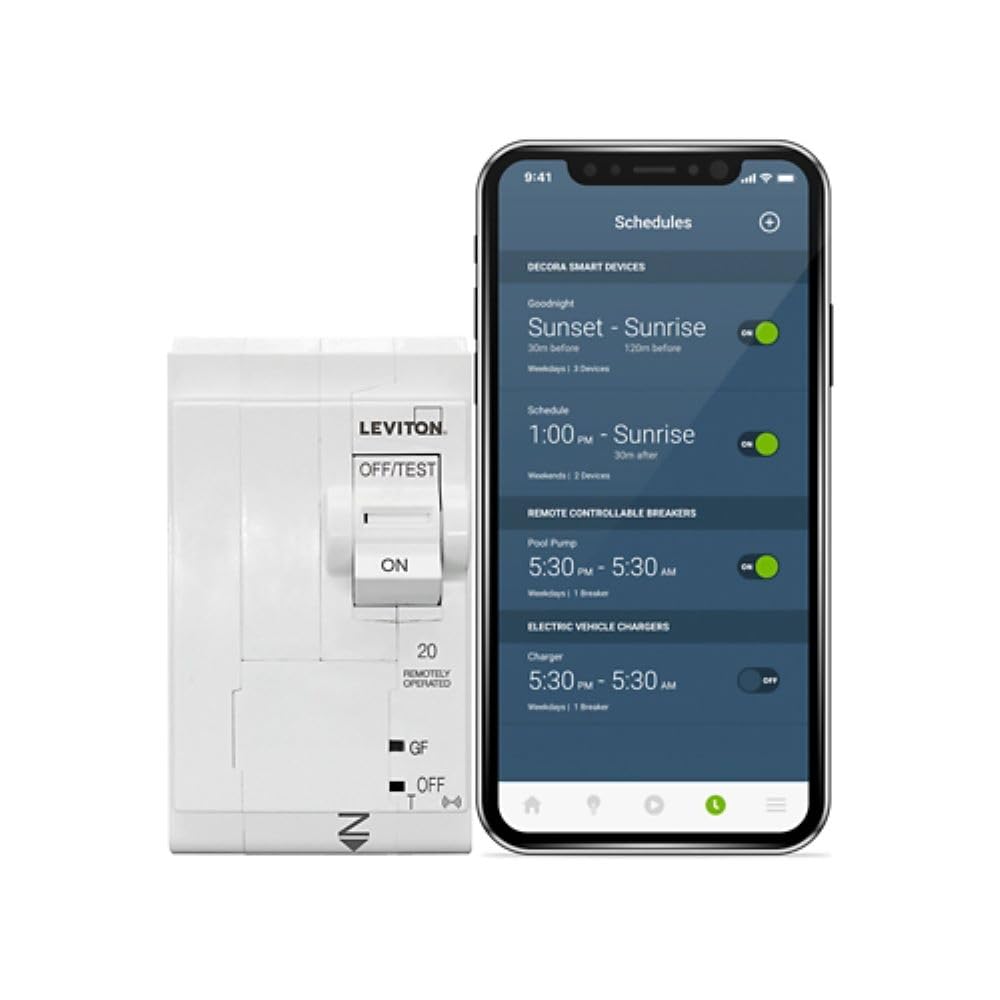
Figure 1: Leviton 2nd Gen Smart GFCI Circuit Breaker LB220-GST. This image shows the front view of the white circuit breaker with the Leviton logo, ON/OFF/TEST switch, and GFCI indicators.
2. സജ്ജീകരണവും ഇൻസ്റ്റാളേഷനും
Installation of the Leviton 2nd Gen Smart GFCI Circuit Breaker is designed for efficiency and ease within the Leviton Load Center. Ensure all power is disconnected before beginning installation.
2.1 Pre-installation Wiring
The Leviton Load Center allows for branch phase and neutral connections to be made directly on the panel. This design facilitates neat wiring during the rough-in phase, without the need for circuit breakers to be present, simplifying the initial wiring process.
2.2 Breaker Installation
Once the panel is wired, the circuit breakers can be easily plugged into place. This plug-on design significantly reduces installation time compared to traditional wired breakers.

Figure 2: Plug-on smart circuit breakers. This image illustrates the simple plug-on installation process of the smart circuit breakers into the Leviton Load Center, highlighting the ease of connection without traditional wiring.
2.3 Whole Home Energy Monitor (LWHEM)
The Leviton 2nd Gen Smart Circuit Breakers require a Whole Home Energy Monitor (LWHEM) to operate and enable smart functionalities. Ensure the LWHEM is properly installed and connected according to its specific instructions.

Figure 3: Whole Home Energy Monitor. This image displays the Leviton Whole Home Energy Monitor (LWHEM) alongside two smart circuit breakers, illustrating the components required for smart functionality.
3. പ്രവർത്തന നിർദ്ദേശങ്ങൾ
The smart features of the LB220-GST circuit breaker are managed through the My Leviton app, providing convenience and control over your home's electrical system.
3.1 My Leviton App Integration
Download and install the My Leviton app on your smartphone or tablet. Follow the in-app instructions to connect your Leviton Load Center and smart circuit breakers. The app provides a centralized interface for monitoring and controlling your electrical system.
3.2 Remote Control and Scheduling
Through the My Leviton app, you can remotely turn individual 2nd Gen Smart Circuit Breakers ON or OFF. This feature is useful for managing power to specific appliances or circuits from anywhere. Additionally, you can set up custom circuit schedules based on time and day to automate power management and save energy.

Figure 4: Schedule breaker activity. This image shows a smartphone screen displaying the My Leviton app interface for scheduling breaker activity, such as setting ON/OFF times for a pool pump.
3.3 ഊർജ്ജ നിരീക്ഷണം
The My Leviton app provides insightful data on your home's energy consumption. You can monitor individual breaker consumption and overall home energy usage, helping you identify energy-saving opportunities.

Figure 5: Individual breaker consumption. This image shows a smartphone screen displaying the My Leviton app interface, illustrating how users can monitor energy consumption for individual breakers, such as for a kitchen circuit.
3.4 Enhanced Safety and Notifications
The smart circuit breakers offer enhanced safety features, including mobile notifications for electrical anomalies. This allows for prompt awareness and action in case of potential issues.

Figure 6: Mobile notifications. This image depicts a smartphone displaying a notification from the My Leviton app, indicating a high current anomaly detected by a refrigerator breaker.
4. പരിപാലനം
The Leviton 2nd Gen Smart GFCI Circuit Breaker LB220-GST is designed for minimal maintenance. Regular visual inspection of the circuit breaker and the load center for any signs of damage or wear is recommended. Ensure the area around the load center remains clear and free from obstructions. No user-serviceable parts are inside the breaker itself. For any electrical work or concerns, consult a qualified electrician.
5. പ്രശ്നപരിഹാരം
If you experience issues with your Leviton 2nd Gen Smart GFCI Circuit Breaker, consider the following:
- Breaker Tripping: If the breaker trips frequently, it may indicate an overload or a ground fault. Disconnect appliances from the circuit and reset the breaker. If it continues to trip, consult a qualified electrician.
- No Remote Control/App Connectivity: Ensure your Whole Home Energy Monitor (LWHEM) is powered and connected to your home network. Verify that your smartphone has internet access and the My Leviton app is up to date.
- കൃത്യമല്ലാത്ത ഊർജ്ജ വായനകൾ: Confirm that the LWHEM is correctly installed and calibrated. Check the My Leviton app for any error messages or diagnostic information.
For complex issues or if you are unsure about any troubleshooting steps, it is always recommended to contact Leviton Technical Support or a licensed electrician.
6 സ്പെസിഫിക്കേഷനുകൾ
| ബ്രാൻഡ് | ലെവിറ്റൺ |
| മോഡൽ നമ്പർ | LB220-GST |
| നിലവിലെ റേറ്റിംഗ് | 20 Amps |
| സർക്യൂട്ട് ബ്രേക്കർ തരം | GFCI (5 mA – Protection of Personnel) |
| വാല്യംtage | 120/240-Volt and 120/208-Volt |
| ധ്രുവങ്ങളുടെ എണ്ണം | 2 |
| റേറ്റിംഗ് തടസ്സപ്പെടുത്തുക | 10kA |
| മൗണ്ടിംഗ് തരം | സ്നാപ്പ്-ഇൻ മൗണ്ട് |
| ഉൽപ്പന്ന അളവുകൾ | 3.9 x 2 x 3.1 ഇഞ്ച് |
| ഇനത്തിൻ്റെ ഭാരം | 15.3 ഔൺസ് |
| സ്മാർട്ട് ഹോം അനുയോജ്യത | Smart Home Compatible (My Leviton app) |
7. ബോക്സിൽ എന്താണുള്ളത്?
ഉൽപ്പന്ന പാക്കേജിൽ ഇവ ഉൾപ്പെടുന്നു:
- 1 x 2nd Gen Smart Circuit Breaker (LB220-GST)
- ഇൻസ്റ്റലേഷൻ നിർദ്ദേശങ്ങൾ
8. ഔദ്യോഗിക ഉൽപ്പന്ന വീഡിയോ
Video 1: Leviton Load Center Overview. This video provides a comprehensive overview of the Leviton Load Center, highlighting its easy installation, modular design, and smart capabilities, including energy management and remote control features.
9. വാറൻ്റിയും പിന്തുണയും
Leviton products are manufactured to high-quality standards. For specific warranty details, please refer to the documentation included with your product or visit the official Leviton website. Leviton is known for its exceptional technical support for its panels and breakers. Should you require assistance with installation, operation, or troubleshooting, please contact Leviton Technical Support directly.
Leviton Customer Service: Refer to the contact information provided on the Leviton webഏറ്റവും കാലികമായ പിന്തുണാ ഓപ്ഷനുകൾക്കായുള്ള സൈറ്റ് അല്ലെങ്കിൽ ഉൽപ്പന്ന പാക്കേജിംഗ്.


