ആമുഖം
This user manual provides comprehensive instructions for the setup, operation, maintenance, and troubleshooting of your Fanvil W610W Portable WiFi Phone. Please read this manual carefully before using the device to ensure proper functionality and to avoid damage.
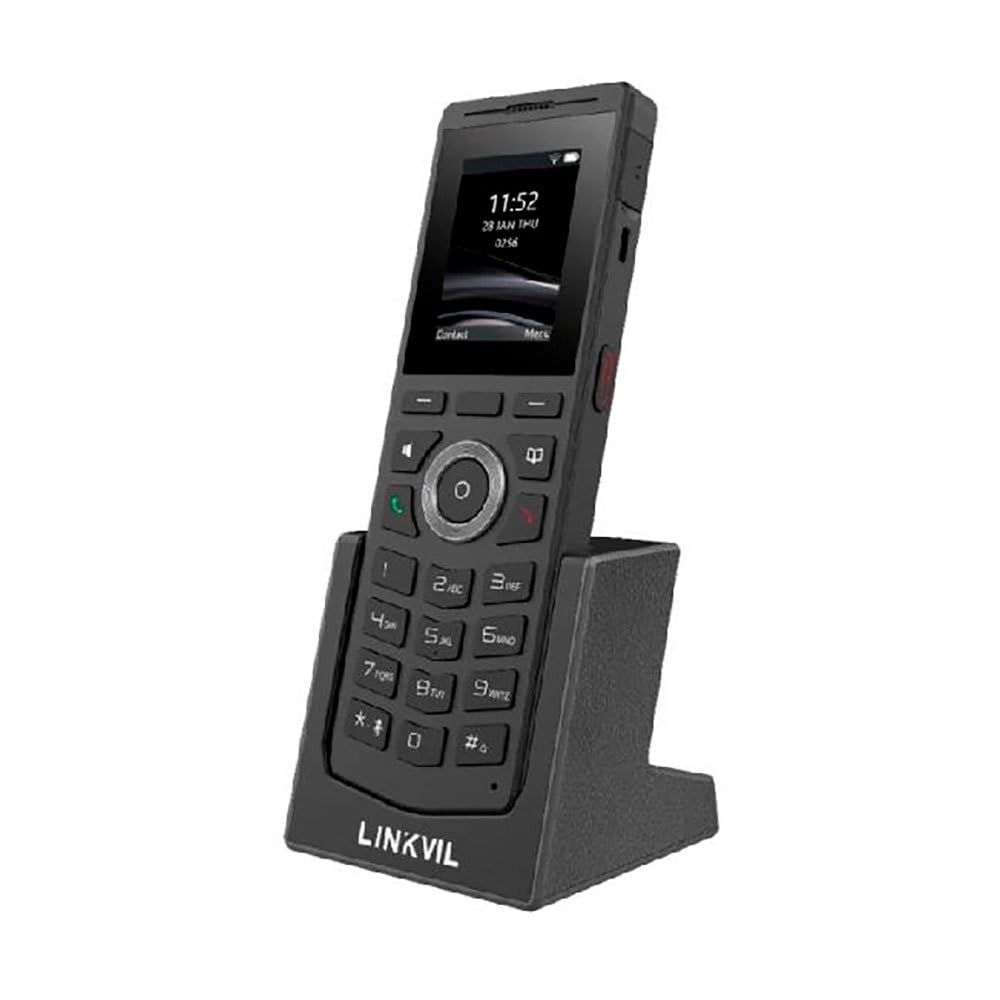
Figure 1: Fanvil W610W Portable WiFi Phone with charging cradle.
The image displays the Fanvil W610W phone, a sleek black device with a color screen showing the time (11:52) and date (23 JAN THU). Below the screen is a standard phone keypad with numerical buttons and navigation keys. The phone is seated in a matching black charging cradle, which has "LINKVIL" embossed on its front base.
The Fanvil W610W is a robust and portable WiFi phone designed for professional environments, offering reliable communication with advanced features such as dual-band Wi-Fi, Bluetooth 5.0, and support for multiple SIP lines.
പാക്കേജ് ഉള്ളടക്കം
- Fanvil W610W Portable WiFi Phone
- ചാർജ്ജിംഗ് തൊട്ടിൽ
- പവർ അഡാപ്റ്റർ
- Rechargeable Battery (may be pre-installed)
- ക്വിക്ക് സ്റ്റാർട്ട് ഗൈഡ് (ബാധകമെങ്കിൽ)
സജ്ജമാക്കുക
1. ബാറ്ററി ഇൻസ്റ്റാളേഷനും ചാർജിംഗും
- ഫോണിന്റെ പിൻഭാഗത്ത് ബാറ്ററി കമ്പാർട്ട്മെന്റ് കണ്ടെത്തുക.
- നൽകിയിരിക്കുന്ന 1900mAh റീചാർജ് ചെയ്യാവുന്ന ബാറ്ററി ഇടുക, ശരിയായ പോളാരിറ്റി ഉറപ്പാക്കുക.
- ബാറ്ററി കമ്പാർട്ട്മെൻ്റ് കവർ സുരക്ഷിതമായി അടയ്ക്കുക.
- Place the phone into the charging cradle.
- Connect the power adapter to the charging cradle and then to a power outlet.
- Allow the phone to charge fully before first use (approximately 4 hours). The battery indicator on the screen will show charging status.
2. പ്രാരംഭ പവർ ഓൺ
Press and hold the Power button (usually on the side or top) until the screen illuminates.
3. Network Configuration (Wi-Fi)
- നാവിഗേറ്റ് ചെയ്യുക ക്രമീകരണങ്ങൾ > നെറ്റ്വർക്ക് > വൈഫൈ.
- Enable Wi-Fi. The phone will scan for available networks.
- Select your desired 2.4GHz or 5GHz Wi-Fi network from the list.
- ആവശ്യപ്പെടുകയാണെങ്കിൽ Wi-Fi പാസ്വേഡ് നൽകുക.
- Confirm connection. The Wi-Fi icon will appear on the status bar.
4. SIP അക്കൗണ്ട് രജിസ്ട്രേഷൻ
The Fanvil W610W supports up to 4 SIP lines. Configuration typically requires details from your VoIP service provider or PBX administrator.
- നാവിഗേറ്റ് ചെയ്യുക ക്രമീകരണങ്ങൾ > അക്കൗണ്ടുകൾ > SIP അക്കൗണ്ട്.
- Select an available account slot.
- Enter the following information provided by your administrator:
- അക്കൗണ്ട് നാമം
- SIP സെർവർ വിലാസം
- SIP ഉപയോക്തൃ ഐഡി
- Authentication Username
- പ്രാമാണീകരണ പാസ്വേഡ്
- Save the settings. The account status icon should indicate successful registration.
പ്രവർത്തന നിർദ്ദേശങ്ങൾ
കോളുകൾ ചെയ്യുന്നു
- ഡയൽ ചെയ്യുന്നു: കീപാഡ് ഉപയോഗിച്ച് ഫോൺ നമ്പർ നൽകി, വിളിക്കൂ ബട്ടൺ.
- From Contacts: നാവിഗേറ്റ് ചെയ്യുക ബന്ധങ്ങൾ, select a contact, and press the വിളിക്കൂ ബട്ടൺ.
- വീണ്ടും ഡയൽ ചെയ്യുക: അമർത്തുക വിളിക്കൂ button to access the call history and select a number to redial.
കോളുകൾ സ്വീകരിക്കുന്നു
When an incoming call rings, press the വിളിക്കൂ button to answer. To reject, press the കോൾ അവസാനിപ്പിക്കുക ബട്ടൺ.
കോൾ സവിശേഷതകൾ
- പിടിക്കുക: ഒരു കോൾ സമയത്ത്, അമർത്തുക പിടിക്കുക സോഫ്റ്റ് കീ.
- കൈമാറ്റം: ഒരു കോൾ സമയത്ത്, അമർത്തുക കൈമാറ്റം soft key, dial the new number, and press കൈമാറ്റം വീണ്ടും.
- സമ്മേളനം: ഒരു കോൾ സമയത്ത്, അമർത്തുക കോൺഫ് soft key, dial the second party, and then press കോൺഫ് വീണ്ടും എല്ലാ പാർട്ടികളിലും ചേരാൻ.
- നിശബ്ദമാക്കുക: അമർത്തുക നിശബ്ദമാക്കുക button to mute your microphone during a call.
- പുഷ്-ടു-ടോക്ക് (PTT): Utilize the dedicated PTT button for one-key calling in supported environments.
ബ്ലൂടൂത്ത് ഹെഡ്സെറ്റ് ജോടിയാക്കൽ
The W610W supports Bluetooth 5.0 for wireless headsets.
- നാവിഗേറ്റ് ചെയ്യുക ക്രമീകരണങ്ങൾ > ബ്ലൂടൂത്ത്.
- ബ്ലൂടൂത്ത് പ്രവർത്തനക്ഷമമാക്കുക.
- Put your Bluetooth headset into pairing mode.
- Select your headset from the list of available devices and confirm pairing.
മെയിൻ്റനൻസ്
വൃത്തിയാക്കൽ
- Use a soft, dry, lint-free cloth to clean the phone and screen.
- Do not use liquid cleaners, aerosols, or abrasive materials.
ബാറ്ററി കെയർ
- മികച്ച പ്രകടനം നിലനിർത്താൻ ബാറ്ററി പതിവായി ചാർജ് ചെയ്യുക.
- ബാറ്ററി ലൈഫ് കുറയ്ക്കാൻ സാധ്യതയുള്ള തീവ്രമായ താപനില ഒഴിവാക്കുക.
- If the phone will not be used for an extended period, charge it to about 50% and store it in a cool, dry place.
ഫേംവെയർ അപ്ഡേറ്റുകൾ
Periodically check for firmware updates to ensure your phone has the latest features and security enhancements. Updates can typically be performed via the phone's web interface or through your system administrator.
ട്രബിൾഷൂട്ടിംഗ്
| പ്രശ്നം | സാധ്യമായ കാരണം | പരിഹാരം |
|---|---|---|
| ഫോൺ പവർ ഓൺ ആകുന്നില്ല. | Low or depleted battery; faulty battery; power adapter issue. | Ensure battery is charged. Check power adapter connection. Try a different power outlet. |
| Wi-Fi-ലേക്ക് കണക്റ്റ് ചെയ്യാൻ കഴിയില്ല. | Incorrect password; out of range; Wi-Fi network issues. | Verify Wi-Fi password. Move closer to the access point. Restart router/access point. |
| കോളുകൾ വിളിക്കാനോ സ്വീകരിക്കാനോ കഴിയില്ല. | SIP account not registered; network connectivity issues; incorrect SIP settings. | Check SIP account status (should be registered). Verify network connection. Re-enter SIP account details. Contact your VoIP administrator. |
| മോശം കോൾ നിലവാരം (എക്കോ, സ്റ്റാറ്റിക്). | Weak Wi-Fi signal; network congestion; headset issues. | Improve Wi-Fi signal strength. Reduce network traffic. Test with a different headset or without one. |
സ്പെസിഫിക്കേഷനുകൾ
- മോഡൽ: വ്ക്സനുമ്ക്സവ്
- അളവുകൾ: 5.91 x 5.91 x 3.15 ഇഞ്ച്
- ഭാരം: 15.1 ഔൺസ് (0.43 കിലോഗ്രാം)
- ഡിസ്പ്ലേ: 2" കളർ സ്ക്രീൻ
- കണക്റ്റിവിറ്റി: Dual-Band Wi-Fi (2.4GHz/5GHz), Bluetooth 5.0
- SIP ലൈനുകൾ: Supports 4 SIP lines
- ബാറ്ററി: 1900mAh റീചാർജ് ചെയ്യാവുന്ന ബാറ്ററി
- സംസാര സമയം: 9 മണിക്കൂർ വരെ
- സ്റ്റാൻഡ്ബൈ സമയം: 200 മണിക്കൂർ വരെ
- Drop Safe: From 1.8 meters
- ഫീച്ചറുകൾ: 16 DSS keys, PTT one-key calling, Roaming protocols (802.11k/v/r), HD voice, Multilingual UI, Voicemail, Enhanced call features.
- ഊർജ്ജ സ്രോതസ്സ്: ബാറ്ററി പവർ
- നിറം: കറുപ്പ്
- നിർമ്മാതാവ്: ഫാൻവിൽ
- ആദ്യം ലഭ്യമായത്: ഒക്ടോബർ 26, 2023
വാറൻ്റി വിവരങ്ങൾ
Fanvil products typically come with a standard manufacturer's warranty. For specific warranty terms and conditions, please refer to the warranty card included with your product or visit the official Fanvil webവാറന്റി ക്ലെയിമുകൾക്കുള്ള വാങ്ങലിന്റെ തെളിവായി നിങ്ങളുടെ വാങ്ങൽ രസീത് സൂക്ഷിക്കുക.
പിന്തുണ
For technical assistance, troubleshooting beyond this manual, or warranty inquiries, please contact your product vendor or Fanvil customer support. You may find contact information on the Fanvil official webസൈറ്റിലോ നിങ്ങളുടെ ഉൽപ്പന്ന പാക്കേജിംഗിലോ.
ഓൺലൈൻ ഉറവിടങ്ങൾ:
- Fanvil Official Webസൈറ്റ്: www.fanvil.com (ഉദാampലിങ്ക്, യഥാർത്ഥ ലിങ്ക് വ്യത്യാസപ്പെടാം)
- Product Support Pages: Refer to the support section on the Fanvil website for firmware, FAQs, and additional documentation.