1. ആമുഖം
Thank you for choosing the Baseus Bowie E5x True Wireless Stereo (TWS) Earphones. These earphones are designed to provide a high-quality audio experience with convenient wireless connectivity. This manual will guide you through the setup, operation, and maintenance of your new earphones.

Figure 1: Baseus Bowie E5x TWS Earphones and Charging Case with Retail Packaging
2. പാക്കേജ് ഉള്ളടക്കം
എല്ലാ ഇനങ്ങളും ഉണ്ടെന്ന് ഉറപ്പാക്കാൻ പാക്കേജ് ഉള്ളടക്കങ്ങൾ പരിശോധിക്കുക:
- Baseus Bowie E5x TWS Earphones (Left and Right)
- ചാർജിംഗ് കേസ്
- USB-C ചാർജിംഗ് കേബിൾ
- ഉപയോക്തൃ മാനുവൽ (ഈ പ്രമാണം)

Figure 2: Baseus Bowie E5x Charging Case and USB-C Charging Cable
3. ഉൽപ്പന്നം കഴിഞ്ഞുview
Familiarize yourself with the components of your Baseus Bowie E5x earphones:
- ഇയർബഡുകൾ: Left (L) and Right (R) earbuds with touch control areas and charging contacts.
- ചാർജിംഗ് കേസ്: Used for charging the earbuds and for storage. Features a USB-C charging port and LED indicators.
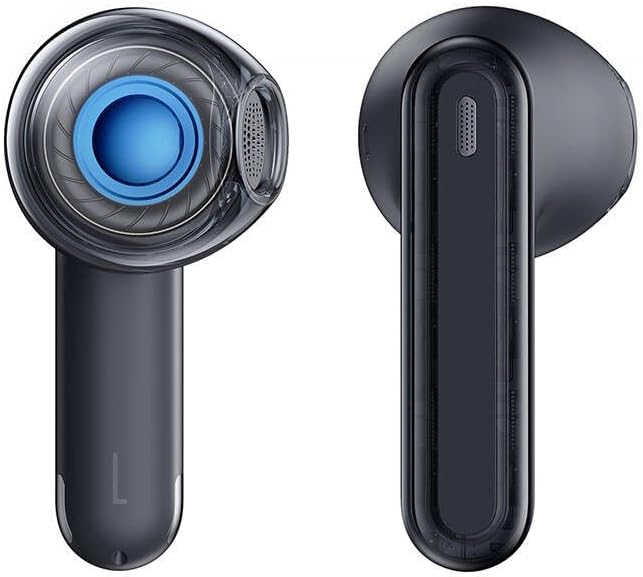
Figure 3: Left and Right Baseus Bowie E5x Earbuds
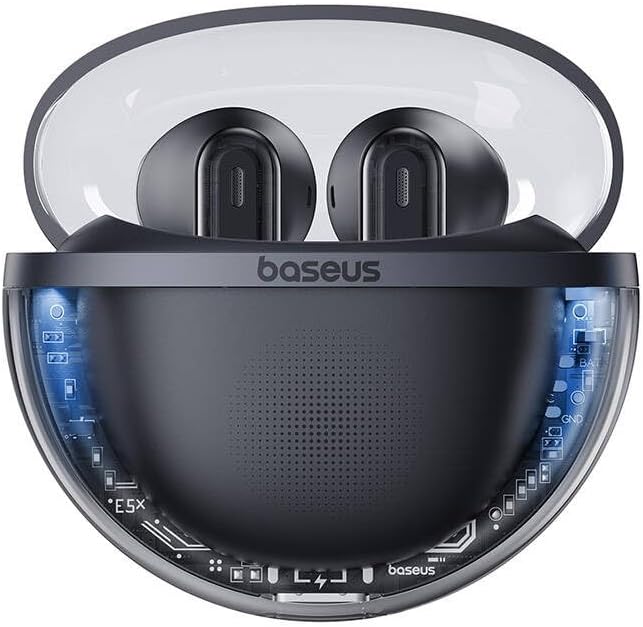
Figure 4: Baseus Bowie E5x Charging Case with Earbuds Inserted
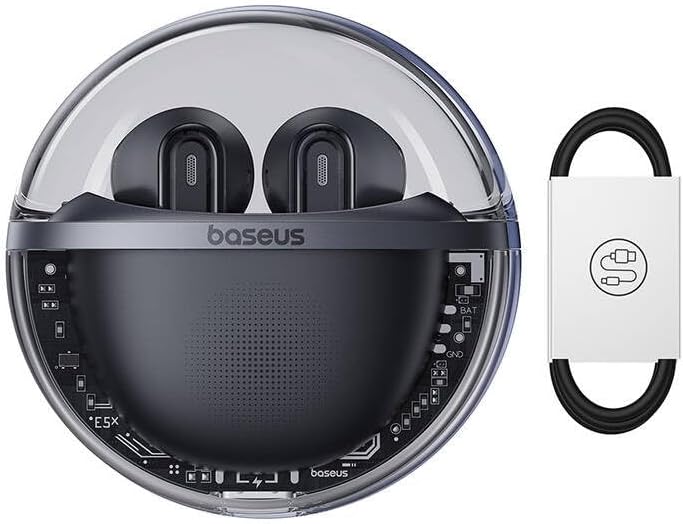
Figure 5: Close-up of an Earbud's Speaker
4. സജ്ജീകരണം
4.1 ഇയർഫോണുകളും കേസും ചാർജ് ചെയ്യുന്നു
- പ്രാരംഭ ചാർജ്: Before first use, fully charge the charging case and earbuds. Place the earbuds into the charging case.
- കേസ് ചാർജ് ചെയ്യുന്നത്: Connect the provided USB-C cable to the charging port on the case and the other end to a USB power adapter (not included). The LED indicator on the case will show charging status.
- ഇയർബഡുകൾ ചാർജ് ചെയ്യുന്നു: When placed in the charging case, the earbuds will automatically begin charging. The case's indicator lights will show the charging status of the earbuds.
4.2 ബ്ലൂടൂത്ത് ജോടിയാക്കൽ
- പവർ ഓൺ: ചാർജിംഗ് കേസ് തുറക്കുക. ഇയർബഡുകൾ സ്വയമേവ ഓണാകുകയും ജോടിയാക്കൽ മോഡിലേക്ക് പ്രവേശിക്കുകയും ചെയ്യും (ഇയർബഡുകളിൽ LED ലൈറ്റുകൾ മിന്നുന്നതിലൂടെ ഇത് സൂചിപ്പിക്കും).
- ബ്ലൂടൂത്ത് സജീവമാക്കുക: നിങ്ങളുടെ ഉപകരണത്തിൽ (സ്മാർട്ട്ഫോൺ, ടാബ്ലെറ്റ്, കമ്പ്യൂട്ടർ), ബ്ലൂടൂത്ത് പ്രവർത്തനക്ഷമമാക്കുക.
- ഉപകരണം തിരഞ്ഞെടുക്കുക: In your device's Bluetooth settings, search for available devices and select "Baseus Bowie E5x".
- ബന്ധിപ്പിക്കുക: Once selected, the earbuds will connect to your device. A voice prompt or steady LED light will confirm successful pairing.
- വീണ്ടും ബന്ധിപ്പിക്കുക: പ്രാരംഭ ജോടിയാക്കലിന് ശേഷം, ഇയർബഡുകൾ കേസിൽ നിന്ന് പുറത്തെടുക്കുമ്പോൾ, അവസാന ജോടിയാക്കിയ ഉപകരണത്തിലേക്ക് യാന്ത്രികമായി കണക്റ്റുചെയ്യും, ഉപകരണത്തിൽ ബ്ലൂടൂത്ത് പ്രവർത്തനക്ഷമമാക്കിയിട്ടുണ്ടെങ്കിൽ.
5. പ്രവർത്തന നിർദ്ദേശങ്ങൾ
The Baseus Bowie E5x earphones feature intuitive touch controls:
| ഫംഗ്ഷൻ | Action (Left/Right Earbud) |
|---|---|
| പവർ ഓൺ | Open charging case / Long press touch area (if off) |
| പവർ ഓഫ് | Place earbuds into charging case and close lid / Disconnect Bluetooth and wait |
| പ്ലേ/താൽക്കാലികമായി നിർത്തുക | Double tap touch area |
| അടുത്ത ട്രാക്ക് | വലത് ഇയർബഡ് ട്രിപ്പിൾ ടാപ്പ് ചെയ്യുക |
| മുമ്പത്തെ ട്രാക്ക് | ഇടത് ഇയർബഡ് ട്രിപ്പിൾ ടാപ്പ് ചെയ്യുക |
| ഉത്തരം / കോൾ അവസാനിപ്പിക്കുക | Double tap touch area |
| കോൾ നിരസിക്കുക | ടച്ച് ഏരിയയിൽ 2 സെക്കൻഡ് ദീർഘനേരം അമർത്തുക |
| വോയ്സ് അസിസ്റ്റൻ്റ് സജീവമാക്കുക | ടച്ച് ഏരിയയിൽ 3 സെക്കൻഡ് ദീർഘനേരം അമർത്തുക |
| Switch to Gaming Mode (Low Latency) | Specific gesture (refer to product packaging or Baseus app for exact control) |
കുറിപ്പ്: Specific touch controls for features like volume adjustment or gaming mode may vary. Refer to the official Baseus app or product packaging for the most accurate and customizable controls.
6. പരിപാലനം
To ensure the longevity and optimal performance of your earphones, follow these maintenance tips:
- വൃത്തിയാക്കൽ: ഇയർബഡുകളും ചാർജിംഗ് കെയ്സും മൃദുവായതും ഉണങ്ങിയതും ലിന്റ് രഹിതവുമായ തുണി ഉപയോഗിച്ച് പതിവായി വൃത്തിയാക്കുക. കഠിനമായ രാസവസ്തുക്കളോ ഉരച്ചിലുകളോ ഉള്ള വസ്തുക്കൾ ഉപയോഗിക്കരുത്.
- ചാർജിംഗ് കോൺടാക്റ്റുകൾ: Ensure the charging contacts on both the earbuds and inside the case are clean and free of debris to ensure proper charging.
- സംഭരണം: ഉപയോഗത്തിലില്ലാത്തപ്പോൾ, പൊടിയിൽ നിന്നും കേടുപാടുകളിൽ നിന്നും സംരക്ഷിക്കാൻ ഇയർഫോണുകൾ അവയുടെ ചാർജിംഗ് കേസിൽ സൂക്ഷിക്കുക.
- തീവ്രമായ അവസ്ഥകൾ ഒഴിവാക്കുക: ഇയർഫോണുകൾ തീവ്രമായ താപനിലയിലോ, ഈർപ്പം അല്ലെങ്കിൽ ദ്രാവകങ്ങളിലോ ഏൽപ്പിക്കരുത്.
7. പ്രശ്നപരിഹാരം
If you encounter issues with your Baseus Bowie E5x earphones, try the following solutions:
- ശബ്ദമില്ല:
- ഇയർബഡുകൾ ചാർജ് ചെയ്തിട്ടുണ്ടെന്ന് ഉറപ്പാക്കുക.
- Check if Bluetooth is enabled on your device and connected to "Baseus Bowie E5x".
- നിങ്ങളുടെ ഉപകരണത്തിലും ഇയർഫോണുകളിലും വോളിയം ക്രമീകരിക്കുക.
- നിങ്ങളുടെ ഉപകരണവുമായി ഇയർബഡുകൾ വീണ്ടും ജോടിയാക്കാൻ ശ്രമിക്കുക.
- ഇയർബഡുകൾ പരസ്പരം ജോടിയാക്കുന്നില്ല:
- രണ്ട് ഇയർബഡുകളും ചാർജിംഗ് കെയ്സിലേക്ക് തിരികെ വയ്ക്കുക, ലിഡ് അടയ്ക്കുക, കുറച്ച് നിമിഷങ്ങൾ കാത്തിരിക്കുക, തുടർന്ന് ലിഡ് വീണ്ടും തുറക്കുക.
- രണ്ട് ഇയർബഡുകളിലും മതിയായ ചാർജ് ഉണ്ടെന്ന് ഉറപ്പാക്കുക.
- ചാർജിംഗ് പ്രശ്നങ്ങൾ:
- USB-C കേബിളും പവർ അഡാപ്റ്ററും പരിശോധിക്കുക.
- ഇയർബഡുകളിലെയും കേസിനുള്ളിലെയും ചാർജിംഗ് കോൺടാക്റ്റുകൾ വൃത്തിയാക്കുക.
- ചാർജിംഗ് കേസ് തന്നെ ചാർജ് ചെയ്തിട്ടുണ്ടെന്ന് ഉറപ്പാക്കുക.
- Connection Drops/Unstable:
- നിങ്ങളുടെ കണക്റ്റ് ചെയ്ത ഉപകരണത്തിന് അടുത്തേക്ക് നീങ്ങുക.
- ശക്തമായ വൈദ്യുതകാന്തിക ഇടപെടൽ ഉള്ള ചുറ്റുപാടുകൾ ഒഴിവാക്കുക.
- ബ്ലൂടൂത്ത് കണക്ഷൻ വിച്ഛേദിച്ച് വീണ്ടും ബന്ധിപ്പിക്കുക.
If the issue persists, consult the Baseus official website or customer support for further assistance.
8 സ്പെസിഫിക്കേഷനുകൾ
| ഫീച്ചർ | വിശദാംശങ്ങൾ |
|---|---|
| ബ്രാൻഡ് | ബേസിയസ് |
| മോഡൽ | Bowie E5x |
| നിറം | കറുപ്പ് |
| ഘടകങ്ങൾ ഉൾപ്പെടുത്തിയിട്ടുണ്ട് | 1 package (Earphones, Charging Case, USB-C Cable, Manual) |
| കണക്റ്റിവിറ്റി | ട്രൂ വയർലെസ് സ്റ്റീരിയോ (TWS) |
| ചാർജിംഗ് പോർട്ട് | USB-C |
ശ്രദ്ധിക്കുക: മുൻകൂർ അറിയിപ്പ് കൂടാതെ സ്പെസിഫിക്കേഷനുകൾ മാറ്റത്തിന് വിധേയമാണ്.
9. വാറൻ്റിയും പിന്തുണയും
Baseus products come with a manufacturer's warranty. Please refer to the warranty card included in your package or visit the official Baseus webനിങ്ങളുടെ പ്രദേശത്തിന് പ്രത്യേകമായുള്ള വിശദമായ വാറന്റി നിബന്ധനകൾക്കും വ്യവസ്ഥകൾക്കും സൈറ്റ് സന്ദർശിക്കുക.
For technical support, troubleshooting, or service inquiries, please contact Baseus customer support through their official webസൈറ്റ് അല്ലെങ്കിൽ നിങ്ങളുടെ ഉൽപ്പന്ന പാക്കേജിംഗിൽ നൽകിയിരിക്കുന്ന ബന്ധപ്പെടാനുള്ള വിവരങ്ങൾ.
ഉദ്യോഗസ്ഥൻ Webസൈറ്റ്: www.baseus.com


