1. ആമുഖം
This user manual provides detailed instructions for the AUSEK 5K Ultra HD Sports Action Camera. Please read this manual thoroughly before using the camera to ensure proper operation and to maximize its capabilities. This camera is designed for capturing high-quality videos and photos in various environments, including underwater, thanks to its robust features and included accessories.
പ്രധാന സവിശേഷതകൾ:
- 5K വീഡിയോ റെസല്യൂഷൻ: സെക്കൻഡിൽ 30 ഫ്രെയിമുകളിൽ അതിശയിപ്പിക്കുന്ന 5K വീഡിയോ റെക്കോർഡുചെയ്യുന്നു.
- 48MP ഫോട്ടോ മിഴിവ്: ഉയർന്ന റെസല്യൂഷനുള്ള സ്റ്റിൽ ചിത്രങ്ങൾ പകർത്തുന്നു.
- Dual Touch Screens: Features a 2.0-inch rear touch screen and a 1.4-inch front screen for easy framing and control.
- 170° വൈഡ് ആംഗിൾ ലെൻസ്: വിപുലമായ ഒരു ഫീൽഡ് നൽകുന്നു view for capturing more of the scene.
- EIS സ്റ്റെബിലൈസേഷൻ: Electronic Image Stabilization ensures smooth and steady footage.
- 30M വാട്ടർപ്രൂഫ്: Submersible up to 30 meters with the included waterproof case.
- വൈഫൈ കണക്റ്റിവിറ്റി: Connects to a mobile app for remote control and file കൈമാറ്റം.
- റിമോട്ട് കൺട്രോൾ: Includes a 2.4G wireless remote for convenient operation.
- 2 x 1350mAh Batteries: Provides extended recording time.
2. ബോക്സിൽ എന്താണുള്ളത്?
എല്ലാ ഇനങ്ങളും ഉണ്ടെന്ന് ഉറപ്പാക്കാൻ നിങ്ങളുടെ പാക്കേജിന്റെ ഉള്ളടക്കങ്ങൾ പരിശോധിക്കുക:
- AUSEK 5K ആക്ഷൻ ക്യാമറ
- വാട്ടർപ്രൂഫ് കേസ്
- റിമോട്ട് കൺട്രോൾ
- ഉപയോക്തൃ മാനുവൽ (ഈ പ്രമാണം)
- Various Mounting Accessories
- 2 x 1350mAh റീചാർജ് ചെയ്യാവുന്ന ബാറ്ററികൾ
- യുഎസ്ബി ചാർജിംഗ് കേബിൾ
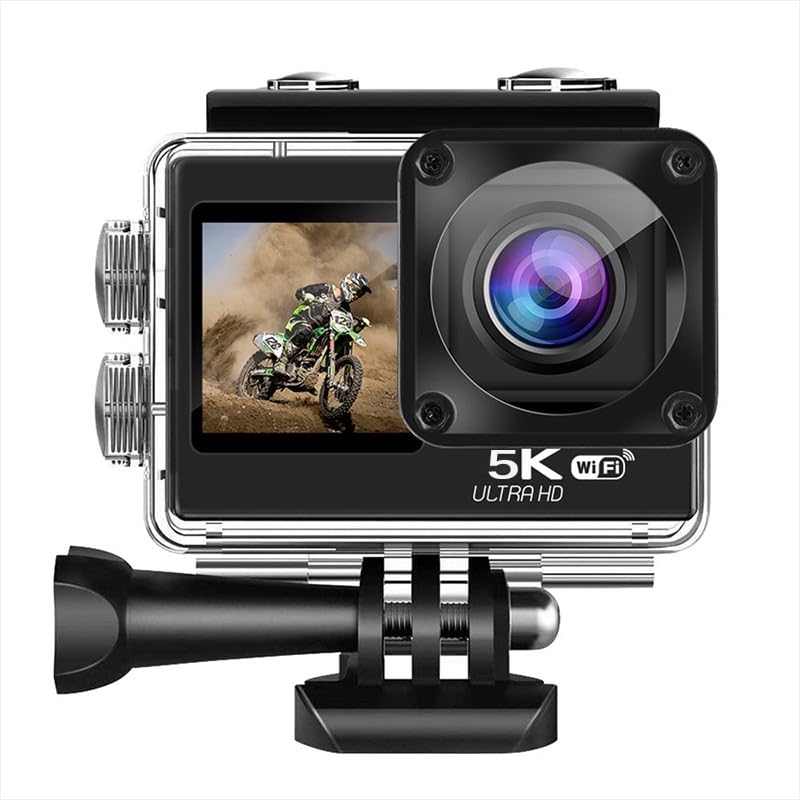
Image: The AUSEK 5K Action Camera with its waterproof case, remote control, and various mounting accessories.
3. ക്യാമറ ഘടകങ്ങൾ
Familiarize yourself with the camera's main parts and controls:
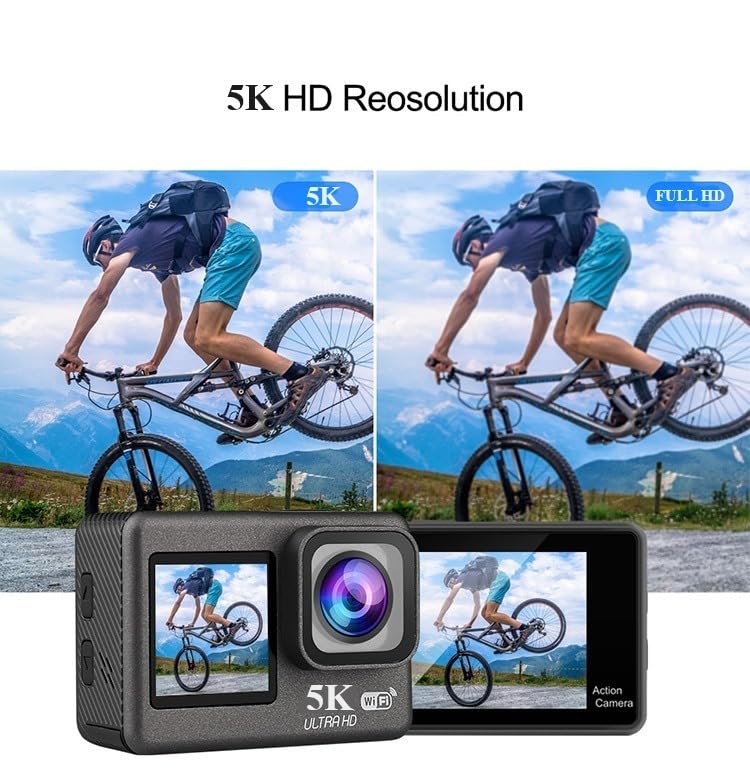
ചിത്രം: മുൻഭാഗം view showing the lens and front screen, and rear view showing the main touch screen.
- ഫ്രണ്ട് സ്ക്രീൻ (1.4-ഇഞ്ച്): For selfie framing and quick status checks.
- പിൻ ടച്ച് സ്ക്രീൻ (2.0-ഇഞ്ച്): Main display for viewing, settings, and playback.
- ലെൻസ്: 170° wide-angle lens for capturing expansive scenes.
- പവർ / മോഡ് ബട്ടൺ: ക്യാമറ ഓൺ/ഓഫ് ചെയ്യുന്നതിനും മോഡുകൾക്കിടയിൽ മാറുന്നതിനും ഉപയോഗിക്കുന്നു.
- ഷട്ടർ/ശരി ബട്ടൺ: Used to start/stop recording, take photos, or confirm selections.
- അപ്പ്/ഡൗൺ ബട്ടണുകൾ: For navigation in menus and digital zoom.
- ബാറ്ററി കമ്പാർട്ട്മെൻ്റ്: Located at the bottom, holds the rechargeable battery.
- മൈക്രോ എസ്ഡി കാർഡ് സ്ലോട്ട്: മെമ്മറി കാർഡ് ഇടുന്നതിന്.
- USB പോർട്ട്: ചാർജിംഗിനും ഡാറ്റ കൈമാറ്റത്തിനും.
- എച്ച്ഡിഎംഐ പോർട്ട്: ഒരു ബാഹ്യ ഡിസ്പ്ലേയിലേക്ക് ബന്ധിപ്പിക്കുന്നതിന്.
- മൈക്രോഫോൺ: Built-in for audio recording.
4. സജ്ജീകരണം
4.1. ബാറ്ററി ഇൻസ്റ്റാളേഷൻ
- ക്യാമറയുടെ അടിയിൽ സ്ഥിതിചെയ്യുന്ന ബാറ്ററി കമ്പാർട്ട്മെന്റ് കവർ തുറക്കുക.
- Insert one of the provided 1350mAh batteries, ensuring the correct orientation according to the diagram inside the compartment.
- ബാറ്ററി കമ്പാർട്ട്മെൻ്റ് കവർ സുരക്ഷിതമായി അടയ്ക്കുക.
- ചാർജ് ചെയ്യാൻ, നൽകിയിരിക്കുന്ന USB കേബിൾ ഉപയോഗിച്ച് ക്യാമറ ഒരു USB പവർ സ്രോതസ്സിലേക്ക് ബന്ധിപ്പിക്കുക. ചാർജിംഗ് ഇൻഡിക്കേറ്റർ പ്രകാശിക്കും.
4.2. മൈക്രോ എസ്ഡി കാർഡ് ഇൻസ്റ്റാളേഷൻ
A high-speed (Class 10 or higher, U3 recommended) MicroSD card up to 256GB is required (not included).
- ക്യാമറയുടെ വശത്ത് മൈക്രോ എസ്ഡി കാർഡ് സ്ലോട്ട് കണ്ടെത്തുക.
- ക്യാമറയുടെ പിൻഭാഗത്തേക്ക് അഭിമുഖമായി സ്വർണ്ണ കോൺടാക്റ്റുകൾ വരുന്ന വിധത്തിൽ, അത് ശരിയായ സ്ഥാനത്ത് ക്ലിക്കായി വരുന്ന വരെ മൈക്രോ എസ്ഡി കാർഡ് ഇടുക.
- നീക്കം ചെയ്യാൻ, കാർഡ് ക്ലിക്ക് ആകുന്നതുവരെ സൌമ്യമായി അകത്തേക്ക് തള്ളുക, തുടർന്ന് പുറത്തെടുക്കാൻ വിടുക.
4.3. വാട്ടർപ്രൂഫ് കേസ് ഉപയോഗിക്കുന്നത്
The included waterproof case allows the camera to be used underwater up to 30 meters (98 feet).
- Ensure the camera is clean and dry before placing it inside the waterproof case.
- Open the latch on the top of the waterproof case and gently insert the camera.
- വെള്ളം കടക്കാത്ത സീൽ ഉറപ്പാക്കാൻ ലാച്ച് ദൃഡമായി അടയ്ക്കുക.
- Before first use, it is recommended to test the waterproof case without the camera inside to ensure no leaks.

Image: An illustration demonstrating the camera's waterproof capability up to 30 meters when enclosed in its protective case.
5. ക്യാമറ പ്രവർത്തിപ്പിക്കുക
5.1. പവർ ഓൺ/ഓഫ്
- പവർ ഓൺ: സ്ക്രീൻ പ്രകാശിക്കുന്നത് വരെ പവർ/മോഡ് ബട്ടൺ കുറച്ച് സെക്കൻഡ് അമർത്തിപ്പിടിക്കുക.
- പവർ ഓഫ്: Press and hold the Power/Mode button for a few seconds until the screen turns off.
5.2. മോഡ് സ്വിച്ചിംഗ്
Press the Power/Mode button repeatedly to cycle through the different modes: Video Recording, Photo, and Playback.
5.3. വീഡിയോ റെക്കോർഡിംഗ്
- Ensure the camera is in Video Recording mode.
- Press the Shutter/OK button to start recording. A red indicator light will flash, and a recording icon will appear on the screen.
- റെക്കോർഡിംഗ് നിർത്താൻ ഷട്ടർ/ശരി ബട്ടൺ വീണ്ടും അമർത്തുക. ഇൻഡിക്കേറ്റർ ലൈറ്റ് മിന്നുന്നത് നിർത്തും.
5.4. ഫോട്ടോ എടുക്കൽ
- Ensure the camera is in Photo mode.
- സ്ക്രീൻ ഉപയോഗിച്ച് നിങ്ങളുടെ ഷോട്ട് ഫ്രെയിം ചെയ്യുക.
- ഒരു ഫോട്ടോ എടുക്കാൻ ഷട്ടർ/ശരി ബട്ടൺ അമർത്തുക.
5.5. Dual Touch Screens
The camera features a 2.0-inch rear touch screen for primary control and a 1.4-inch front screen for convenient selfie framing and quick status checks.
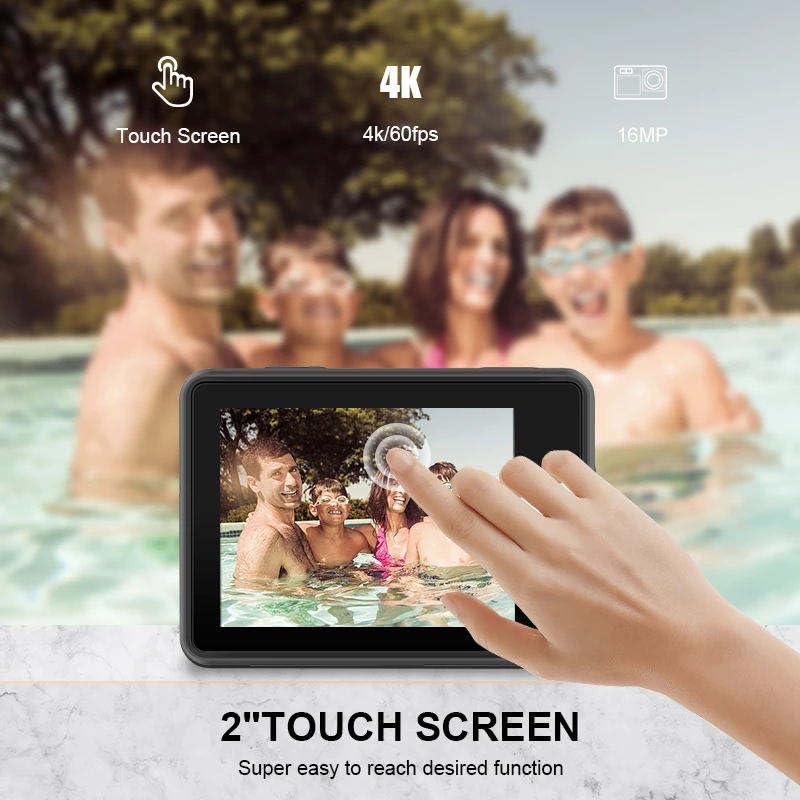
Image: A hand touching the camera's rear screen, demonstrating its touch functionality for easy navigation.
5.6. EIS Stabilization
Electronic Image Stabilization (EIS) helps to reduce blur and shake, resulting in smoother video footage, especially during active movements.

Image: A side-by-side comparison showing the difference between video captured without EIS (blurry) and with EIS (stable and clear).
5.7. Wi-Fi Connectivity & Mobile App Control
റിമോട്ട് കൺട്രോളിനായി നിങ്ങളുടെ ക്യാമറ ഒരു സ്മാർട്ട്ഫോണിലേക്കോ ടാബ്ലെറ്റിലേക്കോ Wi-Fi വഴി ബന്ധിപ്പിക്കുക, തത്സമയം മുൻകൂട്ടിview, and easy file കൈമാറ്റം.
- Download the recommended mobile application (refer to the camera's on-screen instructions or user manual for app name) from your device's app store.
- ക്യാമറയിൽ, ക്രമീകരണ മെനുവിൽ നിന്ന് വൈഫൈ പ്രവർത്തനക്ഷമമാക്കുക. ക്യാമറയുടെ വൈഫൈ പേരും പാസ്വേഡും പ്രദർശിപ്പിക്കും.
- On your smartphone, go to Wi-Fi settings and connect to the camera's Wi-Fi network.
- Open the mobile app to control the camera remotely, view തത്സമയംtage, and download content.
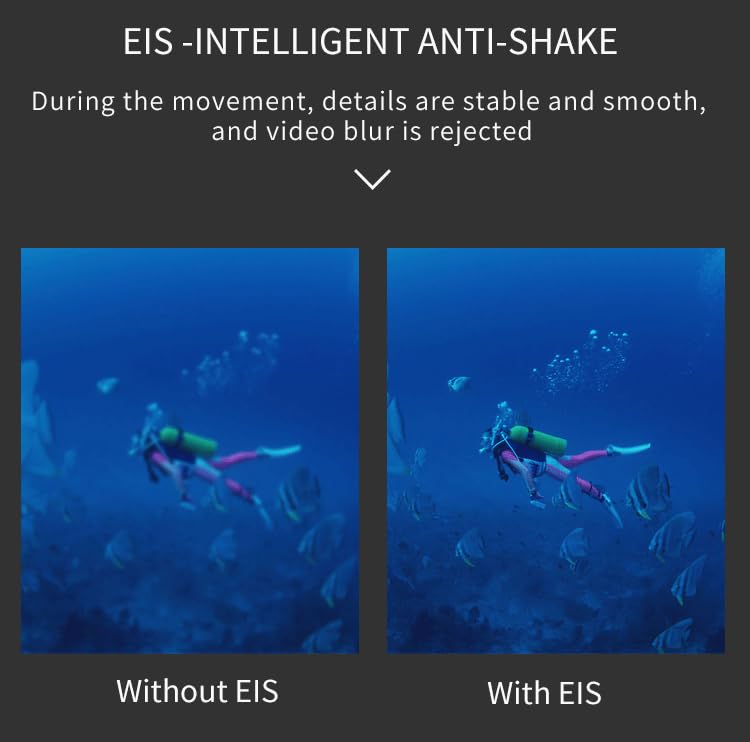
Image: A smartphone displaying a live feed from the action camera, illustrating the Wi-Fi connectivity and app control feature.
5.8. റിമോട്ട് കൺട്രോൾ
The included 2.4G wireless remote control allows for convenient operation from a distance of up to 10 meters.
- വീഡിയോ ബട്ടൺ: വീഡിയോ റെക്കോർഡിംഗ് ആരംഭിക്കാൻ/നിർത്താൻ അമർത്തുക.
- ഫോട്ടോ ബട്ടൺ: Press to take a still photo.

Image: The compact 2.4G wireless remote control, designed for easy operation of the action camera from a distance.
5.9. വൈഡ് ആംഗിൾ ലെൻസ്
The 170-degree wide-angle lens captures a broader perspective, ideal for landscapes, group shots, and immersive action footage.
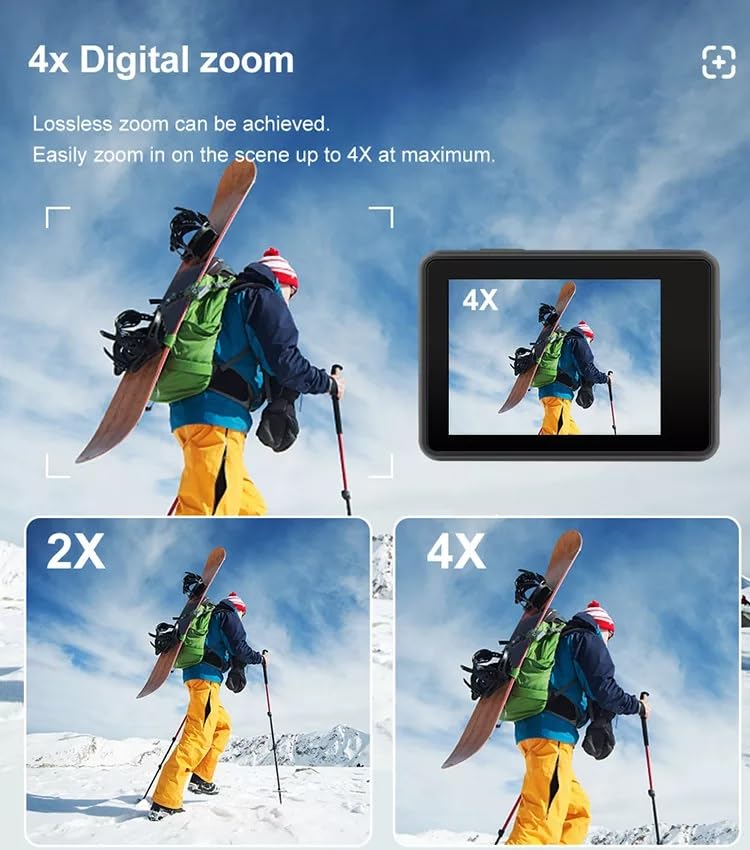
Image: A visual comparison demonstrating the expansive 170-degree field of view provided by the camera's wide-angle lens, showing significantly more of the scene than narrower lenses.
5.10. ഡിജിറ്റൽ സൂം
The camera supports up to 4x digital zoom, allowing you to magnify your subject. Note that digital zoom may reduce image quality compared to optical zoom.
Image: Multiple frames illustrating the effect of 2x and 4x digital zoom on a scene, showing how the subject is magnified on the camera screen.
6. പരിപാലനം
6.1. ക്യാമറ വൃത്തിയാക്കൽ
- ക്യാമറ ലെൻസും സ്ക്രീനുകളും വൃത്തിയാക്കാൻ മൃദുവായ, ലിന്റ് രഹിത തുണി ഉപയോഗിക്കുക.
- കഠിനമായ പാടുകൾക്ക്, നേരിയ തോതിൽ dampen the cloth with water or a lens cleaning solution.
- കഠിനമായ രാസവസ്തുക്കളോ ഉരച്ചിലുകളോ ഉപയോഗിക്കരുത്.
6.2. ബാറ്ററി പരിചരണം
- ഉപയോഗത്തിലില്ലാത്തപ്പോൾ തണുത്തതും ഉണങ്ങിയതുമായ സ്ഥലത്ത് ബാറ്ററികൾ സൂക്ഷിക്കുക.
- Avoid fully discharging batteries before recharging to prolong their lifespan.
- ദീർഘനേരം സൂക്ഷിക്കുകയാണെങ്കിൽ, ബാറ്ററികൾ ഏകദേശം 50% ശേഷി വരെ ചാർജ് ചെയ്യുക.
6.3. സംഭരണം
- Store the camera in a dry, dust-free environment.
- ക്യാമറ ദീർഘനേരം ഉപയോഗിച്ചില്ലെങ്കിൽ ബാറ്ററി നീക്കം ചെയ്യുക.
7. പ്രശ്നപരിഹാരം
| പ്രശ്നം | സാധ്യമായ കാരണം | പരിഹാരം |
|---|---|---|
| ക്യാമറ പവർ ഓൺ ചെയ്യുന്നില്ല. | Low or dead battery; Battery inserted incorrectly. | ബാറ്ററി ചാർജ് ചെയ്യുക; ബാറ്ററി ശരിയായി വീണ്ടും ചേർക്കുക. |
| വീഡിയോ റെക്കോർഡ് ചെയ്യാനോ ഫോട്ടോകൾ എടുക്കാനോ കഴിയില്ല. | No MicroSD card; MicroSD card full or corrupted; Card speed too slow. | Insert a MicroSD card; Delete files or use a new card; Use a Class 10 or U3 rated card. |
| മോശം വീഡിയോ/ഫോട്ടോ നിലവാരം. | Lens is dirty; Insufficient lighting; EIS not enabled. | Clean the lens; Ensure adequate lighting; Enable EIS in settings. |
| വൈഫൈ കണക്ഷൻ പ്രശ്നങ്ങൾ. | തെറ്റായ പാസ്വേഡ്; ക്യാമറയിൽ നിന്ന് വളരെ അകലെയാണ്; ആപ്പ് അപ്ഡേറ്റ് ചെയ്തിട്ടില്ല. | Verify password; Move closer to camera; Update mobile app. |
| റിമോട്ട് കൺട്രോൾ പ്രവർത്തിക്കുന്നില്ല. | Remote battery low; Out of range; Not paired. | Replace remote battery; Operate within 10m; Refer to remote pairing instructions. |
8 സ്പെസിഫിക്കേഷനുകൾ
| ഫീച്ചർ | വിശദാംശങ്ങൾ |
|---|---|
| ബ്രാൻഡ് | AUSEK |
| മോഡലിൻ്റെ പേര് | 5k Bike Camera |
| വീഡിയോ റെസല്യൂഷൻ | 5K @ 30fps |
| ഫോട്ടോ റെസല്യൂഷൻ | 48എംപി |
| Dual Screens | 2.0-inch Rear Touch Screen, 1.4-inch Front Screen |
| വൈഡ് ആംഗിൾ ലെൻസ് | 170° |
| ഇമേജ് സ്റ്റെബിലൈസേഷൻ | ഇലക്ട്രോണിക് ഇമേജ് സ്ഥിരത (EIS) |
| വാട്ടർപ്രൂഫ് ആഴം | 30 മീറ്റർ വരെ (വാട്ടർപ്രൂഫ് കേസോടുകൂടി) |
| സംഭരണം | മൈക്രോ എസ്ഡി കാർഡ്, 256GB വരെ (ഉൾപ്പെടുത്തിയിട്ടില്ല) |
| ബാറ്ററി ശേഷി | 2 1350mAh |
| കണക്റ്റിവിറ്റി | വൈ-ഫൈ, എച്ച്ഡിഎംഐ, യുഎസ്ബി |
| പിന്തുണയ്ക്കുന്ന ഓഡിയോ ഫോർമാറ്റുകൾ | AAC, MP3 |
| വീഡിയോ ക്യാപ്ചർ ഫോർമാറ്റ് | എംപി4, എവിഐ |
| ഡിജിറ്റൽ സൂം | 4x |
9. വാറൻ്റിയും പിന്തുണയും
9.1. വാറൻ്റി വിവരങ്ങൾ
The AUSEK 5K Ultra HD Sports Action Camera comes with a 1 വർഷത്തെ വാറൻ്റി വാങ്ങിയ തീയതി മുതൽ. സാധാരണ ഉപയോഗത്തിലുള്ള നിർമ്മാണ വൈകല്യങ്ങളും പ്രവർത്തനക്ഷമതയും ഈ വാറന്റി ഉൾക്കൊള്ളുന്നു. ദുരുപയോഗം, അപകടങ്ങൾ, അനധികൃത പരിഷ്കാരങ്ങൾ അല്ലെങ്കിൽ പ്രകൃതി ദുരന്തങ്ങൾ എന്നിവ മൂലമുണ്ടാകുന്ന നാശനഷ്ടങ്ങൾക്ക് ഇത് പരിരക്ഷ നൽകുന്നില്ല.
9.2. ഉപഭോക്തൃ പിന്തുണ
For any technical assistance, warranty claims, or product inquiries, please contact AUSEK customer support:
- ഉപഭോക്തൃ പിന്തുണാ ഫോൺ: 08048977694
Please have your product model and purchase date ready when contacting support.
10. ഔദ്യോഗിക ഉൽപ്പന്ന വീഡിയോകൾ
നൽകിയിരിക്കുന്ന ഡാറ്റയിൽ ഈ ഉൽപ്പന്നത്തിന്റെ ഔദ്യോഗിക വിൽപ്പന വീഡിയോകളൊന്നും കണ്ടെത്തിയില്ല.


