1. ആമുഖം
Thank you for choosing the MageGee Cloud98 Mechanical Keyboard. This manual provides detailed instructions for setting up, operating, and maintaining your keyboard. The Cloud98 features a 98-key layout, triple-mode connectivity (Bluetooth, 2.4GHz wireless, and USB-C wired), RGB backlighting, hot-swappable switches, and PBT keycaps for a premium typing experience.

Image 1.1: MageGee Cloud98 Mechanical Keyboard Overview
2. പാക്കേജ് ഉള്ളടക്കം
പാക്കേജിൽ ഇനിപ്പറയുന്ന ഇനങ്ങൾ ഉണ്ടോ എന്ന് പരിശോധിക്കുക:
- MageGee Cloud98 Mechanical Keyboard
- യുഎസ്ബി-സി കേബിൾ
- 2.4GHz USB Receiver (typically stored in the keyboard's bottom compartment)
- കീക്യാപ്പ് പുള്ളർ (ഉൾപ്പെടുത്തിയിട്ടുണ്ടെങ്കിൽ)
- സ്വിച്ച് പുള്ളർ (ഉൾപ്പെടുത്തിയിട്ടുണ്ടെങ്കിൽ)
3. ഉൽപ്പന്ന സവിശേഷതകൾ
- 98-കീ ലേഔട്ട്: Compact yet functional, retaining essential keys.
- ട്രിപ്പിൾ മോഡ് കണക്റ്റിവിറ്റി: ബ്ലൂടൂത്ത്, 2.4GHz വയർലെസ്, യുഎസ്ബി-സി വയർഡ് കണക്ഷനുകൾക്കിടയിൽ സുഗമമായി മാറുക.
- RGB ബാക്ക്ലൈറ്റ്: Customizable full-key RGB backlighting with multiple effects and adjustable brightness.
- ഗാസ്കറ്റ് മൗണ്ടഡ് ഡിസൈൻ: Enhances typing feel and sound by reducing vibrations and cavity noise.
- PBT Material Keycaps: Durable dual-injection molded keycaps with ASA height for clear legends and ergonomic comfort.
- ഹോട്ട്-സ്വാപ്പബിൾ സ്വിച്ചുകൾ: Compatible with most 3-pin and 5-pin mechanical switches, allowing for easy customization without soldering.
- 4000mAh ബാറ്ററി: Provides extended wireless usage, up to 200 hours with backlight off.
- എൻ-കീ റോൾഓവർ: Ensures every keystroke is registered accurately, even during rapid typing or gaming.
- വിശാലമായ അനുയോജ്യത: Supports Win2000, Win XP, Win ME, Vista, Win7, Win8, Win10, Android, Linux, and Mac operating systems.
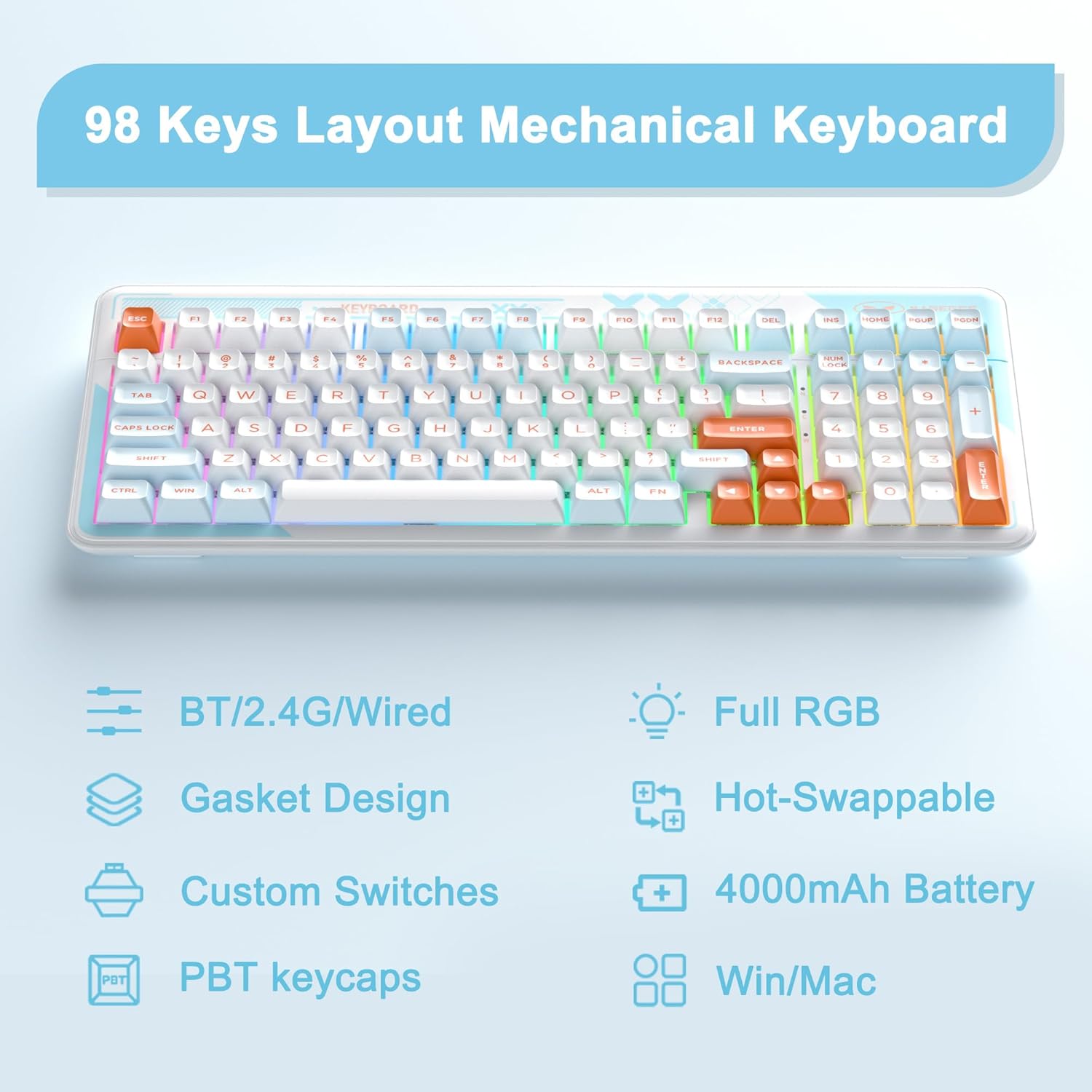
Image 3.1: Key features of the Cloud98 keyboard.

ചിത്രം 3.2: എക്സ്പ്ലോഡഡ് view illustrating the gasket-mounted design and internal components.

ചിത്രം 3.3: ക്ലോസ്-അപ്പ് view of a Blue Whale mechanical switch.

Image 3.4: Detail of the dual-color injection PBT keycaps.
4. സജ്ജീകരണവും കണക്ഷനും
4.1. വയേർഡ് മോഡ് (USB-C)
- കീബോർഡിൽ USB-C പോർട്ട് കണ്ടെത്തുക (സാധാരണയായി മുകളിലെ അരികിൽ).
- നൽകിയിരിക്കുന്ന USB-C കേബിളിന്റെ ഒരറ്റം കീബോർഡുമായി ബന്ധിപ്പിക്കുക.
- USB-C കേബിളിന്റെ മറ്റേ അറ്റം നിങ്ങളുടെ കമ്പ്യൂട്ടറിൽ ലഭ്യമായ ഒരു USB പോർട്ടിലേക്ക് ബന്ധിപ്പിക്കുക.
- കീബോർഡ് യാന്ത്രികമായി തിരിച്ചറിയപ്പെടുകയും ഉപയോഗത്തിന് തയ്യാറാകുകയും ചെയ്യും.
- അമർത്തുക Fn + 5 for 3 seconds to ensure the keyboard is in wired mode.

Image 4.1: Connecting the USB-C cable to the keyboard.
4.2. 2.4GHz വയർലെസ് മോഡ്
- Locate the 2.4GHz USB receiver, usually stored in a compartment on the bottom of the keyboard.
- നിങ്ങളുടെ കമ്പ്യൂട്ടറിൽ ലഭ്യമായ USB പോർട്ടിലേക്ക് 2.4GHz USB റിസീവർ പ്ലഗ് ചെയ്യുക.
- Turn on the keyboard using the power switch (if present, typically on the back or side).
- അമർത്തിപ്പിടിക്കുക Fn + 4 for 3 seconds to enter 2.4GHz pairing mode. The indicator light will flash.
- കണക്റ്റ് ചെയ്തുകഴിഞ്ഞാൽ, ഇൻഡിക്കേറ്റർ ലൈറ്റ് മിന്നുന്നത് നിർത്തുകയും സോളിഡ് ആയി തുടരുകയും ചെയ്യും.

Image 4.2: The 2.4GHz USB receiver.
4.3. ബ്ലൂടൂത്ത് മോഡ്
- കീബോർഡ് ഓണാണെന്ന് ഉറപ്പാക്കുക.
- അമർത്തിപ്പിടിക്കുക Fn + 1, Fn + 2, അല്ലെങ്കിൽ Fn + 3 for 3 seconds to enter Bluetooth pairing mode for the respective profile. The indicator light will flash quickly.
- നിങ്ങളുടെ ഉപകരണത്തിൽ (കമ്പ്യൂട്ടർ, ടാബ്ലെറ്റ്, സ്മാർട്ട്ഫോൺ), ബ്ലൂടൂത്ത് പ്രവർത്തനക്ഷമമാക്കി പുതിയ ഉപകരണങ്ങൾക്കായി തിരയുക.
- Select "MageGee Cloud98" (or similar name) from the list of available devices to pair.
- Once paired, the indicator light will flash slowly when reconnecting, and then remain solid.
- ജോടിയാക്കിയ Bluetooth ഉപകരണങ്ങൾക്കിടയിൽ മാറാൻ, ഹ്രസ്വമായി അമർത്തുക Fn + 1, Fn + 2, അല്ലെങ്കിൽ Fn + 3.

Image 4.3: Visual guide for triple mode connection.
5. പ്രവർത്തന നിർദ്ദേശങ്ങൾ
5.1. RGB ബാക്ക്ലൈറ്റ് നിയന്ത്രണം
The Cloud98 keyboard features full RGB backlighting with 19 RGB modes, 9 monochrome modes, and a custom mode. Use the following key combinations to control the lighting:
- Fn + ← (ഇടത് അമ്പടയാളം): Switch backlight flowing direction.
- Fn + → (വലത് അമ്പടയാളം): Switch backlight color (single color mode).
- Fn + - (Minus): Decrease backlight flowing speed.
- Fn + = (Equals): Increase backlight flowing speed.
- Fn + Del: ബാക്ക്ലൈറ്റ് ഓൺ/ഓഫ് ചെയ്യുക.
- Fn + സ്പെയ്സ്: Switch backlight color (RGB mode).
- Fn + Ins: Switch backlight modes.
- Fn + ↑ (മുകളിലേക്കുള്ള അമ്പടയാളം): ബാക്ക്ലൈറ്റ് തെളിച്ചം വർദ്ധിപ്പിക്കുക.
- Fn + ↓ (താഴേക്കുള്ള അമ്പടയാളം): ബാക്ക്ലൈറ്റ് തെളിച്ചം കുറയ്ക്കുക.

Image 5.1: Keyboard layout showing RGB backlight control key combinations.
5.2. ഹോട്ട്-സ്വാപ്പബിൾ സ്വിച്ചുകൾ
The Cloud98 keyboard supports hot-swappable switches, allowing you to change switches without soldering. This feature enables customization of typing feel and sound.
- കീക്യാപ്പ് നീക്കം ചെയ്യുക: ആവശ്യമുള്ള കീക്യാപ്പ് സൌമ്യമായി നീക്കം ചെയ്യാൻ നൽകിയിരിക്കുന്ന കീക്യാപ്പ് പുള്ളർ ഉപയോഗിക്കുക.
- സ്വിച്ച് നീക്കം ചെയ്യുക: Use the provided switch puller to carefully grip the top and bottom clips of the switch and pull it straight up.
- പുതിയ സ്വിച്ച് ചേർക്കുക: Align the pins of the new switch with the holes on the PCB. Ensure the pins are straight. Gently push the switch down until it clicks into place. Do not force it to avoid bending pins.
- കീക്യാപ്പ് മാറ്റിസ്ഥാപിക്കുക: Press the keycap onto the new switch stem.
കുറിപ്പ്: Ensure the keyboard is disconnected or powered off before changing switches to prevent accidental input or damage.
5.3. WIN Key Lock Function
To prevent accidental presses of the Windows key during gaming, you can lock it. Press Fn+Win to toggle the WIN key lock function. An indicator light may illuminate when the WIN key is locked.
5.4. N-Key Rollover
The Cloud98 supports N-Key Rollover, meaning all keys pressed simultaneously will be registered. This is particularly beneficial for fast typists and gamers.

Image 5.2: Illustration of N-Key Rollover capability.
6. ബാറ്ററിയും ചാർജിംഗും
The Cloud98 keyboard is equipped with a 4000mAh battery, providing extended usage in wireless modes.
- ചാർജിംഗ്: Connect the keyboard to a USB power source using the provided USB-C cable. The charging indicator light will show the charging status.
- ബാറ്ററി ലൈഫ്: The keyboard can last up to 200 hours with the backlight off. Battery life will vary depending on backlight usage and connection mode.
- കുറഞ്ഞ ബാറ്ററി സൂചകം: The keyboard may indicate low battery status through a flashing light or reduced functionality. Charge the keyboard promptly when this occurs.

Image 6.1: Information regarding the 4000mAh battery capacity.
7. പരിപാലനം
ശരിയായ അറ്റകുറ്റപ്പണി നിങ്ങളുടെ കീബോർഡിന്റെ ദീർഘായുസ്സും പ്രകടനവും ഉറപ്പാക്കുന്നു.
- കീക്യാപ്പുകൾ വൃത്തിയാക്കൽ: Use a keycap puller to remove keycaps. Clean them with a mild soap solution and a soft cloth, then dry thoroughly before reattaching.
- കീബോർഡ് ബോഡി വൃത്തിയാക്കൽ: കീബോർഡ് പ്രതലം തുടയ്ക്കാൻ മൃദുവായതും ഉണങ്ങിയതുമായ തുണി ഉപയോഗിക്കുക. കഠിനമായ അഴുക്കിന്, അല്പം ഡി.amp കീബോർഡിനുള്ളിൽ ഈർപ്പം കയറുന്നില്ലെന്ന് ഉറപ്പാക്കാൻ തുണി ഉപയോഗിക്കാം.
- പൊടി നീക്കം: കീക്യാപ്പുകൾക്കും സ്വിച്ചുകൾക്കുമിടയിലുള്ള പൊടിയും അവശിഷ്ടങ്ങളും നീക്കം ചെയ്യാൻ കംപ്രസ് ചെയ്ത വായു ഉപയോഗിക്കുക.
- സംഭരണം: നേരിട്ടുള്ള സൂര്യപ്രകാശവും കടുത്ത താപനിലയും ഏൽക്കാത്ത തണുത്തതും വരണ്ടതുമായ സ്ഥലത്ത് കീബോർഡ് സൂക്ഷിക്കുക.
8. പ്രശ്നപരിഹാരം
If you encounter issues with your MageGee Cloud98 keyboard, please refer to the following common solutions:
| പ്രശ്നം | പരിഹാരം |
|---|---|
| വയേർഡ് മോഡിൽ കീബോർഡ് പ്രതികരിക്കുന്നില്ല. | Ensure the USB-C cable is securely connected to both the keyboard and the computer. Try a different USB port or cable. Confirm the keyboard is in wired mode (Fn + 5 for 3s). |
| 2.4GHz വയർലെസ് കണക്ഷൻ അസ്ഥിരമാണ് അല്ലെങ്കിൽ കണക്റ്റ് ചെയ്യുന്നില്ല. | Ensure the 2.4GHz USB receiver is plugged in. Press and hold Fn + 4 for 3 seconds to re-pair. Move the receiver closer to the keyboard. Check for interference from other wireless devices. |
| ബ്ലൂടൂത്ത് കണക്ഷൻ പ്രശ്നങ്ങൾ. | Ensure Bluetooth is enabled on your device. Press and hold Fn + 1/2/3 for 3 seconds to enter pairing mode. Remove previous pairings from your device and try again. Ensure the keyboard battery is charged. |
| ബാക്ക്ലൈറ്റ് പ്രവർത്തിക്കുന്നില്ല അല്ലെങ്കിൽ സ്തംഭിച്ചിരിക്കുന്നു. | Press Fn + Del to toggle the backlight. Adjust brightness with Fn + ↑/↓. Try switching backlight modes with Fn + Ins. Ensure the keyboard battery is charged. |
| Specific keys not working. | If hot-swappable, carefully remove the keycap and switch. Re-seat the switch firmly, ensuring pins are not bent. If the issue persists, try replacing the switch. |
| Keyboard randomly disconnects. | Ensure the battery is sufficiently charged. For wireless modes, ensure the receiver/device is within range and free from interference. Update drivers if available. |
9 സ്പെസിഫിക്കേഷനുകൾ
| ഫീച്ചർ | വിശദാംശങ്ങൾ |
|---|---|
| മോഡൽ നമ്പർ | Cloud98 |
| കണക്റ്റിവിറ്റി | ബ്ലൂടൂത്ത്, 2.4GHz വയർലെസ്, USB-C വയേർഡ് |
| കീബോർഡ് തരം | മെക്കാനിക്കൽ |
| ബാക്ക്ലൈറ്റിംഗ് | പൂർണ്ണ ആർജിബി |
| കീക്യാപ് മെറ്റീരിയൽ | PBT (Polybutylene Terephthalate) |
| പ്രത്യേക ഫീച്ചർ | Ergonomic, Gasket Mounted, Hot-Swappable |
| ബാറ്ററി ശേഷി | 4000mAh |
| ഉൽപ്പന്ന അളവുകൾ | 16.5 x 7.87 x 1.57 ഇഞ്ച് (41.9 x 19.99 x 3.99 സെ.മീ) |
| ഇനത്തിൻ്റെ ഭാരം | 2.66 പൗണ്ട് (1.21 കി.ഗ്രാം) |
| അനുയോജ്യമായ ഉപകരണങ്ങൾ | Laptop, PC, Android, Mac |
| ഓപ്പറേറ്റിംഗ് സിസ്റ്റങ്ങൾ | Win2000, Win XP, Win ME, Vista, Win7, Win8, Win10, Android, Linux, Mac |
10. വാറൻ്റിയും പിന്തുണയും
MageGee products come with a standard warranty. For specific warranty details, please refer to the warranty card included with your product or visit the official MageGee website. If you encounter any issues not covered in this manual or require further assistance, please contact MageGee customer support through their official channels.
നിങ്ങൾക്ക് സാധാരണയായി നിർമ്മാതാവിന്റെ പിന്തുണാ കോൺടാക്റ്റ് വിവരങ്ങൾ കണ്ടെത്താൻ കഴിയും webസൈറ്റ് അല്ലെങ്കിൽ ഉൽപ്പന്ന പാക്കേജിംഗിൽ.


