1. ആമുഖം
This manual provides essential information for the safe and efficient operation of your BLUETTI AC70 Portable Power Station. Please read this manual thoroughly before using the product and keep it for future reference. The BLUETTI AC70 is a versatile power solution designed for various applications, including outdoor activities, emergency backup, and mobile power needs.
2. സുരക്ഷാ നിർദ്ദേശങ്ങൾ
To ensure safe operation, always follow these guidelines:
- യൂണിറ്റ് ഡിസ്അസംബ്ലിംഗ്, റിപ്പയർ അല്ലെങ്കിൽ പരിഷ്ക്കരിക്കരുത്.
- യൂണിറ്റ് തീ, വെള്ളം, കടുത്ത താപനില എന്നിവയിൽ നിന്ന് അകറ്റി നിർത്തുക.
- Use only BLUETTI-approved accessories and charging cables.
- അമിതമായി ചൂടാകുന്നത് തടയാൻ ഉപയോഗിക്കുമ്പോഴും ചാർജ് ചെയ്യുമ്പോഴും ശരിയായ വായുസഞ്ചാരം ഉറപ്പാക്കുക.
- കുട്ടികൾക്കും വളർത്തുമൃഗങ്ങൾക്കും ലഭ്യമാകാതെ സൂക്ഷിക്കുക.
- യൂണിറ്റ് താഴെയിടുകയോ ശക്തമായ ആഘാതങ്ങൾക്ക് വിധേയമാക്കുകയോ ചെയ്യുന്നത് ഒഴിവാക്കുക.
3. പാക്കേജ് ഉള്ളടക്കം
എല്ലാ ഇനങ്ങളും നിങ്ങളുടെ പാക്കേജിൽ ഉൾപ്പെടുത്തിയിട്ടുണ്ടെന്ന് ഉറപ്പാക്കുക:
- BLUETTI AC70 പോർട്ടബിൾ പവർ സ്റ്റേഷൻ
- 100W Solar Panel (Ships Separately)
- എസി ചാർജിംഗ് കേബിൾ
- കാർ ചാർജിംഗ് കേബിൾ
- സോളാർ ചാർജിംഗ് കേബിൾ
- ഉപയോക്തൃ മാനുവൽ

Figure 1: BLUETTI AC70 Portable Power Station with its standard accessories.
4. ഉൽപ്പന്നം കഴിഞ്ഞുview
4.1 ഫ്രണ്ട് പാനൽ
The front panel features the main display, input/output ports, and control buttons.
- LCD ഡിസ്പ്ലേ: ബാറ്ററി ലെവൽ, ഇൻപുട്ട്/ഔട്ട്പുട്ട് വാട്ട് എന്നിവ കാണിക്കുന്നുtage, ശേഷിക്കുന്ന റൺടൈം, പിശക് സൂചകങ്ങൾ.
- DC/PV Input: For connecting solar panels or other DC charging sources.
- ഡിസി ഔട്ട്പുട്ട് (12V/10A): Standard car-style outlet.
- USB-C Ports (100W): Two ports for fast charging compatible devices.
- USB-A Ports (12W): Two ports for standard USB charging.
- AC Outlets (120V/1000W): Two standard AC outlets.
- പവർ ബട്ടൺ: യൂണിറ്റ് ഓൺ/ഓഫ് ചെയ്യുന്നു.
- ഡിസി ഔട്ട്പുട്ട് ബട്ടൺ: Activates/deactivates DC output.
- എസി ഔട്ട്പുട്ട് ബട്ടൺ: Activates/deactivates AC output.

Figure 2: Front panel layout of the BLUETTI AC70.
4.2 പിൻ പാനൽ
The rear panel includes the AC input port and ventilation.
- എസി ഇൻപുട്ട്: For connecting the AC charging cable.
- വെന്റിലേഷൻ ഗ്രില്ലുകൾ: Ensures proper airflow for cooling.
4.3 ടോപ്പ് പാനൽ
The top panel features a sturdy handle for portability.

Figure 3: Top handle for easy portability.
5. സജ്ജീകരണം
5.1 പ്രാരംഭ ചാർജിംഗ്
Before first use, fully charge the BLUETTI AC70. Connect the AC charging cable to the AC input port on the rear of the unit and plug it into a wall outlet. The LCD display will show the charging status. A full charge from 0% to 100% typically takes about 1.5 hours.
5.2 സോളാർ പാനൽ കണക്ഷൻ
If using the included 100W solar panel, unfold it and position it in direct sunlight. Connect the solar charging cable to the solar panel and then to the DC/PV input port on the front of the AC70. The display will indicate solar input wattage.
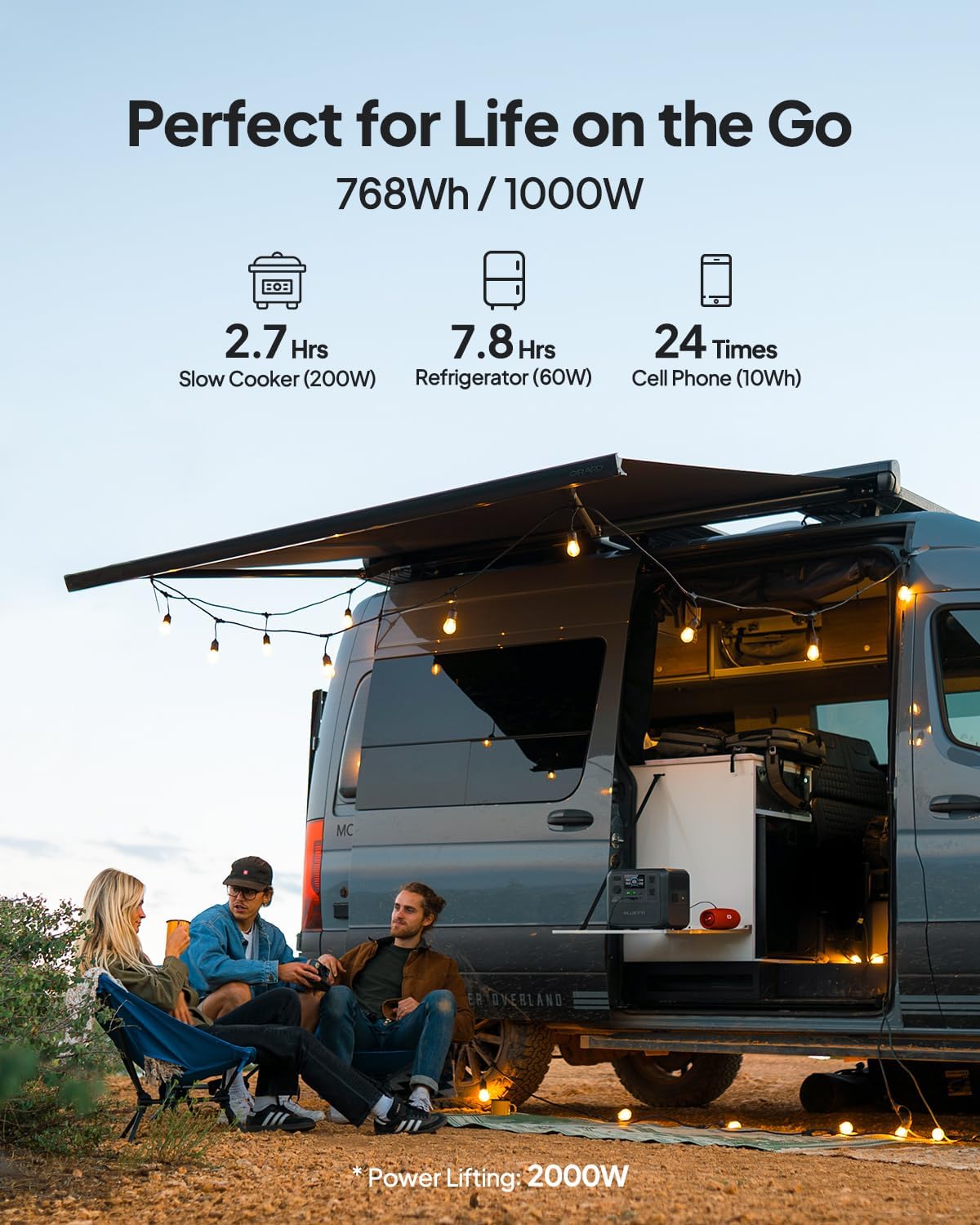
Figure 4: Connecting the BLUETTI AC70 to a solar panel.
6. പ്രവർത്തന നിർദ്ദേശങ്ങൾ
6.1 പവർ ഓൺ/ഓഫ്
Press and hold the main Power Button for 2-3 seconds to turn the unit on or off.
6.2 ഔട്ട്പുട്ടുകൾ ഉപയോഗിക്കൽ
Press the respective DC Output Button or AC Output Button to activate the desired output ports. The corresponding icons on the LCD display will illuminate.

Figure 5: Various output ports of the BLUETTI AC70 in use.
6.3 BLUETTI APP Control
Download the BLUETTI APP from your smartphone's app store. Connect your AC70 via Bluetooth to monitor its status, adjust settings (like charging mode), and update firmware remotely.

Figure 6: Monitoring and controlling the AC70 using the BLUETTI App.
6.4 പവർ ലിഫ്റ്റിംഗ് മോഡ്
The Power Lifting mode allows the AC70 to handle high-power resistive loads up to 2000W, exceeding its rated 1000W output. This is particularly useful for devices like hair dryers or electric kettles. Activate this mode via the BLUETTI APP.
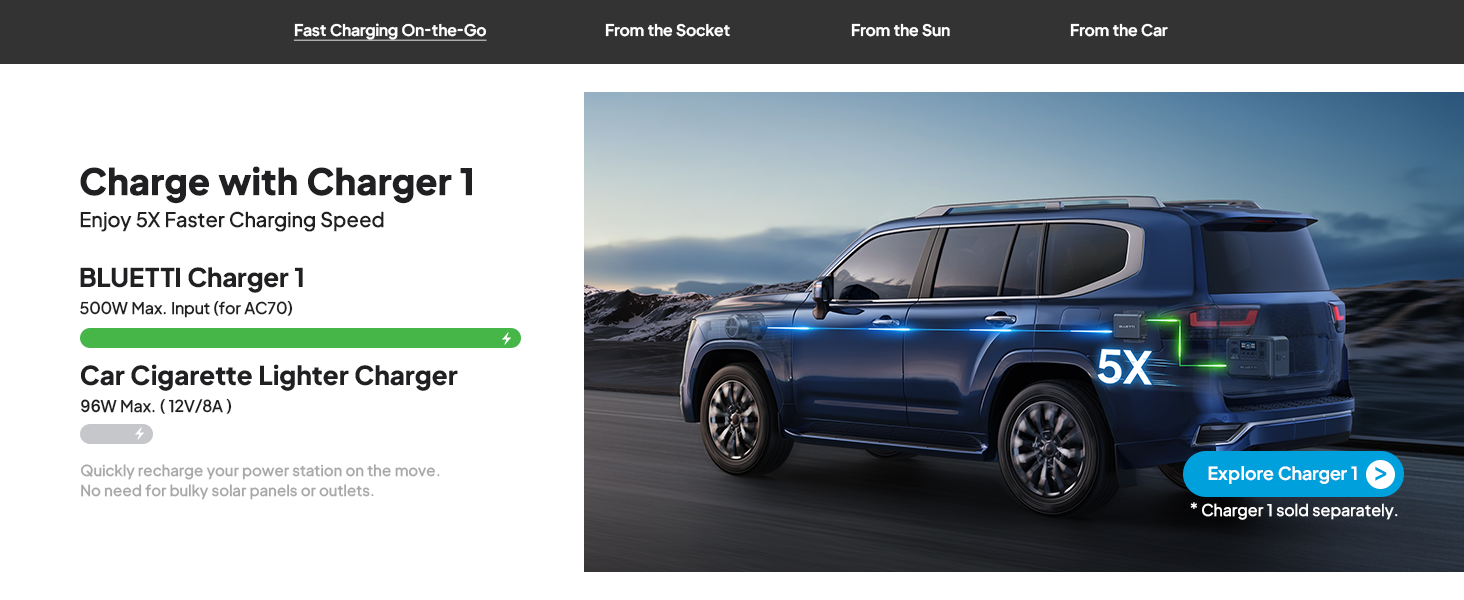
Figure 7: AC70 utilizing Power Lifting mode for higher wattagഇ ഉപകരണങ്ങൾ.
6.5 യുപിഎസ് പ്രവർത്തനം
The AC70 features an Uninterruptible Power Supply (UPS) function with a switching time of ≤20ms. When connected to a wall outlet and powering devices, it can automatically switch to battery power in the event of a power outage, ensuring continuous operation for connected electronics.
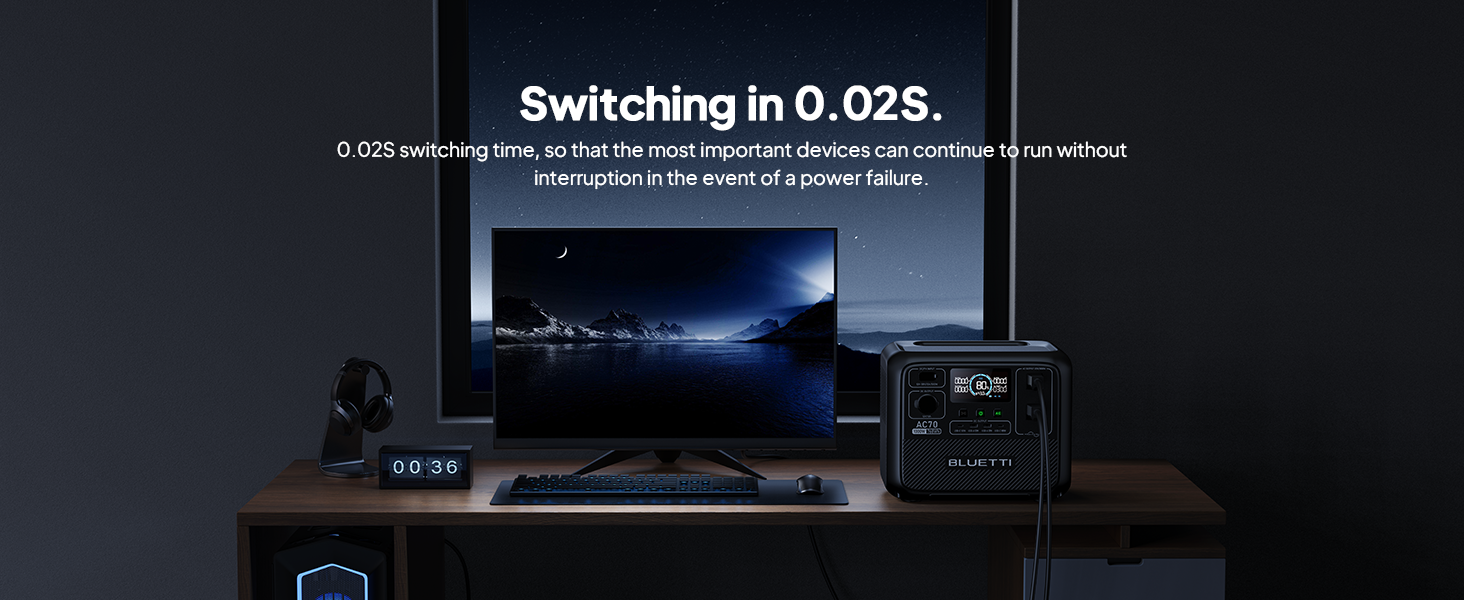
Figure 8: AC70 acting as an Uninterruptible Power Supply (UPS).
7. Charging the AC70
7.1 എസി ചാർജിംഗ്
Connect the AC charging cable to the AC input port and a wall outlet. The AC70 supports up to 950W fast charging, reaching 80% in 45 minutes and 100% in 1.5 hours.

Figure 9: AC70 charging from a standard wall outlet.
7.2 സോളാർ ചാർജിംഗ്
Connect compatible solar panels (up to 500W) to the DC/PV input port using the solar charging cable. The AC70 can be fully charged via solar power in 1.9-2.4 hours under optimal sunlight conditions.

Figure 10: AC70 charging using solar panels.
7.3 കാർ ചാർജിംഗ്
Use the car charging cable to connect the AC70 to your vehicle's 12V/24V cigarette lighter port. This allows for convenient charging while on the go, with a full charge taking approximately 3.2-7 hours.
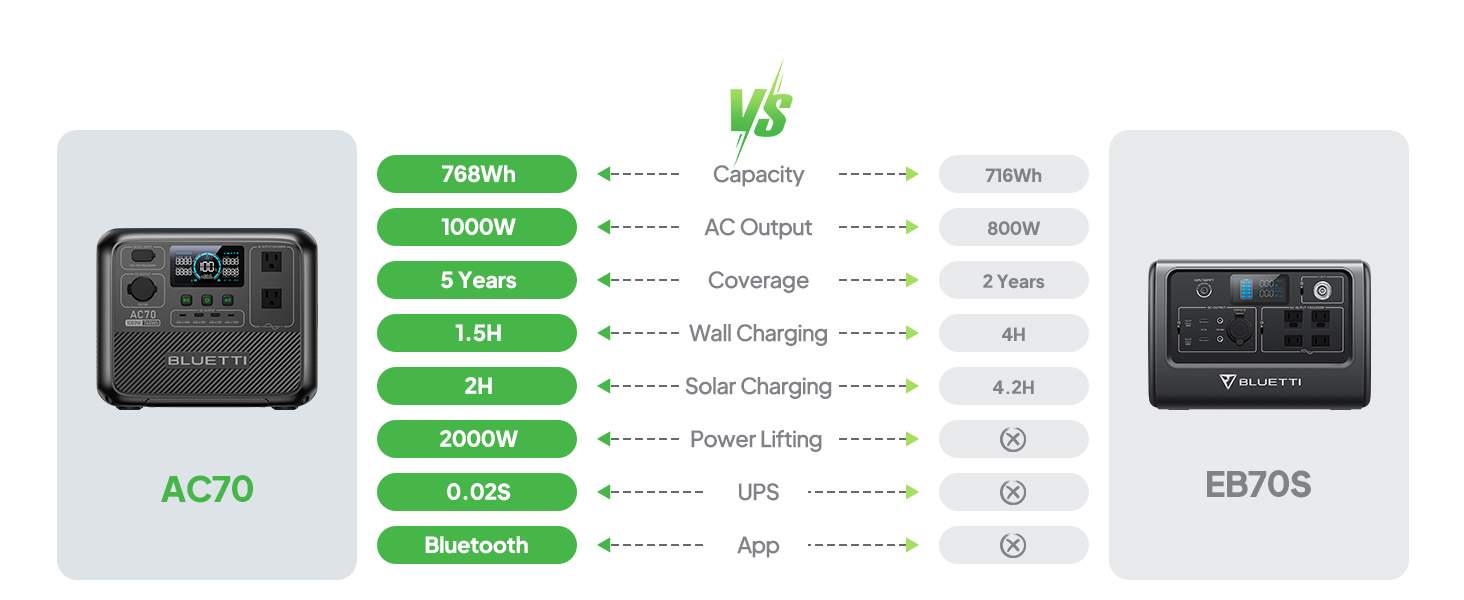
Figure 11: AC70 charging from a vehicle's 12V/24V outlet.
8. പരിപാലനം
Proper maintenance ensures the longevity and performance of your AC70:
- നേരിട്ട് സൂര്യപ്രകാശം ഏൽക്കാത്ത ഒരു തണുത്ത വരണ്ട സ്ഥലത്ത് യൂണിറ്റ് സൂക്ഷിക്കുക.
- ബാറ്ററിയുടെ ആരോഗ്യം നിലനിർത്താൻ പതിവായി ഉപയോഗിക്കുന്നില്ലെങ്കിൽ, ഓരോ 3-6 മാസത്തിലും യൂണിറ്റ് റീചാർജ് ചെയ്യുക.
- Clean the exterior with a dry, soft cloth. Do not use harsh chemicals or abrasives.
- വെന്റിലേഷൻ ഓപ്പണിംഗുകൾ പൊടിയും അവശിഷ്ടങ്ങളും ഇല്ലാതെ വൃത്തിയായി സൂക്ഷിക്കുക.
9. പ്രശ്നപരിഹാരം
If you encounter issues with your AC70, refer to the following common problems and solutions:
| പ്രശ്നം | സാധ്യമായ കാരണം | പരിഹാരം |
|---|---|---|
| യൂണിറ്റ് പവർ ഓണാക്കുന്നില്ല | Low battery or unit is off. | Charge the unit. Press and hold the power button for 2-3 seconds. |
| എസി ഔട്ട്പുട്ട് പ്രവർത്തിക്കുന്നില്ല | AC output is off or overloaded. | Press the AC output button. Reduce the load or check for short circuits. |
| സോളാർ ചാർജിംഗ് പ്രവർത്തിക്കുന്നില്ല | Insufficient sunlight, incorrect connection, or incompatible panel. | Ensure direct sunlight, check cable connections, verify panel compatibility. |
| APP കണക്റ്റ് ചെയ്യുന്നില്ല | Bluetooth is off or unit is too far. | Ensure Bluetooth is enabled on your phone and AC70. Move closer to the unit. |
10 സ്പെസിഫിക്കേഷനുകൾ
| ഫീച്ചർ | വിശദാംശങ്ങൾ |
|---|---|
| ബ്രാൻഡ് | ബ്ലൂട്ടി |
| മോഡലിൻ്റെ പേര് | AC70 |
| ബാറ്ററി ശേഷി | 768Wh (LiFePO4) |
| എസി ഔട്ട്പുട്ട് | 2 x 1000W (2000W Power Lifting) |
| ഡിസി put ട്ട്പുട്ട് | 1 x 12V/10A |
| USB-C ഔട്ട്പുട്ട് | 2 x 100W പരമാവധി |
| യുഎസ്ബി-എ put ട്ട്പുട്ട് | 2 x 12W പരമാവധി |
| എസി ഇൻപുട്ട് | 950W Max (0-80% in 45 min, 0-100% in 1.5 hrs) |
| സോളാർ ഇൻപുട്ട് | 500W Max (0-100% in 1.9-2.4 hrs) |
| കാർ ചാർജിംഗ് | 12V/24V, 10A (0-100% in 3.2-7 hrs) |
| ബാറ്ററി സൈക്കിളുകൾ | 3000+ മുതൽ 80% വരെ ശേഷി |
| യുപിഎസ് മാറുന്ന സമയം | ≤20മി.സെ |
| ഇനത്തിൻ്റെ ഭാരം | 22.5 പൗണ്ട് |
| ഉൽപ്പന്ന അളവുകൾ | 12.4"L x 8.2"W x 10.1"H |
11. വാറണ്ടിയും പിന്തുണയും
The BLUETTI AC70 Portable Power Station comes with a 5-year warranty. For technical support, troubleshooting assistance, or warranty claims, please contact BLUETTI customer service through their official website or the BLUETTI APP.
Video 1: Official BLUETTI AC70 product overview highlighting its features and portability.


