1. ആമുഖം
This manual provides comprehensive instructions for the Keychron M6 Wireless Optical Mouse. It covers setup, operation, maintenance, and troubleshooting to ensure optimal performance and longevity of your device. The Keychron M6 is a high-performance wireless mouse designed for productivity and gaming, featuring multiple connectivity options, a precise sensor, and customizable buttons.

Figure 1: Keychron M6 Wireless Optical Mouse (Black)
This image shows the Keychron M6 wireless optical mouse in black, highlighting its ergonomic design and sleek appearance. A separate component, likely a wireless receiver, is also visible to the right.
2 പ്രധാന സവിശേഷതകൾ
- ബഹുമുഖ കണക്റ്റിവിറ്റി: Supports 2.4 GHz wireless, Bluetooth 5.1, and wired USB connections.
- ഉയർന്ന പോളിംഗ് നിരക്ക്: Up to 4000 Hz polling rate for ultra-low latency response.
- Precise Sensor: Equipped with PixArt 3395 sensor, offering up to 26,000 DPI and 650 IPS.
- ഭാരം കുറഞ്ഞ ഡിസൈൻ: Weighs approximately 78g for comfortable extended use.
- പ്രോഗ്രാം ചെയ്യാവുന്ന ബട്ടണുകൾ: Over ten customizable buttons and an infinite scroll wheel.
- സോഫ്റ്റ്വെയർ ഇഷ്ടാനുസൃതമാക്കൽ: Keychron Engine software for macOS/Windows allows personalization of keys, shortcuts, macros, LOD, polling rate, and DPI settings.

Figure 2: Key Features of Keychron M6 Mouse
This image visually highlights the key features of the Keychron M6 mouse, including its infinite scroll wheel, 4000 Hz polling rate, up to 26000 DPI, and 78g lightweight design.
3. പാക്കേജ് ഉള്ളടക്കം
പാക്കേജിൽ എല്ലാ ഇനങ്ങളും ഉണ്ടെന്ന് ഉറപ്പാക്കുക:
- 1x Keychron M6 Wireless Optical Mouse
- 1x ടൈപ്പ്-സി മുതൽ ടൈപ്പ്-സി കേബിൾ വരെ
- 1x ടൈപ്പ്-എ മുതൽ ടൈപ്പ്-സി അഡാപ്റ്റർ വരെ
- 1x 4K വയർലെസ് റിസീവർ

Figure 3: Standard Version (4K) Package Contents
This image illustrates the contents included with the Keychron M6 mouse, showing the mouse itself, a USB-C cable, a USB-A to USB-C adapter, and the 4K wireless receiver.
4. സജ്ജീകരണ ഗൈഡ്
4.1 മൗസ് ചാർജ് ചെയ്യുന്നു
The Keychron M6 mouse comes with a built-in 800 mAh battery. Before first use, it is recommended to fully charge the mouse.
- നൽകിയിരിക്കുന്ന ടൈപ്പ്-സി കേബിൾ മൗസിന്റെ ചാർജിംഗ് പോർട്ടുമായി ബന്ധിപ്പിക്കുക.
- കേബിളിന്റെ മറ്റേ അറ്റം ഒരു USB പവർ സ്രോതസ്സുമായി ബന്ധിപ്പിക്കുക (ഉദാ: കമ്പ്യൂട്ടർ USB പോർട്ട്, USB വാൾ അഡാപ്റ്റർ).
- The charging indicator light will show the charging status. A full charge can provide up to 80 hours of use.

Figure 4: Mouse Dimensions and Battery Life
This image provides the physical dimensions of the Keychron M6 mouse and highlights its 800 mAh battery, which offers up to 80 hours of usage. It also shows the Huano 80M Micro Switch and DPI/Report Rate adjustment buttons.
4.2 മൗസ് ബന്ധിപ്പിക്കൽ
The Keychron M6 supports three connection modes: 2.4 GHz wireless, Bluetooth 5.1, and wired USB.
4.2.1 2.4 GHz വയർലെസ് കണക്ഷൻ
- Locate the 4K wireless receiver included in the package.
- നിങ്ങളുടെ കമ്പ്യൂട്ടറിൽ ലഭ്യമായ ഒരു USB പോർട്ടിലേക്ക് 4K വയർലെസ് റിസീവർ പ്ലഗ് ചെയ്യുക.
- On the bottom of the mouse, slide the switch to the "2.4G" position.
- മൗസ് സ്വയമേവ റിസീവറുമായി ബന്ധിപ്പിക്കണം.

ചിത്രം 5: കണക്റ്റിവിറ്റി ഓപ്ഷനുകൾ
This image illustrates the stable and ultra-low latency response of the Keychron M6 mouse, showcasing its 2.4GHz, Bluetooth 5.1, and USB Wired connectivity options.
4.2.2 ബ്ലൂടൂത്ത് 5.1 കണക്ഷൻ
- On the bottom of the mouse, slide the switch to the "B" (Bluetooth) position.
- The mouse will enter pairing mode (indicator light may flash).
- നിങ്ങളുടെ കമ്പ്യൂട്ടറിലോ ഉപകരണത്തിലോ, Bluetooth ക്രമീകരണങ്ങൾ തുറന്ന് പുതിയ ഉപകരണങ്ങൾക്കായി തിരയുക.
- Select "Keychron M6" from the list of available devices to pair.
4.2.3 വയർഡ് യുഎസ്ബി കണക്ഷൻ
- Connect the provided Type-C cable to the mouse's port.
- Connect the other end of the cable (using the Type-A adapter if necessary) to a USB port on your computer.
- The mouse will function immediately in wired mode.
5. പ്രവർത്തന നിർദ്ദേശങ്ങൾ
5.1 ഡിപിഐ അഡ്ജസ്റ്റ്മെന്റ്
The Keychron M6 mouse allows for on-the-fly DPI adjustment without software.
- Locate the DPI button on the bottom of the mouse.
- Press the DPI button to cycle through different DPI levels. The indicator light may change color to indicate the current DPI setting.
- Fine-tune DPI settings using the Keychron Engine software for more precise control.

Figure 6: DPI and Report Rate Adjustment Buttons
This close-up image shows the buttons on the underside of the Keychron M6 mouse, specifically highlighting the DPI adjustment button and the G/OFF/B switch for connectivity modes, along with the Report Rate button.
5.2 പോളിംഗ് നിരക്ക് ക്രമീകരണം
The polling rate can be adjusted to optimize responsiveness for different uses.
- Locate the Report Rate button on the bottom of the mouse.
- Press the Report Rate button to cycle through available polling rates (e.g., 125 Hz, 500 Hz, 1000 Hz, 2000 Hz, 4000 Hz).
- Refer to the table below for indicator light meanings.

Figure 7: M6 (4000 Hz) Polling Rate and Indicator Guide
This image displays a table detailing the polling rates (Hz) and corresponding report rate light indicators (White, Blue, Red, Blue + Red, White + Red) for the Keychron M6 mouse, along with the available connection modes for each rate.
5.3 Customizing Buttons and Macros (Keychron Engine Software)
For advanced customization, download and install the Keychron Engine software from the official Keychron webസൈറ്റ്.
- The software allows you to remap buttons, create custom shortcuts, and set up complex macros.
- Adjust Lift-Off Distance (LOD) and other sensor parameters.
- ഒന്നിലധികം പ്രൊഫഷണലുകളെ കൈകാര്യം ചെയ്യുകfileവ്യത്യസ്ത ആപ്ലിക്കേഷനുകൾക്കോ ഗെയിമുകൾക്കോ വേണ്ടിയുള്ളത്.
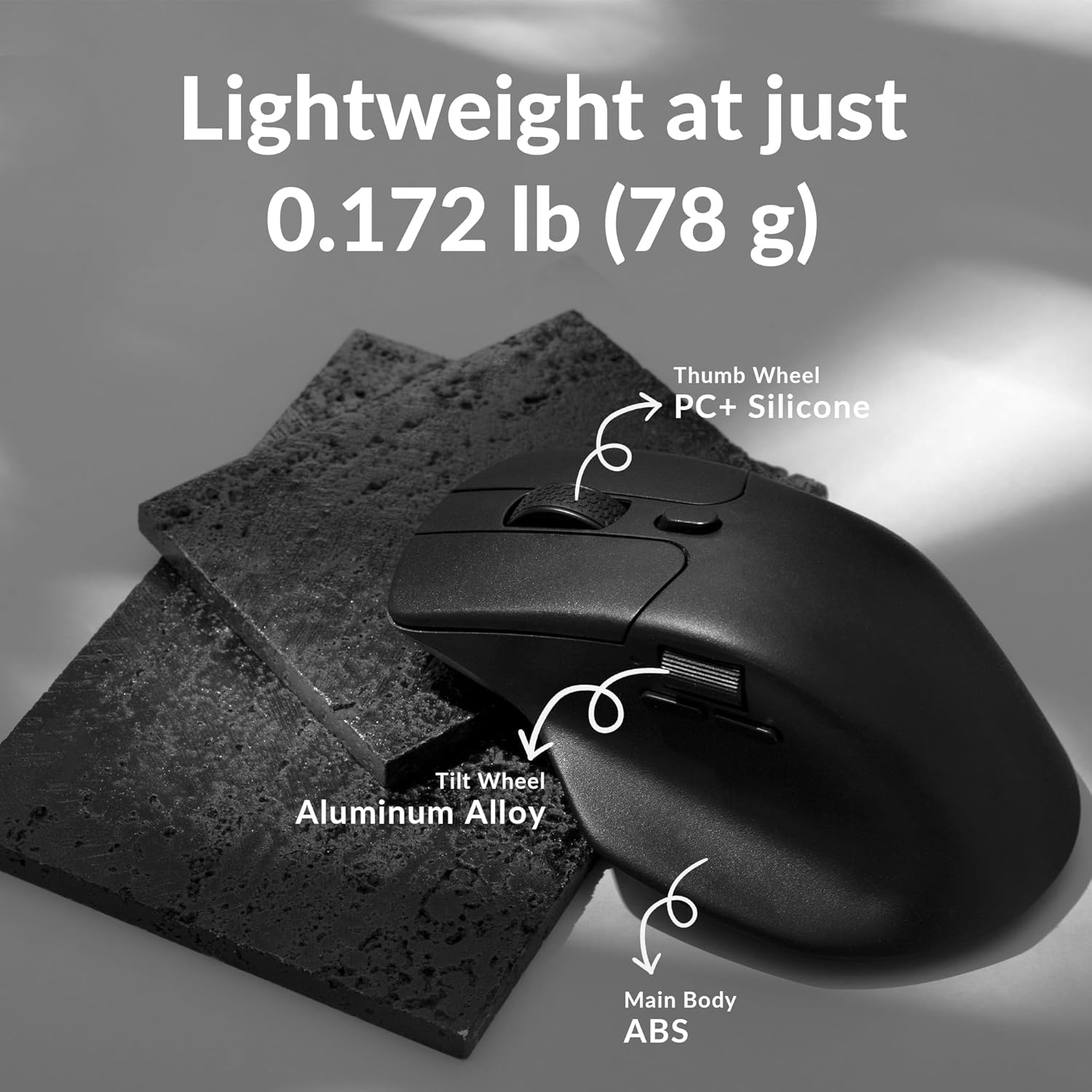
Figure 8: Keychron Engine Software for Customization
This image shows the user interface of the Keychron Engine software, demonstrating how users can customize buttons and settings for the Keychron M6 mouse on macOS and Windows operating systems.
6. പരിപാലനം
Proper maintenance ensures the longevity and optimal performance of your Keychron M6 mouse.
- വൃത്തിയാക്കൽ: മൗസിന്റെ പ്രതലം തുടയ്ക്കാൻ മൃദുവായതും ഉണങ്ങിയതുമായ ഒരു തുണി ഉപയോഗിക്കുക. കഠിനമായ അഴുക്കിന്, ചെറുതായി dampതുണിയിൽ വെള്ളം അല്ലെങ്കിൽ നേരിയ ക്ലീനിംഗ് ലായനി ഉപയോഗിക്കുക. കഠിനമായ രാസവസ്തുക്കൾ ഒഴിവാക്കുക.
- സെൻസർ പരിചരണം: മൗസിന്റെ അടിയിലുള്ള ഒപ്റ്റിക്കൽ സെൻസർ വൃത്തിയായും പൊടിയോ അവശിഷ്ടങ്ങളോ ഇല്ലാതെയും സൂക്ഷിക്കുക. ആവശ്യമെങ്കിൽ ഒരു കോട്ടൺ സ്വാബ് അല്ലെങ്കിൽ കംപ്രസ് ചെയ്ത വായു ഉപയോഗിക്കുക.
- സംഭരണം: ദീർഘനേരം ഉപയോഗിക്കാത്തപ്പോൾ, നേരിട്ടുള്ള സൂര്യപ്രകാശവും കടുത്ത താപനിലയും ഏൽക്കാത്ത തണുത്തതും വരണ്ടതുമായ സ്ഥലത്ത് മൗസ് സൂക്ഷിക്കുക.
- ബാറ്ററി ലൈഫ്: To preserve battery health, avoid fully discharging the battery frequently. Charge the mouse when the battery indicator is low.
7. പ്രശ്നപരിഹാരം
| പ്രശ്നം | സാധ്യമായ കാരണം | പരിഹാരം |
|---|---|---|
| മൗസ് പ്രതികരിക്കുന്നില്ല (വയർലെസ്) | Low battery; Receiver not plugged in; Incorrect mode selected; Interference. | Charge the mouse; Ensure 4K receiver is securely plugged in; Switch to 2.4G or Bluetooth mode; Move closer to receiver or reduce interference sources. |
| മൗസ് പ്രതികരിക്കുന്നില്ല (വയേർഡ്) | Cable not connected properly; Faulty USB port. | Ensure USB-C cable is securely connected to both mouse and computer; Try a different USB port. |
| മന്ദത അല്ലെങ്കിൽ ക്രമരഹിതമായ ചലനം | Dirty sensor; Surface issues; Low battery; Wireless interference. | Clean the optical sensor; Use on a clean, non-reflective mouse pad; Charge the mouse; Minimize other wireless devices nearby. |
| ബട്ടണുകൾ പ്രതീക്ഷിച്ചതുപോലെ പ്രവർത്തിക്കുന്നില്ല. | Software settings; Driver issues. | Check Keychron Engine software settings for button assignments; Reinstall mouse drivers if necessary. |
| ബ്ലൂടൂത്ത് വഴി ബന്ധിപ്പിക്കാൻ കഴിയില്ല | Mouse not in pairing mode; Bluetooth on device is off; Already paired to another device. | Ensure mouse is in Bluetooth pairing mode; Enable Bluetooth on your device; Unpair from other devices or reset Bluetooth connection. |
8 സ്പെസിഫിക്കേഷനുകൾ
| ഫീച്ചർ | വിശദാംശങ്ങൾ |
|---|---|
| മോഡൽ നമ്പർ | എം6-എ1 |
| കണക്റ്റിവിറ്റി | 2.4 GHz വയർലെസ്, ബ്ലൂടൂത്ത് 5.1, യുഎസ്ബി വയേർഡ് |
| സെൻസർ | PixArt 3395 ഒപ്റ്റിക്കൽ സെൻസർ |
| ഡിപിഐ ശ്രേണി | 26,000 DPI വരെ |
| ഐ.പി.എസ് | 650 ഐ.പി.എസ് |
| പോളിംഗ് നിരക്ക് | 4000 Hz വരെ |
| ഭാരം | ഏകദേശം 78 ഗ്രാം (2.75 ഔൺസ്) |
| ബാറ്ററി | 800 mAh (80 മണിക്കൂർ വരെ) |
| അളവുകൾ | 4.82 x 2.97 x 1.97 ഇഞ്ച് (122.5 x 75.4 x 50 മിമി) |
| ഓപ്പറേറ്റിംഗ് സിസ്റ്റം അനുയോജ്യത | വിൻഡോസ്, മാകോസ്, ലിനക്സ് |
9. വാറൻ്റിയും പിന്തുണയും
Keychron products typically come with a limited warranty. Please refer to the official Keychron webനിർദ്ദിഷ്ട വാറന്റി നിബന്ധനകൾക്കും വ്യവസ്ഥകൾക്കും വേണ്ടി, നിങ്ങളുടെ വെബ്സൈറ്റ് അല്ലെങ്കിൽ നിങ്ങളുടെ വാങ്ങൽ ഡോക്യുമെന്റേഷൻ.
For technical support, driver downloads, or further assistance, please visit the official Keychron support page:
You can also find the official user guide PDF here: Keychron M6 User Guide (PDF)


