1. ആമുഖം
This manual provides detailed instructions for the RUIZU X52 64GB Bluetooth 5.0 MP3 Player. Please read this manual carefully before using the device to ensure proper operation and to maximize your user experience. The RUIZU X52 is a compact and versatile music player designed for sports and daily use, featuring a 1.5-inch TFT color screen, Bluetooth 5.0 connectivity, and support for up to 128GB TF cards.

ചിത്രം: മുൻവശവും വശവും view of the RUIZU X52 MP3 Player, showcasing its compact design, screen, and side controls.
2. ബോക്സിൽ എന്താണുള്ളത്?
പാക്കേജ് തുറക്കുമ്പോൾ, താഴെ പട്ടികപ്പെടുത്തിയിരിക്കുന്ന എല്ലാ ഇനങ്ങളും അവിടെ ഉണ്ടെന്ന് ഉറപ്പാക്കുക:
- 1 x RUIZU X52 Clip MP3 Player
- 1 x വയർഡ് ഇയർഫോണുകൾ
- 1 x ഓക്സ് കേബിൾ
- 1 x USB Cable (for charging and data transfer)
- 1 x Protection Bag
- 1 x ഉപയോക്തൃ മാനുവൽ
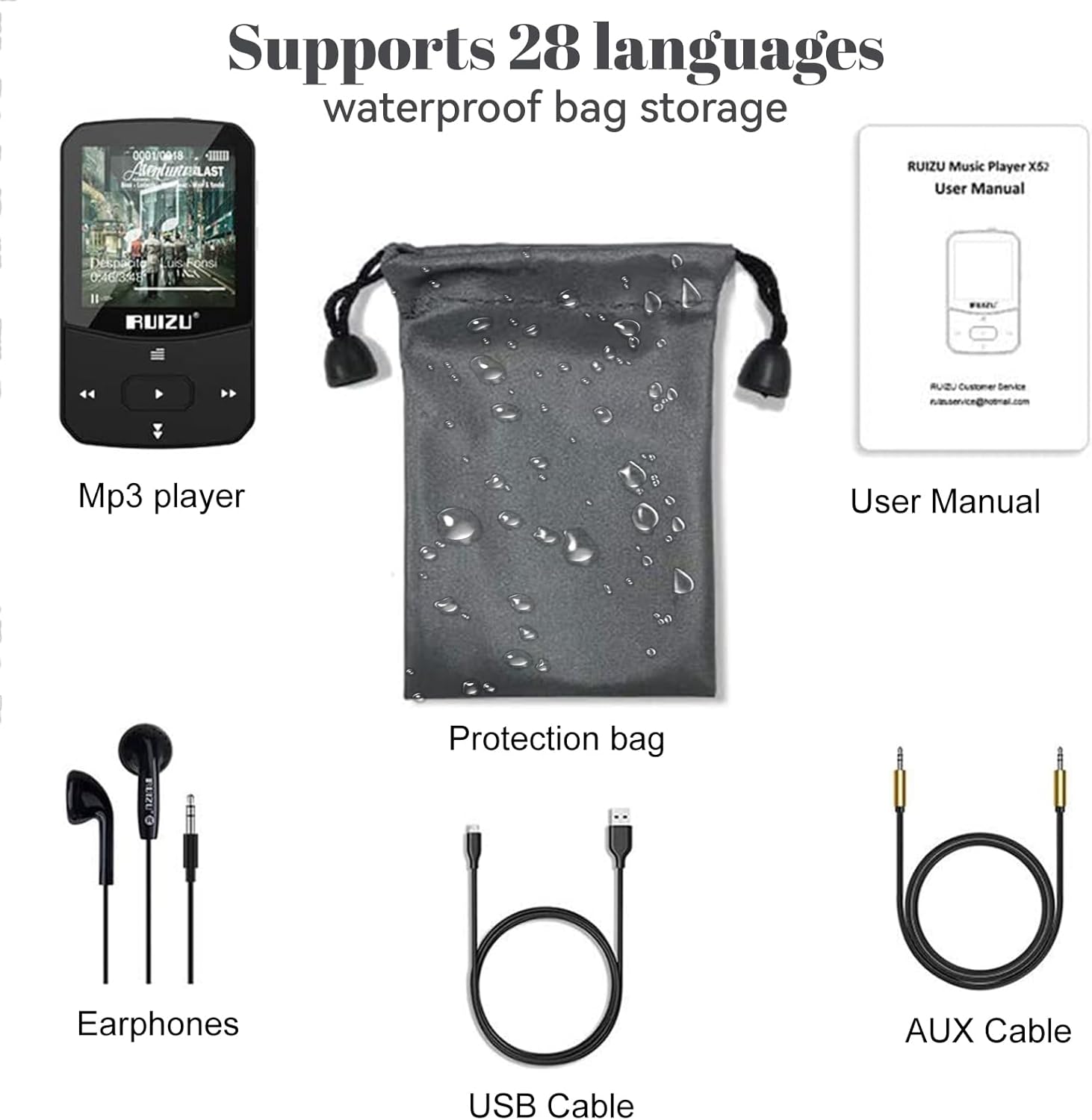
Image: All included accessories for the RUIZU X52 MP3 Player, including the player, earphones, cables, and protection bag.
3. ഉൽപ്പന്നം കഴിഞ്ഞുview
The RUIZU X52 features a user-friendly interface and physical buttons for easy control. Familiarize yourself with the device's layout:
3.1. ഉപകരണ ലേഔട്ട്
- 1.5-ഇഞ്ച് TFT കളർ സ്ക്രീൻ: Displays menus, music information, videos, and e-books.
- വോളിയം ബട്ടണുകൾ (+/-): Located on the side for independent volume control.
- നാവിഗേഷൻ ബട്ടണുകൾ: Play/Pause, Next/Previous Track, Menu, Back.
- ക്ലിപ്പ്: Integrated clip for attaching the player to clothing or accessories.
- മൈക്രോ യുഎസ്ബി പോർട്ട്: ചാർജിംഗിനും ഡാറ്റ കൈമാറ്റത്തിനും.
- 3.5mm ഓഡിയോ ജാക്ക്: For connecting wired earphones or AUX cable.
- ടിഎഫ് കാർഡ് സ്ലോട്ട്: Supports external memory expansion up to 128GB.

Image: The RUIZU X52 MP3 Player being worn with its portable clip, demonstrating its use during physical activity.
4. സജ്ജീകരണം
4.1 ഉപകരണം ചാർജ് ചെയ്യുന്നു
Before first use, fully charge the MP3 player. Connect the included USB cable to the device's Micro USB port and the other end to a computer's USB port or a compatible USB wall adapter (not included). The battery icon on the screen will indicate charging status. A full charge takes approximately 1.5 hours.
4.2. Transferring Music and Files
- യുഎസ്ബി കേബിൾ ഉപയോഗിച്ച് നിങ്ങളുടെ കമ്പ്യൂട്ടറിലേക്ക് MP3 പ്ലെയർ ബന്ധിപ്പിക്കുക.
- നിങ്ങളുടെ കമ്പ്യൂട്ടറിൽ ഉപകരണം നീക്കം ചെയ്യാവുന്ന ഒരു ഡിസ്ക് ഡ്രൈവായി ദൃശ്യമാകും.
- Drag and drop your desired music files (MP3, WAV, APE, WMA, FLAC) or other supported files into the player's storage or a connected TF card.
- USB കേബിൾ വിച്ഛേദിക്കുന്നതിന് മുമ്പ് നിങ്ങളുടെ കമ്പ്യൂട്ടറിൽ നിന്ന് ഉപകരണം സുരക്ഷിതമായി പുറത്തെടുക്കുക.

Image: The RUIZU X52 MP3 Player highlighting its 64GB internal storage and the option to expand memory with a 128GB TF card.
4.3. Inserting/Removing TF Card
To expand storage, insert a TF (Micro SD) card into the designated slot until it clicks into place. To remove, gently push the card inward until it springs out.
5. പ്രവർത്തന നിർദ്ദേശങ്ങൾ
5.1. പവർ ഓൺ/ഓഫ്
Press and hold the Power button (usually the Play/Pause button) for a few seconds to turn the device on or off.
5.2. അടിസ്ഥാന നാവിഗേഷൻ
- ഉപയോഗിക്കുക മുകളിലേക്ക് / താഴേക്ക് navigation buttons to scroll through menus.
- അമർത്തുക പ്ലേ/താൽക്കാലികമായി നിർത്തുക ഒരു ഓപ്ഷൻ തിരഞ്ഞെടുക്കാൻ ബട്ടൺ.
- അമർത്തുക തിരികെ മുമ്പത്തെ സ്ക്രീനിലേക്ക് മടങ്ങാനുള്ള ബട്ടൺ.
- ഉപയോഗിക്കുക വോളിയം +/- buttons on the side to adjust audio levels.
5.3. സംഗീതം പ്ലേബാക്ക്
Navigate to the "Music" option on the main menu. You can browse by artist, album, genre, or all songs. The player supports MP3, WAV, APE, WMA, and FLAC formats. Adjust equalizer settings for personalized sound.
5.4. ബ്ലൂടൂത്ത് ജോടിയാക്കൽ
The RUIZU X52 features Bluetooth 5.0 for wireless audio. To pair with Bluetooth headphones or speakers:
- Go to the "Bluetooth" menu.
- ബ്ലൂടൂത്ത് ഓണാക്കുക.
- Select "Search Device" to find available Bluetooth devices.
- Choose your device from the list to pair.

Image: The RUIZU X52 MP3 Player screen showing the Bluetooth icon and version 5.0, indicating wireless connectivity.
5.5. എഫ്എം റേഡിയോ
Connect wired earphones (they act as the antenna) and navigate to the "FM Radio" menu. You can auto-scan for stations or manually tune to your preferred frequency (87.5-108MHz).

Image: A person using the RUIZU X52 MP3 Player to listen to FM radio while engaged in gardening, demonstrating its portability.
5.6. വോയ്സ് റെക്കോർഡർ
Select "Record" from the main menu to start, pause, or save voice recordings. Recordings are saved in a dedicated folder.
5.7. വീഡിയോ പ്ലേബാക്ക്
The device supports video playback. Ensure video files are in a compatible format for optimal viewing on the 1.5-inch screen.
5.8. E-book Reader
Access the "E-book" function to read text fileഎസ്. ഉറപ്പാക്കുക files are in a compatible format (e.g., TXT).
5.9. റിട്ടയർമീറ്റർ
Activate the pedometer function to track your steps during exercise. This feature is ideal for sports enthusiasts.
5.10. മറ്റ് പ്രവർത്തനങ്ങൾ
The RUIZU X52 also includes a Stopwatch, Alarm Clock, Calendar, Screensaver, Resume Playback, A-B Repeat, and Lyrics Synchronization. Explore these features through the main menu.

Image: The RUIZU X52 MP3 Player screen showing icons for Music, Recording, FM Radio, Bluetooth, Video, eBook, Stopwatch, Pedometer, A-B Repeat, Resume Playback, Lyrics Synchronization, and Time Screensaver.
5.11. Connecting to Car Audio
Use the included AUX cable to connect the MP3 player to your car's audio system or external speakers for a larger sound experience.
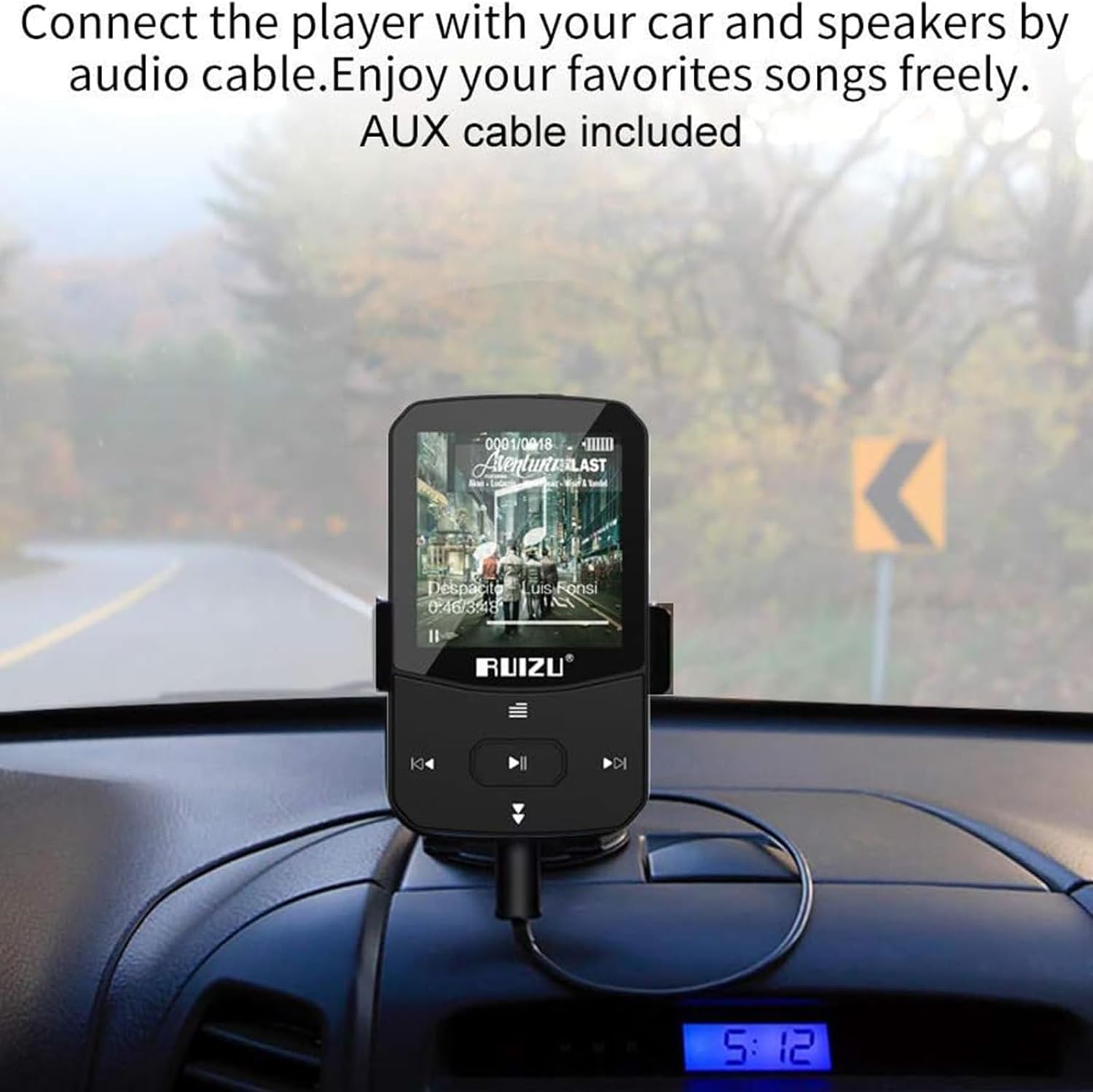
Image: The RUIZU X52 MP3 Player mounted on a car dashboard, connected to the car's audio system using an AUX cable.
6. പരിപാലനം
- ഉപകരണം വരണ്ടതായി സൂക്ഷിക്കുക. ഈർപ്പമോ ദ്രാവകങ്ങളോ സമ്പർക്കം പുലർത്തുന്നത് ഒഴിവാക്കുക.
- Clean the screen and body with a soft, dry cloth. Do not use abrasive cleaners.
- തീവ്രമായ താപനില ഒഴിവാക്കുക.
- ഉപകരണത്തെ ശക്തമായ ആഘാതങ്ങൾക്ക് വിധേയമാക്കുകയോ ഉപേക്ഷിക്കുകയോ ചെയ്യരുത്.
- Store the player in the provided protection bag when not in use.
7. പ്രശ്നപരിഹാരം
| പ്രശ്നം | സാധ്യമായ പരിഹാരം |
|---|---|
| ഉപകരണം പവർ ഓണാക്കുന്നില്ല. | ഉപകരണം പൂർണ്ണമായും ചാർജ് ചെയ്തിട്ടുണ്ടെന്ന് ഉറപ്പാക്കുക. ഒരു പവർ സ്രോതസ്സിലേക്ക് കണക്റ്റ് ചെയ്ത് വീണ്ടും ശ്രമിക്കുക. |
| കൈമാറാൻ കഴിയില്ല fileഉപകരണത്തിലേക്ക് എസ്. | Check USB cable connection. Ensure the device is properly recognized by the computer. Try a different USB port or cable. |
| ബ്ലൂടൂത്ത് ജോടിയാക്കൽ പരാജയപ്പെട്ടു. | Ensure the target Bluetooth device is in pairing mode and within range. Restart both devices and try again. |
| ഇയർഫോണുകളിൽ നിന്ന് ശബ്ദമൊന്നുമില്ല. | Check earphone connection. Ensure volume is not muted or too low. Test with different earphones. |
| സ്ക്രീൻ പ്രതികരിക്കുന്നില്ല അല്ലെങ്കിൽ നിശ്ചലമാണ്. | റീസ്റ്റാർട്ട് ചെയ്യാൻ പവർ ബട്ടൺ 10-15 സെക്കൻഡ് അമർത്തിപ്പിടിക്കുക. |
| സംഗീതം files are not recognized. | ഉറപ്പാക്കുക files are in a supported format (MP3, WAV, APE, WMA, FLAC). |
8 സ്പെസിഫിക്കേഷനുകൾ
- ബ്രാൻഡ്: റൂയിസു
- മോഡൽ: X52
- ആന്തരിക സംഭരണം: 64 ജിബി
- വികസിപ്പിക്കാവുന്ന സംഭരണം: TF കാർഡ് വഴി 128GB വരെ
- സ്ക്രീൻ: 1.5-inch TFT Color Display
- ബ്ലൂടൂത്ത് പതിപ്പ്: 5.0
- പിന്തുണയ്ക്കുന്ന ഓഡിയോ ഫോർമാറ്റുകൾ: MP3, WAV, APE, WMA, FLAC
- പിന്തുണയ്ക്കുന്ന വീഡിയോ ഫോർമാറ്റുകൾ: (Specific format not detailed, generally AMV/AVI converted)
- Supported E-book Format: ടെക്സ്റ്റ്
- എഫ്എം റേഡിയോ ഫ്രീക്വൻസി: 87.5-108MHz
- ബാറ്ററി തരം: ലിഥിയം-പോളിമർ
- ചാർജിംഗ് സമയം: ഏകദേശം 1.5 മണിക്കൂർ
- ബാറ്ററി ലൈഫ് (സംഗീത പ്ലേബാക്ക്): Up to 25 hours (wired), 6 hours (Bluetooth)
- Battery Life (Video Playback): 6 മണിക്കൂർ വരെ
- Battery Life (FM Radio): 8 മണിക്കൂർ വരെ
- ബാറ്ററി ലൈഫ് (റെക്കോർഡിംഗ്): 26 മണിക്കൂർ വരെ
- കണക്റ്റിവിറ്റി: ഓക്സിലറി, ബ്ലൂടൂത്ത്
- പ്രത്യേക സവിശേഷതകൾ: Voice Recorder, Pedometer, Clip Design, Independent Volume Button, Multi-language support (28 languages)

Image: Infographic detailing the battery life of the RUIZU X52 MP3 Player for various activities like music playback (wired and Bluetooth), video, FM radio, and recording.
9. വാറണ്ടിയും പിന്തുണയും
9.1. വാറൻ്റി വിവരങ്ങൾ
This product comes with a manufacturer's warranty. Please refer to the warranty card included in your package for specific terms and conditions. Keep your purchase receipt as proof of purchase.
9.2. ഉപഭോക്തൃ പിന്തുണ
For any product issues or technical assistance, please contact RUIZU customer service. You can typically find contact information on the product packaging or the official RUIZU website. The product listing mentions "100% satisfaction from 24 hours Online-Kundenservice. Bei Produktproblemen wenden Sie sich bitte direkt an Tihoosky." This suggests contacting the seller "Tihoosky-eu" for support.
വിൽപ്പനക്കാരൻ: Tihoosky-eu


