ഉൽപ്പന്നം കഴിഞ്ഞുview
The Fosmon Countdown Plug-in Timer is designed to provide convenient and customizable control over your electrical appliances and lights. Featuring dual grounded outlets, this timer allows you to set precise countdown durations, ensuring your devices turn on and off exactly when needed. It is ideal for a variety of indoor applications, enhancing energy efficiency and home security.

ചിത്രം: മുൻഭാഗം view of the Fosmon Countdown Plug-in Timer, showing the control buttons and dual outlets.
പ്രധാന സവിശേഷതകൾ:
- Customizable Countdown: Offers 55 possible countdown durations by combining multiple time buttons (15 Min, 30 Min, 1 Hour, 2 Hour, 4 Hour, 8 Hour).
- ഡ്യുവൽ ഗ്രൗണ്ടഡ് ഔട്ട്ലെറ്റുകൾ: Two accessible outlets that operate simultaneously.
- Easy to Program: Simple button-press interface for setting desired durations.
- Daily Repeat Function: Automatically repeats the set countdown program every day.
- മാനുവൽ ഓൺ/ഓഫ്: Override the programmed countdown for instant control.
- Internal Battery Backup: Maintains program settings during power failures.
- സുരക്ഷാ സാക്ഷ്യപ്പെടുത്തിയത്: ETL Listed with fire-resistant V-0 rated shell and grounded protection.
- വിശാലമായ അനുയോജ്യത: Supports up to 15A/1875W, 1/2 HP, compatible with incandescent, CFL, and LED lights.
സജ്ജീകരണ ഗൈഡ്
Follow these steps to set up your Fosmon Countdown Plug-in Timer.
Video: Official setup guide for the Fosmon Plug-In Countdown Timer, demonstrating how to program and use its features.
Step 1: Plug in the Timer
Insert the Fosmon Countdown Plug-in Timer into a standard grounded wall outlet. Ensure it is securely plugged in. The timer has an internal battery backup that will maintain your settings in case of a power outage. If the internal battery completely depletes, the timer will reset.

Image: The timer plugged into an outlet, highlighting its compact design, 15A max load capacity, and built-in battery backup.
പ്രവർത്തന നിർദ്ദേശങ്ങൾ
Setting a Countdown Program
To set a countdown, press the desired time buttons (15 Min, 30 Min, 1 Hour, 2 Hour, 4 Hour, 8 Hour) in quick succession (within 2 seconds of the last button press) to combine them for a total duration. The blue LED indicators on the buttons will light up to confirm your selection. For example, to set a 5 hour and 45 minute countdown, press the 15 Min, 30 Min, 1 Hour, and 4 Hour buttons. The timer will activate the connected device for the combined duration and then turn it off.
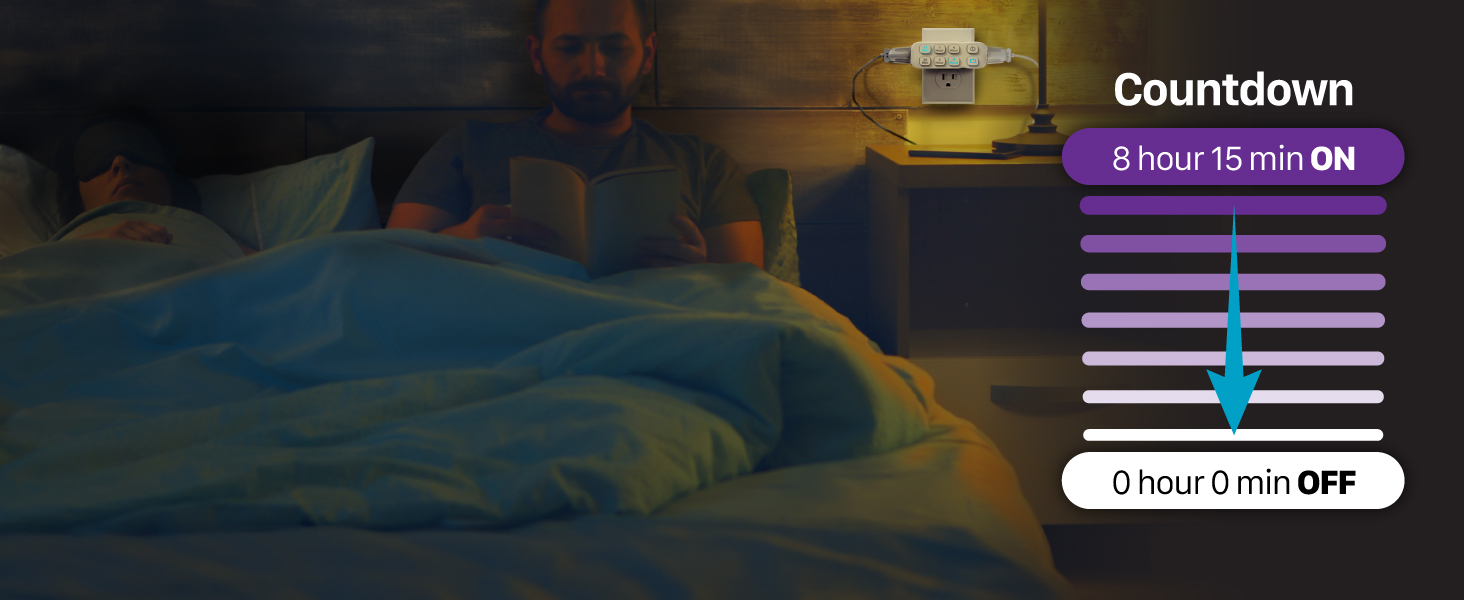
Image: Visual representation of a countdown timer in action, showing a device turning off after a set period.
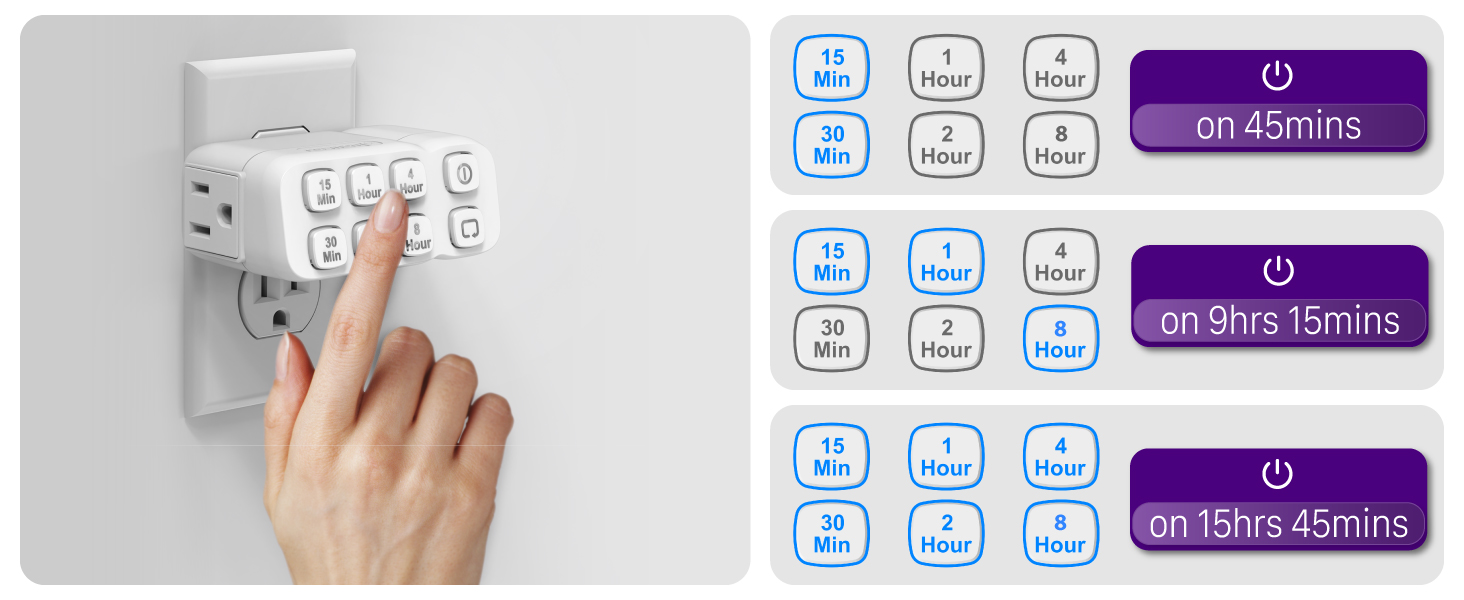
Image: Demonstrates how to combine different time buttons to achieve various countdown durations.
Daily Repeat Function
To enable the daily repeat function, press the 'Repeat' button (indicated by a circular arrow icon) while a countdown program is active. The repeat indicator will light up, signifying that the current program will automatically run at the same time every day. This is useful for daily routines, such as turning on lights at dusk or operating a coffee maker in the morning.
മാനുവൽ ഓൺ/ഓഫ് ബട്ടൺ
The manual ON/OFF button (power icon) allows you to override any active countdown or repeat program. Pressing this button will instantly turn the connected device ON or OFF, regardless of the programmed schedule. The timer device will remain in this manual state until the button is pressed again or a new countdown is initiated.
സുരക്ഷാ സവിശേഷതകൾ
The Fosmon Countdown Plug-in Timer is designed with multiple safety features to ensure reliable and secure operation:
- ETL സാക്ഷ്യപ്പെടുത്തിയത്: The timer is certified by ETL, confirming it meets rigorous safety standards for electrical products.
- ഗ്രൗണ്ടഡ് ഔട്ട്ലെറ്റുകൾ: The dual 3-prong grounded outlets provide protection against electrical shocks.
- Fire-Resistant Shell: The timer's housing is made from V-0 rated fire-resistant material, offering enhanced safety.
- ഓവർലോഡ് സംരക്ഷണം: Rated at 15A/1875W, the timer is designed to handle common household appliances safely.

ചിത്രം: പൊട്ടിത്തെറിച്ച ഒരു view of the timer highlighting its internal components and safety certifications.

Image: Depicts the timer's use in home security by automatically controlling lights to simulate occupancy.
ഒന്നിലധികം ഉപയോഗങ്ങൾ
The versatility of the Fosmon Countdown Plug-in Timer makes it suitable for a wide range of applications:

Image: Timer in use with a plant grow light and an electric bike charger.

ചിത്രം: ഉദാamples of timer applications including aquariums, grow lights, lamps, and holiday decorations.
- Seasonal Lights: Perfect for Christmas trees, string lights, and other holiday decorations.
- Lamps & Fans: Automate lighting and air circulation in bedrooms, living rooms, or offices.
- ചാർജറുകൾ: Prevent overcharging of electronic devices.
- Coffee Makers & Slow Cookers: Have your beverages or meals ready at a specific time.
- Plant Grow Lights & Aquariums: Maintain consistent light cycles for optimal plant growth or aquatic environments.
- Hair Appliances: Ensure curling irons, straighteners, and hair dryers turn off automatically for safety.
സ്പെസിഫിക്കേഷനുകൾ
| ആട്രിബ്യൂട്ട് | വിശദാംശങ്ങൾ |
|---|---|
| മോഡൽ നമ്പർ | C-10803FFUS |
| ബ്രാൻഡ് | ഫോസ്മോൻ |
| നിറം | വെള്ള |
| മെറ്റീരിയൽ | പ്ലാസ്റ്റിക് |
| ഇനത്തിൻ്റെ ഭാരം | 6.4 ഔൺസ് |
| പാക്കേജ് അളവുകൾ | 4.57 x 3.62 x 2.24 ഇഞ്ച് |
| ഇലക്ട്രിക്കൽ റേറ്റിംഗ് | 125V/15A 1875W, 1/2 HP |
| സർട്ടിഫിക്കേഷൻ | ETL ലിസ്റ്റുചെയ്തിരിക്കുന്നു |
| യു.പി.സി | 879565007065 |
ട്രബിൾഷൂട്ടിംഗ്
If you encounter issues with your Fosmon Countdown Plug-in Timer, please refer to the following common solutions:
- ടൈമർ പ്രതികരിക്കുന്നില്ല: Ensure the timer is securely plugged into a live outlet. Check if the internal battery has run out, which may cause the timer to reset. Re-program the desired countdown.
- Program Not Activating: Verify that the blue LED indicators on the selected time buttons are lit, confirming the program is set correctly. If using the daily repeat function, ensure the repeat indicator is on.
- Device Not Turning ON/OFF: Check the manual ON/OFF button. If it's pressed, it will override the program. Press it again to return to programmed operation. Ensure the connected device is properly plugged into the timer's outlets and is functioning correctly.
- പവർ ഓtage: The timer has an internal battery backup to retain settings during short power interruptions. For extended outages, the timer may reset once power is restored. Re-program if necessary.
- ഓവർലോഡ്: If the connected device exceeds the timer's 15A/1875W rating, the timer may not function or could be damaged. Ensure the load is within specified limits.
വാറൻ്റിയും പിന്തുണയും
Fosmon stands by the quality of its products. This product comes with a പരിമിതമായ ആജീവനാന്ത വാറൻ്റി. For any inquiries or support needs, please contact our dedicated US-based customer service team. We are committed to providing 24/7 free customer support to ensure your satisfaction.
Fosmon is a trusted brand on Amazon since 2007, serving over 100 million satisfied customers. We are a Minnesota Registered Small Business with Federal SAM and 889 Certification.
For more information or to register your product, please visit the official Fosmon Store: Fosmon Store on Amazon