1. ആമുഖം
This manual provides essential information for the proper setup, operation, and maintenance of your Tele System SMART24 LS2 A11 24-inch Android Smart TV. Please read it thoroughly before using the product to ensure safe and efficient operation.
2. ബോക്സിൽ എന്താണുള്ളത്?
എല്ലാ ഘടകങ്ങളും ഉണ്ടെന്ന് ഉറപ്പാക്കുക:
- Tele System SMART24 LS2 A11 Smart TV
- റിമോട്ട് കൺട്രോൾ
- പവർ കേബിൾ
- ദ്രുത ആരംഭ ഗൈഡ്
- വാറന്റി പേപ്പർ
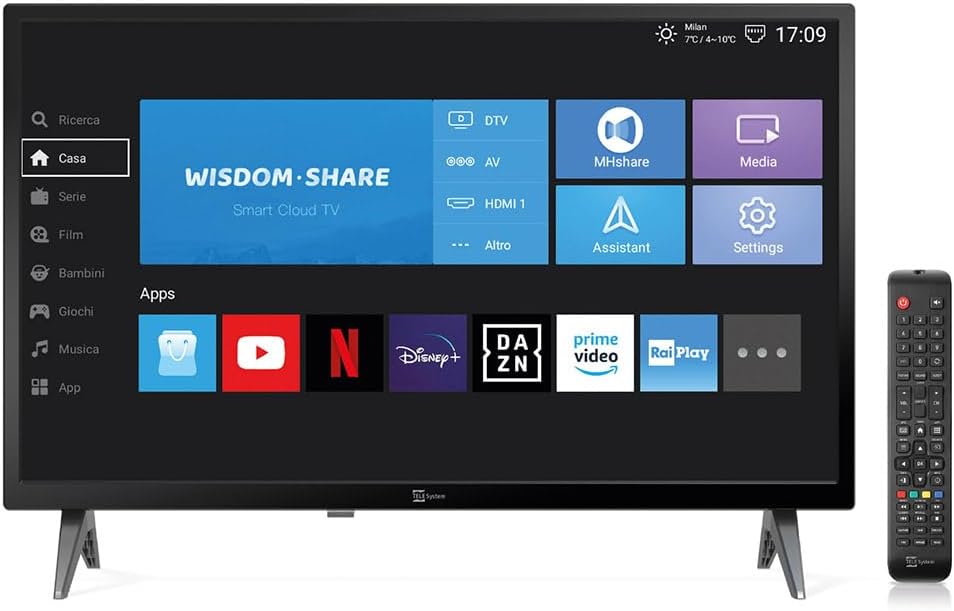
Image: The Tele System SMART24 LS2 A11 Smart TV displaying its home screen, with the included remote control positioned to the right. This illustrates the main components and initial user interface.
3. സജ്ജീകരണം
3.1. പായ്ക്ക് ചെയ്യലും പ്ലേസ്മെന്റും
- ടിവി അതിന്റെ പാക്കേജിംഗിൽ നിന്ന് ശ്രദ്ധാപൂർവ്വം നീക്കം ചെയ്യുക.
- Place the TV on a stable, flat surface or mount it on a wall using a compatible VESA 100x100 wall mount (sold separately).
- ടിവിക്ക് ചുറ്റും മതിയായ വായുസഞ്ചാരം ഉറപ്പാക്കുക.
3.2. പവർ ബന്ധിപ്പിക്കുന്നു
Connect the power cable to the TV's power input and then to a suitable electrical outlet (100-240V AC). While the product description mentions 12/220V, the specifications indicate 100-240V AC. Ensure the power source matches the TV's requirements.
3.3. പ്രാരംഭ സജ്ജീകരണ വിസാർഡ്
ആദ്യമായി പവർ-ഓൺ ചെയ്യുമ്പോൾ, ടിവി നിങ്ങളെ ഒരു പ്രാരംഭ സജ്ജീകരണ വിസാർഡിലൂടെ നയിക്കും. ഇതിൽ ഇവ ഉൾപ്പെടുന്നു:
- ഭാഷ തിരഞ്ഞെടുക്കൽ.
- നെറ്റ്വർക്ക് കണക്ഷൻ (വൈ-ഫൈ അല്ലെങ്കിൽ ഇതർനെറ്റ്).
- Channel scanning for DVB-T2 (Digital Terrestrial) and Satellite channels.
- Tivùsat LCN channel numbering setup (if applicable).
4. പ്രവർത്തന നിർദ്ദേശങ്ങൾ
4.1 റിമോട്ട് കൺട്രോൾ ഓവർview

Image: The standard remote control for the Tele System Smart TV, showing various buttons for power, numbers, volume, channel, navigation, and smart TV functions.
Familiarize yourself with the remote control buttons for power, volume, channel selection, navigation, and smart TV functions.
4.2. Android Smart TV Features
Your TV runs on Android AOSP, providing access to a wide range of applications.
- ആപ്പ് ആക്സസ്: Navigate to the "Apps" section on the home screen to download and use applications like Prime Video, YouTube, Disney Plus, and DAZN.
- സ്ക്രീൻ മിററിംഗ്: Use the mirroring function to share content from your mobile devices (smartphone, tablet) to the TV screen. This includes photos, videos, and music.
- MHshare App: Download the free MHshare app on your smartphone to use it as an additional remote control for your TV.

Image: The Smart TV displaying a streaming service interface with various movie and series titles, demonstrating the Android app capabilities.

Image: The Smart TV screen displaying "Mirroring" with an arrow pointing from a smartphone icon to the TV, illustrating the screen mirroring function.
4.3. TV Pause (USB)
The TV Pause function allows you to temporarily pause live TV broadcasts. To use this feature:
- Connect an external USB memory stick (not included) to the TV's USB port.
- While watching live TV, press the 'Play/Pause' button on your remote control to pause the program.
- Press 'Play' again to resume.

Image: A TV screen displaying a "TV Pause" overlay with playback controls, indicating the functionality to pause live television.
4.4. Digital Terrestrial (DVB-T2) and Satellite (Tivùsat LCN)
The TV supports DVB-T2 for digital terrestrial broadcasts and satellite reception. It features a CI+ slot for maximum compatibility with TELE System certified Tivùsat CAMs, enhancing viewing quality and experience.
- ചാനൽ തിരയൽ: The TV allows for satellite channel search with Tivùsat HD classification.
- CI+ സ്ലോട്ട്: Insert a compatible CI+ module (e.g., Tivùsat CAM) into the CI+ slot for access to encrypted channels.
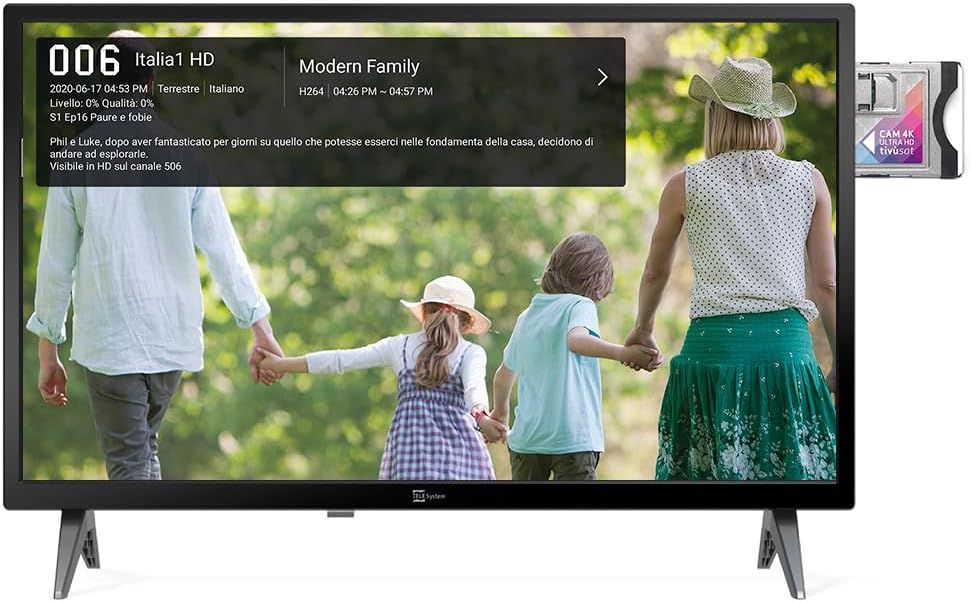
Image: The Smart TV displaying channel information for "Italia 1 HD" and a CI+ module inserted into the side, indicating support for encrypted satellite channels.
4.5. ഹോട്ടൽ മോഡ്
The Hotel Mode function is designed for use in hospitality environments. It allows for specific settings to be pre-defined:
- Set maximum audio levels.
- Determine the default channel upon power-on.
- Adjust the initial volume when the unit is turned on.
- Select the default source signal.
5. പരിപാലനം
5.1. വൃത്തിയാക്കൽ
- വൃത്തിയാക്കുന്നതിന് മുമ്പ് എപ്പോഴും ടിവി അൺപ്ലഗ് ചെയ്യുക.
- സ്ക്രീനും കാബിനറ്റും തുടയ്ക്കാൻ മൃദുവായതും ഉണങ്ങിയതുമായ തുണി ഉപയോഗിക്കുക.
- കഠിനമായ അടയാളങ്ങൾക്ക്, നേരിയ dampവെള്ളം അല്ലെങ്കിൽ നേരിയതും ഉരച്ചിലുകളില്ലാത്തതുമായ സ്ക്രീൻ ക്ലീനർ ഉപയോഗിച്ച് തുണി വൃത്തിയാക്കുക.
- കഠിനമായ രാസവസ്തുക്കളോ ഉരച്ചിലുകളോ ഉപയോഗിക്കുന്നത് ഒഴിവാക്കുക.
5.2. സംഭരണം
If storing the TV for an extended period, ensure it is kept in a cool, dry place, protected from dust and extreme temperatures.
6. പ്രശ്നപരിഹാരം
നിങ്ങൾക്ക് പ്രശ്നങ്ങൾ നേരിടുകയാണെങ്കിൽ, ഇനിപ്പറയുന്ന പൊതുവായ പരിഹാരങ്ങൾ പരിശോധിക്കുക:
- ശക്തിയില്ല: പവർ കേബിൾ ടിവിയിലേക്കും പവർ ഔട്ട്ലെറ്റിലേക്കും സുരക്ഷിതമായി ബന്ധിപ്പിച്ചിട്ടുണ്ടോയെന്ന് പരിശോധിക്കുക. ഔട്ട്ലെറ്റ് പ്രവർത്തനക്ഷമമാണെന്ന് ഉറപ്പാക്കുക.
- ചിത്രം/ശബ്ദം ഇല്ല: Verify the correct input source is selected. Check cable connections for external devices. For broadcast channels, perform a channel scan.
- റിമോട്ട് കൺട്രോൾ പ്രവർത്തിക്കുന്നില്ല: ബാറ്ററികൾ മാറ്റിസ്ഥാപിക്കുക. റിമോട്ടിനും ടിവിയുടെ ഐആർ സെൻസറിനും ഇടയിൽ തടസ്സങ്ങളൊന്നുമില്ലെന്ന് ഉറപ്പാക്കുക.
- നെറ്റ്വർക്ക് കണക്ഷൻ പ്രശ്നങ്ങൾ: Check your Wi-Fi router or Ethernet cable. Try restarting the TV and your router.
- സോഫ്റ്റ്വെയർ തകരാറുകൾ: Perform a factory reset (refer to the TV's settings menu for this option). Note that a factory reset will erase all personal settings and installed apps.
7 സ്പെസിഫിക്കേഷനുകൾ
Below are the technical specifications for the Tele System SMART24 LS2 A11 Smart TV:
| ഫീച്ചർ | വിശദാംശങ്ങൾ |
|---|---|
| മോഡൽ നമ്പർ | TELE System SMART24 LS2 A11 2022 |
| സ്ക്രീൻ വലിപ്പം | 23.6 ഇഞ്ച് (60 സെ.മീ) |
| ഡിസ്പ്ലേ ടെക്നോളജി | എൽഇഡി |
| റെസലൂഷൻ | 720p (1366 x 768) |
| പുതുക്കിയ നിരക്ക് | 60 Hz |
| ഓപ്പറേറ്റിംഗ് സിസ്റ്റം | Android AOSP |
| കണക്റ്റിവിറ്റി | ഇഥർനെറ്റ്, വൈ-ഫൈ |
| വീക്ഷണാനുപാതം | 16:9 |
| അളവുകൾ (സ്റ്റാൻഡിനൊപ്പം) | 60.4 x 37.5 x 10.5 സെ.മീ |
| ഭാരം | 3 കി.ഗ്രാം |
| ഊർജ്ജ കാര്യക്ഷമത റേറ്റിംഗ് | E |
| പവർ ഇൻപുട്ട് | 100-240V, 50/60Hz (AC) |
| പ്രത്യേക സവിശേഷതകൾ | TV Pause (USB), Digital Terrestrial DVB-T2, Satellite, Tivùsat LCN, Hotel Mode, Screen Mirroring |

Image: A detailed table listing the technical specifications of the SMART24 LS2 A11 TV, including display size, resolution, operating system, and connectivity options.

Image: The EU Energy Label for the Tele System SMART24 LS2 A11, showing an energy efficiency rating of 'E' and power consumption details. For more information, visit eprel.ec.europa.eu/qr/1183185.
8. വാറൻ്റിയും പിന്തുണയും
Your Tele System SMART24 LS2 A11 TV comes with a standard manufacturer's warranty. Please refer to the included Warranty Paper for specific terms and conditions.
For technical support, service, or further inquiries, please visit the official Tele System website or contact their customer service department. Contact information can typically be found in the Quick Start Guide or on the manufacturer's webസൈറ്റ്.
Official Tele System Webസൈറ്റ്: www.telesystem-world.com


