1. ആമുഖം
This manual provides detailed instructions for the installation, configuration, and operation of your NICGIGA 6-Port 2.5G Web Smart Managed Ethernet Switch, model S25-0501-M. This device is designed to enhance your network with high-speed connectivity and advanced management features.
The switch features five 100/1000/2500Mbps RJ45 Ethernet ports and one 10G SFP+ uplink port, offering a total switching capacity of 60Gbps. It supports various Layer 2 management functions including VLAN, QoS, Multicast, MAC address management, and Link Aggregation (LAG).
2. പാക്കേജ് ഉള്ളടക്കം
പാക്കേജിൽ എല്ലാ ഇനങ്ങളും ഉണ്ടെന്ന് ഉറപ്പാക്കുക:
- NICGIGA S25-0501-M 6-Port 2.5G Web സ്മാർട്ട് നിയന്ത്രിത ഇഥർനെറ്റ് സ്വിച്ച്
- പവർ അഡാപ്റ്റർ
- ദ്രുത ആരംഭ ഗൈഡ്
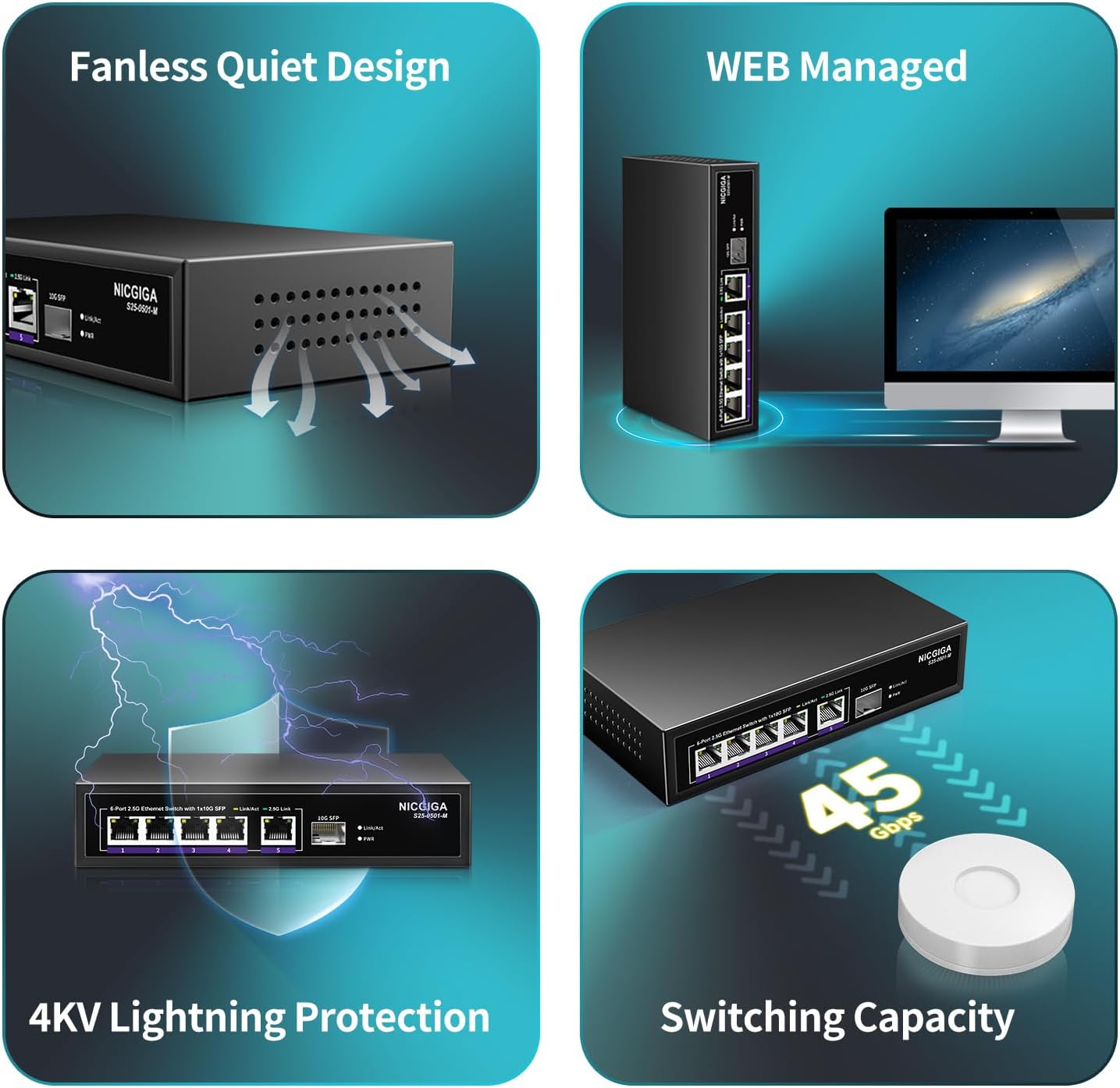
Image: The package contents, showing the S25-0501-M switch, power adapter, and quick start guide.
3. ഉൽപ്പന്നം കഴിഞ്ഞുview
3.1 ഫ്രണ്ട് പാനൽ

Image: Front panel of the NICGIGA S25-0501-M switch.
The front panel features five 2.5 Gigabit Ethernet ports (RJ45) and one 10 Gigabit SFP+ port. Each RJ45 port includes Link/Act indicators:
- മഞ്ഞ LED: Indicates 10/100/1000Mbps link/activity.
- പച്ച LED: Indicates 2.5Gbps link/activity.
The SFP+ port also has a Link/Act indicator. A Power LED indicates the device's operational status.
3.2 പിൻ പാനൽ

Image: Rear panel of the NICGIGA S25-0501-M switch.
The rear panel includes the DC power input (12V 1A) and a reset button. The reset button can be used to restore factory default settings.
3.3 പ്രധാന സവിശേഷതകൾ
- ഹൈ-സ്പീഡ് കണക്റ്റിവിറ്റി: Five 2.5Gbps RJ45 ports and one 10Gbps SFP+ uplink port for high-bandwidth applications.
- Web Smart Management: Provides Layer 2 management features including VLAN, QoS, Multicast (IGMP), MAC address management, Static Aggregation (LAG), and port mirroring.
- യാന്ത്രിക ചർച്ച: Automatically detects and adjusts link speed (100Mb/1G/2.5G) for optimal performance and compatibility.
- ഫാനില്ലാത്ത ഡിസൈൻ: Ensures quiet operation, suitable for various environments.
- 4KV മിന്നൽ സംരക്ഷണം: Enhances device durability and reliability.

Image: Visual representation of the switch's fanless design, web management, lightning protection, and switching capacity.
4. സജ്ജീകരണവും ഇൻസ്റ്റാളേഷനും
4.1 ഫിസിക്കൽ ഇൻസ്റ്റലേഷൻ
- പവർ കണക്ഷൻ: Connect the provided power adapter to the DC input port on the rear panel of the switch, then plug the adapter into a power outlet. The Power LED on the front panel will illuminate.
- നെറ്റ്വർക്ക് കണക്ഷനുകൾ: Connect your network devices (e.g., PCs, NAS, WiFi 6 routers, wireless APs) to the RJ45 ports (1-5) using Ethernet cables. For high-speed backbone connections, use the 10G SFP+ port with a compatible SFP+ module (not included).
- വാൾ മൗണ്ടിംഗ് (ഓപ്ഷണൽ): The switch features two wall-hanging holes on the bottom for flexible placement. Securely mount the switch using appropriate screws (not included) if desired.
Image: Wall mount design and dimensions of the switch.
4.2 പ്രാരംഭം Web ഇന്റർഫേസ് ആക്സസ്
ആക്സസ് ചെയ്യാൻ web management interface for configuration:
- Connect Directly: Connect a computer directly to one of the switch's RJ45 ports using an Ethernet cable.
- IP വിലാസം കോൺഫിഗർ ചെയ്യുക: Ensure your computer's IP address is on the same subnet as the switch's default IP address. The default IP address for the NICGIGA S25-0501-M switch is typically 192.168.1.199. You may need to manually set your computer's IP address (e.g., 192.168.1.100) and subnet mask (255.255.255.0).
- പ്രവേശനം Web ബ്രൗസർ: എ തുറക്കുക web browser and enter the switch's default IP address (
http://192.168.1.199/) വിലാസ ബാറിലേക്ക്. - ലോഗിൻ: Enter the default username and password (refer to the Quick Start Guide or product documentation for default credentials, often 'admin'/'admin' or similar).
Note: If you cannot access the web interface, ensure your computer's network settings are compatible with the switch's default IP range. If the IP address has been changed, you may need to perform a factory reset to revert to default settings.
5. സ്വിച്ച് പ്രവർത്തിപ്പിക്കൽ
ഒരിക്കൽ ലോഗിൻ ചെയ്തു web management interface, you can configure various network settings. The interface provides options for:
- VLAN (വെർച്വൽ ലോക്കൽ ഏരിയ നെറ്റ്വർക്ക്): മെച്ചപ്പെട്ട സുരക്ഷയ്ക്കും പ്രകടനത്തിനുമായി നിങ്ങളുടെ നെറ്റ്വർക്കിനെ വിഭാഗീകരിക്കുക.
- QoS (സേവന നിലവാരം): നിർണായക ആപ്ലിക്കേഷനുകൾക്കായി നെറ്റ്വർക്ക് ട്രാഫിക്കിന് മുൻഗണന നൽകുക.
- Multicast (IGMP Snooping): മൾട്ടികാസ്റ്റ് ട്രാഫിക് ഡെലിവറി ഒപ്റ്റിമൈസ് ചെയ്യുക.
- Link Aggregation (LAG/Trunk): ബാൻഡ്വിഡ്ത്തും ആവർത്തനവും വർദ്ധിപ്പിക്കുന്നതിന് ഒന്നിലധികം ഫിസിക്കൽ ലിങ്കുകൾ ഒരൊറ്റ ലോജിക്കൽ ലിങ്കിലേക്ക് സംയോജിപ്പിക്കുക.
- പോർട്ട് മിററിംഗ്: Monitor network traffic by sending a copy of packets from one port to another.
- MAC Address Management: Control access based on MAC addresses.

ചിത്രം: കഴിഞ്ഞുview പിന്തുണച്ചത് web മാനേജ്മെന്റ് പ്രവർത്തനങ്ങൾ.
Refer to the detailed online documentation or the full user manual (if available from NICGIGA's website) for specific configuration steps for each feature.
6. പരിപാലനം
6.1 പൊതു പരിചരണം
- Keep the switch in a cool, dry environment, away from direct sunlight and heat sources.
- ഉപകരണത്തിന് ചുറ്റും ശരിയായ വായുസഞ്ചാരം ഉറപ്പാക്കുക.
- Clean the exterior with a soft, dry cloth. Avoid using liquid cleaners.
6.2 ഫേംവെയർ അപ്ഡേറ്റുകൾ
Periodically check the NICGIGA official webസൈറ്റ് (www.nicgiga.com) for firmware updates. Firmware updates can provide new features, performance improvements, and security enhancements.
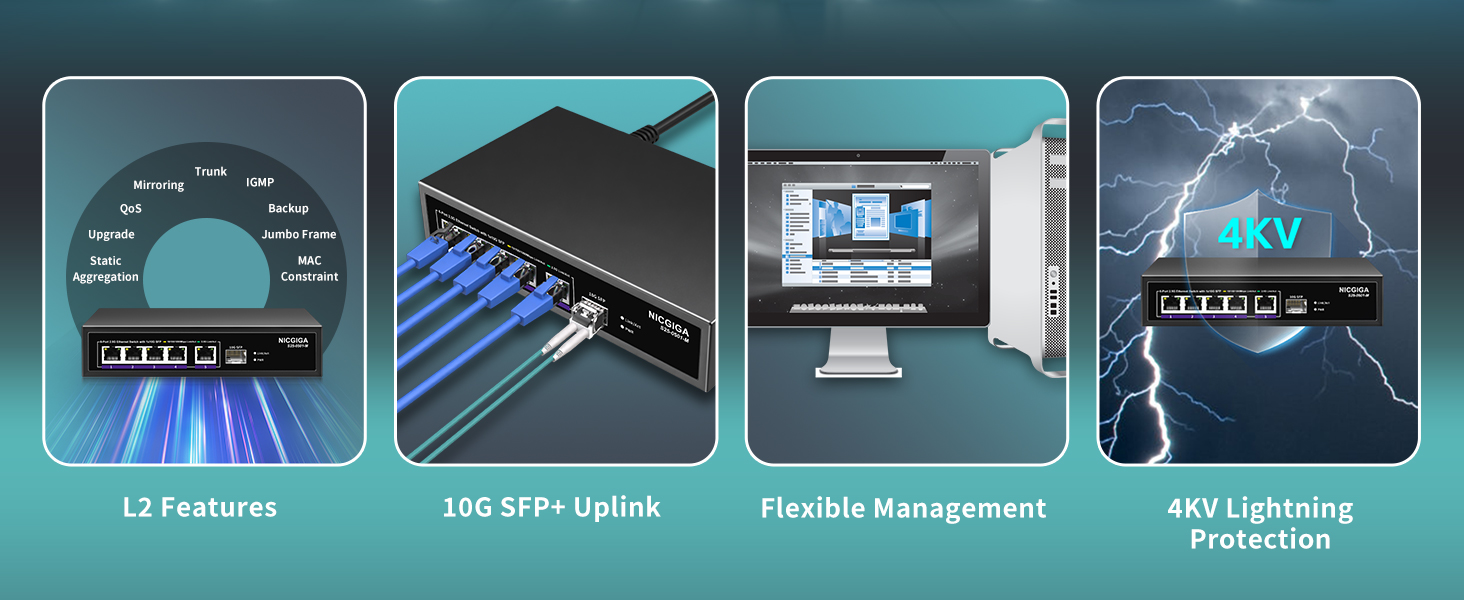
Image: Illustration of checking for firmware updates on the NICGIGA webസൈറ്റ്.
7. പ്രശ്നപരിഹാരം
7.1 ആക്സസ് ചെയ്യാൻ കഴിയില്ല Web ഇൻ്റർഫേസ്
- Verify IP Address: Ensure your computer's IP address is on the same subnet as the switch (default: 192.168.1.199).
- ശാരീരിക ബന്ധം പരിശോധിക്കുക: Confirm that the Ethernet cable is securely connected between your computer and the switch.
- പവർ സൈക്കിൾ: Disconnect and reconnect the power to the switch.
- ഫാക്ടറി പുന et സജ്ജമാക്കുക: If the IP address was changed and forgotten, perform a factory reset by pressing and holding the reset button on the rear panel for approximately 5-10 seconds while the device is powered on. This will revert all settings to their defaults, including the IP address.
- ബ്രൗസർ പ്രശ്നങ്ങൾ: മറ്റൊന്ന് പരീക്ഷിക്കുക web browser or clear your browser's cache.
7.2 Intermittent Web Interface Responsiveness
Some users have reported that the web interface may become unresponsive after extended periods of operation, even if network traffic continues to pass through the switch. If this occurs:
- Reboot the Switch: Perform a power cycle (disconnect and reconnect power) to restore access to the web ഇൻ്റർഫേസ്.
7.3 Low Network Speed
- Check Cable Quality: Ensure you are using Cat5e or Cat6 Ethernet cables for 2.5G connections, and Cat6a or higher for 10G SFP+ connections (with appropriate SFP+ modules).
- ഉപകരണ അനുയോജ്യത: Verify that connected devices (NICs, routers) support 2.5G or 10G speeds.
- Port Indicators: Observe the Link/Act LEDs. A green LED indicates a 2.5Gbps connection on RJ45 ports.
8 സ്പെസിഫിക്കേഷനുകൾ
| ഫീച്ചർ | വിശദാംശങ്ങൾ |
|---|---|
| മോഡൽ നമ്പർ | S25-0501-M |
| ഇൻ്റർഫേസ് തരം | 5x 100/1000/2500Mbps RJ45, 1x 10Gbps SFP+ |
| സ്വിച്ചിംഗ് കപ്പാസിറ്റി | 60Gbps |
| ഡാറ്റ കൈമാറ്റ നിരക്ക് | 10 Gigabits Per Second (max) |
| മാനേജ്മെൻ്റ് | Web Smart Managed (L2 features: VLAN, QoS, IGMP, LAG, etc.) |
| സ്വയമേവയുള്ള ചർച്ച | Supported (100Mb/1G/2.5G) |
| കേസ് മെറ്റീരിയൽ | ലോഹം |
| തണുപ്പിക്കൽ | ഫാനില്ലാത്തത് |
| മിന്നൽ സംരക്ഷണം | 4കെ.വി |
| ഉൽപ്പന്ന അളവുകൾ | 9.84 x 7.87 x 3.15 ഇഞ്ച് |
| ഇനത്തിൻ്റെ ഭാരം | 1.21 പൗണ്ട് |
| പവർ ഇൻപുട്ട് | DC 12V 1A (Adapter Input: AC 110-240V) |
| അനുയോജ്യമായ ഉപകരണങ്ങൾ | Desktop, Laptop, Wireless Access Point, NAS |
9. വാറൻ്റിയും പിന്തുണയും
NICGIGA provides a one-year warranty for this product, covering manufacturing defects and malfunctions under normal use. Additionally, lifetime technical support is available to assist you with any questions or issues you may encounter.
For technical assistance, warranty claims, or further inquiries, please contact NICGIGA support through their official webസൈറ്റ് അല്ലെങ്കിൽ നിങ്ങളുടെ ക്വിക്ക് സ്റ്റാർട്ട് ഗൈഡിൽ നൽകിയിരിക്കുന്ന കോൺടാക്റ്റ് വിവരങ്ങൾ.


