FOREO PEACH 2 go IPL Hair Removal Device
ഉപയോക്തൃ മാനുവൽ
ആമുഖം
The FOREO PEACH 2 go is a compact and powerful Intense Pulsed Light (IPL) device designed for effective and comfortable at-home hair removal. It utilizes advanced IPL technology to disrupt the hair regrowth cycle, leading to visibly smoother skin over time. This manual provides essential information for safe and optimal use of your device.

Image: The FOREO PEACH 2 go device in lavender, shown with its packaging, highlighting its compact design.
സുരക്ഷാ വിവരങ്ങൾ
Please read all safety warnings and instructions thoroughly before using the FOREO PEACH 2 go device. Failure to follow these instructions could result in injury or damage to the device.
- ഉപയോഗിക്കരുത് if you have medical conditions such as skin cancer, lesions, epilepsy, vascular disorders, immunosuppressive disorders, skin allergies to light, or diabetes.
- ഉപയോഗിക്കരുത് if you are pregnant or breastfeeding.
- Avoid use near damaged skin, piercings, tattoos, injection sites, pacemakers, or implants.
- Always perform a patch test before full treatment to check for adverse reactions.
- ഉപകരണം കുട്ടികൾക്ക് ലഭ്യമാകാതെ സൂക്ഷിക്കുക.

Image: A chart illustrating suitable skin tones and hair colors for effective and safe IPL treatment. Darker skin tones and very light or grey hair colors are generally not suitable.
സജ്ജമാക്കുക
Before first use, you must unlock and register your FOREO PEACH 2 go device via the FOREO For You mobile app.
- നിങ്ങളുടെ മൊബൈൽ ഫോണിൽ FOREO For You ആപ്പ് ഡൗൺലോഡ് ചെയ്യുക.
- നിങ്ങളുടെ നിലവിലുള്ള അക്കൗണ്ടിലേക്ക് ലോഗിൻ ചെയ്യുക അല്ലെങ്കിൽ പുതിയതിനായി സൈൻ അപ്പ് ചെയ്യുക.
- Add your device within the app (usually found at the top of the screen).
- Select your device series.
- Follow the on-screen instructions in the app and fill in the required purchase information.
Once these steps are completed, your device is ready for use.

Image: A visual guide detailing the steps to unlock and register your FOREO device using the mobile application.
പ്രവർത്തന നിർദ്ദേശങ്ങൾ
Preparation for Treatment
- Shave the area of skin you wish to treat.
- Apply FOREO PEACH Cooling Prep Gel to the shaved area. This gel helps cool and calm the skin while enabling the device to glide smoothly.

Image: A woman applying the FOREO PEACH Cooling Prep Gel to her arm before starting the IPL treatment.
Performing the Treatment
- Plug in your PEACH 2 go device.
- Select the desired treatment intensity. This can be adjusted via the FOREO app or directly on the device. Start with the lowest intensity level and gradually increase as tolerated.
- For smaller, precise areas (e.g., bikini zone, underarms, face), use Stamp മോഡ് by pressing the device firmly against the skin and flashing.
- For larger areas (e.g., legs, arms), use ഗ്ലൈഡ് മോഡ് by holding the flash button and slowly gliding the device across the skin, ensuring continuous contact. The device delivers up to 120 flashes per minute for quick coverage.

Image: A user demonstrating the application of the FOREO PEACH 2 go device on their leg, highlighting its ease of use for full-body treatments.
The device features a 360° skin-cooling system to ensure comfort during treatment by cooling the treated skin and pre-cooling the upcoming area.
ചികിത്സാ ഷെഡ്യൂൾ
For optimal results, follow this recommended treatment schedule:
- Phase 1: Initial Treatments (6 Treatments)
Treat each desired area once every 2 weeks for a total of 12 weeks.
- ഘട്ടം 2: അറ്റകുറ്റപ്പണികൾ
After the initial 12 weeks, use the device once a month, or as required, until desired results are achieved.
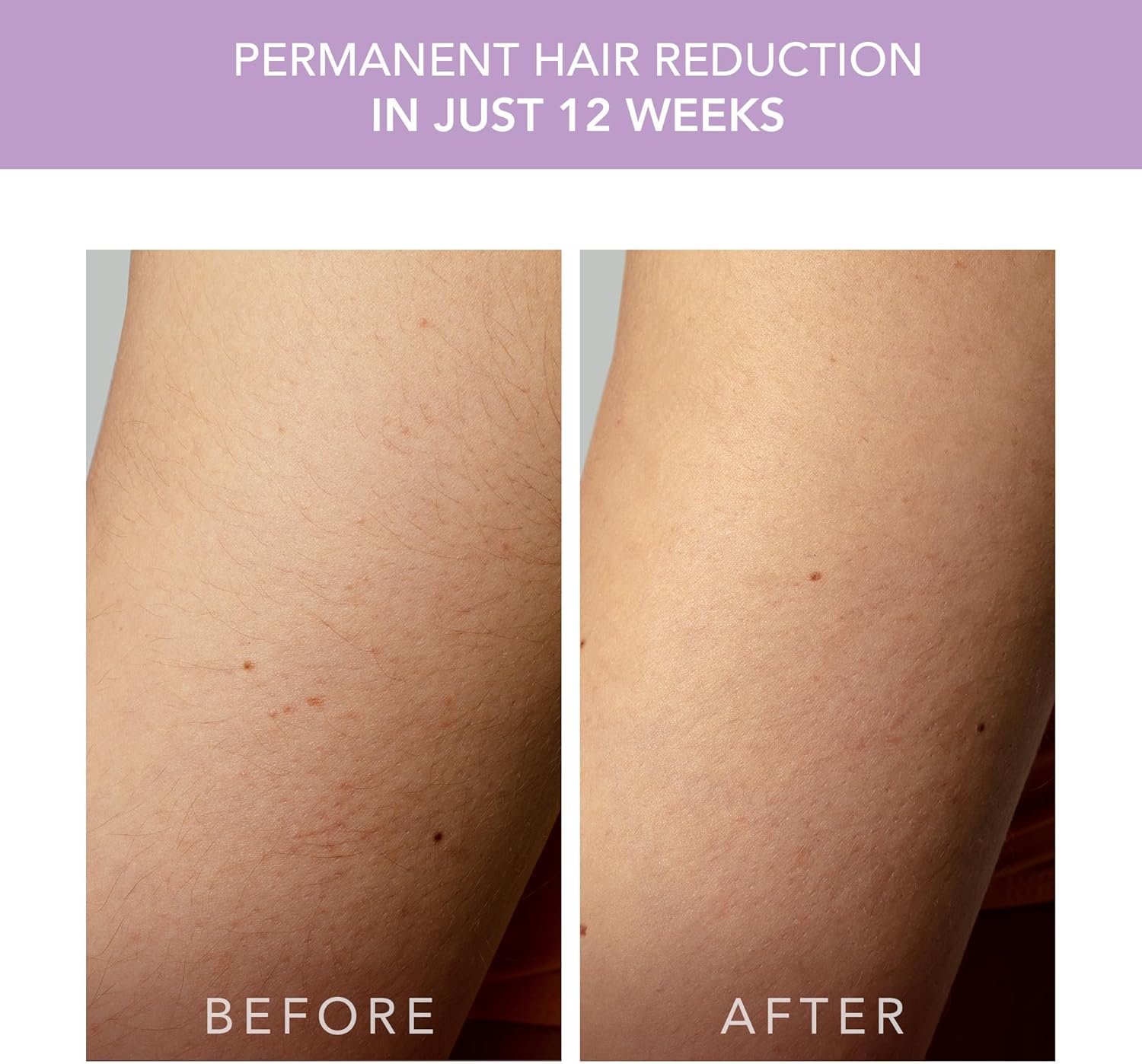
Image: Before and after comparison demonstrating visible hair reduction after consistent use of the device over 12 weeks.
Typical treatment times for a full body session are approximately 10 minutes, with specific areas taking less time:
- കാലുകൾ: 3 മിനിറ്റ്
- ആയുധങ്ങൾ: 3 മിനിറ്റ്
- Armpits: 2 മിനിറ്റ്
- Bikini: 1 മിനിറ്റ്
- മുഖം: 1 മിനിറ്റ്
മെയിൻ്റനൻസ്
To ensure the longevity and optimal performance of your FOREO PEACH 2 go device, follow these maintenance guidelines:
- After each use, wipe the treatment window and the device body with a soft, damp cloth. Ensure no gel residue remains.
- Do not use abrasive cleaners or alcohol-based solutions, as these can damage the device.
- നേരിട്ടുള്ള സൂര്യപ്രകാശത്തിൽ നിന്നും കടുത്ത താപനിലയിൽ നിന്നും മാറി തണുത്തതും വരണ്ടതുമായ സ്ഥലത്ത് ഉപകരണം സൂക്ഷിക്കുക.
- Keep the device and its power supply clean and free from dust.
ട്രബിൾഷൂട്ടിംഗ്
If you encounter any issues with your FOREO PEACH 2 go, refer to the following common problems and their solutions:
| പ്രശ്നം | പരിഹാരം |
|---|---|
| ഉപകരണം ഓണാക്കുന്നില്ല. |
|
| ഫ്ലാഷ് ബട്ടൺ പ്രതികരിക്കുന്നില്ല. |
|
| The device won't sync to the FOREO app. |
|
| The device, treatment window, power supply, or cable are damaged, broken, cracked, or appear defective. | ഉപയോഗിക്കരുത്. If you are in any doubt about the safety of the device or suspect it is damaged in any way, it must not be used. Refer to the official FOREO website for support or contact customer service. |
സ്പെസിഫിക്കേഷനുകൾ
- ഉൽപ്പന്ന അളവുകൾ: 2.76 x 7.09 x 7.87 ഇഞ്ച്; 1.76 പൗണ്ട്
- ഇനം മോഡൽ നമ്പർ: F1894
- ബാറ്ററികൾ: 1 ലിഥിയം അയോൺ ബാറ്ററി ആവശ്യമാണ് (ഉൾപ്പെടുത്തിയിരിക്കുന്നു)
- നിർമ്മാതാവ്: ഫോറിയോ
- ASIN: B0CNKDFS5R
- ഫ്ലാഷുകൾ: Up to 500,000 flashes (estimated 35 years of use)
- Treatment Window: 9 സെ.മീ
- Flash Speed: 120 flashes/min
വാറൻ്റിയും പിന്തുണയും
For warranty information, product registration, and customer support, please visit the official FOREO webസൈറ്റിൽ ബന്ധപ്പെടുകയോ അവരുടെ ഉപഭോക്തൃ സേവനവുമായി നേരിട്ട് ബന്ധപ്പെടുകയോ ചെയ്യുക. വാറന്റി ക്ലെയിമുകൾക്കായി നിങ്ങളുടെ വാങ്ങിയതിന്റെ തെളിവ് സൂക്ഷിക്കുക.
നിങ്ങൾക്ക് കൂടുതൽ വിവരങ്ങളും പിന്തുണയും ഇവിടെ കണ്ടെത്താനാകും FOREO Brand Store.
For product authenticity verification, you may use the UPC: 7350120791894.