1. പ്രധാന സുരക്ഷാ നിർദ്ദേശങ്ങൾ
Please read and understand all safety instructions before operating this product. Keep this manual for future reference.
- മഴ, ഈർപ്പം, അല്ലെങ്കിൽ തീവ്രമായ താപനില എന്നിവയിൽ യൂണിറ്റ് തുറന്നുകാട്ടരുത്.
- റേഡിയേറ്ററുകൾ, ഹീറ്റ് രജിസ്റ്ററുകൾ, സ്റ്റൗകൾ അല്ലെങ്കിൽ ചൂട് ഉൽപ്പാദിപ്പിക്കുന്ന മറ്റ് ഉപകരണങ്ങൾ പോലുള്ള താപ സ്രോതസ്സുകൾക്ക് സമീപം യൂണിറ്റ് സ്ഥാപിക്കുന്നത് ഒഴിവാക്കുക.
- നിർമ്മാതാവ് വ്യക്തമാക്കിയ അറ്റാച്ച്മെൻ്റുകൾ/ആക്സസറികൾ മാത്രം ഉപയോഗിക്കുക.
- മിന്നൽ കൊടുങ്കാറ്റുകളുടെ സമയത്തോ ദീർഘനേരം ഉപയോഗിക്കാത്ത സമയത്തോ ഈ യൂണിറ്റ് അൺപ്ലഗ് ചെയ്യുക.
- യോഗ്യതയുള്ള സേവന ഉദ്യോഗസ്ഥർക്ക് എല്ലാ സേവനങ്ങളും റഫർ ചെയ്യുക. ഉപകരണം ഏതെങ്കിലും വിധത്തിൽ കേടുവരുമ്പോൾ സർവീസ് ആവശ്യമാണ്.
- യൂണിറ്റിന് ചുറ്റും ശരിയായ വായുസഞ്ചാരം ഉറപ്പാക്കുക. വെന്റിലേഷൻ ദ്വാരങ്ങളൊന്നും തടയരുത്.
- പവർ കോർഡ് നടക്കുകയോ നുള്ളുകയോ ചെയ്യുന്നതിൽ നിന്ന് സംരക്ഷിക്കുക.
2. പാക്കേജ് ഉള്ളടക്കം
താഴെ ലിസ്റ്റ് ചെയ്തിരിക്കുന്ന എല്ലാ ഇനങ്ങളും നിങ്ങളുടെ പാക്കേജിൽ ഉൾപ്പെടുത്തിയിട്ടുണ്ടെന്ന് ഉറപ്പാക്കുക:
- 1x syitren PARON II Record Player
- 1x ഉപയോക്തൃ മാനുവൽ
- 1x പൊടി കവർ
- 1x 12V AC Power Adapter

3. ഉൽപ്പന്നം കഴിഞ്ഞുview
Familiarize yourself with the main components of your syitren PARON II Record Player.


4. സജ്ജീകരണം
- യൂണിറ്റ് അൺപാക്ക് ചെയ്യുക: പാക്കേജിംഗിൽ നിന്ന് റെക്കോർഡ് പ്ലെയറും എല്ലാ അനുബന്ധ ഉപകരണങ്ങളും ശ്രദ്ധാപൂർവ്വം നീക്കം ചെയ്യുക.
- Place the Dust Cover: Position the dust cover onto the hinges at the back of the unit.
- പവർ ബന്ധിപ്പിക്കുക: Plug the 12V AC power adapter into the DC IN port on the back of the record player, then plug the adapter into a wall outlet.
- Adjust Counterweight: The tonearm features an adjustable counterweight. Carefully balance the tonearm so it floats horizontally. Then, rotate the counterweight to the recommended tracking force (refer to cartridge specifications, typically around 2.5g for the AT3600L). This ensures optimal sound quality and prevents record damage.
- ആന്റി-സ്കേറ്റിംഗ് ക്രമീകരണം: The anti-skating system helps prevent the stylus from skipping. Adjust this setting according to the instructions provided with the cartridge or by testing with a blank record.

5. പ്രവർത്തന നിർദ്ദേശങ്ങൾ
5.1 ഒരു വിനൈൽ റെക്കോർഡ് പ്ലേ ചെയ്യുന്നു
- പവർ ഓൺ: Turn the power knob to switch on the unit.
- വേഗത തിരഞ്ഞെടുക്കുക: Choose the appropriate speed (33 or 45 RPM) for your vinyl record using the speed selector switch.
- സ്ഥല രേഖ: Carefully place your vinyl record on the platter. If playing a 45 RPM single, use the included adapter.
- ലിഫ്റ്റ് ടോൺ ആം: ടോൺ ആം ഉയർത്താൻ ടോൺ ആം ലിഫ്റ്റ് ലിവർ ഉപയോഗിക്കുക.
- പൊസിഷൻ സ്റ്റൈലസ്: റെക്കോർഡിന്റെ ആവശ്യമുള്ള സ്റ്റാർട്ടിംഗ് ഗ്രൂവിന് മുകളിലൂടെ ടോൺആം സൌമ്യമായി നീക്കുക.
- താഴത്തെ ടോൺ ആം: ലിഫ്റ്റ് ലിവർ ഉപയോഗിച്ച് ടോൺആം പതുക്കെ താഴ്ത്തുക. സ്റ്റൈലസ് റെക്കോർഡുമായി സമ്പർക്കം സ്ഥാപിക്കുകയും പ്ലേബാക്ക് ആരംഭിക്കുകയും ചെയ്യും.
- വോളിയം ക്രമീകരിക്കുക: Use the volume knob to set the desired listening level.
The record player features an auto-stop function that will stop the platter approximately three minutes after the record ends. The tonearm will not auto-return.

5.2 ബ്ലൂടൂത്ത് കണക്റ്റിവിറ്റി
The syitren PARON II Record Player can receive audio wirelessly from Bluetooth-enabled devices.
- ബ്ലൂടൂത്ത് പ്രവർത്തനക്ഷമമാക്കുക: Switch the function selector to Bluetooth mode. The indicator light will flash, indicating it's in pairing mode.
- ഉപകരണം ജോടിയാക്കുക: On your smartphone, tablet, or other Bluetooth device, enable Bluetooth and search for available devices. Select "syitren PARON II" (or similar name) from the list.
- സ്ഥിരീകരണം: Once paired, the indicator light on the record player will stop flashing and remain solid. You can now stream audio from your device to the record player's built-in speakers.
5.3 External Audio Connections
The unit supports both Aux-in and RCA output for versatile audio connections.
- ഓക്സ്-ഇൻ: Connect an external audio source (e.g., MP3 player, CD player) to the AUX IN port using a 3.5mm audio cable. Select AUX mode on the record player to play audio from the connected device.
- ആർസിഎ putട്ട്പുട്ട്: Connect the RCA output jacks on the back of the record player to an external amplifier or powered speakers using RCA cables. This allows you to use the record player as a source for a larger audio system.
6. പരിപാലനം
6.1 സ്റ്റൈലസ് വൃത്തിയാക്കൽ
വൃത്തിയുള്ള ഒരു സ്റ്റൈലസ് ഒപ്റ്റിമൽ ശബ്ദ നിലവാരം ഉറപ്പാക്കുകയും നിങ്ങളുടെ റെക്കോർഡുകളുടെ ആയുസ്സ് വർദ്ധിപ്പിക്കുകയും ചെയ്യുന്നു. സ്റ്റൈലസ് വൃത്തിയാക്കലിനായി രൂപകൽപ്പന ചെയ്ത മൃദുവായ ബ്രഷ് ഉപയോഗിക്കുക, പിന്നിൽ നിന്ന് മുന്നിലേക്ക് സൌമ്യമായി ബ്രഷ് ചെയ്യുക.
6.2 യൂണിറ്റ് വൃത്തിയാക്കൽ
Wipe the unit with a soft, dry cloth. For stubborn marks, a slightly damp തുണി ഉപയോഗിക്കാം, തുടർന്ന് ഉണങ്ങിയ തുണി ഉപയോഗിക്കാം. ഉരച്ചിലുകൾ ഉള്ള ക്ലീനറുകളോ ലായകങ്ങളോ ഒഴിവാക്കുക.
6.3 പൊടി മൂടൽ സംരക്ഷണം
The dust cover protects your turntable. Clean it with a soft, lint-free cloth. Avoid harsh chemicals that may scratch or cloud the plastic.
7. പ്രശ്നപരിഹാരം
നിങ്ങൾക്ക് പ്രശ്നങ്ങൾ നേരിടുകയാണെങ്കിൽ, ഇനിപ്പറയുന്ന പൊതുവായ പ്രശ്നങ്ങളും പരിഹാരങ്ങളും പരിശോധിക്കുക:
| പ്രശ്നം | സാധ്യമായ പരിഹാരം |
|---|---|
| ശക്തിയില്ല | പവർ അഡാപ്റ്റർ യൂണിറ്റിലേക്കും പ്രവർത്തിക്കുന്ന ഒരു പവർ ഔട്ട്ലെറ്റിലേക്കും സുരക്ഷിതമായി ബന്ധിപ്പിച്ചിട്ടുണ്ടെന്ന് ഉറപ്പാക്കുക. |
| സ്പീക്കറുകളിൽ നിന്ന് ശബ്ദമില്ല | Check volume level. Ensure correct input mode (Phono, Aux, Bluetooth) is selected. |
| ശബ്ദം ഒഴിവാക്കൽ അല്ലെങ്കിൽ വികലമാക്കൽ | Clean the record and stylus. Re-adjust the tonearm counterweight and anti-skating. Ensure the record player is on a stable, level surface. |
| ബ്ലൂടൂത്ത് ജോടിയാക്കുന്നില്ല | Ensure the record player is in Bluetooth pairing mode. Disable and re-enable Bluetooth on your device. Move closer to the record player. |
പ്രശ്നങ്ങൾ നിലനിൽക്കുകയാണെങ്കിൽ, സഹായത്തിനായി ഉപഭോക്തൃ പിന്തുണയുമായി ബന്ധപ്പെടുക.
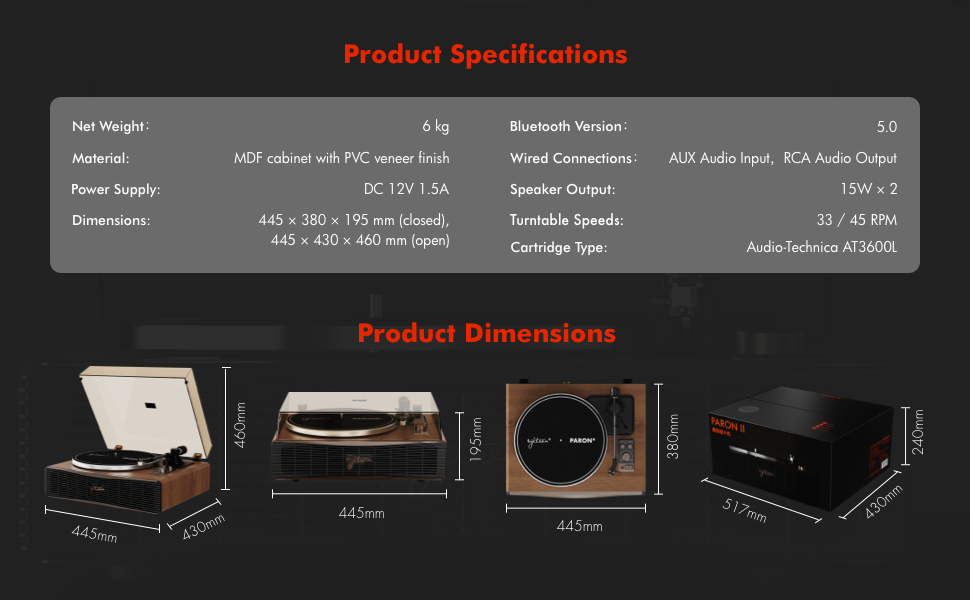
8 സ്പെസിഫിക്കേഷനുകൾ
| ഫീച്ചർ | വിശദാംശങ്ങൾ |
|---|---|
| മോഡലിൻ്റെ പേര് | PARON II |
| ഇനം മോഡൽ നമ്പർ | SN13 |
| ഉൽപ്പന്ന അളവുകൾ | 17.4 x 14.96 x 7.48 inches (445 x 380 x 195 mm closed) |
| ഇനത്തിൻ്റെ ഭാരം | 16 പൗണ്ട് (6 കി.ഗ്രാം) |
| മെറ്റീരിയൽ | MDF cabinet with PVC veneer finish (Wood, Metal, Plastic) |
| ടേൺ ചെയ്യാവുന്ന വേഗത | 33 1/3, 45 ആർപിഎം |
| കാട്രിഡ്ജ് തരം | Audio-Technica AT3600L (Magnet-type) |
| ബ്ലൂടൂത്ത് പതിപ്പ് | 5.0 |
| വയർഡ് കണക്ഷനുകൾ | AUX Audio Input, RCA Audio Output |
| സ്പീക്കർ ഔട്ട്പുട്ട് | 15W x 2 (Built-in 2.5" woofer and 2" tweeter) |
| വൈദ്യുതി വിതരണം | DC 12V 1.5A |
| പ്രത്യേക സവിശേഷതകൾ | Adjustable Counterweight, Built-In Speaker, Built-In Bluetooth Receiver, RCA Output, Suspension Shock Absorption System, S5 Motor System |
9. വാറൻ്റിയും പിന്തുണയും
The syitren PARON II Record Player is designed for reliable performance. For warranty information or technical support, please refer to the contact details provided with your purchase documentation or visit the official syitren webസൈറ്റ്.
ഏതെങ്കിലും വാറന്റി ക്ലെയിമുകൾക്കായി നിങ്ങളുടെ വാങ്ങിയതിന്റെ തെളിവ് സൂക്ഷിക്കുക.


