ആമുഖം
Thank you for choosing the OLIGHT Baton4 Premium Edition EDC Flashlights Bundle. This manual provides detailed instructions for the safe and effective operation, maintenance, and troubleshooting of your Baton4 flashlight and Oclip rechargeable light. Please read this manual thoroughly before use and retain it for future reference.
പാക്കേജ് ഉള്ളടക്കം
- OLIGHT Baton4 Flashlight
- Baton4 Charging Case
- Oclip Rechargeable Light
- USB-C ചാർജിംഗ് കേബിൾ
- ഉപയോക്തൃ മാനുവൽ
ഉൽപ്പന്നം കഴിഞ്ഞുview
The OLIGHT Baton4 Premium Edition offers a compact yet powerful lighting solution for everyday carry (EDC). It features a high-lumen flashlight and a versatile Oclip light, both rechargeable via a smart charging case that also functions as a power bank.
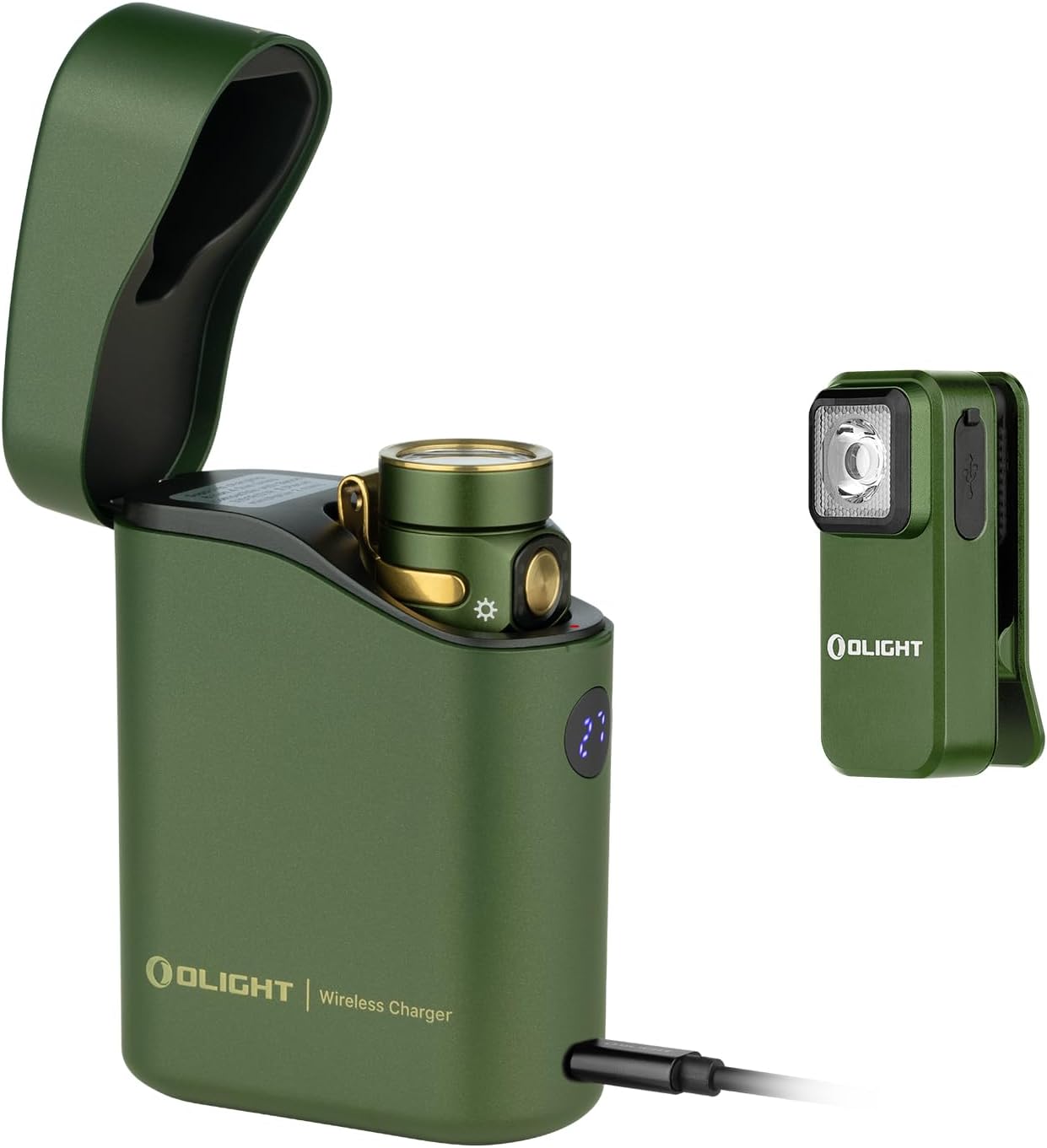
ചിത്രം 1: The OLIGHT Baton4 Premium Edition bundle, showing the Baton4 flashlight inside its charging case and the separate Oclip rechargeable light. Both are in an OD Green finish.

ചിത്രം 2: ക്ലോസ് അപ്പ് view of the OLIGHT Oclip rechargeable light, highlighting its compact design and integrated clip.
സ്പെസിഫിക്കേഷനുകൾ
| ഫീച്ചർ | വിശദാംശങ്ങൾ |
|---|---|
| പവർ ഉറവിടം | ബാറ്ററി പവർ (ലിഥിയം അയോൺ) |
| പ്രകാശ സ്രോതസ്സ് തരം | എൽഇഡി |
| മെറ്റീരിയൽ | ലോഹം |
| White Brightness (Baton4) | 1300 Lumens വരെ |
| ജല പ്രതിരോധ നില | വാട്ടർ റെസിസ്റ്റൻ്റ് അല്ല |
| Mounting Type (Oclip) | Clip-on, Magnetic |
| Charging Case Runtime | Up to 190 days for Baton4 |
| Charging Case Compatibility | Baton3, S1R II, Perun Mini, Perun 2 Mini |
സജ്ജമാക്കുക
പ്രാരംഭ ചാർജിംഗ്
- Charge the Baton4 Charging Case: Connect the provided USB-C cable to the charging case and a compatible USB power source. The digital display on the case will indicate the charging progress.
- Charge the Baton4 Flashlight: Place the Baton4 flashlight into the charging case. The case will automatically begin charging the flashlight.
- Charge the Oclip Light: The Oclip light has its own USB-C port. Connect it directly to a USB power source using the provided cable or a compatible USB-C cable.

ചിത്രം 3: The Baton4 charging case connected via USB-C to charge a mobile device, demonstrating its power bank functionality.
പ്രവർത്തന നിർദ്ദേശങ്ങൾ
Baton4 Flashlight Operation
- പവർ ഓൺ/ഓഫ്: Press the side switch once to turn the flashlight on or off.
- തെളിച്ച നില മാറ്റുക: When the flashlight is on, press and hold the side switch to cycle through brightness levels (Low, Medium, High). Release the switch at the desired brightness.
- ടർബോ മോഡ്: Double-press the side switch quickly to activate Turbo mode. Double-press again to return to the previous brightness level.
- മൂൺലൈറ്റ് മോഡ്: When the flashlight is off, press and hold the side switch for approximately one second to activate Moonlight mode.
- സ്ട്രോബ് മോഡ്: Triple-press the side switch quickly to activate Strobe mode. Press once to exit.
- ലോക്കൗട്ട്/അൺലോക്ക്: When the flashlight is off, press and hold the side switch for approximately two seconds until the moonlight mode turns on and then off. The flashlight is now locked out. To unlock, press and hold the side switch for approximately one second until the light briefly turns on.
Baton4 Charging Case Operation
- Charging Flashlight: Insert the Baton4 flashlight into the case. The case will automatically detect and charge the flashlight. The digital display shows the case's battery percentage.
- പവർ ബാങ്ക് പ്രവർത്തനം: Connect a mobile device to the USB-C port on the charging case using a compatible cable to use it as a power bank.
- Controlling Flashlight via Case: The case can be used to turn the flashlight on or off while it is docked. Opening the lid may activate the flashlight, and closing it will turn it off.

ചിത്രം 4: The Baton4 charging case open, showing the Baton4 flashlight docked inside. The digital display indicates the case's charge level.
Oclip Rechargeable Light Operation
- പവർ ഓൺ/ഓഫ്: Press the button once to turn the Oclip on or off.
- ലൈറ്റ് മോഡ് മാറ്റുക: When the Oclip is on, press the button to cycle through white light modes and red light modes.
- ബാറ്ററി സൂചകം: The indicator light on the Oclip shows battery status:
- പച്ച: >60% ബാറ്ററി
- Orange: 30%-60% battery
- Red: <30% battery
- ബഹുമുഖ മൗണ്ടിംഗ്: Use the integrated clip to attach the Oclip to clothing, belts, or other objects. The magnetic base allows attachment to metal surfaces.

ചിത്രം 5: Diagram illustrating the Oclip's battery indicator light colors (green, orange, red) for both non-charging and charging states.

ചിത്രം 6: Examples of Oclip usage, including daily illumination, warning signals (red light), and emergency lighting.
മെയിൻ്റനൻസ്
- വൃത്തിയാക്കൽ: Wipe the flashlight and charging case with a soft, damp തുണി. ഉരച്ചിലുകളുള്ള ക്ലീനറുകളോ ലായകങ്ങളോ ഉപയോഗിക്കരുത്.
- ബാറ്ററി കെയർ: For optimal battery life, charge the devices regularly. Avoid fully discharging the batteries for extended periods.
- സംഭരണം: ഉപകരണങ്ങൾ നേരിട്ട് സൂര്യപ്രകാശം ഏൽക്കാത്തതും ഉയർന്ന താപനില ഏൽക്കാത്തതുമായ തണുത്തതും വരണ്ടതുമായ സ്ഥലത്ത് സൂക്ഷിക്കുക.
ട്രബിൾഷൂട്ടിംഗ്
| പ്രശ്നം | സാധ്യമായ കാരണം | പരിഹാരം |
|---|---|---|
| ഫ്ലാഷ്ലൈറ്റ് ഓണാക്കുന്നില്ല | Low battery; Lockout mode activated; Faulty switch | Charge the flashlight; Unlock the flashlight (see Operating Instructions); Contact customer support if switch is faulty. |
| ചാർജിംഗ് കേസ് ചാർജുചെയ്യുന്നില്ല | USB-C cable not connected properly; Faulty cable/adapter | Ensure cable is securely connected; Try a different USB-C cable and power adapter. |
| Oclip not changing modes | Low battery; Button malfunction | Charge the Oclip; Contact customer support if button is unresponsive. |
വാറൻ്റിയും പിന്തുണയും
OLIGHT products are manufactured with high-quality materials and craftsmanship. For detailed warranty information and customer support, please refer to the official OLIGHT webസൈറ്റിൽ ബന്ധപ്പെടുക അല്ലെങ്കിൽ അവരുടെ ഉപഭോക്തൃ സേവനവുമായി നേരിട്ട് ബന്ധപ്പെടുക. വാറന്റി ക്ലെയിമുകൾക്കായി നിങ്ങളുടെ വാങ്ങൽ രസീത് സൂക്ഷിക്കുക.
Official OLIGHT Webസൈറ്റ്: www.olightstore.com


