1. ആമുഖം
The Ruggard EDC-180LC Electronic Dry Cabinet is designed to protect sensitive equipment such as cameras, lenses, photographic and optical instruments, and mobile electronics from excessive moisture, dirt, and dust. This cabinet features dual humidity zones, allowing for independent humidity control in the upper and lower compartments.
Its fast-acting TE Cooling Wafer technology regulates the interior's relative humidity from 60% down to 35%, effectively preventing corrosion and damage to delicate items. Humidity adjustments typically occur within a 1- to 3-hour period. The cabinet operates silently, without a fan or compressor, and eliminates the need for a water tray.
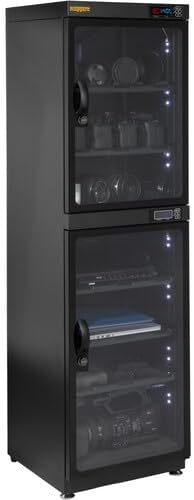
Figure 1.1: The Ruggard EDC-180LC Electronic Dry Cabinet in its closed state, showcasing the dual-zone design and integrated LCD displays.
2 സുരക്ഷാ വിവരങ്ങൾ
- Read all instructions before operating the dry cabinet.
- Do not expose the cabinet to direct sunlight, high temperatures, or high humidity environments.
- ടിപ്പിംഗ് തടയാൻ കാബിനറ്റ് ഒരു സ്ഥിരതയുള്ളതും നിരപ്പായതുമായ പ്രതലത്തിൽ സ്ഥാപിച്ചിട്ടുണ്ടെന്ന് ഉറപ്പാക്കുക.
- Do not block the ventilation openings on the cabinet.
- Only use the provided multi-voltagഇ വൈദ്യുതി വിതരണം.
- കുട്ടികൾക്ക് ലഭ്യമാകാതെ സൂക്ഷിക്കുക.
3. പാക്കേജ് ഉള്ളടക്കം
അൺപാക്ക് ചെയ്യുമ്പോൾ എല്ലാ ഘടകങ്ങളും ഉണ്ടെന്ന് ഉറപ്പാക്കുക:
- റഗ്ഗാർഡ് EDC-180LC ഇലക്ട്രോണിക് ഡ്രൈ കാബിനറ്റ്
- 5 x Adjustable Sliding Plastic Shelves
- 6 x Fitted Padded Shelf Liners
- 10 x Sliding Shelf Brackets
- മൾട്ടി-വോളിയംtagഇ പവർ സപ്ലൈ
- Combination Lock Pin (for setting combination)

Figure 3.1: The dry cabinet with its doors open, revealing the adjustable shelves, padded liners, and shelf brackets.
4. സജ്ജീകരണം
4.1 പ്ലേസ്മെൻ്റ്
- Choose a stable, level surface for the dry cabinet.
- Adjust the four leveling feet at the bottom of the cabinet to ensure stability and prevent unwanted movement. Two of the feet are specifically designed for leveling.
- Ensure adequate ventilation around the cabinet, especially near the top and bottom rear vents.

ചിത്രം 4.1: മുകളിൽ നിന്ന് താഴേക്ക് view of the cabinet, highlighting the ventilation grilles and the adjustable leveling feet for stable placement.
4.2 ഷെൽഫ് ഇൻസ്റ്റാളേഷൻ
- കാബിനറ്റ് വാതിലുകൾ തുറക്കുക.
- Insert the sliding shelf brackets into the desired slots on the interior side walls of the cabinet.
- Place the adjustable plastic shelves onto the installed brackets.
- Position the padded shelf liners onto each shelf to protect your equipment.
4.3 പവർ കണക്ഷൻ
- മൾട്ടി-വോൾ കണക്റ്റുചെയ്യുകtage power supply to the power input port located at the rear of the cabinet.
- Plug the power supply into a suitable electrical outlet.

ചിത്രം 4.2: മൾട്ടി-വോളിയംtage power supply unit provided with the dry cabinet.
4.4 Combination Lock Setup
Each door features a three-digit combination lock. To set your personal combination:
- With the lock in the open position (factory default is typically 0-0-0), locate the small reset button or pinhole on the side of the lock mechanism.
- Using the provided combination lock pin or a thin pointed object, press and hold the reset button.
- While holding the button, set your desired three-digit combination by rotating the dials.
- Release the reset button. Your new combination is now set. Test the combination before closing the door.
- There are over 900 possible combinations per lock.
5. പ്രവർത്തന നിർദ്ദേശങ്ങൾ
5.1 പവർ ഓൺ/ഓഫ്
Each humidity zone (upper and lower) has an independent power switch located near its respective control panel. Press the power switch to turn the zone on or off.
5.2 Setting Humidity Levels
The EDC-180LC features dual-zone climate control, allowing you to set different humidity levels for the upper and lower compartments independently. Each zone has its own control panel and LCD display.
- Locate the control panel for the desired zone (upper or lower).
- The LCD screen displays the current ambient temperature (in Fahrenheit or Celsius) and the relative humidity within that zone.
- Use the control buttons (typically labeled 'SET', 'UP', 'DOWN') to adjust the target relative humidity. Refer to the specific button functions on your unit's control panel.
- The cabinet will automatically work to achieve and maintain the set humidity level. Humidity adjustments can take 1 to 3 hours to stabilize.

Figure 5.1: A graphic illustrating the dual-zone humidity control feature and the easy-to-read LCD display for setting and monitoring humidity and temperature.
5.3 Using Interior LED Lighting
The cabinet is equipped with interior LED lights to improve visibility and make it easier to locate items. A switch for the LED lights is typically located near the control panel for each zone. Toggle the switch to turn the lights on or off.

Figure 5.2: The dry cabinet with its doors open, showcasing various items stored inside, illuminated by the interior LED lights.
6. പരിപാലനം
6.1 വൃത്തിയാക്കൽ
- വൃത്തിയാക്കുന്നതിന് മുമ്പ് വൈദ്യുതി വിതരണം വിച്ഛേദിക്കുക.
- Wipe the exterior of the cabinet with a soft, damp തുണി. ഉരച്ചിലുകൾ ഉണ്ടാക്കുന്ന ക്ലീനറുകളോ ലായകങ്ങളോ ഒഴിവാക്കുക.
- Clean the interior shelves and padded liners as needed.
- Ensure the cabinet is completely dry before reconnecting power.
6.2 Door Seal Inspection
Periodically inspect the door gaskets for any signs of wear or damage. A proper seal is crucial for maintaining consistent humidity levels within the cabinet and protecting against dust and dirt.
7. പ്രശ്നപരിഹാരം
- Cabinet Not Powering On: Ensure the power supply is securely connected to both the cabinet and a working electrical outlet. Check the independent power switches for each zone.
- Humidity Not Changing: Verify that the desired humidity level is set correctly on the control panel. Allow 1 to 3 hours for the humidity to stabilize. Ensure the cabinet doors are fully closed and the door seals are intact.
- Inaccurate Humidity/Temperature Display: If you suspect the readings are incorrect, ensure the cabinet is not exposed to extreme external conditions. Allow the unit to operate for several hours to stabilize.
- Combination Lock Issues: If you forget your combination, refer to the lock manufacturer's instructions or contact Ruggard customer support for assistance.
For further assistance, please refer to the Ruggard webസൈറ്റ് അല്ലെങ്കിൽ ഉപഭോക്തൃ പിന്തുണയുമായി ബന്ധപ്പെടുക.
8 സ്പെസിഫിക്കേഷനുകൾ
| ഫീച്ചർ | സ്പെസിഫിക്കേഷൻ |
|---|---|
| മോഡലിൻ്റെ പേര് | EDC-180LC |
| ബ്രാൻഡ് | റഗാർഡ് |
| ശേഷി | 180 Liters (approximate) |
| ഈർപ്പം നിയന്ത്രണ പരിധി | 60% മുതൽ 35% വരെ ആപേക്ഷിക ആർദ്രത |
| Humidity Adjustment Time | 1 മുതൽ 3 മണിക്കൂർ വരെ |
| Dehumidification Method | TE Cooling Wafer (Electronic) |
| സോണുകൾ | Dual, independently controlled |
| പ്രദർശിപ്പിക്കുക | LCD (Temperature in °F/°C, Relative Humidity) |
| സുരക്ഷ | Three-digit combination locks on each door |
| അലമാരകൾ | 5 x Adjustable Sliding Plastic Shelves with Padded Liners |
| ഇൻ്റീരിയർ ലൈറ്റിംഗ് | എൽഇഡി |
| മെറ്റീരിയൽ | ഗ്ലാസ്, സ്റ്റീൽ |
| ബാഹ്യ അളവുകൾ (പ x പാ x ഡി) | 15 x 53 x 15.4 ഇഞ്ച് (38.1 x 134.6 x 39.1 സെ.മീ) |
| Interior Dimensions (Top Section, W x H x D) | 14.9 x 21.4 x 14.1 ഇഞ്ച് (37.8 x 54.4 x 35.8 സെ.മീ) |
| Interior Dimensions (Bottom Section, W x H x D) | 14.9 x 27.1 x 14.1 ഇഞ്ച് (37.8 x 68.8 x 35.8 സെ.മീ) |
| ഇനത്തിൻ്റെ ഭാരം | 58.4 പൗണ്ട് (26.5 കി.ഗ്രാം) |
| വൈദ്യുതി വിതരണം | മൾട്ടി-വോളിയംtage (included) |
| യു.പി.സി | 847628562721 |
9. വാറൻ്റിയും പിന്തുണയും
For information regarding warranty coverage, please refer to the warranty card included with your product or visit the official Ruggard website. For technical support or service inquiries, please contact Ruggard customer service through their official channels.


