ഉൽപ്പന്നം കഴിഞ്ഞുview
The Keychron K10 Pro is a full-size (100% layout) custom wireless mechanical keyboard designed for versatility and performance. It features QMK/VIA support for extensive key remapping, dual wireless (Bluetooth 5.1) and wired (USB-C) connectivity, and a durable construction with pre-lubricated Keychron K Pro switches. This manual provides essential information for setting up, operating, and maintaining your K10 Pro keyboard.
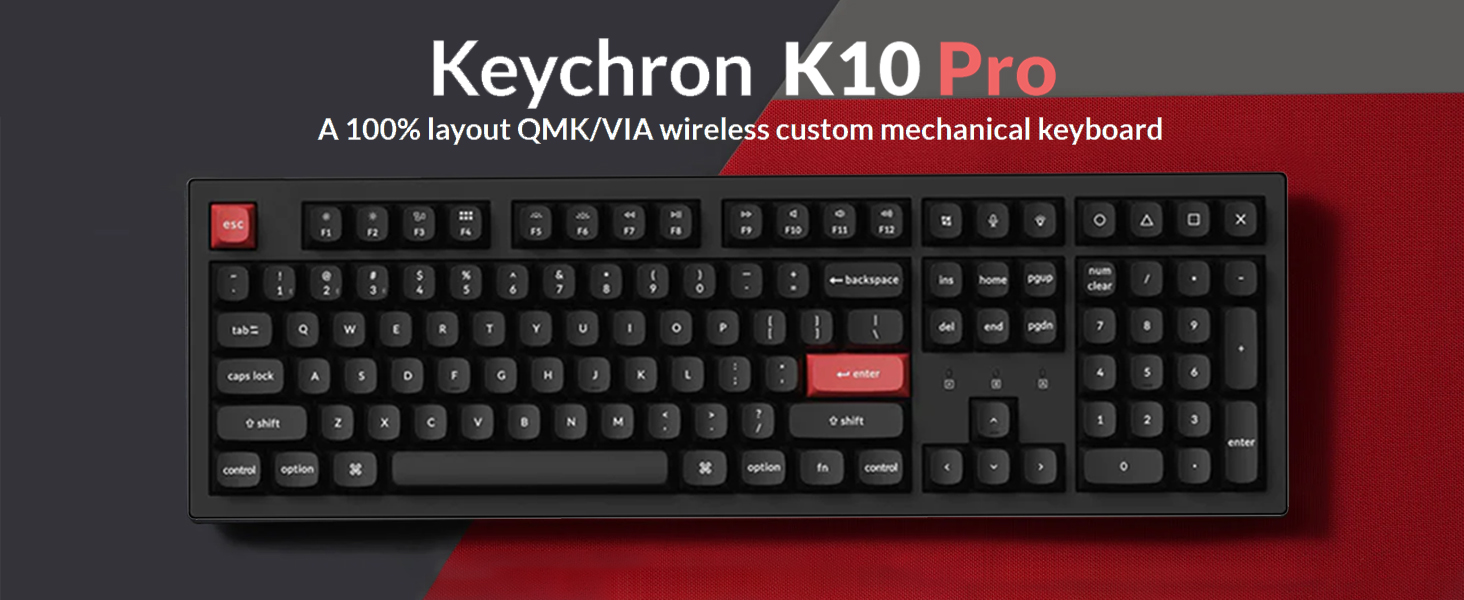
ചിത്രം: കീക്രോൺ കെ10 പ്രോ കീബോർഡ്, ഷോasing its full-size layout and design.
പ്രധാന സവിശേഷതകൾ:
- QMK/VIA Support: Fully programmable keys for custom layouts, macros, and shortcuts.
- ഇരട്ട കണക്റ്റിവിറ്റി: Seamless switching between Bluetooth 5.1 (up to 3 devices) and USB-C wired mode.
- Pre-lubed Keychron K Pro Switches: Ensures a smooth and consistent typing experience.
- മെച്ചപ്പെടുത്തിയ ടൈപ്പിംഗ് അനുഭവം: Features sound-absorbing foam, a silicone bottom pad, and a steel plate for improved acoustics and feel.
- വെളുത്ത ബാക്ക്ലൈറ്റ്: Offers 14 types of white backlight effects.
- എർഗണോമിക് ഡിസൈൻ: Three levels of adjustable typing angles (5°, 9.2°, and 12°).
- ഡ്യൂറബിൾ കീക്യാപ്പുകൾ: Double-shot PBT keycaps for longevity and resistance to shine.
സജ്ജീകരണ ഗൈഡ്
പാക്കേജ് ഉള്ളടക്കം:
ആരംഭിക്കുന്നതിന് മുമ്പ്, എല്ലാ ഘടകങ്ങളും ഉണ്ടെന്ന് ഉറപ്പാക്കുക:
- 1 Keychron K10 Pro Mechanical Keyboard
- 1 ABS Case
- 1 Hot-swap PCB
- 1 Steel Plate
- 1 Sound Absorbing Foam
- 1 Silicone Bottom Pad
- 7 Sets 2U Screw-In Stabilizers
- 1 Set 6.25U Screw-In Stabilizers
- 1 ടൈപ്പ്-എ മുതൽ ടൈപ്പ്-സി വരെ കേബിൾ
പ്രാരംഭ ചാർജിംഗ്:
Connect the keyboard to a power source using the provided USB-C cable. The battery indicator will show charging status. A full charge can last up to 100 hours with the lowest backlight brightness.

Image: The Keychron K10 Pro keyboard highlighting its 4000mAh battery capacity.
ഓപ്പറേറ്റിംഗ് സിസ്റ്റം സ്വിച്ച്:
Locate the OS switch on the side of the keyboard. Slide it to the appropriate position for your operating system (macOS or Windows/Linux). This ensures correct key mapping for your system.

Image: Close-up of the keyboard's side switch for macOS and Windows/Linux compatibility.
കണക്റ്റിവിറ്റി മോഡുകൾ:
കെ10 പ്രോ വയർലെസ് ബ്ലൂടൂത്ത്, വയർഡ് യുഎസ്ബി-സി കണക്ഷനുകളെ പിന്തുണയ്ക്കുന്നു.
- ബ്ലൂടൂത്ത് മോഡ്: Slide the mode switch to 'BT'. Press and hold 'Fn + 1' (or 'Fn + 2'/'Fn + 3') for 4 seconds to enter pairing mode. The key will flash rapidly. ഇതിനായി തിരയുക 'Keychron K10 Pro' on your device and connect.
- വയർഡ് മോഡ്: Slide the mode switch to 'Cable'. Connect the USB-C cable from the keyboard to your computer. The keyboard will automatically switch to wired mode.

Image: The Keychron K10 Pro keyboard shown with both Mac and Windows operating systems, indicating broad compatibility.
പ്രവർത്തന നിർദ്ദേശങ്ങൾ
Key Remapping with QMK/VIA:
The K10 Pro is fully programmable with QMK and VIA software. To remap keys or create macros:
- Download the VIA software from the Keychron official webസൈറ്റ്.
- Connect the K10 Pro to your device using the USB-C cable (wired mode is required for remapping).
- Open the VIA software. The software should automatically detect your keyboard.
- Drag and drop desired keys or macro commands to remap any key. Changes are saved directly to the keyboard's firmware and will work in both wired and wireless modes.

Image: A screenshot of the VIA software interface, demonstrating its drag-and-drop functionality for key customization.
ബാക്ക്ലൈറ്റ് നിയന്ത്രണം:
The K10 Pro features 14 types of white backlight effects. Use the dedicated backlight key (usually located near the function row) or a combination of 'Fn' and other keys (refer to the keyboard's keycap legends) to cycle through effects and adjust brightness.

ചിത്രം: ഒരു ക്ലോസ്-അപ്പ് view of the keyboard's switches illuminated by the white backlight.
ക്രമീകരിക്കാവുന്ന ടൈപ്പിംഗ് ആംഗിൾ:
കീബോർഡിൽ രണ്ട്-സെക്കൻഡുകൾ ഉണ്ട്tage adjustable feet, allowing for three different typing angles: 5°, 9.2°, and 12°. Adjust the feet to find your preferred ergonomic position.
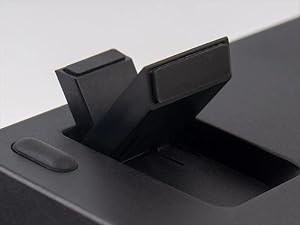
ചിത്രം: വിശദമായ ഒരു ചിത്രം view of the keyboard's adjustable feet, illustrating the different height settings.
മെയിൻ്റനൻസ്
കീബോർഡ് വൃത്തിയാക്കൽ:
മികച്ച പ്രകടനവും രൂപഭംഗിയും നിലനിർത്താൻ, നിങ്ങളുടെ കീബോർഡ് പതിവായി വൃത്തിയാക്കുക:
- നിങ്ങളുടെ കമ്പ്യൂട്ടറിൽ നിന്ന് കീബോർഡ് വിച്ഛേദിക്കുക.
- കീക്യാപ്പുകൾക്കിടയിൽ നിന്ന് പൊടിയും അവശിഷ്ടങ്ങളും നീക്കം ചെയ്യാൻ ഒരു കംപ്രസ് ചെയ്ത വായു ക്യാൻ ഉപയോഗിക്കുക.
- Wipe the keycaps and case with a soft, damp തുണി. കഠിനമായ രാസവസ്തുക്കളോ ഉരച്ചിലുകളോ ഉപയോഗിക്കുന്നത് ഒഴിവാക്കുക.
- കൂടുതൽ ആഴത്തിലുള്ള വൃത്തിയാക്കലിനായി, ഒരു കീക്യാപ്പ് പുള്ളർ ഉപയോഗിച്ച് കീക്യാപ്പുകൾ നീക്കം ചെയ്യാവുന്നതാണ്.
കീക്യാപ്പും സ്വിച്ചും മാറ്റിസ്ഥാപിക്കൽ:
The K10 Pro features hot-swappable switches, allowing you to change switches without soldering. The double-shot PBT keycaps are also durable and can be replaced if desired.
- കീക്യാപ്പുകൾ നീക്കംചെയ്യുന്നു: Use a keycap puller to gently lift keycaps straight up.
- സ്വിച്ചുകൾ നീക്കംചെയ്യുന്നു: Use a switch puller to carefully remove the switch from the PCB. Ensure the keyboard is disconnected before attempting this.
- Installing Switches/Keycaps: Align the new switch/keycap with the socket/stem and press down gently until it clicks into place.

ചിത്രം: ഒരു ക്ലോസ്-അപ്പ് view of the mechanical switches, showing their construction and hot-swappable nature.

Image: A detailed shot of the double-shot PBT keycaps, highlighting their texture and durability.
ട്രബിൾഷൂട്ടിംഗ്
കണക്റ്റിവിറ്റി പ്രശ്നങ്ങൾ:
- ബ്ലൂടൂത്ത് ബന്ധിപ്പിക്കുന്നില്ല: Ensure the keyboard is in Bluetooth mode and in pairing mode (Fn + 1/2/3 for 4 seconds). Check your device's Bluetooth settings and try re-pairing.
- വയർ കണക്ഷൻ പ്രവർത്തിക്കുന്നില്ല: Ensure the mode switch is set to 'Cable' and the USB-C cable is securely connected to both the keyboard and your computer. Try a different USB port or cable.
Key Remapping Not Applying:
- Remember that key remapping via VIA software requires the keyboard to be connected in വയർഡ് മോഡ് during the remapping process. Once remapped, the changes will apply to both wired and wireless modes.
- Ensure you have the correct firmware and VIA JSON file loaded for your specific K10 Pro model.
ബാക്ക്ലൈറ്റ് പ്രവർത്തിക്കുന്നില്ല:
- Check if the backlight is simply turned off or set to the lowest brightness. Use the backlight control keys to adjust.
- കീബോർഡ് ബാറ്ററിക്ക് മതിയായ ചാർജ് ഉണ്ടെന്ന് ഉറപ്പാക്കുക.
സ്പെസിഫിക്കേഷനുകൾ
| മോഡൽ നമ്പർ | K10P-A1 |
| ലേഔട്ട് | 100% Full Size (108 Keys) |
| കണക്റ്റിവിറ്റി | Bluetooth 5.1 (Wireless), USB-C (Wired) |
| സ്വിച്ചുകൾ | Keychron K Pro Red (Linear), Hot-swappable |
| കീകാപ്പുകൾ | ഡബിൾ-ഷോട്ട് പിബിടി |
| ബാക്ക്ലൈറ്റ് | വെളുത്ത LED (14 തരം) |
| ബാറ്ററി | 4000 mAh Lithium Ion (up to 100 hours with lowest brightness) |
| അനുയോജ്യമായ OS | macOS, Windows, Linux |
| ഇനത്തിൻ്റെ ഭാരം | 3.72 പൗണ്ട് |
| പാക്കേജ് അളവുകൾ | 18.58 x 7.44 x 2.13 ഇഞ്ച് |
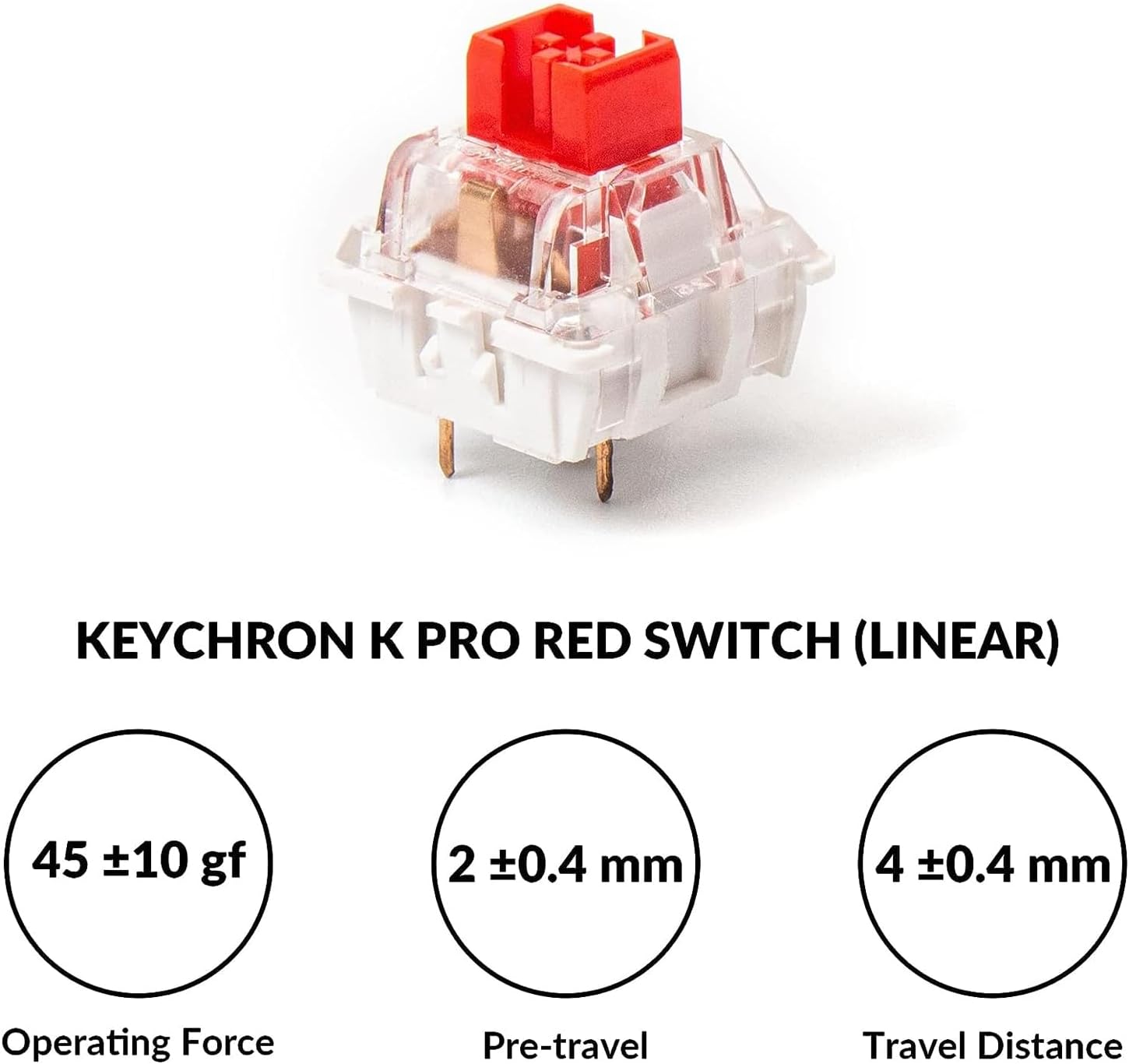
Image: Detailed specifications for the Keychron K Pro Red (Linear) switch, including operating force, pre-travel, and total travel distance.
വാറൻ്റിയും പിന്തുണയും
For warranty information, technical support, and frequently asked questions, please visit the official Keychron website. You can also find updated drivers and VIA software downloads there.
ഔദ്യോഗിക കീക്രോൺ Webസൈറ്റ്: www.keychron.com