1. ആമുഖം
This manual provides essential instructions for the safe and efficient use of your OUKITEL WP23 rugged smartphone. Please read this manual thoroughly before operating the device and retain it for future reference. The OUKITEL WP23 is designed for durability, featuring robust construction to withstand challenging environments.

Figure 1: OUKITEL WP23 Rugged Smartphone. This image displays the front and back of the OUKITEL WP23, highlighting its robust design and large display.
2. ഉൽപ്പന്നം കഴിഞ്ഞുview
The OUKITEL WP23 is engineered for resilience and performance. Key components include:
- ഡിസ്പ്ലേ: 6.5-inch HD+ screen with Corning Gorilla Glass.
- ക്യാമറകൾ: Triple AI rear camera system (13MP main, 2MP macro) and a 5MP front camera.
- ബട്ടണുകൾ: Power button, volume rocker, customizable side key.
- തുറമുഖങ്ങൾ: ചാർജിംഗിനും ഡാറ്റ കൈമാറ്റത്തിനുമായി യുഎസ്ബി ടൈപ്പ്-സി പോർട്ട്.
- സെൻസറുകൾ: Fingerprint sensor, face recognition, NFC.
3. സജ്ജീകരണം
3.1. സിം, മൈക്രോ എസ്ഡി കാർഡുകൾ ചേർക്കൽ
To insert your SIM card(s) and/or MicroSD card:
- ഉപകരണത്തിന്റെ വശത്ത് സിം കാർഡ് ട്രേ കണ്ടെത്തുക.
- ട്രേ തുറക്കാൻ നൽകിയിരിക്കുന്ന സിം എജക്റ്റർ ഉപകരണം ഉപയോഗിക്കുക.
- Place your Nano-SIM card(s) and/or MicroSD card into the designated slots, ensuring correct orientation.
- ഉപകരണത്തിലേക്ക് ട്രേ ശ്രദ്ധാപൂർവ്വം വീണ്ടും ചേർക്കുക.
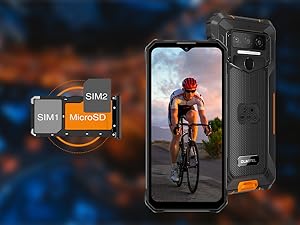
Figure 2: SIM and MicroSD Card Installation. This image illustrates the correct placement of SIM cards and a MicroSD card in the OUKITEL WP23's tray.
3.2. പ്രാരംഭ പവർ ഓണും ചാർജിംഗും
Press and hold the Power button until the device vibrates and the OUKITEL logo appears. For optimal performance, fully charge the device before first use. Connect the provided USB Type-C cable to the phone and a compatible power adapter.
4. ഓപ്പറേറ്റിംഗ് സിസ്റ്റം (ആൻഡ്രോയിഡ് 13)
The OUKITEL WP23 runs on Android 13.0, offering enhanced privacy controls and a user-friendly interface. Key features include:
- Privacy Information Center: Access a centralized hub to review and manage app permissions and data access for the past week.
- വ്യക്തിപരമാക്കൽ: Customize your device's appearance with new themes and dynamic colors.
- മെച്ചപ്പെടുത്തിയ സുരക്ഷ: Improved security features to protect your data.

Figure 3: Android 13 Operating System. This image shows the OUKITEL WP23 display with various application icons, illustrating the Android 13 interface.
5. ബാറ്ററി മാനേജ്മെന്റ്
The OUKITEL WP23 is equipped with a large 10600mAh battery, designed for extended use. A single charge can provide up to 5 days of typical usage, reducing the need for frequent recharging.
5.1. ചാർജിംഗ്
Use the provided charger and USB Type-C cable for optimal charging. The device supports fast charging, allowing for quick power replenishment.
5.2. Reverse Charging (OTG)
The WP23 supports OTG (On-The-Go) functionality, enabling it to act as a power bank to charge other compatible devices. Connect the other device to your WP23 using an OTG cable.

Figure 4: Extended Battery Life. This infographic highlights the 10600mAh battery capacity of the OUKITEL WP23 and its long usage times for various activities like standby, music, calls, web browsing, gaming, and video playback.
6. ഈട് സവിശേഷതകൾ
The OUKITEL WP23 is built to withstand harsh conditions, making it suitable for outdoor activities and demanding work environments.
- IP68 വാട്ടർപ്രൂഫ്: Protected against continuous immersion in water.
- IP69K Dustproof: Offers complete protection against dust ingress and high-pressure, high-temperature water jets.
- MIL-STD-810H Shockproof: Certified to military standards for resistance against drops and impacts.
- കോർണിംഗ് ഗൊറില്ല ഗ്ലാസ്: The 6.5-inch display is protected by scratch-resistant and highly transparent Corning Gorilla Glass.
- കരുത്തുറ്റ നിർമ്മാണം: Features a sturdy rubber structure and metal frame for enhanced impact resistance.

Figure 5: Rugged Certifications. This image displays the OUKITEL WP23 submerged in water, covered in dust, and being dropped, illustrating its MIL-STD 810H, IP69K, and IP68 certifications for shock, dust, and water resistance.

Figure 6: Corning Gorilla Glass Display. This image highlights the 6.5-inch display of the OUKITEL WP23, emphasizing its scratch-resistant, high transparency, and fingerprint-resistant properties provided by Corning Gorilla Glass.
7. പ്രകടനവും സംഭരണവും
The WP23 offers efficient performance and ample storage capacity:
- റാം: 4GB physical RAM, expandable with up to 3GB virtual memory for a total of 7GB RAM, ensuring smooth multitasking and application performance.
- ROM: 64GB internal storage, expandable up to 1TB via a MicroSD (TF) card for extensive app and media storage.
8. ഡിസ്പ്ലേ
The device features a 6.5-inch HD+ display with a resolution of 720x1600 pixels and a 60Hz refresh rate. The in-cell process provides responsive touch input and smooth visuals, enhancing the viewing experience for videos and games.
9. ക്യാമറ ഉപയോഗം
Capture moments with the OUKITEL WP23's triple AI camera system:
- പിൻ ക്യാമറകൾ: 13MP main camera and a 2MP macro camera for detailed close-up shots.
- മുൻ ക്യാമറ: സെൽഫികൾക്കും വീഡിയോ കോളുകൾക്കുമായി 5 എംപി ക്യാമറ.
To take a photo or record a video, open the Camera application and select your desired mode. Tap the shutter button to capture.

Figure 7: Triple AI Camera. This image showcases the OUKITEL WP23's triple AI camera setup, including a 13MP main camera, a 5MP front camera, and a 2MP macro camera, demonstrating its photography capabilities.
10. Connectivity and Special Features
The OUKITEL WP23 includes several features for convenience and utility:
- NFC (ഫീൽഡ് കമ്മ്യൂണിക്കേഷന് സമീപം): Supports Google Pay for contactless payments.
- OTG (On-The-Go): Enables direct data transfer between devices and reverse charging.
- ഗ്ലൗ മോഡ്: Allows for touch screen operation even when wearing gloves.
- ഫ്ലാഷ്ലൈറ്റ്: Equipped with four large flashlights for illumination in dark environments.

Figure 8: NFC Payment. This image shows the OUKITEL WP23 being used for a contactless payment via Google Pay, demonstrating its NFC capability.

Figure 9: OTG Functionality. This image illustrates the OUKITEL WP23's ability to charge another device, such as wireless earbuds, using its OTG port.
11. പ്രശ്നപരിഹാരം
This section addresses common issues you might encounter with your OUKITEL WP23.
11.1. നെറ്റ്വർക്ക് കണക്റ്റിവിറ്റി പ്രശ്നങ്ങൾ
- No Signal/Unstable Connection: Ensure your SIM card is correctly inserted and activated. Check network settings (APN) and confirm you are within network coverage. Some network bands may have limited coverage in certain areas.
- Data Not Working: Verify mobile data is enabled and your data plan is active. Check APN settings.
11.2. ടച്ച് സ്ക്രീൻ പ്രതികരിക്കുന്നില്ല
- Intermittent Unresponsiveness: സ്ക്രീൻ വൃത്തിയുള്ളതും വരണ്ടതുമാണെന്ന് ഉറപ്പാക്കുക. നിങ്ങൾ ഒരു സ്ക്രീൻ പ്രൊട്ടക്ടർ ഉപയോഗിക്കുകയാണെങ്കിൽ, അത് ശരിയായി പ്രയോഗിച്ചിട്ടുണ്ടെന്നും സ്പർശന സംവേദനക്ഷമതയെ തടസ്സപ്പെടുത്തുന്നില്ലെന്നും ഉറപ്പാക്കുക.
- ഗ്ലൗ മോഡ്: If experiencing issues with gloves, ensure Glove Mode is correctly enabled or disabled as needed.
11.3. Device Reboots Unexpectedly
- Frequent Restarts: This could indicate a software issue or an incompatible application. Try uninstalling recently installed apps. If the issue persists, consider performing a factory reset (back up your data first).
11.4. പൊതു ഉപദേശം
- പുനരാരംഭിക്കുക: ഒരു ലളിതമായ പുനരാരംഭം പലപ്പോഴും ചെറിയ സോഫ്റ്റ്വെയർ തകരാറുകൾ പരിഹരിക്കും.
- സോഫ്റ്റ്വെയർ അപ്ഡേറ്റുകൾ: Ensure your device's software is up to date. Updates often include bug fixes and performance improvements.
- ഫാക്ടറി പുന et സജ്ജമാക്കുക: As a last resort, a factory reset can resolve persistent software issues. Remember to back up all important data before proceeding.
12 സ്പെസിഫിക്കേഷനുകൾ
| ഫീച്ചർ | സ്പെസിഫിക്കേഷൻ |
|---|---|
| ബ്രാൻഡ് | OUKITEL |
| മോഡൽ നമ്പർ | WP23 |
| ഓപ്പറേറ്റിംഗ് സിസ്റ്റം | ആൻഡ്രോയിഡ് 13.0 |
| സ്ക്രീൻ വലിപ്പം | 6.52 ഇഞ്ച് |
| ഡിസ്പ്ലേ തരം | LED, HD+ (720x1600) |
| ഇൻസ്റ്റാൾ ചെയ്ത RAM മെമ്മറി വലുപ്പം | 7 ജിബി (4 ജിബി ഫിസിക്കൽ + 3 ജിബി വെർച്വൽ) |
| മെമ്മറി സ്റ്റോറേജ് കപ്പാസിറ്റി | 64 GB (expandable up to 1TB via MicroSD) |
| ബാറ്ററി ശേഷി | 10600 mAh |
| കണക്റ്റിവിറ്റി | യുഎസ്ബി, എൻഎഫ്സി |
| നിറം | പച്ച |
| പാക്കേജ് അളവുകൾ | 24.1 x 22.8 x 5.2 സെ.മീ |
| ഇനത്തിൻ്റെ ഭാരം | 690 ഗ്രാം |
13. വാറൻ്റിയും പിന്തുണയും
OUKITEL provides a 2 വർഷത്തെ വാറൻ്റി for the WP23 smartphone, covering defects in materials and manufacturing. This warranty applies to all waterproof smartphones. In cases where necessary, OUKITEL may offer a free replacement with a new device.
For any questions or support needs, please contact OUKITEL customer service. We aim to respond to inquiries within 24 hours.
Please refer to your purchase documentation for specific warranty terms and contact details.


