1. ഉൽപ്പന്നം കഴിഞ്ഞുview
The Speedlink LIBERA is a versatile rechargeable wireless mouse designed for comfort and efficiency. It offers dual connectivity options, allowing you to connect via Bluetooth or a 2.4 GHz USB-A nano receiver. Key features include silent main buttons, a thumb scroll wheel for horizontal scrolling, and adjustable DPI settings for precise control.

Image: The Speedlink LIBERA mouse shown with its accompanying USB receiver, highlighting its sleek design and connectivity components.
2. ബോക്സിൽ എന്താണുള്ളത്?
പാക്കേജ് തുറക്കുമ്പോൾ, താഴെ പറയുന്ന എല്ലാ ഇനങ്ങളും ഉണ്ടെന്ന് ഉറപ്പാക്കുക:
- Speedlink LIBERA Mouse
- USB റിസീവർ
- യുഎസ്ബി-സി മുതൽ യുഎസ്ബി-എ ചാർജിംഗ് കേബിൾ വരെ
- ഉപയോക്തൃ മാനുവൽ (ഈ പ്രമാണം)
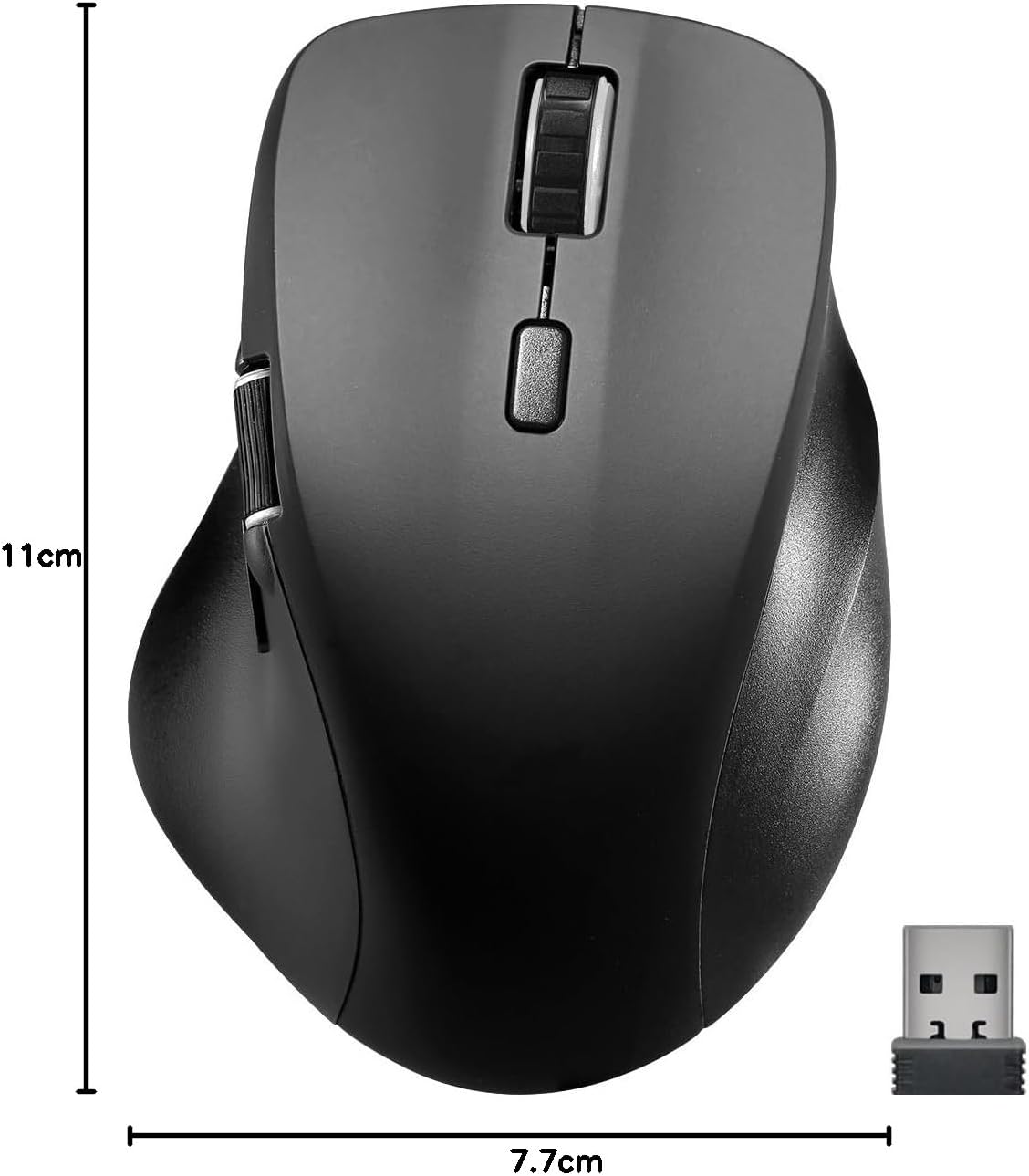
Image: The retail packaging for the Speedlink LIBERA mouse, indicating the contents and key features.
3. സജ്ജീകരണം
3.1. മൗസ് ചാർജ് ചെയ്യുന്നു
Before first use, it is recommended to fully charge the mouse. The mouse can be charged while in use.
- Locate the USB-C port on the front of the mouse.
- Connect the included USB-C to USB-A charging cable to the mouse.
- Plug the USB-A end of the cable into a powered USB port (e.g., computer, USB wall adapter).
- ചാർജിംഗ് ഇൻഡിക്കേറ്റർ ലൈറ്റ് പ്രകാശിക്കും. പൂർണ്ണമായി ചാർജ് ചെയ്യുമ്പോൾ അത് ഓഫാകും അല്ലെങ്കിൽ നിറം മാറും.

Image: The USB-C to USB-A charging cable included with the mouse, used for recharging the internal battery.
3.2. മൗസ് ബന്ധിപ്പിക്കൽ
The Speedlink LIBERA mouse offers two connection methods: 2.4 GHz USB receiver and Bluetooth.
3.2.1. 2.4 GHz USB Connection
- Locate the USB-A nano receiver, typically stored in a compartment on the underside of the mouse.
- നിങ്ങളുടെ കമ്പ്യൂട്ടറിൽ ലഭ്യമായ ഒരു USB-A പോർട്ടിലേക്ക് USB റിസീവർ പ്ലഗ് ചെയ്യുക.
- അടിവശത്തുള്ള ഓൺ/ഓഫ് സ്വിച്ച് ഉപയോഗിച്ച് മൗസ് ഓണാക്കുക.
- മൗസ് നിങ്ങളുടെ കമ്പ്യൂട്ടറിലേക്ക് യാന്ത്രികമായി കണക്റ്റുചെയ്യണം.
3.2.2. ബ്ലൂടൂത്ത് കണക്ഷൻ
The mouse supports up to two Bluetooth profiles.
- മൗസ് ഓണാണെന്ന് ഉറപ്പാക്കുക.
- Press the Bluetooth pairing button (refer to the diagram in Section 4.1 for location) to enter pairing mode. The indicator light will flash.
- നിങ്ങളുടെ കമ്പ്യൂട്ടറിൽ, Bluetooth ക്രമീകരണങ്ങളിലേക്ക് നാവിഗേറ്റ് ചെയ്യുക.
- ഇതിനായി തിരയുക new devices and select "Speedlink LIBERA" from the list.
- ജോടിയാക്കൽ പ്രക്രിയ പൂർത്തിയാക്കാൻ ഏതെങ്കിലും ഓൺ-സ്ക്രീൻ നിർദ്ദേശങ്ങൾ പാലിക്കുക.
- To switch between Bluetooth profiles or to the 2.4 GHz connection, press the mode switch button on the underside of the mouse.

Image: The Speedlink LIBERA mouse positioned next to its compact USB receiver, illustrating the 2.4 GHz wireless connection method.
4. പ്രവർത്തന നിർദ്ദേശങ്ങൾ
4.1. ബട്ടൺ പ്രവർത്തനങ്ങൾ
The Speedlink LIBERA mouse features multiple buttons for enhanced control:
- ഇടത് ക്ലിക്ക് ബട്ടൺ: Standard primary click function. (Silent)
- റൈറ്റ് ക്ലിക്ക് ബട്ടൺ: Standard secondary click function. (Silent)
- സ്ക്രോൾ വീൽ: Vertical scrolling. Can also be pressed for middle-click functionality.
- ഡിപിഐ സ്വിച്ച് ബട്ടൺ: Cycles through DPI settings (1000/1600/2400/3200 DPI).
- തമ്പ് സ്ക്രോൾ വീൽ: Located on the side, allows for horizontal scrolling of documents and web പേജുകൾ.
- ഫോർവേഡ്/ബാക്ക്വേർഡ് ബട്ടണുകൾ: Located near the thumb scroll wheel, typically used for navigation in web ബ്രൗസറുകൾ അല്ലെങ്കിൽ file പര്യവേക്ഷകർ.

Image: A hand demonstrating the ergonomic grip and use of the Speedlink LIBERA mouse, highlighting the placement of the thumb scroll wheel and side buttons.
4.2. ഡിപിഐ ക്രമീകരണം
The mouse's optical sensor resolution can be adjusted to suit your preference and task. Press the DPI switch button (located behind the main scroll wheel) to cycle through the available DPI settings: 1000, 1600, 2400, and 3200 DPI. Each press will change the sensitivity, allowing for faster or slower cursor movement.
4.3. പവർ മാനേജ്മെന്റ്
The mouse features an On/Off switch on its underside to conserve battery life when not in use. It also incorporates a smart power-saving mode that activates after a period of inactivity, further extending battery life. To wake the mouse, simply move it or click any button.
5. പരിപാലനം
To ensure the longevity and optimal performance of your Speedlink LIBERA mouse, follow these simple maintenance guidelines:
- വൃത്തിയാക്കൽ: മൗസിന്റെ പ്രതലം തുടയ്ക്കാൻ മൃദുവായതും ഉണങ്ങിയതും ലിന്റ് രഹിതവുമായ ഒരു തുണി ഉപയോഗിക്കുക. കഠിനമായ അഴുക്കിന്, ചെറുതായി dampതുണിയിൽ വെള്ളം ഒഴിക്കുക. കഠിനമായ രാസവസ്തുക്കൾ, ലായകങ്ങൾ അല്ലെങ്കിൽ അബ്രസീവ് ക്ലീനറുകൾ ഉപയോഗിക്കുന്നത് ഒഴിവാക്കുക.
- സെൻസർ പരിചരണം: Keep the optical sensor on the underside of the mouse clean and free from dust or debris. A small brush or compressed air can be used carefully.
- ബാറ്ററി കെയർ: While the mouse has a rechargeable battery, avoid completely draining it frequently. Recharge it when the low battery indicator appears. Store the mouse in a cool, dry place if not used for extended periods.
- സംഭരണം: മൗസ് കൊണ്ടുപോകുമ്പോഴോ സൂക്ഷിക്കുമ്പോഴോ, ആഘാതങ്ങളിൽ നിന്നും തീവ്രമായ താപനിലയിൽ നിന്നും അത് സംരക്ഷിക്കപ്പെട്ടിട്ടുണ്ടെന്ന് ഉറപ്പാക്കുക.
6. പ്രശ്നപരിഹാരം
If you encounter issues with your Speedlink LIBERA mouse, please refer to the following common problems and solutions:
| പ്രശ്നം | സാധ്യമായ കാരണം | പരിഹാരം |
|---|---|---|
| മൗസ് പ്രതികരിക്കുന്നില്ല | Mouse is off, low battery, connection issue. | Ensure mouse is on. Charge the mouse. Re-establish 2.4 GHz or Bluetooth connection. Try a different USB port. |
| കഴ്സർ ചലനം ക്രമരഹിതമോ മന്ദഗതിയിലുള്ളതോ ആണ്. | Dirty optical sensor, unsuitable surface, low DPI setting. | Clean the optical sensor. Use on a clean, non-reflective mouse pad. Increase DPI setting. |
| ബ്ലൂടൂത്ത് കണക്ഷൻ പരാജയപ്പെടുന്നു | Mouse not in pairing mode, interference, incorrect pairing steps. | Ensure mouse is in Bluetooth pairing mode. Turn off other Bluetooth devices. Remove previous pairings from computer and re-pair. |
| ചാർജിംഗ് പ്രശ്നം | Faulty cable, power source issue. | Try a different USB port or power adapter. Ensure the charging cable is securely connected. |
| Buttons not clicking or unresponsive | Software issue, physical obstruction. | Restart your computer. Ensure no debris is lodged under the buttons. |
7 സാങ്കേതിക സവിശേഷതകൾ
| ഫീച്ചർ | സ്പെസിഫിക്കേഷൻ |
|---|---|
| മോഡൽ നമ്പർ | SL-630021-RRBK |
| കണക്റ്റിവിറ്റി | Bluetooth, 2.4 GHz Radio Frequency (USB Receiver) |
| മൂവ്മെന്റ് ഡിറ്റക്ഷൻ ടെക്നോളജി | ഒപ്റ്റിക്കൽ |
| DPI പ്രമേയം | 1000 / 1600 / 2400 / 3200 dpi (adjustable) |
| ബട്ടണുകൾ | 5 buttons + DPI switch + dual scroll wheels (vertical and horizontal) |
| ബാറ്ററി തരം | 500mAh Lithium-Ion (rechargeable) |
| ചാർജിംഗ് പോർട്ട് | USB-C |
| അളവുകൾ (L x W x H) | 110 x 77 x 45 മിമി |
| ഭാരം | 93 ഗ്രാം |
| ഓപ്പറേറ്റിംഗ് സിസ്റ്റം അനുയോജ്യത | Windows 7, Windows 8, Windows 8.1, Windows 10, Windows 11 |
8. വാറന്റി, പിന്തുണ വിവരങ്ങൾ
Speedlink products are manufactured with care and undergo strict quality controls. This product is covered by a manufacturer's warranty. For detailed warranty terms and conditions, please refer to the warranty card included with your purchase or visit the official Speedlink webസൈറ്റ്.
For technical support, troubleshooting assistance beyond this manual, or warranty claims, please contact Speedlink customer service through their official website or the contact information provided in your product packaging. Please have your product model number (SL-630021-RRBK) and proof of purchase ready when contacting support.


