1. പ്രധാന സുരക്ഷാ നിർദ്ദേശങ്ങൾ
മുന്നറിയിപ്പ്: Do not use this appliance near water. Exercise extreme caution during use to prevent injury. Always ensure your hands are dry before handling the trimmer or charger.
- ഉപകരണം ഉപയോഗിക്കുന്നതിന് മുമ്പ് എല്ലാ നിർദ്ദേശങ്ങളും വായിക്കുക.
- ഉപകരണം കുട്ടികളിൽ നിന്ന് അകറ്റി നിർത്തുക.
- ഉപകരണം വെള്ളത്തിലോ മറ്റ് ദ്രാവകങ്ങളിലോ മുക്കരുത്.
- ഉപകരണത്തിന് കേടുപാടുകൾ സംഭവിക്കുകയോ പ്രവർത്തിക്കാതിരിക്കുകയോ ചെയ്താൽ അത് ഉപയോഗിക്കരുത്.
- ഉപകരണത്തിനൊപ്പം നൽകിയിരിക്കുന്ന ചാർജർ മാത്രം ഉപയോഗിക്കുക.
- വൃത്തിയാക്കുന്നതിന് മുമ്പ് ഉപകരണം അൺപ്ലഗ് ചെയ്യുക.
2. ഉൽപ്പന്നം കഴിഞ്ഞുview
2.1 ഘടകങ്ങൾ
The Rowenta TN1603 Cordless Beard Trimmer comes with the following components:
- ട്രിമ്മർ ബോഡി
- Multiple Comb Attachments (for various cutting lengths)
- ഫോയിൽ ഷേവർ ഹെഡ്
- ചാർജിംഗ് കേബിൾ (USB)
- ക്ലീനിംഗ് ബ്രഷ്
- ലൂബ്രിക്കേറ്റിംഗ് ഓയിൽ ബോട്ടിൽ
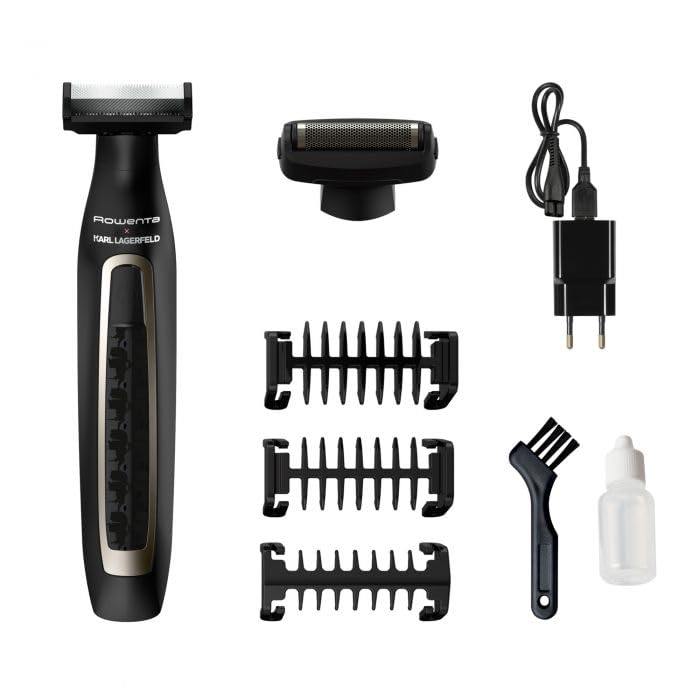
Image 2.1: The Rowenta TN1603 trimmer shown with all included accessories, including various comb attachments, a foil shaver head, charging cable, cleaning brush, and oil bottle.
2.2 പ്രധാന സവിശേഷതകൾ
- കോർഡ്ലെസ്സ് ഓപ്പറേഷൻ: Provides flexibility and ease of use without being tethered to an outlet.
- സ്വയം മൂർച്ച കൂട്ടുന്ന ബ്ലേഡുകൾ: Ensures long-lasting sharpness and consistent cutting performance.
- 120-Minute Battery Life: ഒറ്റ ചാർജിൽ വിപുലീകൃത ഉപയോഗം വാഗ്ദാനം ചെയ്യുന്നു.
- സ്റ്റെയിൻലെസ്സ് സ്റ്റീൽ ബ്ലേഡുകൾ: Durable and precise for effective trimming.
- ഒന്നിലധികം അറ്റാച്ചുമെന്റുകൾ: Includes various comb guides and a foil shaver head for versatile grooming.
3. സജ്ജീകരണം
3.1 ട്രിമ്മർ ചാർജ് ചെയ്യുന്നു
- ട്രിമ്മർ സ്വിച്ച് ഓഫ് ആണെന്ന് ഉറപ്പാക്കുക.
- Connect the charging cable to the trimmer's charging port.
- Plug the USB end of the charging cable into a compatible USB power adapter (not included) or a USB port.
- The charging indicator light will illuminate (typically green) to show that the trimmer is charging.
- Allow approximately 120 minutes for a full charge. The indicator light may change or turn off when fully charged.

ചിത്രം 3.1: ക്ലോസ്-അപ്പ് view of the Rowenta TN1603 trimmer's power button and charging indicator light, which glows green when charging.
3.2 Attaching and Detaching Accessories
- Ensure the trimmer is switched off before attaching or detaching any accessories.
- To attach a comb attachment: Align the comb with the trimmer head and gently push it down until it clicks into place.
- To detach a comb attachment: ട്രിമ്മർ തലയിൽ നിന്ന് ചീപ്പ് പതുക്കെ മുകളിലേക്ക് വലിക്കുക.
- To attach the foil shaver head: Align the foil head with the trimmer body and push it firmly until it locks.
- To detach the foil shaver head: Press the release buttons (if present) on the sides of the head and pull it away from the body.

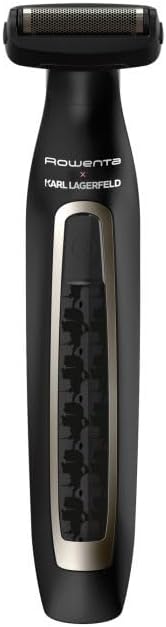
Image 3.2: The Rowenta TN1603 trimmer shown with a comb attachment (left) and with the foil shaver head attached (right).
4. പ്രവർത്തന നിർദ്ദേശങ്ങൾ
4.1 Basic Trimming
- ട്രിമ്മർ പൂർണ്ണമായി ചാർജ്ജ് ചെയ്തിട്ടുണ്ടെന്ന് ഉറപ്പാക്കുക.
- Attach the desired comb attachment for your preferred hair length.
- ട്രിമ്മർ ഓണാക്കാൻ പവർ ബട്ടൺ അമർത്തുക.
- Hold the trimmer with the blades facing the area to be trimmed.
- Move the trimmer against the direction of hair growth for best results.
- ഉപയോഗത്തിന് ശേഷം, ട്രിമ്മർ ഓഫ് ചെയ്യാൻ പവർ ബട്ടൺ അമർത്തുക.
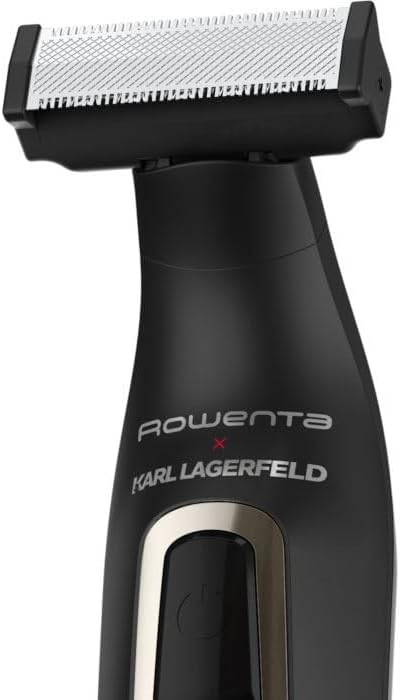
ചിത്രം 4.1: ഒരു ക്ലോസപ്പ് view of the Rowenta TN1603 trimmer head, showing the self-sharpening stainless steel blades.
4.2 Using the Foil Shaver Head
- Ensure the trimmer is switched off and the foil shaver head is securely attached.
- ട്രിമ്മർ ഓണാക്കുക.
- Gently press the foil shaver head against your skin and move it in short, circular motions or straight lines.
- This head is designed for a close shave on smaller areas or for finishing edges.
- ഉപയോഗത്തിന് ശേഷം, ട്രിമ്മർ ഓഫ് ചെയ്യുക.
5. പരിപാലനം
5.1 വൃത്തിയാക്കൽ
- Always ensure the trimmer is switched off and unplugged before cleaning.
- Remove any comb attachments or the foil shaver head.
- ബ്ലേഡുകളിൽ നിന്നും ട്രിമ്മർ ഹെഡിനുള്ളിലും മുടിയുടെ കഷ്ണങ്ങൾ നീക്കം ചെയ്യാൻ നൽകിയിരിക്കുന്ന ക്ലീനിംഗ് ബ്രഷ് ഉപയോഗിക്കുക.
- The blades can be rinsed under running water. Ensure they are completely dry before reattaching or storing.
- Wipe the trimmer body with a damp cloth. Do not use abrasive cleaners or immerse the body in water.
5.2 ലൂബ്രിക്കേഷൻ
- After cleaning and drying the blades, apply 1-2 drops of the lubricating oil (provided) to the blades.
- എണ്ണ തുല്യമായി വിതരണം ചെയ്യാൻ അനുവദിക്കുന്നതിന് കുറച്ച് സെക്കൻഡ് നേരത്തേക്ക് ട്രിമ്മർ ഓണാക്കുക.
- Wipe off any excess oil. Regular lubrication helps maintain blade performance and longevity.
5.3 സംഭരണം
Store the trimmer and its accessories in a cool, dry place, away from direct sunlight and moisture. Ensure the trimmer is clean and dry before storing.
6. പ്രശ്നപരിഹാരം
| പ്രശ്നം | സാധ്യമായ കാരണം | പരിഹാരം |
|---|---|---|
| ട്രിമ്മർ ഓണാക്കുന്നില്ല. | ബാറ്ററി തീർന്നു. | ട്രിമ്മർ പൂർണ്ണമായും ചാർജ് ചെയ്യുക. |
| മോശം ട്രിമ്മിംഗ് പ്രകടനം. | Blades are dirty or not lubricated. | Clean and lubricate the blades as per maintenance instructions. |
| ട്രിമ്മർ അസാധാരണമായ ശബ്ദമുണ്ടാക്കുന്നു. | Hair caught in blades or lack of lubrication. | Clean the blades thoroughly and apply lubricating oil. If the issue persists, contact customer support. |
| ബാറ്ററി ചാർജ് ചെയ്യുന്നില്ല. | Charging cable or adapter is faulty; poor connection. | Ensure the charging cable is securely connected. Try a different USB power adapter. |
7 സാങ്കേതിക സവിശേഷതകൾ
- മോഡൽ നമ്പർ: TN1603
- ഊർജ്ജ സ്രോതസ്സ്: ബാറ്ററി പവർ (റീചാർജ് ചെയ്യാവുന്നത്)
- ബാറ്ററി ലൈഫ്: 120 മിനിറ്റ് വരെ
- ബ്ലേഡ് മെറ്റീരിയൽ: സ്റ്റെയിൻലെസ്സ് സ്റ്റീൽ
- പ്രത്യേക സവിശേഷതകൾ: Cordless, Self-sharpening
- നിറം: കറുപ്പ്
- ഉൽപ്പന്ന അളവുകൾ (L x W x H): 31.5 x 23.5 x 24.8 cm (Note: These dimensions seem unusually large for a trimmer, likely packaging dimensions. Please refer to product packaging for exact device dimensions.)
8. വാറൻ്റിയും പിന്തുണയും
This Rowenta product is covered by a manufacturer's warranty. Please refer to the warranty card included in your product packaging for specific terms and conditions, including warranty duration and coverage details.
For technical support, spare parts, or service inquiries, please visit the official Rowenta webസൈറ്റ് ചെയ്യുകയോ അവരുടെ ഉപഭോക്തൃ സേവന വിഭാഗവുമായി ബന്ധപ്പെടുകയോ ചെയ്യുക. കോൺടാക്റ്റ് വിവരങ്ങൾ സാധാരണയായി റോവെന്റയിൽ കാണാം. webസൈറ്റ് അല്ലെങ്കിൽ നിങ്ങളുടെ ഉൽപ്പന്ന ഡോക്യുമെന്റേഷനിൽ.