1. ആമുഖം
Thank you for choosing the Maxcom Smartwatch FW53 Nitro. This manual provides essential information for the safe and efficient use of your device. Please read it carefully before using the smartwatch and keep it for future reference.
The Maxcom FW53 Nitro is a versatile smartwatch designed to enhance your daily activities, offering features such as activity tracking, notification alerts, and health monitoring when connected to a compatible smartphone.
2 സുരക്ഷാ വിവരങ്ങൾ
- ഉപകരണം വേർപെടുത്താനോ നന്നാക്കാനോ പരിഷ്ക്കരിക്കാനോ ശ്രമിക്കരുത്. ഇത് വാറന്റി അസാധുവാക്കുകയും കേടുപാടുകൾ വരുത്തുകയും ചെയ്തേക്കാം.
- ഉപകരണത്തെ തീവ്രമായ താപനില, നേരിട്ടുള്ള സൂര്യപ്രകാശം, ഈർപ്പം എന്നിവയിൽ നിന്ന് അകറ്റി നിർത്തുക.
- ശക്തമായ ആഘാതങ്ങൾക്കോ വൈബ്രേഷനുകൾക്കോ ഉപകരണം വിധേയമാക്കുന്നത് ഒഴിവാക്കുക.
- Use only the charger provided or recommended by the manufacturer.
- Consult a medical professional before starting any new exercise regimen or if you have a medical condition that could be affected by using the smartwatch.
- This device is not a medical device and should not be used for diagnosing or treating any medical condition.
3. പാക്കേജ് ഉള്ളടക്കം
തുറക്കുമ്പോൾ പാക്കേജ് ഉള്ളടക്കം പരിശോധിക്കുക. ഏതെങ്കിലും ഇനങ്ങൾ നഷ്ടപ്പെട്ടാലോ കേടുപാടുകൾ സംഭവിച്ചാലോ, നിങ്ങളുടെ റീട്ടെയിലറെ ബന്ധപ്പെടുക.
- Maxcom Smartwatch FW53 Nitro
- ചാർജിംഗ് കേബിൾ
- ഉപയോക്തൃ മാനുവൽ (ഈ പ്രമാണം)
4. ഡിവൈസ് ഓവർview
The Maxcom FW53 Nitro features a rectangular display and a single physical button for navigation and control. The back of the device houses the charging contacts and health sensors.
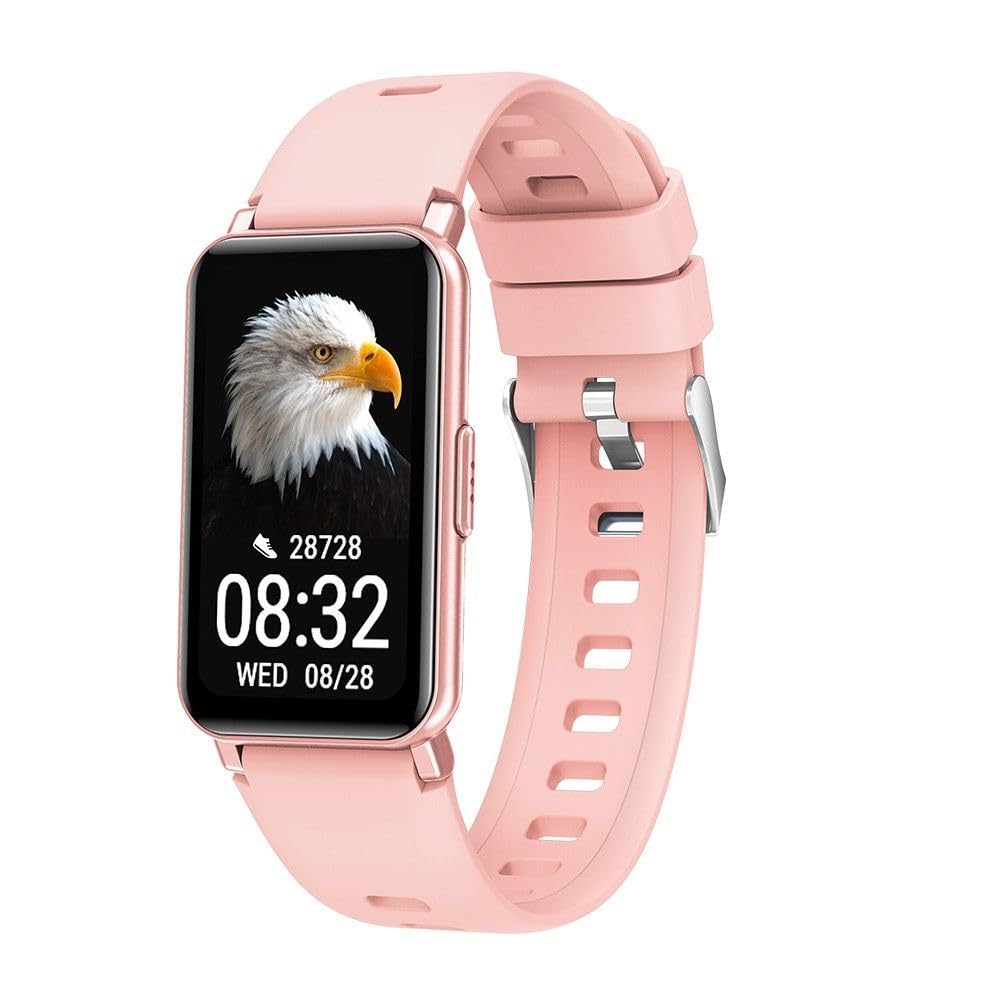
Image 1: Maxcom Smartwatch FW53 Nitro Gold. This image displays the front view of the smartwatch, highlighting its rectangular screen and overall design.
Note: No additional product images or official seller videos were available in the provided data for embedding.
4.1. ഘടകങ്ങൾ
- ടച്ച്സ്ക്രീൻ ഡിസ്പ്ലേ: For interacting with the user interface.
- സൈഡ് ബട്ടൺ: Typically used for powering on/off, returning to the home screen, or accessing the menu.
- ഹൃദയമിടിപ്പ് സെൻസർ: Located on the back of the watch, for monitoring heart rate.
- ചാർജിംഗ് കോൺടാക്റ്റുകൾ: Located on the back of the watch, for connecting the charging cable.
5. സജ്ജീകരണം
5.1. സ്മാർട്ട് വാച്ച് ചാർജ് ചെയ്യുന്നു
- Connect the charging cable to a USB power adapter (not included) or a computer's USB port.
- Align the magnetic charging pins of the cable with the charging contacts on the back of the smartwatch. The cable will snap into place.
- The watch display will show a charging indicator. Allow the device to charge fully before first use. A full charge typically takes 1-2 hours.
5.2. പവർ ഓൺ/ഓഫ്
- പവർ ഓണാക്കാൻ: Press and hold the side button for a few seconds until the Maxcom logo appears.
- പവർ ഓഫ് ചെയ്യാൻ: From the home screen, swipe down or navigate to the settings menu, then select the 'Power Off' option. Alternatively, press and hold the side button and select 'Power Off' when prompted.
5.3. നിങ്ങളുടെ സ്മാർട്ട്ഫോണുമായി ജോടിയാക്കൽ
The Maxcom FW53 Nitro connects to your smartphone via Bluetooth using a dedicated companion application.
- ആപ്പ് ഡൗൺലോഡ് ചെയ്യുക: ഇതിനായി തിരയുക the official Maxcom smartwatch companion app (refer to the packaging or quick start guide for the exact app name) on the App Store (iOS) or Google Play Store (Android) and install it on your smartphone.
- ബ്ലൂടൂത്ത് പ്രവർത്തനക്ഷമമാക്കുക: നിങ്ങളുടെ സ്മാർട്ട്ഫോണിൽ ബ്ലൂടൂത്ത് പ്രവർത്തനക്ഷമമാക്കിയിട്ടുണ്ടെന്ന് ഉറപ്പാക്കുക.
- ആപ്പ് തുറക്കുക: നിങ്ങളുടെ സ്മാർട്ട്ഫോണിൽ കമ്പാനിയൻ ആപ്പ് സമാരംഭിച്ച് സ്ക്രീനിലെ നിർദ്ദേശങ്ങൾ പാലിച്ച് ഒരു അക്കൗണ്ട് സൃഷ്ടിക്കുകയോ ലോഗിൻ ചെയ്യുകയോ ചെയ്യുക.
- ഉപകരണം ചേർക്കുക: ആപ്പിനുള്ളിൽ, 'ഉപകരണം ചേർക്കുക' അല്ലെങ്കിൽ 'ഉപകരണം ജോടിയാക്കുക' വിഭാഗത്തിലേക്ക് നാവിഗേറ്റ് ചെയ്യുക. ലഭ്യമായ സ്മാർട്ട് വാച്ചുകൾക്കായി ആപ്പ് തിരയും.
- Select Your Smartwatch: Select 'FW53 Nitro' from the list of discovered devices.
- ജോടിയാക്കൽ സ്ഥിരീകരിക്കുക: A pairing request may appear on both your smartphone and the smartwatch. Confirm the pairing on both devices.
- സജ്ജീകരണം പൂർത്തിയാക്കുക: Follow any remaining prompts in the app to complete the setup, including granting necessary permissions for notifications, location, etc.
6. സ്മാർട്ട് വാച്ച് പ്രവർത്തിപ്പിക്കൽ
6.1. അടിസ്ഥാന നാവിഗേഷൻ
- മുകളിലേക്കും താഴേക്കും സ്വൈപ്പ് ചെയ്യുക: To scroll through menus or notifications.
- ഇടത്തേക്ക്/വലത്തേക്ക് സ്വൈപ്പ് ചെയ്യുക: To switch between different watch faces or quick access widgets.
- ടാപ്പ് ചെയ്യുക: ഒരു ഇനം തിരഞ്ഞെടുക്കാനോ ഒരു ആപ്ലിക്കേഷൻ തുറക്കാനോ.
- Side Button Press: A short press usually returns to the home screen or acts as a back button. A long press may access power options or a specific function.
6.2 പ്രധാന സവിശേഷതകൾ
- അറിയിപ്പുകൾ: നിങ്ങളുടെ ജോടിയാക്കിയ സ്മാർട്ട്ഫോണിൽ നിന്ന് കോളുകൾ, സന്ദേശങ്ങൾ, ആപ്പ് അറിയിപ്പുകൾ എന്നിവയ്ക്കുള്ള അലേർട്ടുകൾ സ്വീകരിക്കുക.
- പ്രവർത്തന ട്രാക്കിംഗ്: Monitors steps taken, distance covered, and calories burned.
- ഹൃദയമിടിപ്പ് നിരീക്ഷണം: Measures your heart rate throughout the day or on demand.
- ഉറക്ക നിരീക്ഷണം: നിങ്ങളുടെ ഉറക്ക പാറ്റേണുകൾ ട്രാക്ക് ചെയ്യുന്നു, അതിൽ ഗാഢമായതും ലഘുവായതുമായ ഉറക്കം ഉൾപ്പെടുന്നു.tages.
- സ്പോർട്സ് മോഡുകൾ: Offers various modes for tracking specific exercises (e.g., running, walking).
- സംഗീത നിയന്ത്രണം: വാച്ചിൽ നിന്ന് നേരിട്ട് നിങ്ങളുടെ സ്മാർട്ട്ഫോണിൽ സംഗീത പ്ലേബാക്ക് നിയന്ത്രിക്കുക.
- ക്യാമറ വിദൂര: Use the watch as a remote shutter for your smartphone's camera.
- കാലാവസ്ഥ: Displays current weather information when connected to your smartphone.
6.3. Using the Companion App
The companion app on your smartphone is crucial for unlocking the full potential of your Maxcom FW53 Nitro. It allows you to:
- View detailed activity and health data.
- Customize watch faces.
- Set alarms and reminders.
- അറിയിപ്പ് ക്രമീകരണങ്ങൾ കൈകാര്യം ചെയ്യുക.
- Update the smartwatch firmware.
- Configure personal profile വിവരങ്ങൾ.
7. പരിപാലനം
7.1. വൃത്തിയാക്കൽ
- Wipe the smartwatch and strap regularly with a soft, damp, ലിൻ്റ് രഹിത തുണി.
- കഠിനമായ രാസവസ്തുക്കളോ, അബ്രസീവ് ക്ലീനറുകളോ, ലായകങ്ങളോ ഉപയോഗിക്കരുത്.
- ചാർജ് ചെയ്യുന്നതിനുമുമ്പ് ഉപകരണം ഉണങ്ങിയെന്ന് ഉറപ്പാക്കുക.
7.2. ബാറ്ററി പരിചരണം
- ബാറ്ററി ഇടയ്ക്കിടെ പൂർണ്ണമായും ഡിസ്ചാർജ് ചെയ്യുന്നത് ഒഴിവാക്കുക.
- ബാറ്ററിയുടെ ആരോഗ്യം നിലനിർത്താൻ, ഉപയോഗത്തിലില്ലെങ്കിൽ പോലും, ഉപകരണം പതിവായി ചാർജ് ചെയ്യുക.
- Store the device in a cool, dry place if not used for an extended period.
7.3. സോഫ്റ്റ്വെയർ അപ്ഡേറ്റുകൾ
ലഭ്യമായ സോഫ്റ്റ്വെയർ അപ്ഡേറ്റുകൾക്കായി കമ്പാനിയൻ ആപ്പ് ഇടയ്ക്കിടെ പരിശോധിക്കുക. അപ്ഡേറ്റുകൾക്ക് പ്രകടനം മെച്ചപ്പെടുത്താനും പുതിയ ഫീച്ചറുകൾ ചേർക്കാനും ബഗുകൾ പരിഹരിക്കാനും കഴിയും. അപ്ഡേറ്റ് ആരംഭിക്കുന്നതിന് മുമ്പ് നിങ്ങളുടെ വാച്ച് ആവശ്യത്തിന് ചാർജ് ചെയ്തിട്ടുണ്ടെന്ന് ഉറപ്പാക്കുക.
8. പ്രശ്നപരിഹാരം
| ഇഷ്യൂ | സാധ്യമായ പരിഹാരം |
|---|---|
| Smartwatch does not power on | Ensure the device is fully charged. Press and hold the side button for at least 10 seconds. |
| സ്മാർട്ട്ഫോണുമായി ജോടിയാക്കാൻ കഴിയില്ല | Ensure Bluetooth is enabled on your phone. Restart both the smartwatch and smartphone. Make sure the companion app is installed and running. Forget the device in your phone's Bluetooth settings and try pairing again. |
| Notifications are not received | Check notification permissions in your phone's settings for the companion app. Ensure the app is running in the background. Verify notification settings within the companion app. |
| കൃത്യമല്ലാത്ത ആരോഗ്യ ഡാറ്റ | Ensure the watch is worn snugly on your wrist, not too tight or too loose. Clean the sensor area on the back of the watch. Ensure your personal information (age, height, weight) is accurate in the companion app. |
| ബാറ്ററി പെട്ടെന്ന് തീരുന്നു | Reduce screen brightness. Limit background app refresh. Turn off features like continuous heart rate monitoring if not needed. Ensure no apps are constantly running in the background on the watch. |
8.1. ഫാക്ടറി റീസെറ്റ്
If you encounter persistent issues, a factory reset may resolve them. This will erase all data on your smartwatch and restore it to its original factory settings.
- Navigate to the 'Settings' menu on your smartwatch.
- Look for an option like 'System', 'Reset', or 'Factory Reset'.
- ആവശ്യപ്പെടുമ്പോൾ റീസെറ്റ് സ്ഥിരീകരിക്കുക.
9 സ്പെസിഫിക്കേഷനുകൾ
| ഫീച്ചർ | വിശദാംശങ്ങൾ |
|---|---|
| മോഡലിൻ്റെ പേര് | FW53 Nitro |
| ബ്രാൻഡ് | മാക്സ്കോം |
| കണക്റ്റിവിറ്റി | ബ്ലൂടൂത്ത് |
| അനുയോജ്യമായ ഉപകരണങ്ങൾ | സ്മാർട്ട്ഫോൺ |
| ബാറ്ററി കോമ്പോസിഷൻ | ലിഥിയം-പോളിമർ |
| ജിപിഎസ് | Via smartphone (uses phone's GPS) |
| ആകൃതി | ദീർഘചതുരം |
| സ്ക്രീൻ വലിപ്പം | 0.634 inches (Please note this value is as provided in product data and may refer to a specific measurement unit or be a typo. Actual display size may vary.) |
| ടാർഗെറ്റ് പ്രേക്ഷകർ | Adult Mixed |
10. പിന്തുണ
For further assistance, technical support, or warranty information, please refer to the contact details provided with your purchase or visit the official Maxcom webസൈറ്റ്. വാങ്ങിയതിന്റെ തെളിവായി നിങ്ങളുടെ വാങ്ങൽ രസീത് സൂക്ഷിക്കുക.


