ആമുഖം
Thank you for choosing the AULA S12Pro Wired Gaming Mouse. This manual provides detailed instructions for setting up, operating, and maintaining your new gaming mouse. Please read this manual thoroughly before use to ensure optimal performance and longevity of your device.
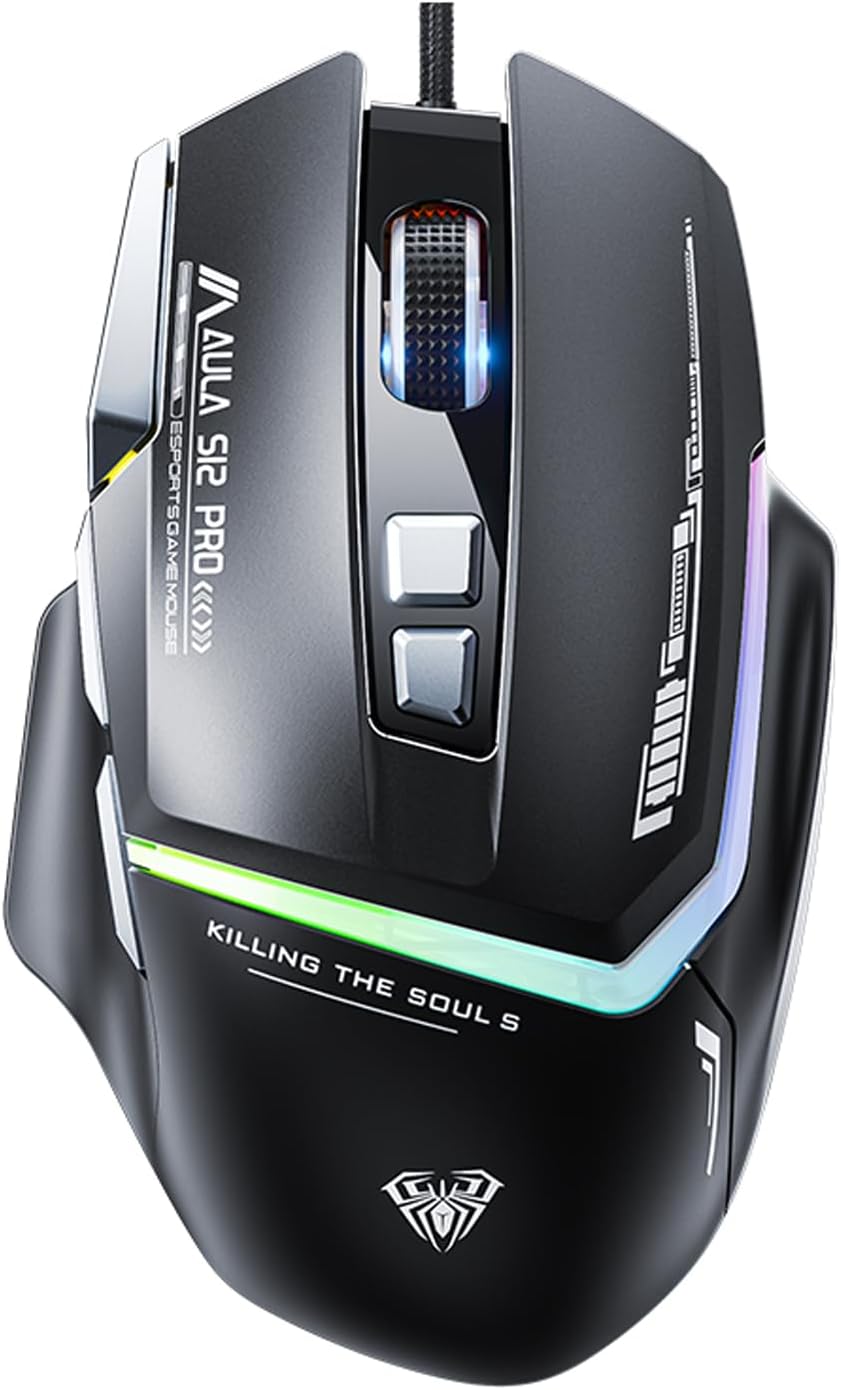
ചിത്രം: മുൻഭാഗം view of the AULA S12Pro Wired Gaming Mouse, showcasinഅതിന്റെ എർഗണോമിക് ഡിസൈനും RGB ലൈറ്റിംഗും.
പാക്കേജ് ഉള്ളടക്കം
- AULA S12Pro Wired Gaming Mouse x1
- ഉപയോക്തൃ മാനുവൽ x1
ഉൽപ്പന്നം കഴിഞ്ഞുview
The AULA S12Pro is a high-performance wired gaming mouse designed for precision and comfort. It features 8 programmable buttons, adjustable DPI settings up to 12800, and customizable RGB backlighting.
പ്രധാന സവിശേഷതകൾ:
- Professional Gaming Mouse: High-end optical engine for precise positioning, with a maximum DPI of 12800, 7000 fps frame rate, 60 inch/s speed, and 20g acceleration. Includes a side firepower button and macro programmable buttons via software.
- 6 Adjustable DPI Levels: Easily switch between 1200/1600/2400/4800/7200/12800 DPI to suit various tasks and games. Polling rate is 1000Hz.
- RGB Gaming Mouse: Features 13 RGB lighting effects. Lighting can be turned off. Press and hold the DPI button for 3 seconds to change the light mode. Press and hold DPI + forward/back button to switch LED modes.
- എർഗണോമിക് ഡിസൈൻ: Designed with a thumb rest and a high-low bending arc for comfortable long-term use, reducing fatigue.
- Programmable Side Buttons: All macro buttons are customizable. Three side buttons are conveniently placed for thumb access, enhancing gameplay.
- വിശാലമായ അനുയോജ്യത: Plug and play. Compatible with Windows, Mac OS, and Linux systems. Supports PC, Mac laptop, Desktop, Computer, PS4, PS5, and Xbox.
- നീണ്ടുനിൽക്കുന്ന നിർമ്മാണം: 50 million keystroke test ensures long-lasting button performance. Features a durable braided cable with an anti-interference ring.

Image: The AULA S12Pro mouse positioned next to a laptop keyboard, highlighting its "Wired Esports Game Mouse" features, 12800DPI, flowing light effect, and ergonomic design.

Image: Close-up of the AULA S12Pro mouse demonstrating its RGB backlight effect, with a note that RGB lights have 13 adjustable lighting effects.
സജ്ജീകരണ ഗൈഡ്
സിസ്റ്റം ആവശ്യകതകൾ:
- Operating System: Windows 7/8/10/XP/VISTA, Mac OS, Linux
- USB 2.0 പോർട്ട് ലഭ്യമാണ്
ഇൻസ്റ്റലേഷൻ:
- മൗസ് ബന്ധിപ്പിക്കുക: Plug the USB connector of the AULA S12Pro gaming mouse into an available USB 2.0 port on your computer.
- Driver Installation (Plug and Play): The mouse is plug-and-play. Your operating system will automatically detect and install the necessary drivers. No manual driver installation is typically required.
- സോഫ്റ്റ്വെയർ ഇൻസ്റ്റാളേഷൻ (ഓപ്ഷണൽ): For advanced customization, including macro programming and button remapping, you may download the official AULA S12Pro software from the manufacturer's webസൈറ്റ്. സോഫ്റ്റ്വെയർ ഇൻസ്റ്റാളേഷനായി ഓൺ-സ്ക്രീൻ നിർദ്ദേശങ്ങൾ പാലിക്കുക.

Image: The underside of the AULA S12Pro mouse, highlighting its high-end optical engine for accurate positioning.
പ്രവർത്തന നിർദ്ദേശങ്ങൾ
ബട്ടൺ പ്രവർത്തനങ്ങൾ:
| ബട്ടൺ | ഫംഗ്ഷൻ |
|---|---|
| ഇടത് ബട്ടൺ | സ്റ്റാൻഡേർഡ് ക്ലിക്ക് ഫംഗ്ഷൻ. |
| വലത് ബട്ടൺ | സ്റ്റാൻഡേർഡ് റൈറ്റ്-ക്ലിക്ക് ഫംഗ്ഷൻ. |
| സ്ക്രോൾ വീൽ | മുകളിലേക്കും/താഴേക്കും സ്ക്രോൾ ചെയ്യുക, മധ്യത്തിൽ ക്ലിക്ക് ചെയ്യുക. |
| DPI + ബട്ടൺ | Increases DPI sensitivity (cycles through 1200/1600/2400/4800/7200/12800 DPI). |
| DPI - Button | Decreases DPI sensitivity (cycles through 12800/7200/4800/2400/1600/1200 DPI). |
| ഫോർവേഡ് ബട്ടൺ | മുന്നോട്ട് നാവിഗേറ്റ് ചെയ്യുന്നു web browsers/folders. Programmable. |
| ബാക്ക് ബട്ടൺ | പിന്നിലേക്ക് നാവിഗേറ്റ് ചെയ്യുന്നു web browsers/folders. Programmable. |
| Firepower Button | Dedicated button for rapid fire or custom macro. Programmable. |
ഡിപിഐ ക്രമീകരിക്കുന്നു:
Use the DPI + and DPI - buttons located on the top of the mouse to cycle through the 6 available DPI settings: 1200, 1600, 2400, 4800, 7200, and 12800 DPI. The current DPI setting is often indicated by the RGB lighting pattern or color (refer to software for specific indicators).
Customizing RGB Lighting:
- To change the RGB lighting effect, press and hold the DPI button for 3 seconds.
- To switch between different LED modes, press and hold the DPI + Forward/Back button simultaneously.
- To turn off the lighting, refer to the optional software settings.
Macro Programming (via Software):
For advanced users, the AULA S12Pro mouse supports macro definition programming. Download and install the official AULA software to access these features. The software allows you to:
- Customize keybinds for all 8 buttons.
- Create and assign complex macros for gaming or productivity.
- Set up different configurations (e.g., office, game, multimedia) and switch between them using the "Configure ToggleKeys" function within the software.

Image: The AULA S12Pro mouse on a desk with a laptop, illustrating its capability for customized combo moves and macro definition programming.
പരിപാലനവും പരിചരണവും
- വൃത്തിയാക്കൽ: മൗസ് വൃത്തിയാക്കാൻ മൃദുവായതും ഉണങ്ങിയതുമായ ഒരു തുണി ഉപയോഗിക്കുക. കഠിനമായ അഴുക്കിന്, അല്പം ഡി.amp cloth can be used, but ensure no liquid enters the mouse. Do not use harsh chemicals or abrasive cleaners.
- കേബിൾ കെയർ: കേബിളിന് കേടുപാടുകൾ സംഭവിക്കാതിരിക്കാൻ മൂർച്ചയുള്ള വളവുകളോ അമിതമായി വലിക്കുന്നതോ ഒഴിവാക്കുക.
- സംഭരണം: നേരിട്ടുള്ള സൂര്യപ്രകാശത്തിൽ നിന്നും കടുത്ത താപനിലയിൽ നിന്നും മാറി തണുത്തതും വരണ്ടതുമായ സ്ഥലത്ത് മൗസ് സൂക്ഷിക്കുക.
- തുള്ളികൾ ഒഴിവാക്കുക: ആന്തരിക ഘടകങ്ങളെ തകരാറിലാക്കുന്ന തുള്ളികളിൽ നിന്നും ആഘാതങ്ങളിൽ നിന്നും മൗസിനെ സംരക്ഷിക്കുക.
ട്രബിൾഷൂട്ടിംഗ്
| പ്രശ്നം | സാധ്യമായ കാരണം | പരിഹാരം |
|---|---|---|
| മൗസ് പ്രതികരിക്കുന്നില്ല | അയഞ്ഞ യുഎസ്ബി കണക്ഷൻ, തകരാറുള്ള യുഎസ്ബി പോർട്ട്, ഡ്രൈവർ പ്രശ്നം. |
|
| കഴ്സറിന്റെ ചലനം ക്രമരഹിതമോ ചാഞ്ചാട്ടമോ ആണ് | വൃത്തികെട്ട ഒപ്റ്റിക്കൽ സെൻസർ, അനുയോജ്യമല്ലാത്ത മൗസ് പാഡ് പ്രതലം. |
|
| Buttons not working or programmable features not active | Software not installed/configured, button malfunction. |
|
| RGB ലൈറ്റിംഗ് പ്രവർത്തിക്കുന്നില്ല അല്ലെങ്കിൽ തടസ്സപ്പെട്ടു | Software conflict, power issue, hardware malfunction. |
|
സ്പെസിഫിക്കേഷനുകൾ
| ഫീച്ചർ | വിശദാംശങ്ങൾ |
|---|---|
| ഉൽപ്പന്നത്തിൻ്റെ പേര് | വയർഡ് ഗെയിമിംഗ് മൗസ് |
| ബ്രാൻഡ് | ഔല |
| മോഡൽ | S12ProB |
| നിറം | S12Pro-black |
| കൈത്താങ്ങ് | വലംകൈ |
| ഡിപിഐ ക്രമീകരണങ്ങൾ | 1200-1600-2400-4800-7200-12800 DPI |
| ട്രാക്കിംഗ് സ്പീഡ് | 60 ഇഞ്ച്/സെക്കൻഡ് |
| പോളിംഗ് നിരക്ക് | 1000Hz |
| കണക്ഷൻ രീതി | യുഎസ്ബി 2.0 ഇന്റർഫേസ് |
| ബട്ടണുകളുടെ എണ്ണം | 8 (പ്രോഗ്രാം ചെയ്യാവുന്നത്) |
| കേബിൾ നീളം | 1.6മീ |
| മെറ്റീരിയൽ | എബിഎസ് |
| സിസ്റ്റം പിന്തുണ | Mac OS, Windows 7/8/10/XP/VISTA, Linux |
| ഉപകരണ പിന്തുണ | USB interface PC/Mac/Laptop/Desktop/Computer/PS4/PS5/Xbox |
| ഉൽപ്പന്ന അളവുകൾ | 5 x 2.99 x 1.57 ഇഞ്ച് |
| ഇനത്തിൻ്റെ ഭാരം | 7.1 ഔൺസ് |
വാറൻ്റിയും പിന്തുണയും
AULA products are designed for durability and performance. For warranty information and technical support, please refer to the official AULA webനിങ്ങളുടെ സൈറ്റിൽ ബന്ധപ്പെടുക അല്ലെങ്കിൽ നിങ്ങളുടെ റീട്ടെയിലറെ ബന്ധപ്പെടുക. വാറന്റി ക്ലെയിമുകൾക്കുള്ള വാങ്ങലിന്റെ തെളിവായി നിങ്ങളുടെ വാങ്ങൽ രസീത് സൂക്ഷിക്കുക.
For further assistance, you may visit the AULA Store online: AULA Official Store


