1. ആമുഖം
Thank you for choosing the Inkbird C226T Plug-in Thermostat. This device is designed to provide precise temperature control for a variety of applications, including greenhouses, reptile enclosures, terrariums, home brewing, and more. It features multiple control modes, a wide temperature range, and safety functions to ensure reliable operation.
Please read this manual thoroughly before operating the device to ensure proper use and to prevent any damage.
2 സുരക്ഷാ വിവരങ്ങൾ
- വൈദ്യുതി വിതരണം വോളിയം ഉറപ്പാക്കുകtage matches the device's requirements (230V AC).
- Do not exceed the maximum load capacity of 16A / 3680W.
- Keep the device away from water or excessive moisture, except for the IP67 rated waterproof probe.
- Do not disassemble or modify the device. Contact customer support for any issues.
- Always unplug the device from the power outlet before cleaning or maintenance.
- Utilize the child lock feature to prevent accidental changes to settings.
3. ഉൽപ്പന്നം കഴിഞ്ഞുview
The Inkbird C226T thermostat features a clear backlit LCD display and intuitive button controls for easy programming. It includes a durable IP67 waterproof temperature probe.
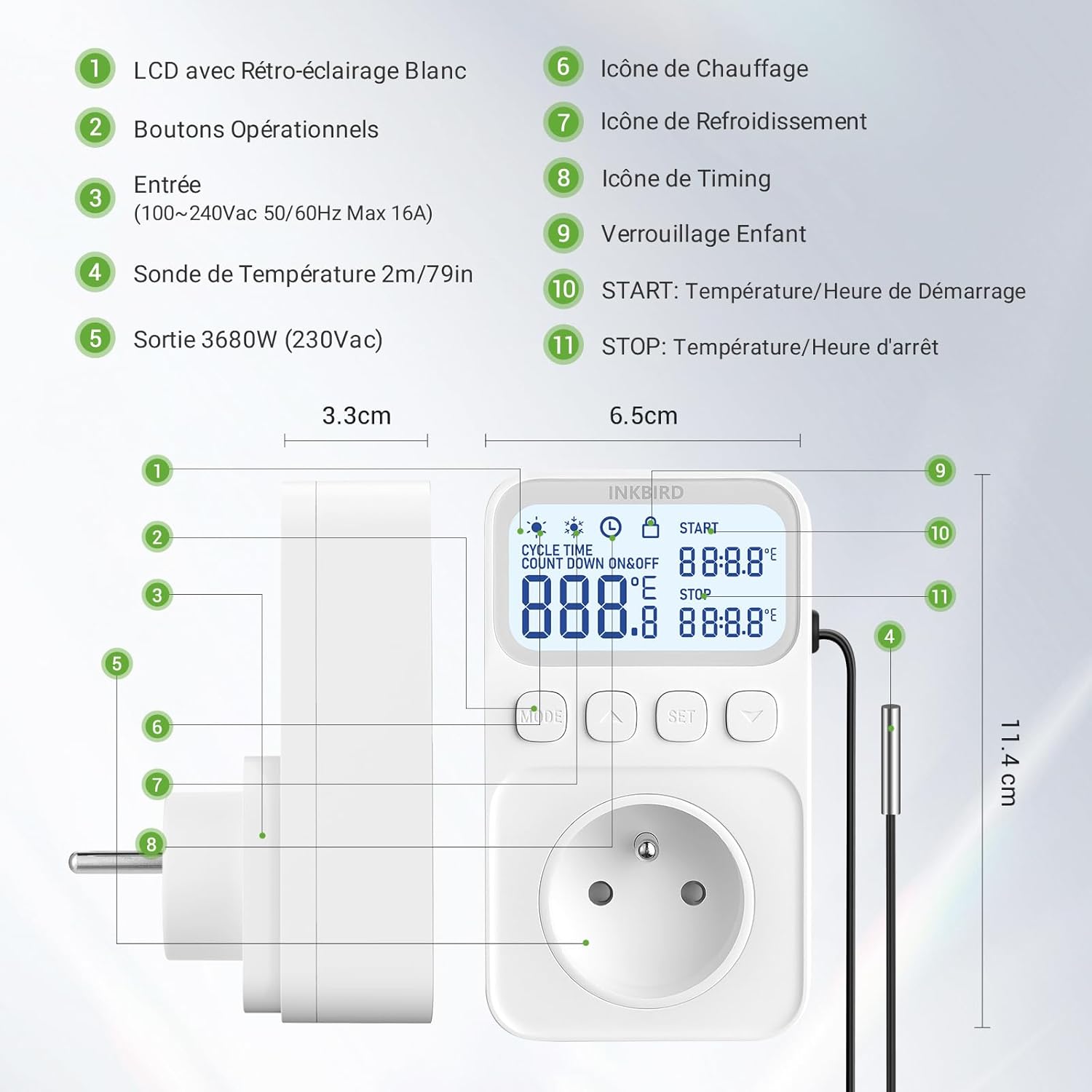
ചിത്രം 3.1: Labeled components and dimensions of the Inkbird C226T thermostat. The image shows the device with its LCD screen, operational buttons, power input, temperature probe, and power output socket. Dimensions are indicated as 3.3cm depth, 6.5cm width, and 11.4cm height, with a 2m/79in probe cable.
പ്രധാന ഘടകങ്ങൾ:
- LCD ഡിസ്പ്ലേ: Shows current temperature, set points, and mode indicators.
- Operational Buttons: MODE, UP, SET, DOWN for navigation and setting adjustments.
- പവർ ഇൻപുട്ട്: 100-240Vac 50/60Hz Max 16A.
- താപനില പരിശോധന: IP67 waterproof, 2m/79in length for accurate temperature sensing.
- പവർ ഔട്ട്പുട്ട്: Max 16A 3680W (230Vac) socket for connecting heating or cooling devices.
4. സജ്ജീകരണം
- അൺപാക്ക്: Carefully remove the thermostat and its accessories from the packaging.
- കണക്ട് പ്രോബ്: Insert the temperature probe into the designated port on the thermostat.
- പൊസിഷൻ പ്രോബ്: Place the waterproof temperature probe in the area where temperature needs to be monitored and controlled. Ensure it is securely positioned and not directly exposed to heating or cooling elements, which could lead to inaccurate readings.
- പ്ലഗ് ഇൻ: Plug the Inkbird C226T thermostat into a standard power outlet. The LCD screen will light up.
- ഉപകരണം ബന്ധിപ്പിക്കുക: Plug your heating or cooling appliance (e.g., heater, fan, heat mat) into the power output socket of the thermostat.

ചിത്രം 4.1: The Inkbird C226T thermostat connected to a power outlet, ready for use.
5 ഓപ്പറേറ്റിംഗ് മോഡുകൾ
The C226T offers three primary control modes: Temperature Mode, Cycle Time Mode, and Countdown Mode. Please note that Temperature Mode and Timer functions (Cycle Time, Countdown) cannot be used simultaneously.

ചിത്രം 5.1: The three main control modes available on the Inkbird C226T thermostat.
5.1. Temperature Mode
This mode allows you to maintain a specific temperature range by setting a START temperature and a STOP temperature. The thermostat will automatically switch between heating and cooling as needed.

ചിത്രം 5.2: Visual representation of the thermostat operating in heating or cooling mode based on set temperatures.
- അമർത്തുക മോഡ് button until the temperature mode icon is displayed.
- അമർത്തിപ്പിടിക്കുക സെറ്റ് ക്രമീകരണ മോഡിൽ പ്രവേശിക്കാൻ 2 സെക്കൻഡ് ബട്ടൺ.
- ഉപയോഗിക്കുക UP ഒപ്പം താഴേക്ക് buttons to adjust the START temperature.
- അമർത്തുക സെറ്റ് again to move to the STOP temperature setting.
- ഉപയോഗിക്കുക UP ഒപ്പം താഴേക്ക് buttons to adjust the STOP temperature.
- അമർത്തുക സെറ്റ് സ്ഥിരീകരിക്കാനും പുറത്തുകടക്കാനും.
Operation Logic:
- If START temperature < STOP temperature: The device operates in ചൂടാക്കൽ മോഡ്. It will turn on when the temperature drops below START and turn off when it reaches STOP.
- If START temperature > STOP temperature: The device operates in തണുപ്പിക്കൽ മോഡ്. It will turn on when the temperature rises above START and turn off when it drops to STOP.
5.2. ടൈമർ പ്രവർത്തനങ്ങൾ
The C226T includes various timer functions for scheduled operation. These functions cannot be used simultaneously with Temperature Mode.

ചിത്രം 5.3: കഴിഞ്ഞുview of the flexible timer functions (P01-P04).
5.2.1. Cycle Time Mode (P01)
This mode allows the device to cycle ON and OFF repeatedly for set durations.

ചിത്രം 5.4: Detailed explanation of Cycle Time Mode (P01).
- അമർത്തുക മോഡ് to select Cycle Time Mode (P01).
- അമർത്തിപ്പിടിക്കുക സെറ്റ് ക്രമീകരണ മോഡിൽ പ്രവേശിക്കാൻ 2 സെക്കൻഡ് നേരത്തേക്ക്.
- ഉപയോഗിക്കുക മുകളിലേക്ക് / താഴേക്ക് to set the START time (ON duration).
- അമർത്തുക സെറ്റ് to move to the STOP time (OFF duration).
- ഉപയോഗിക്കുക മുകളിലേക്ക് / താഴേക്ക് to set the STOP time.
- അമർത്തുക സെറ്റ് to confirm. The device will cycle ON for the START duration and OFF for the STOP duration repeatedly.
- നിർത്താൻ, അമർത്തുക സെറ്റ്.
5.2.2. Countdown ON Mode (P02)
The device will start operating after a set countdown period.

ചിത്രം 5.5: Detailed explanation of Countdown ON Mode (P02).
- അമർത്തുക മോഡ് to select Countdown ON Mode (P02).
- അമർത്തിപ്പിടിക്കുക സെറ്റ് ക്രമീകരണ മോഡിൽ പ്രവേശിക്കാൻ 2 സെക്കൻഡ് നേരത്തേക്ക്.
- ഉപയോഗിക്കുക മുകളിലേക്ക് / താഴേക്ക് to set the START countdown time.
- അമർത്തുക സെറ്റ് to confirm. The device will start after the countdown.
- നിർത്താൻ, അമർത്തുക സെറ്റ്.
5.2.3. Countdown OFF Mode (P03)
The device will stop operating after a set countdown period.

ചിത്രം 5.6: Detailed explanation of Countdown OFF Mode (P03).
- അമർത്തുക മോഡ് to select Countdown OFF Mode (P03).
- അമർത്തിപ്പിടിക്കുക സെറ്റ് ക്രമീകരണ മോഡിൽ പ്രവേശിക്കാൻ 2 സെക്കൻഡ് നേരത്തേക്ക്.
- ഉപയോഗിക്കുക മുകളിലേക്ക് / താഴേക്ക് to set the STOP countdown time.
- അമർത്തുക സെറ്റ് to confirm. The device will stop after the countdown.
- നിർത്താൻ, അമർത്തുക സെറ്റ്.
5.2.4. Countdown ON & OFF Mode (P04)
The device will start after a set countdown and then stop after another set countdown.

ചിത്രം 5.7: Detailed explanation of Countdown ON & OFF Mode (P04).
- അമർത്തുക മോഡ് to select Countdown ON & OFF Mode (P04).
- അമർത്തിപ്പിടിക്കുക സെറ്റ് ക്രമീകരണ മോഡിൽ പ്രവേശിക്കാൻ 2 സെക്കൻഡ് നേരത്തേക്ക്.
- ഉപയോഗിക്കുക മുകളിലേക്ക് / താഴേക്ക് to set the START countdown time.
- അമർത്തുക സെറ്റ് to move to the STOP countdown time.
- ഉപയോഗിക്കുക മുകളിലേക്ക് / താഴേക്ക് to set the STOP countdown time.
- അമർത്തുക സെറ്റ് to confirm. The device will start after the START countdown and stop after the STOP countdown.
- നിർത്താൻ, അമർത്തുക സെറ്റ്.
6. വിപുലമായ ക്രമീകരണങ്ങൾ
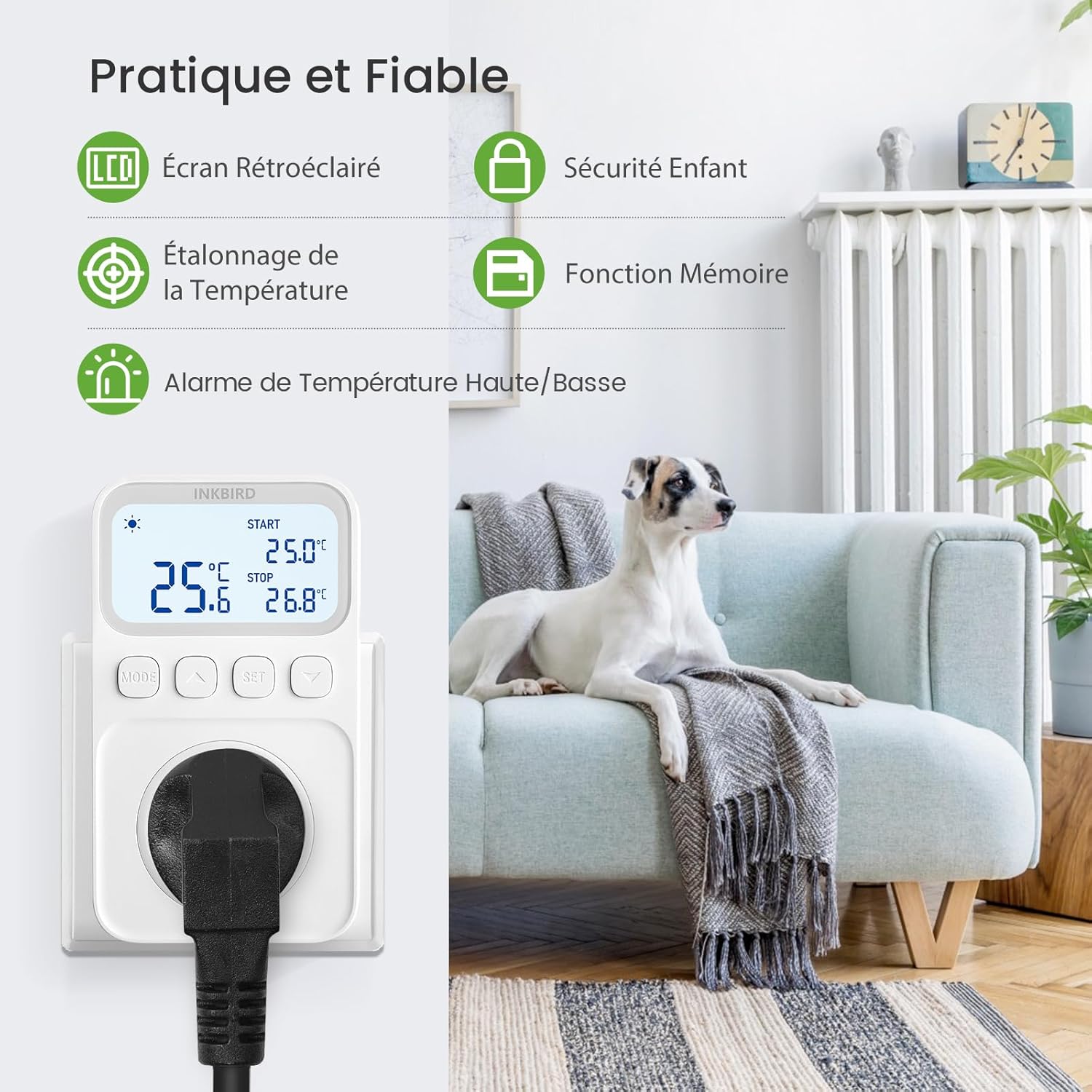
ചിത്രം 6.1: കഴിഞ്ഞുview of practical and reliable features.
6.1. താപനില കാലിബ്രേഷൻ
If you suspect the temperature reading is inaccurate, you can calibrate the probe.

ചിത്രം 6.2: The display showing the temperature calibration setting.
- With the device powered on, press and hold മോഡ് ഒപ്പം സെറ്റ് simultaneously for 3 seconds to enter the parameter settings.
- ഉപയോഗിക്കുക മുകളിലേക്ക് / താഴേക്ക് to navigate to the 'CA' (Calibration) parameter.
- അമർത്തുക സെറ്റ്, പിന്നെ ഉപയോഗിക്കുക മുകളിലേക്ക് / താഴേക്ക് to adjust the calibration value (e.g., +0.5°C or -0.5°C).
- അമർത്തുക സെറ്റ് സ്ഥിരീകരിക്കാനും പുറത്തുകടക്കാനും.
6.2. Cooling Delay (Pt)
This function prevents rapid cycling of cooling equipment, extending its lifespan.
ചിത്രം 6.3: The display showing the cooling delay setting.
- Enter parameter settings (press and hold മോഡ് ഒപ്പം സെറ്റ് 3 സെക്കൻഡ് നേരത്തേക്ക്).
- ഉപയോഗിക്കുക മുകളിലേക്ക് / താഴേക്ക് to navigate to the 'Pt' (Cooling Delay) parameter.
- അമർത്തുക സെറ്റ്, പിന്നെ ഉപയോഗിക്കുക മുകളിലേക്ക് / താഴേക്ക് to set the delay time in minutes.
- അമർത്തുക സെറ്റ് സ്ഥിരീകരിക്കാനും പുറത്തുകടക്കാനും.
6.3. High/Low Temperature Alarms (AH/AL)
Set custom high and low temperature alarm values. The buzzer will sound if the detected temperature exceeds these limits.

ചിത്രം 6.4: The display indicating high and low temperature alarm settings.
- Enter parameter settings (press and hold മോഡ് ഒപ്പം സെറ്റ് 3 സെക്കൻഡ് നേരത്തേക്ക്).
- ഉപയോഗിക്കുക മുകളിലേക്ക് / താഴേക്ക് to navigate to 'AH' (High Alarm) or 'AL' (Low Alarm).
- അമർത്തുക സെറ്റ്, പിന്നെ ഉപയോഗിക്കുക മുകളിലേക്ക് / താഴേക്ക് to set the desired alarm temperature.
- അമർത്തുക സെറ്റ് സ്ഥിരീകരിക്കാൻ.
- To mute/unmute the buzzer, press the മോഡ് button briefly when an alarm is active.
6.4. ചൈൽഡ് ലോക്ക്
ക്രമീകരണങ്ങളിൽ ആകസ്മികമായ മാറ്റങ്ങൾ തടയുന്നതിന് ചൈൽഡ് ലോക്ക് സജീവമാക്കുക.

ചിത്രം 6.5: The child lock feature helps protect settings from unintended adjustments.
- To activate/deactivate the child lock, press and hold the UP ഒപ്പം താഴേക്ക് 3 സെക്കൻഡ് നേരത്തേക്ക് ഒരേസമയം ബട്ടണുകൾ.
- A lock icon will appear/disappear on the display to indicate the status.
6.5. മെമ്മറി പ്രവർത്തനം
The thermostat retains your settings even after a power outage, ensuring continuous operation without reprogramming.
6.6. ഫാക്ടറി റീസെറ്റ്
To restore the device to its original factory settings:
- With the device powered on, press and hold the മോഡ് ഒപ്പം താഴേക്ക് 5 സെക്കൻഡ് നേരത്തേക്ക് ഒരേസമയം ബട്ടണുകൾ.
- The display will show 'RST' or similar, indicating a successful reset.
7. അപേക്ഷകൾ
The Inkbird C226T thermostat is versatile and suitable for various temperature-controlled environments:

ചിത്രം 7.1: Diverse applications for the Inkbird C226T thermostat.
- ഉരഗ ടെറേറിയങ്ങൾ: Maintain optimal temperatures for reptiles.
- അക്വേറിയങ്ങൾ: Control water temperature for aquatic life.
- ഹരിതഗൃഹങ്ങൾ: Regulate temperature for plant growth.
- Home Brewing/Fermentation: Ensure consistent temperatures for yeast activity.
- Incubators: Precise temperature control for hatching eggs.
- Freezers/Refrigerators: Manage cooling for specific storage needs.
- Heating Mats: Control temperature for seed germination or pet warmth.
8 സ്പെസിഫിക്കേഷനുകൾ
| പരാമീറ്റർ | മൂല്യം |
|---|---|
| മോഡൽ നമ്പർ | ITC-C216T-IBFR |
| ബ്രാൻഡ് | മഷി പക്ഷി |
| വാല്യംtage | 230V എസി |
| പരമാവധി ലോഡ് | 16A / 3680W |
| താപനില നിയന്ത്രണ പരിധി | -40°C മുതൽ 100°C വരെ (-40°F മുതൽ 212°F വരെ) |
| താപനില കൃത്യത | ±1°C (±1.8°F) |
| അന്വേഷണ തരം | IP67 വാട്ടർപ്രൂഫ് |
| അന്വേഷണ ദൈർഘ്യം | 2 മീ / 79 ഇഞ്ച് |
| പ്രദർശിപ്പിക്കുക | ബാക്ക്ലിറ്റ് എൽസിഡി |
| നിയന്ത്രണ തരം | Digital, Button-operated |
| മെറ്റീരിയൽ | പ്ലാസ്റ്റിക് |
| അളവുകൾ (L x W x H) | 6.5 x 3.3 x 11.4 സെ.മീ |
| ഭാരം | 251 ഗ്രാം |
9. പ്രശ്നപരിഹാരം
- പ്രദർശനം ശൂന്യമാണ്: Check if the thermostat is properly plugged into a live power outlet. Ensure there is power to the outlet.
- താപനില വായന തെറ്റാണ്: Ensure the probe is correctly inserted and positioned. Perform a temperature calibration (refer to Section 6.1).
- Device not turning ON/OFF as expected: Verify the START and STOP temperature settings in Temperature Mode, or the timing settings in Timer Modes. Ensure Temperature Mode and Timer functions are not active simultaneously.
- Alarm sounding: Check the current temperature against the High (AH) and Low (AL) alarm settings. Adjust alarm limits or mute the buzzer if desired (refer to Section 6.3).
- ബട്ടണുകൾ പ്രതികരിക്കുന്നില്ല: Check if the child lock is active (a lock icon will be visible on the display). Deactivate it by pressing and holding UP and DOWN buttons for 3 seconds (refer to Section 6.4).
- Connected appliance not working: Ensure the appliance itself is functional and properly plugged into the thermostat's output socket. Check the thermostat's output status (heating/cooling indicator).
10. പരിപാലനം
- വൃത്തിയാക്കൽ: Disconnect the thermostat from the power supply. Wipe the device with a soft, dry cloth. Do not use abrasive cleaners or immerse the main unit in water.
- പ്രോബ് കെയർ: The temperature probe is IP67 waterproof and can be cleaned with water. Ensure it is free from debris that might affect readings.
- സംഭരണം: ഉപയോഗത്തിലില്ലാത്തപ്പോൾ തണുത്തതും ഉണങ്ങിയതുമായ സ്ഥലത്ത് ഉപകരണം സൂക്ഷിക്കുക.
11. വാറൻ്റിയും പിന്തുണയും
Inkbird products come with a standard warranty. For detailed warranty information, technical support, or service inquiries, please visit the official Inkbird website or contact their customer service directly. Please have your model number (ITC-C216T-IBFR) and purchase date available when contacting support.
Webസൈറ്റ്: www.inkbird.com