1. ആമുഖം
വാങ്ങിയതിന് നന്ദി.asing the LDNIO BC AU BS Portable Outdoor Bluetooth Speaker. This manual provides essential information for the safe and efficient operation of your device. Please read it thoroughly before use and retain it for future reference.
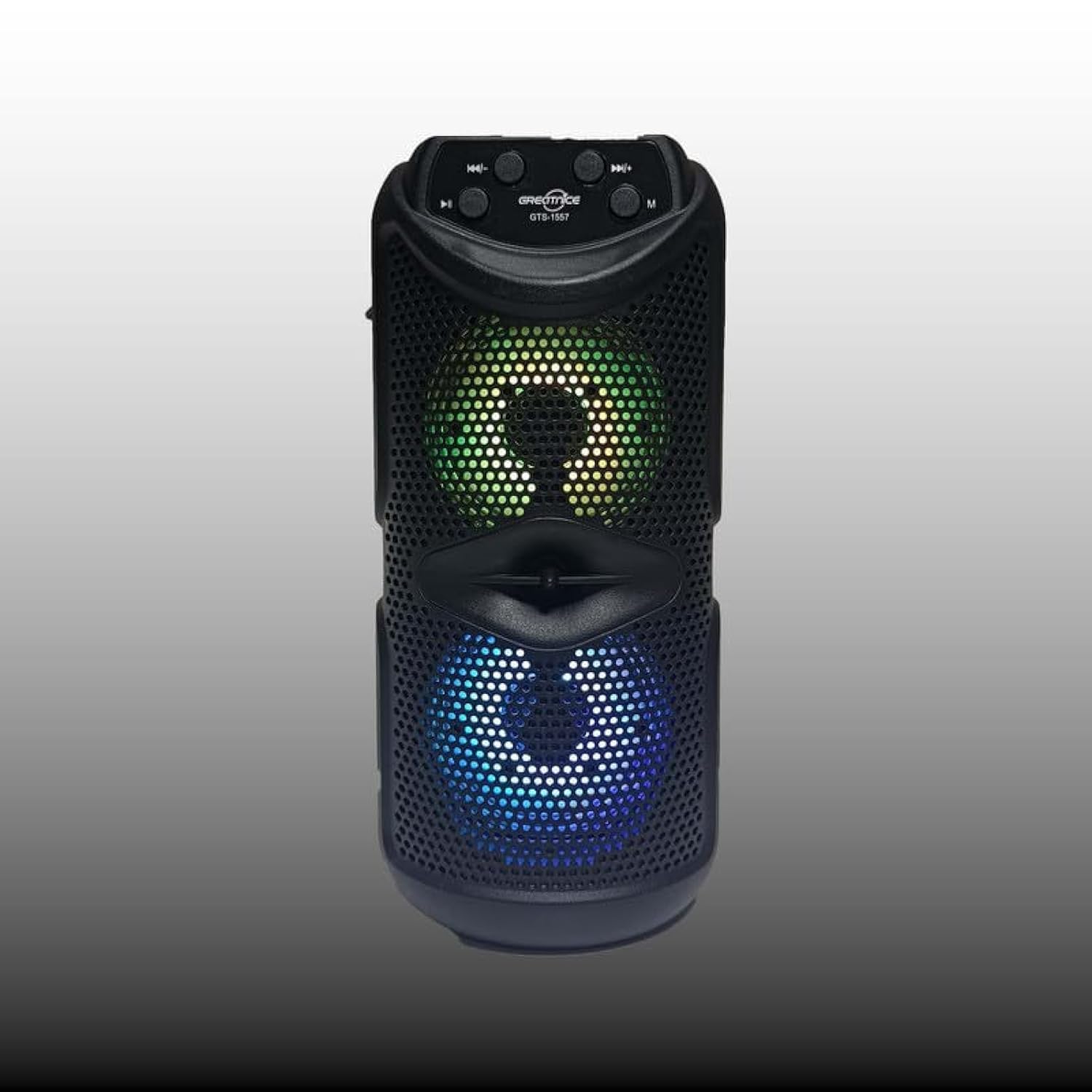
ചിത്രം 1.1: ഫ്രണ്ട് view of the LDNIO BC AU BS Portable Outdoor Bluetooth Speaker. This image displays the speaker's main body, control panel at the top, and the dual speaker grilles with internal lighting visible.
2. ഉൽപ്പന്ന സവിശേഷതകൾ
- ഉയർന്ന നിലവാരമുള്ള ശബ്ദം: 10W output for clear and powerful audio.
- വയർലെസ് കണക്റ്റിവിറ്റി: Bluetooth for seamless audio streaming.
- മൾട്ടി-ഫങ്ഷണൽ പ്ലേബാക്ക്: Supports FM radio, USB drive, and TF card playback.
- ട്രൂ വയർലെസ് സ്റ്റീരിയോ (TWS): Connect two speakers for an enhanced stereo experience.
- കരോക്കെ പ്രവർത്തനം: Integrated support for karaoke.
- ഡൈനാമിക് ലൈറ്റിംഗ്: Color-changing lights for bass boost and visual appeal.
- പോർട്ടബിൾ ഡിസൈൻ: Easy-to-carry handle, suitable for outdoor use.
- നീണ്ട ബാറ്ററി ലൈഫ്: Up to 8 hours of use on a single charge.
- ഇരട്ട സ്പീക്കറുകൾ: Features dual 4-inch subwoofers for rich sound.
3. പാക്കേജ് ഉള്ളടക്കം
പാക്കേജിൽ ഇനിപ്പറയുന്ന ഇനങ്ങൾ ഉണ്ടോ എന്ന് പരിശോധിക്കുക:
- LDNIO BC AU BS Portable Outdoor Bluetooth Speaker
- യുഎസ്ബി ചാർജിംഗ് കേബിൾ
- ഉപയോക്തൃ മാനുവൽ (ഈ പ്രമാണം)
ഏതെങ്കിലും ഇനങ്ങൾ നഷ്ടപ്പെട്ടാലോ കേടുപാടുകൾ സംഭവിച്ചാലോ, ദയവായി നിങ്ങളുടെ റീട്ടെയിലറെ ബന്ധപ്പെടുക.
4 സുരക്ഷാ വിവരങ്ങൾ
- സ്പീക്കറിനെ തീവ്രമായ താപനിലയിലോ, നേരിട്ടുള്ള സൂര്യപ്രകാശത്തിലോ, ഉയർന്ന ആർദ്രതയിലോ തുറന്നുകാട്ടരുത്.
- സ്പീക്കറെ ശക്തമായ ആഘാതങ്ങൾക്ക് വിധേയമാക്കുകയോ താഴെയിടുകയോ ചെയ്യുന്നത് ഒഴിവാക്കുക.
- സ്പീക്കർ സ്വയം ഡിസ്അസംബ്ലിംഗ് ചെയ്യുകയോ നന്നാക്കാൻ ശ്രമിക്കുകയോ ചെയ്യരുത്. ഇത് വാറന്റി അസാധുവാക്കും.
- Keep the speaker away from water and other liquids to prevent electric shock or damage.
- നൽകിയിരിക്കുന്നതോ സാക്ഷ്യപ്പെടുത്തിയതോ ആയ ചാർജിംഗ് കേബിൾ മാത്രം ഉപയോഗിക്കുക.
- മൃദുവായതും ഉണങ്ങിയതുമായ തുണി ഉപയോഗിച്ച് സ്പീക്കർ വൃത്തിയാക്കുക. അബ്രസീവ് ക്ലീനറുകൾ ഉപയോഗിക്കരുത്.
5. സജ്ജീകരണം
5.1 സ്പീക്കർ ചാർജ് ചെയ്യുന്നു
- സ്പീക്കറിന്റെ ചാർജിംഗ് പോർട്ടിലേക്ക് USB ചാർജിംഗ് കേബിൾ ബന്ധിപ്പിക്കുക.
- USB കേബിളിന്റെ മറ്റേ അറ്റം അനുയോജ്യമായ ഒരു USB പവർ അഡാപ്റ്ററുമായി (ഉൾപ്പെടുത്തിയിട്ടില്ല) അല്ലെങ്കിൽ കമ്പ്യൂട്ടറിന്റെ USB പോർട്ടുമായി ബന്ധിപ്പിക്കുക.
- ചാർജ് ചെയ്യുമ്പോൾ ചാർജിംഗ് ഇൻഡിക്കേറ്റർ ലൈറ്റ് പ്രകാശിക്കും, സാധാരണയായി ചുവപ്പ് നിറത്തിൽ.
- Once fully charged, the indicator light will change color or turn off (refer to specific model behavior). A full charge provides up to 8 hours of playback.
5.2 പവർ ഓൺ/ഓഫ്
- പവർ ഓണാക്കാൻ, അമർത്തിപ്പിടിക്കുക പവർ ബട്ടൺ (usually marked with ⏻) for a few seconds until you hear an audible prompt or see the indicator lights activate.
- പവർ ഓഫ് ചെയ്യുന്നതിന്, അമർത്തിപ്പിടിക്കുക പവർ ബട്ടൺ again for a few seconds until the speaker powers down.
5.3 ബ്ലൂടൂത്ത് ജോടിയാക്കൽ
- സ്പീക്കർ ഓണാണെന്നും ബ്ലൂടൂത്ത് മോഡിൽ ആണെന്നും ഉറപ്പാക്കുക. ഇല്ലെങ്കിൽ, അമർത്തുക മോഡ് ബട്ടൺ (M) to switch to Bluetooth mode. The Bluetooth indicator light will flash, indicating it's ready for pairing.
- നിങ്ങളുടെ മൊബൈൽ ഉപകരണത്തിൽ (സ്മാർട്ട്ഫോൺ, ടാബ്ലെറ്റ്, ലാപ്ടോപ്പ്), ബ്ലൂടൂത്ത് പ്രവർത്തനക്ഷമമാക്കി ലഭ്യമായ ഉപകരണങ്ങൾക്കായി തിരയുക.
- Select "LDNIO BC AU BS" (or similar name) from the list of found devices.
- ജോടിയാക്കിക്കഴിഞ്ഞാൽ, സ്പീക്കർ ഒരു കേൾക്കാവുന്ന സ്ഥിരീകരണം പുറപ്പെടുവിക്കും, ബ്ലൂടൂത്ത് ഇൻഡിക്കേറ്റർ ലൈറ്റ് മിന്നുന്നത് നിർത്തി ഉറച്ചതായി തുടരും.
- ഇപ്പോൾ നിങ്ങളുടെ ഉപകരണത്തിൽ നിന്ന് സ്പീക്കറിലൂടെ ഓഡിയോ പ്ലേ ചെയ്യാൻ കഴിയും.
5.4 മറ്റ് പ്ലേബാക്ക് മോഡുകൾ
- എഫ്എം റേഡിയോ: അമർത്തുക മോഡ് ബട്ടൺ (M) to switch to FM radio. Use the Previous/Next Track buttons സ്റ്റേഷനുകൾക്കായി സ്കാൻ ചെയ്യാൻ.
- USB/TF കാർഡ്: Insert a USB drive or TF (MicroSD) card into the respective port. The speaker will automatically switch to USB/TF mode and begin playing audio files.
- TWS (ട്രൂ വയർലെസ് സ്റ്റീരിയോ): To pair two LDNIO BC AU BS speakers for stereo sound, ensure both speakers are on and in Bluetooth mode. On one speaker, press and hold the TWS ബട്ടൺ (if available, or a specific pairing button) until it enters TWS pairing mode. The speakers will connect automatically.
6. പ്രവർത്തന നിർദ്ദേശങ്ങൾ

ചിത്രം 6.1: Close-up of the speaker's control panel and illuminated dual speakers. The control panel typically includes buttons for power, mode, play/pause, and track navigation/volume.
6.1 ബട്ടൺ പ്രവർത്തനങ്ങൾ
- പവർ ബട്ടൺ (⏻): പവർ ഓൺ/ഓഫ് ചെയ്യാൻ അമർത്തിപ്പിടിക്കുക.
- മോഡ് ബട്ടൺ (M): Short press to switch between Bluetooth, FM, USB, and TF card modes.
- Play/Pause Button (⏸): ഓഡിയോ പ്ലേ ചെയ്യാനോ താൽക്കാലികമായി നിർത്താനോ ഹ്രസ്വമായി അമർത്തുക.
- Previous Track / Volume Down Button (⏮): മുമ്പത്തെ ട്രാക്കിനായി ഹ്രസ്വമായി അമർത്തുക. ശബ്ദം കുറയ്ക്കാൻ അമർത്തിപ്പിടിക്കുക.
- Next Track / Volume Up Button (⏭): അടുത്ത ട്രാക്കിനായി ഷോർട്ട് പ്രസ്സ് ചെയ്യുക. വോളിയം കൂട്ടാൻ അമർത്തിപ്പിടിക്കുക.
6.2 വോളിയം നിയന്ത്രണം
Adjust the volume by pressing and holding the വോളിയം കൂട്ടുക (⏭) or വോളിയം ഡൗൺ (⏮) buttons. You can also control the volume from your connected device.
6.3 ലൈറ്റ് മോഡുകൾ
The speaker features color-changing lights. Specific controls for light modes may vary. Typically, a dedicated ലൈറ്റ് ബട്ടൺ or a long press on the മോഡ് ബട്ടൺ (M) can cycle through different light patterns or turn them off.
6.4 കരോക്കെ ഫംഗ്ഷൻ
To use the karaoke function, connect a microphone (not included) to the designated microphone input port on the speaker. Adjust the microphone volume as needed using the speaker's controls or the microphone's own controls.
7. പരിപാലനം
- വൃത്തിയാക്കൽ: Wipe the speaker's exterior with a soft, dry, lint-free cloth. Do not use liquid cleaners or aerosols.
- സംഭരണം: ദീർഘനേരം ഉപയോഗിക്കാത്തപ്പോൾ, സ്പീക്കർ തണുത്തതും വരണ്ടതുമായ സ്ഥലത്ത് സൂക്ഷിക്കുക, നേരിട്ടുള്ള സൂര്യപ്രകാശത്തിൽ നിന്നും കടുത്ത താപനിലയിൽ നിന്നും അകറ്റി നിർത്തുക.
- ബാറ്ററി കെയർ: ബാറ്ററി ലൈഫ് വർദ്ധിപ്പിക്കാൻ, ബാറ്ററി ഇടയ്ക്കിടെ പൂർണ്ണമായും ഡിസ്ചാർജ് ചെയ്യുന്നത് ഒഴിവാക്കുക. ഉപയോഗത്തിലില്ലെങ്കിൽ പോലും സ്പീക്കർ പതിവായി ചാർജ് ചെയ്യുക.
8. പ്രശ്നപരിഹാരം
| പ്രശ്നം | സാധ്യമായ കാരണം | പരിഹാരം |
|---|---|---|
| സ്പീക്കർ പവർ ഓൺ ചെയ്യുന്നില്ല. | ബാറ്ററി തീർന്നു. | സ്പീക്കർ പൂർണ്ണമായും ചാർജ് ചെയ്യുക. |
| ശബ്ദമില്ല. | Volume is too low; device not paired; incorrect mode. | Increase volume on speaker and device; ensure proper Bluetooth pairing; switch to correct playback mode (Bluetooth, USB, TF, FM). |
| ബ്ലൂടൂത്ത് ജോടിയാക്കൽ പരാജയപ്പെട്ടു. | സ്പീക്കർ ജോടിയാക്കൽ മോഡിലല്ല; ഉപകരണം വളരെ അകലെയാണ്; ഇടപെടൽ. | Ensure speaker is in Bluetooth pairing mode (flashing indicator); move device closer to speaker; restart both devices. |
| മോശം എഫ്എം റേഡിയോ സ്വീകരണം. | ദുർബലമായ സിഗ്നൽ. | മികച്ച സ്വീകരണമുള്ള ഒരു സ്ഥലത്തേക്ക് സ്പീക്കർ മാറ്റിസ്ഥാപിക്കുക. |
9 സ്പെസിഫിക്കേഷനുകൾ
- മോഡലിൻ്റെ പേര്: BC AU BS
- സ്പീക്കർ തരം: ഔട്ട്ഡോർ, പോർട്ടബിൾ
- കണക്റ്റിവിറ്റി: വയർലെസ് (ബ്ലൂടൂത്ത്)
- സ്പീക്കർ പരമാവധി ഔട്ട്പുട്ട് പവർ: 10 വാട്ട്സ്
- സബ് വൂഫർ വ്യാസം: ഡ്യുവൽ 4 ഇഞ്ച്
- സറൗണ്ട് സൗണ്ട് ചാനൽ കോൺഫിഗറേഷൻ: 2
- പ്രത്യേക സവിശേഷതകൾ: Bluetooth, Portable, Wireless, FM Radio, USB Playback, TF Card Playback, TWS, Karaoke Function, Color-changing Lights
- അനുയോജ്യമായ ഉപകരണങ്ങൾ: ലാപ്ടോപ്പ്, സ്മാർട്ട്ഫോൺ, ടാബ്ലെറ്റ്
- മൗണ്ടിംഗ് തരം: ടേബിൾടോപ്പ്
- ഏകദേശ പാക്കേജ് അളവുകൾ: 12 x 12 x 8 സെ.മീ
- ഏകദേശ പാക്കേജ് ഭാരം: 2 കി.ഗ്രാം
10. വാറൻ്റിയും പിന്തുണയും
LDNIO products are designed to provide reliable performance. For warranty information, please refer to the warranty card included with your purchase or contact your local retailer. For technical support or inquiries, please visit the official LDNIO webസൈറ്റ് അല്ലെങ്കിൽ അവരുടെ ഉപഭോക്തൃ സേവന വിഭാഗവുമായി ബന്ധപ്പെടുക.


