1. ആമുഖം
This manual provides instructions for the installation, operation, and maintenance of your ENVIO USB Wireless WiFi Adapter. This adapter is designed to connect DVR/NVR systems to a local area network wirelessly, eliminating the need for network cables. It simplifies the setup process for your DVR/NVR by enabling a wireless connection to your router.
2. പാക്കേജ് ഉള്ളടക്കം
- ENVIO USB Wireless WiFi Adapter (Model: B0CPYPJM1X)
- ഉപയോക്തൃ മാനുവൽ (ഈ പ്രമാണം)
കുറിപ്പ്: പാക്കേജ് ഉള്ളടക്കം ലഭിച്ചുകഴിഞ്ഞാൽ ദയവായി പരിശോധിക്കുക. ഏതെങ്കിലും ഇനങ്ങൾ നഷ്ടപ്പെട്ടാലോ കേടായാലോ, നിങ്ങളുടെ വിൽപ്പനക്കാരനെ ബന്ധപ്പെടുക.
3. ഉൽപ്പന്നം കഴിഞ്ഞുview
The ENVIO USB Wireless WiFi Adapter provides wireless connectivity for compatible DVR and NVR systems. It operates on the 2.4 GHz frequency band and supports IEEE 802.11 b/g/n standards, offering data transfer speeds up to 150 Mbps.

Figure 1: ENVIO USB Wireless WiFi Adapter with antenna in extended position.
The compact design allows for easy integration with your existing surveillance equipment. Its primary function is to enable wireless network access for DVRs and NVRs, facilitating remote viewing and management without the need for physical Ethernet connections.
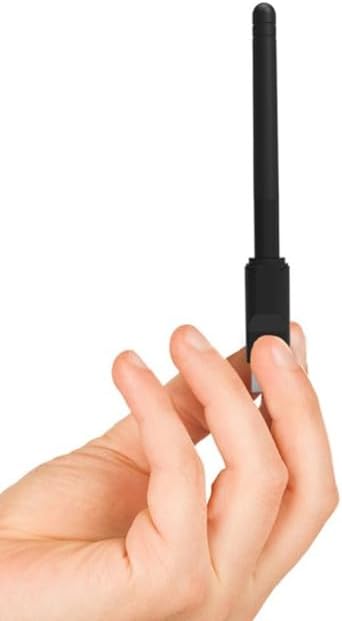
Figure 2: The adapter's compact size, shown held in a hand.
3.1 പ്രധാന സവിശേഷതകൾ
- Wireless connectivity for DVR/NVR systems.
- IEEE 802.11 b/g/n compliant.
- Up to 150 Mbps data transfer rate.
- 2.4 GHz frequency band operation.
- USB interface for easy connection.
3.2. Compatible DVR/NVR Models
This adapter is compatible with a wide range of DVR/NVR models, including but not limited to:
- ADH2-416v3, ADH304v3, ADH-304v3, ADH308v3, ADH-308v3
- ADM2-516, ADM-504, ADM-508
- ADN2-416v3, AGS-404, AGS-408, AGS-416
- AMS2-816, AMS-804, AMS-808
- ESS2M04-NRT, ESS2M08-NRT, ESS4M04-NRT, ESS4M08-NRT, ESS4M16-NRT, ESS5M04-NRT, ESS5M08-NRT, ESS5M16-NRT, ESS8M04-NRT, ESS8M08-NRT, ESS8M16-NRT
- HS-NH-3808BW-T4
- NVR164K-N, NVR324K-N, NVR-328M325, NVR-85M245FHD2
- PNNR-404, PNV504-P, PNV508-P, PNVR-408, PNVR-804, PNVR804P, PNVR-808, PNVR808P
- XVR2604HN, XVR2608HN
കുറിപ്പ്: Compatibility may vary depending on the firmware version of your DVR/NVR. Refer to your DVR/NVR manual or manufacturer's website for specific wireless adapter support.
4. സജ്ജീകരണ നിർദ്ദേശങ്ങൾ
Follow these steps to install and configure your ENVIO USB Wireless WiFi Adapter:
- Prepare your DVR/NVR: Ensure your DVR/NVR system is powered off before connecting the adapter.
- അഡാപ്റ്റർ ബന്ധിപ്പിക്കുക: Insert the ENVIO USB Wireless WiFi Adapter into an available USB port on your DVR/NVR. Ensure it is firmly seated.
- പവർ ഓൺ: Power on your DVR/NVR system. The system should detect the new hardware.
- നെറ്റ്വർക്ക് ക്രമീകരണങ്ങൾ ആക്സസ് ചെയ്യുക: Navigate to the network settings menu on your DVR/NVR. The exact path may vary depending on your device model (e.g., Menu > Network > Wi-Fi Settings).
- നെറ്റ്വർക്കുകൾക്കായി സ്കാൻ ചെയ്യുക: Select the option to scan for available wireless networks. Your DVR/NVR should display a list of nearby Wi-Fi networks.
- നിങ്ങളുടെ നെറ്റ്വർക്ക് തിരഞ്ഞെടുക്കുക: ലിസ്റ്റിൽ നിന്ന് നിങ്ങൾക്ക് ആവശ്യമുള്ള വൈഫൈ നെറ്റ്വർക്ക് തിരഞ്ഞെടുക്കുക.
- പാസ്വേഡ് നൽകുക: If your network is secured, enter the Wi-Fi password (WPA/WPA2 key) when prompted. Ensure the password is entered correctly.
- ബന്ധിപ്പിക്കുക: Confirm the settings and initiate the connection. The DVR/NVR should now connect to your wireless network.
- കണക്ഷൻ സ്ഥിരീകരിക്കുക: Check the network status on your DVR/NVR to ensure it has obtained an IP address and is successfully connected to the internet (if applicable).

Figure 3: ENVIO USB Wireless WiFi Adapter with antenna in folded position, ready for insertion.
പ്രധാനപ്പെട്ടത്: If the DVR/NVR does not detect the adapter or connect to the network, ensure your DVR/NVR firmware supports this specific adapter model. You may need to update your DVR/NVR firmware or consult its manufacturer's support resources.
5. പ്രവർത്തന നിർദ്ദേശങ്ങൾ
Once the ENVIO USB Wireless WiFi Adapter is successfully connected to your DVR/NVR and configured with your wireless network, its operation is largely automatic. The adapter facilitates the wireless communication between your DVR/NVR and your router.
- യാന്ത്രിക പുനഃസംയോജനം: The adapter is designed to automatically reconnect to the last configured Wi-Fi network upon DVR/NVR startup, provided the network is available and its credentials have not changed.
- നെറ്റ്വർക്ക് സ്ഥിരത: For optimal performance, ensure the adapter is within a reasonable range of your wireless router and free from major obstructions that could interfere with the signal.
- വിദൂര ആക്സസ്: With a stable wireless connection, you can now access your DVR/NVR remotely via its dedicated mobile application or web interface, as configured by your DVR/NVR system.
6. പരിപാലനം
The ENVIO USB Wireless WiFi Adapter requires minimal maintenance. Follow these guidelines to ensure its longevity and optimal performance:
- വൃത്തിയായി സൂക്ഷിക്കു: Periodically wipe the adapter with a soft, dry cloth to remove dust. Avoid using liquid cleaners or solvents.
- ശാരീരിക സംരക്ഷണം: Avoid exposing the adapter to extreme temperatures, humidity, or direct sunlight. Do not drop or subject it to physical shock.
- സുരക്ഷിത കണക്ഷൻ: Ensure the adapter remains securely plugged into the USB port of your DVR/NVR. Loose connections can lead to intermittent network issues.
- ഫേംവെയർ അപ്ഡേറ്റുകൾ: While the adapter itself typically does not require user-initiated firmware updates, ensure your DVR/NVR's firmware is kept up-to-date, as this can improve compatibility and performance with network devices.
7. പ്രശ്നപരിഹാരം
If you encounter issues with your ENVIO USB Wireless WiFi Adapter, refer to the following troubleshooting steps:
- അഡാപ്റ്റർ കണ്ടെത്തിയില്ല:
- അഡാപ്റ്റർ പൂർണ്ണമായും യുഎസ്ബി പോർട്ടിൽ ചേർത്തിട്ടുണ്ടെന്ന് ഉറപ്പാക്കുക.
- Try a different USB port on your DVR/NVR.
- Restart your DVR/NVR system.
- Verify that your DVR/NVR model is listed as compatible and has the latest firmware.
- വൈഫൈ നെറ്റ്വർക്കിലേക്ക് കണക്റ്റുചെയ്യാൻ കഴിയില്ല:
- Double-check the Wi-Fi password. Passwords are case-sensitive.
- നിങ്ങളുടെ വൈഫൈ റൂട്ടർ ഓണാണെന്നും ഒരു സിഗ്നൽ പ്രക്ഷേപണം ചെയ്യുന്നുണ്ടെന്നും ഉറപ്പാക്കുക.
- Move the DVR/NVR closer to the Wi-Fi router to improve signal strength.
- Check if your Wi-Fi network is using a hidden SSID. If so, you may need to manually enter the network name (SSID).
- നിങ്ങളുടെ വൈഫൈ റൂട്ടർ പുനരാരംഭിക്കുക.
- Intermittent Connection/Slow Speed:
- Ensure the adapter's antenna is positioned optimally for signal reception.
- Reduce interference from other electronic devices (e.g., microwaves, cordless phones).
- Check for congestion on your Wi-Fi channel. You might need to change the channel on your router.
- Verify that your internet service provider (ISP) is not experiencing issues.
If the problem persists after trying these steps, contact ENVIO customer support or your DVR/NVR manufacturer for further assistance.
8 സ്പെസിഫിക്കേഷനുകൾ
| ബ്രാൻഡ് | എൻവിയോ |
| നിർമ്മാതാവ് | ENVIO SECURITY |
| മോഡൽ നമ്പർ (ASIN) | B0CPYPJM1X |
| ഹാർഡ്വെയർ ഇന്റർഫേസ് | USB |
| വയർലെസ് മാനദണ്ഡങ്ങൾ | IEEE 802.11n, IEEE 802.11g, IEEE 802.11b |
| ഡാറ്റ ലിങ്ക് പ്രോട്ടോക്കോൾ | IEEE 802.11n, IEEE 802.11 |
| ഡാറ്റ കൈമാറ്റ നിരക്ക് | Up to 150 Megabits per second |
| ഫ്രീക്വൻസി ബാൻഡ് | 2.4 GHz |
| അനുയോജ്യമായ ഉപകരണങ്ങൾ | DVR, NVR, Desktop Computer, Laptop |
| ആദ്യം ലഭ്യമായ തീയതി | ഡിസംബർ 11, 2023 |
9. വാറൻ്റിയും പിന്തുണയും
ENVIO products are designed for reliability and performance. For specific warranty information, please refer to the documentation included with your purchase or visit the official ENVIO website. If you require technical assistance or have questions regarding your USB Wireless WiFi Adapter, please contact ENVIO customer support.
ബന്ധപ്പെടാനുള്ള വിവരങ്ങൾ: Please refer to your purchase receipt or the ENVIO official webഏറ്റവും കാലികമായ ഉപഭോക്തൃ പിന്തുണാ കോൺടാക്റ്റ് വിശദാംശങ്ങൾക്കായി സൈറ്റ്.


