1. ആമുഖം
This manual provides essential information for the safe and effective operation, assembly, and maintenance of your Genmitsu 3030-PROVer MAX CNC Machine and its compatible 1HP 65mm Diameter Palm Trimmer Router. Please read this manual thoroughly before using the product to ensure proper functionality and to prevent injury or damage.

Image 1.1: The Genmitsu 3030-PROVer MAX CNC Machine shown with the compatible Palm Trimmer Router and various accessories. This image provides an overview of the complete product package.
2. സുരക്ഷാ മാർഗ്ഗനിർദ്ദേശങ്ങൾ
Operating CNC machines and power tools requires strict adherence to safety protocols. Failure to follow these guidelines may result in serious injury or damage to the equipment.
- Always wear appropriate personal protective equipment (PPE), including safety glasses, hearing protection, and dust masks.
- ജോലിസ്ഥലം വൃത്തിയുള്ളതും, നല്ല വെളിച്ചമുള്ളതും, തടസ്സങ്ങളില്ലാത്തതുമാണെന്ന് ഉറപ്പാക്കുക.
- Keep hands and loose clothing away from moving parts and cutting tools.
- Disconnect power before performing any maintenance, adjustments, or tool changes.
- സുരക്ഷിതമായി clamp all workpieces to prevent movement during operation.
- മെഷീൻ പ്രവർത്തിക്കുമ്പോൾ ഒരിക്കലും ശ്രദ്ധിക്കാതെ വിടരുത്.
- Familiarize yourself with the emergency stop function and its location.
- d-യിൽ മെഷീൻ പ്രവർത്തിപ്പിക്കരുത്amp അല്ലെങ്കിൽ ആർദ്ര സാഹചര്യങ്ങൾ.
- Use only accessories and attachments recommended by Genmitsu.
3. ഉൽപ്പന്ന ഘടകങ്ങൾ
3.1. 3030-PROVer MAX CNC Machine
The 3030-PROVer MAX is a desktop CNC router designed for precision carving and cutting. Key components include:
- ഫ്രെയിം: Robust aluminum construction for stability.
- ജോലി ഏരിയ: Spacious bed for various material sizes.
- Spindle Mount: Designed to accommodate 65mm diameter spindles, including the provided palm trimmer router.
- ചലന സംവിധാനം: Features ball screws and dual linear guides on X, Y, and Z axes for enhanced accuracy.
- ഓഫ്ലൈൻ കൺട്രോളർ: A dedicated unit for direct control without a computer connection.
- വൈദ്യുതി വിതരണം: External unit providing power to the machine.
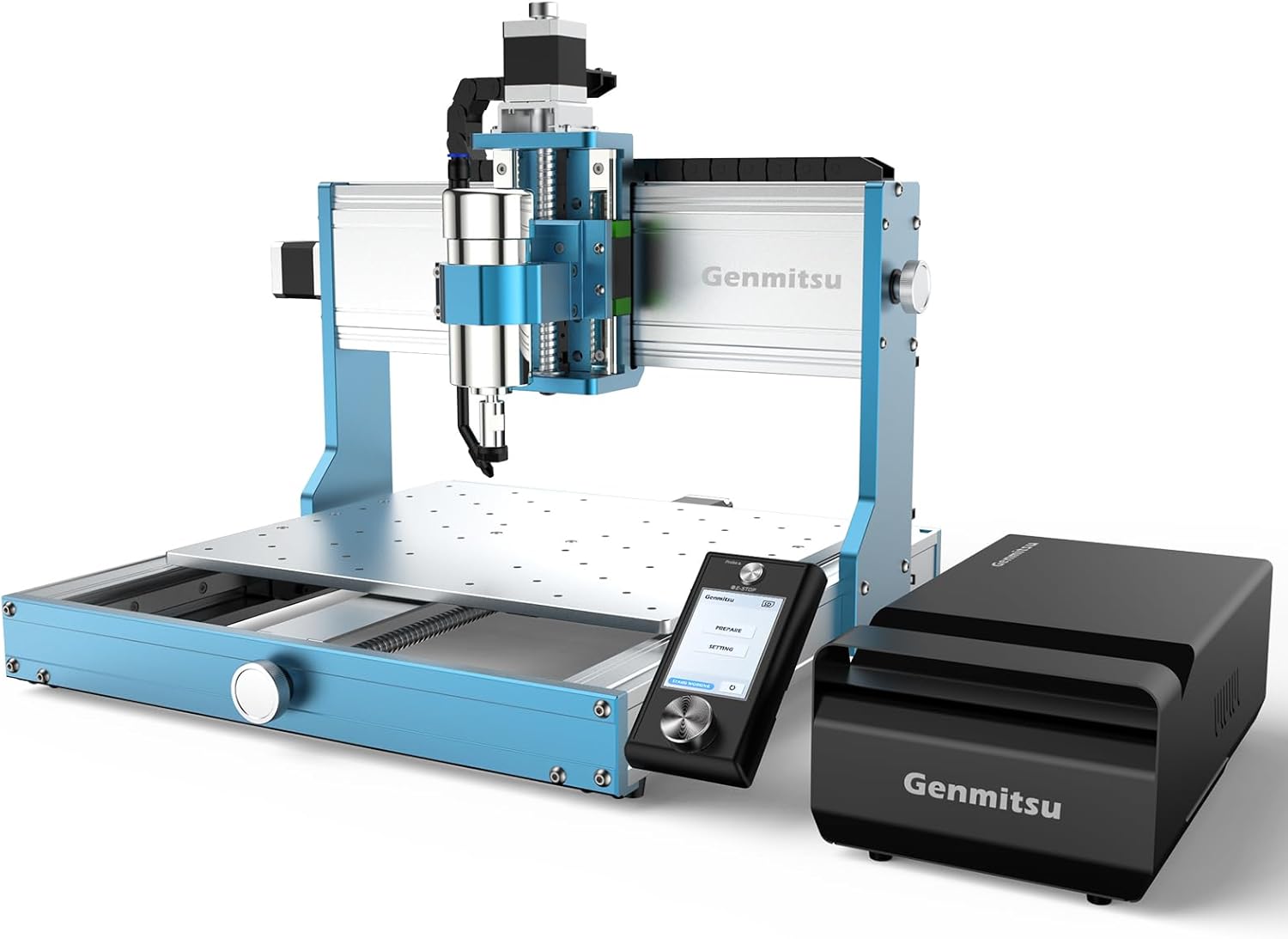
ചിത്രം 3.1: ഒരു ആംഗിൾഡ് view of the Genmitsu 3030-PROVer MAX CNC Machine, showcasing its robust frame, the offline controller, and the external power supply unit.

ചിത്രം 3.2: വിശദമായത് view highlighting the ball screws and dual linear guides on the X, Y, and Z axes, which contribute to the machine's precision and smooth movement.

Image 3.3: This image illustrates the versatility of the spindle mount, showing compatibility with laser modules, 65mm trimmers (like the included router), and 69mm trimmers.
3.2. 1HP 65mm Diameter Palm Trimmer Router
The included palm trimmer router is a versatile tool that can be used both handheld and integrated into the CNC machine. Its components include:
- മോട്ടോർ: 1 horsepower motor for efficient cutting.
- കോളെറ്റ്: For securing various router bits.
- അടിസ്ഥാനം: Clear base for visibility during handheld operation.
- ആഴത്തിലുള്ള ക്രമീകരണം: Mechanism for precise cutting depth control.
- Dust Nozzle: Attachment for connecting to a dust collection system.

Image 3.4: The 1HP 65mm Diameter Palm Trimmer Router is displayed with its accompanying accessories, including wrenches, guides, and dust collection components.
4. അസംബ്ലിയും സജ്ജീകരണവും
4.1. CNC Machine Assembly
The 3030-PROVer MAX is designed for quick self-assembly, typically within 10 minutes. Follow the detailed instructions provided in the separate assembly guide for your specific model. Key steps include:
- എല്ലാ ഘടകങ്ങളും അൺപാക്ക് ചെയ്ത് പാക്കിംഗ് ലിസ്റ്റുമായി താരതമ്യം ചെയ്യുക.
- Assemble the main frame, ensuring all connections are secure.
- Install the X, Y, and Z axis modules, paying attention to the Y-axis notch design for proper alignment.
- Connect all motor and limit switch cables to the control board.
- Mount the work bed.

Image 4.1: This image highlights the Y-axis notch design, which simplifies the alignment and balancing process during the initial assembly of the CNC machine, contributing to its quick setup time.
4.2. Router Installation on CNC
To use the palm trimmer router with the CNC machine:
- Ensure the CNC machine is powered off.
- Carefully insert the palm trimmer router into the 65mm spindle mount on the Z-axis.
- cl മുറുക്കുകamping screws on the spindle mount to secure the router firmly.
- Insert the desired router bit into the collet and tighten it securely using the provided wrenches.
- Connect the router's power cable to a suitable power outlet, separate from the CNC machine's power supply if required, or to a relay module if available.
5. പ്രവർത്തന നിർദ്ദേശങ്ങൾ
5.1. CNC Machine Operation
The 3030-PROVer MAX offers versatile control options, primarily through its offline controller.
Using the Offline Controller
The new single knob offline controller provides direct control over your carving projects.
- പവർ ഓൺ: Connect the power supply to the CNC machine and the offline controller.
- നാവിഗേഷൻ: Use the operating knob to navigate through menus (Prepare, Settings, etc.).
- അടിയന്തരമായി നിർത്തുക: The controller features an easily accessible emergency stop button for immediate shutdown in critical situations.
- Loading G-code: Transfer your G-code files to the controller via a USB drive (refer to the controller's specific manual for detailed steps).
- Homing: Perform a homing sequence to set the machine's origin.
- Z-Probe: Utilize the Z-probe for accurate Z-axis zeroing, especially when changing bits or materials.

Image 5.1: The CNC machine is shown alongside its offline controller, with callouts indicating the emergency stop button and the operating knob, emphasizing the intuitive control interface.
Material Compatibility and Carving
The 3030-PROVer MAX supports engraving and cutting a wide range of materials, including:
- ലോഹങ്ങൾ: Capable of cutting 2mm thick aluminum stock.
- മരം: Various types of solid wood.
- പ്ലാസ്റ്റിക്: Acrylic, ABS, PVC.
- Composites: Carbon fiber.
- മറ്റുള്ളവ: PCB boards.
The machine's precision, down to 0.05mm, ensures clean cuts and engravings, even on challenging materials like metal, producing flat edges without metal burrs.

Image 5.2: The CNC machine is depicted carving a piece of wood, accompanied by icons representing the diverse range of materials it supports, including metal, wood, acrylic, and other composites.

Image 5.3: A collage of various materials, including wood, PCB, metal, plastic, and carbon fiber, demonstrating the machine's capability to engrave and cut different textures and compositions.

Image 5.4: This image visually compares the 2mm depth engraving capability of the 3030-PROVer MAX against another CNC, illustrating the superior precision and clean finish achieved by the PROVer MAX.
4th Axis Module Support
The 3030-PROVer MAX supports the integration of a 4th axis module (sold separately) for 3D rotary carving. This expands the machine's capabilities, allowing for complex designs on cylindrical objects and from multiple angles.

Image 5.5: The Genmitsu 3030-PROVer MAX CNC machine is shown with a 4th axis module installed, demonstrating its capability for advanced rotary carving and complex 3D projects.
5.2. Palm Trimmer Router Operation (Handheld)
The 1HP 65mm Diameter Palm Trimmer Router can also be used independently for various woodworking tasks.
- ബിറ്റ് ഇൻസ്റ്റാളേഷൻ: Ensure the router is unplugged. Insert the desired bit into the collet and tighten securely.
- ആഴത്തിലുള്ള ക്രമീകരണം: Use the depth adjustment mechanism to set the desired cutting depth.
- പവർ ഓൺ/ഓഫ്: Use the power switch on the router.
- പൊടി മാനേജ്മെന്റ്: Attach the dust nozzle to a vacuum cleaner or dust collection system to maintain a clean work environment and improve visibility.

Image 5.6: A user is shown operating the palm trimmer router, with a dust collection hose attached to the dust nozzle, illustrating effective dust management during use.

Image 5.7: This collage demonstrates the diverse applications of the palm trimmer router, including wood trimming, furniture production, DIY projects, and its integration into CNC milling setups.
6. പരിപാലനം
Regular maintenance ensures the longevity and optimal performance of your Genmitsu 3030-PROVer MAX CNC Machine and Palm Trimmer Router.
- വൃത്തിയാക്കൽ: After each use, clean the machine and router to remove dust, chips, and debris. The CNC machine features a sealed dust-proof design to protect internal components, but external cleaning is still necessary.
- ലൂബ്രിക്കേഷൻ: Periodically apply a thin layer of appropriate lubricant to the ball screws and linear guides to ensure smooth operation. Refer to the specific lubricant recommendations in the full product manual.
- പരിശോധന: Regularly inspect all cables, connections, and moving parts for wear or damage. Replace any worn or damaged components immediately.
- ബിറ്റ് കെയർ: Keep router bits clean and sharp. Dull bits can lead to poor cut quality and increased strain on the motor.

Image 6.1: This image illustrates the sealed dust-proof design of the CNC machine, showing how it protects the slide and screw assembly from dust and debris, thereby extending the machine's lifespan and simplifying maintenance.
7. പ്രശ്നപരിഹാരം
നിങ്ങൾ നേരിട്ടേക്കാവുന്ന സാധാരണ പ്രശ്നങ്ങളെ ഈ വിഭാഗം അഭിസംബോധന ചെയ്യുന്നു. കൂടുതൽ സങ്കീർണ്ണമായ പ്രശ്നങ്ങൾക്ക്, ഉപഭോക്തൃ പിന്തുണയുമായി ബന്ധപ്പെടുക.
- മെഷീൻ പ്രതികരിക്കുന്നില്ല: Check all power connections, ensure the emergency stop button is not engaged, and verify cable connections to the controller and motors.
- Poor Cut Quality/Inaccuracy: വർക്ക്പീസ് സുരക്ഷിതമാണെന്ന് ഉറപ്പാക്കുകamped. Check for loose router bits or worn bits. Verify that the ball screws and linear guides are clean and lubricated. Re-calibrate the Z-axis zero point.
- മോട്ടോർ അമിത ചൂടാക്കൽ: Ensure proper ventilation around the router and CNC machine. Avoid excessive feed rates or depth of cut for the material being processed.
- Controller Display Issues: Restart the controller. Ensure the cable connecting the controller to the CNC machine is secure.
8 സാങ്കേതിക സവിശേഷതകൾ
| ഫീച്ചർ | സ്പെസിഫിക്കേഷൻ |
|---|---|
| മോഡൽ | 3030-PROVer MAX |
| മെറ്റീരിയൽ | അലൂമിനിയം (ഫ്രെയിം) |
| കൃത്യത | 0.05 മില്ലിമീറ്റർ വരെ |
| ഡ്രൈവ് സിസ്റ്റം | Ball Screws & Dual Linear Guides (X, Y, Z Axis) |
| Spindle Mount Diameter | 65mm (compatible) |
| Router Horsepower | 1 എച്ച്.പി |
| Router Speed | 30,000 ആർപിഎം |
| പവർ ഉറവിടം | കോർഡഡ് ഇലക്ട്രിക് |
| പിന്തുണയ്ക്കുന്ന മെറ്റീരിയലുകൾ | Metal (e.g., 2mm aluminum), Wood, Acrylic, Carbon Fiber, Plastic, PCB |
| നിയന്ത്രണ ഇൻ്റർഫേസ് | Offline Controller with Emergency Stop |
| അളവുകൾ (L x W x H) | 559mm x 523mm x 412mm (ഏകദേശം 22.01in x 20.59in x 16.22in) |
| Working Area (X x Y) | 300mm x 300mm (approx. 11.81in x 11.81in) |

Image 8.1: A diagram illustrating the overall dimensions of the Genmitsu 3030-PROVer MAX CNC machine, including its length, width, height, and the working area.
9. വാറൻ്റിയും പിന്തുണയും
Genmitsu products are designed for reliability and performance. For specific warranty details, please refer to the official Genmitsu website or the warranty card included with your product. If you encounter any issues or require technical assistance, please contact Genmitsu customer support through their official channels.
For the latest information, FAQs, and additional resources, visit the Genmitsu Store on Amazon.


