Thank you for choosing the ROYALAXE F75 Mechanical Gaming Keyboard. This manual provides detailed instructions for setting up, operating, and maintaining your new keyboard. The F75 is designed for optimal gaming and typing performance, featuring a compact 75% layout, customizable LED backlighting, and durable mechanical switches.
പാക്കേജ് ഉള്ളടക്കം
ROYALAXE F75 Mechanical Gaming Keyboard
USB-A മുതൽ USB-C കേബിൾ വരെ
കീക്യാപ് പുള്ളർ
Additional Keycaps (for customization)
സജ്ജീകരണ ഗൈഡ്
1. നിങ്ങളുടെ കീബോർഡ് ബന്ധിപ്പിക്കുന്നു
The ROYALAXE F75 keyboard uses a wired USB-C connection for stable and reliable performance. No drivers are typically required for basic functionality.
Locate the USB-C port on the back of your ROYALAXE F75 keyboard.
നൽകിയിരിക്കുന്ന കേബിളിന്റെ ചെറിയ USB-C അറ്റം കീബോർഡിന്റെ USB-C പോർട്ടുമായി ബന്ധിപ്പിക്കുക.
Connect the larger USB-A end of the cable to an available USB port on your computer (PC, Mac, or compatible device).
The keyboard's LED backlight will illuminate, indicating a successful connection.
Figure 1: ROYALAXE F75 Keyboard connected to a computer.
2. Adjusting Tilt Angles
The ROYALAXE F75 features double kick-up feet, allowing for three different typing angles to enhance ergonomic comfort.
Gently lift the front edge of the keyboard.
Extend the smaller feet for the first tilt angle.
Extend the larger feet (which will also extend the smaller feet) for the second, higher tilt angle.
Fold both sets of feet back into the keyboard for a flat typing position.
Figure 2: Adjustable keyboard feet for ergonomic typing.
പ്രവർത്തന നിർദ്ദേശങ്ങൾ
1. LED Backlight Customization
The keyboard features a charming blue LED backlight with approximately 20 different modes. The shine-through legends ensure visibility in various lighting conditions.
ബാക്ക്ലൈറ്റ് നിയന്ത്രിക്കാൻ ഇനിപ്പറയുന്ന കീ കോമ്പിനേഷനുകൾ ഉപയോഗിക്കുക:
FN + ഹോം: ബാക്ക്ലൈറ്റ് മോഡുകളിലൂടെ സൈക്കിൾ ചെയ്യുക.
FN + Left Arrow / Right Arrow: ബാക്ക്ലൈറ്റ് വേഗത ക്രമീകരിക്കുക.
FN + Up Arrow / Down Arrow: ബാക്ക്ലൈറ്റിന്റെ തെളിച്ചം ക്രമീകരിക്കുക.
Figure 3: Keyboard illuminated with blue LED backlight.
2. System Compatibility (Windows/Mac/iOS)
The ROYALAXE F75 keyboard is compatible with Windows, Mac, and iOS operating systems. Easily switch between systems using the following key combination:
FN + P/O/I: Toggle between Windows (P), Mac (O), and iOS (I) modes.
3. ആന്റി-ഗോസ്റ്റിംഗും എൻ-കീ റോൾഓവറും
The keyboard supports full N-key rollover, ensuring that every keypress is registered accurately, even during rapid, simultaneous inputs. This feature is crucial for competitive gaming and fast typing.
4. Software Customization (Macros & Shortcuts)
Utilize the dedicated ROYALAXE driver software to expand your customization options. The software allows you to:
Design your own lighting effects and modes.
Create macros with different keybindings.
Set up custom shortcuts for enhanced efficiency in gaming and work.
Please visit the official ROYALAXE website to download the latest driver software for your F75 keyboard.
Figure 4: Customization options available through ROYALAXE software.
വീഡിയോ 1: ഔദ്യോഗിക ഉൽപ്പന്നം അവസാനിച്ചുview of the ROYALAXE F75 Wired Mechanical Keyboard, demonstrating features like compact design, LED backlight, anti-ghosting, red switches, adjustable feet, and USB-C connectivity.
മെയിൻ്റനൻസ്
1. നിങ്ങളുടെ കീബോർഡ് വൃത്തിയാക്കൽ
To ensure longevity and optimal performance, regularly clean your keyboard:
കീക്യാപ്പുകൾക്കിടയിൽ നിന്ന് പൊടിയും അവശിഷ്ടങ്ങളും നീക്കം ചെയ്യാൻ ഒരു കംപ്രസ് ചെയ്ത വായു ക്യാൻ ഉപയോഗിക്കുക.
Wipe the surface of the keycaps and keyboard body with a soft, lint-free cloth slightly dampവെള്ളം അല്ലെങ്കിൽ നേരിയ ക്ലീനിംഗ് ലായനി ഉപയോഗിച്ച് നനയ്ക്കുക. അമിതമായ ഈർപ്പം ഒഴിവാക്കുക.
2. കീക്യാപ്പ് നീക്കം ചെയ്യലും മാറ്റിസ്ഥാപിക്കലും
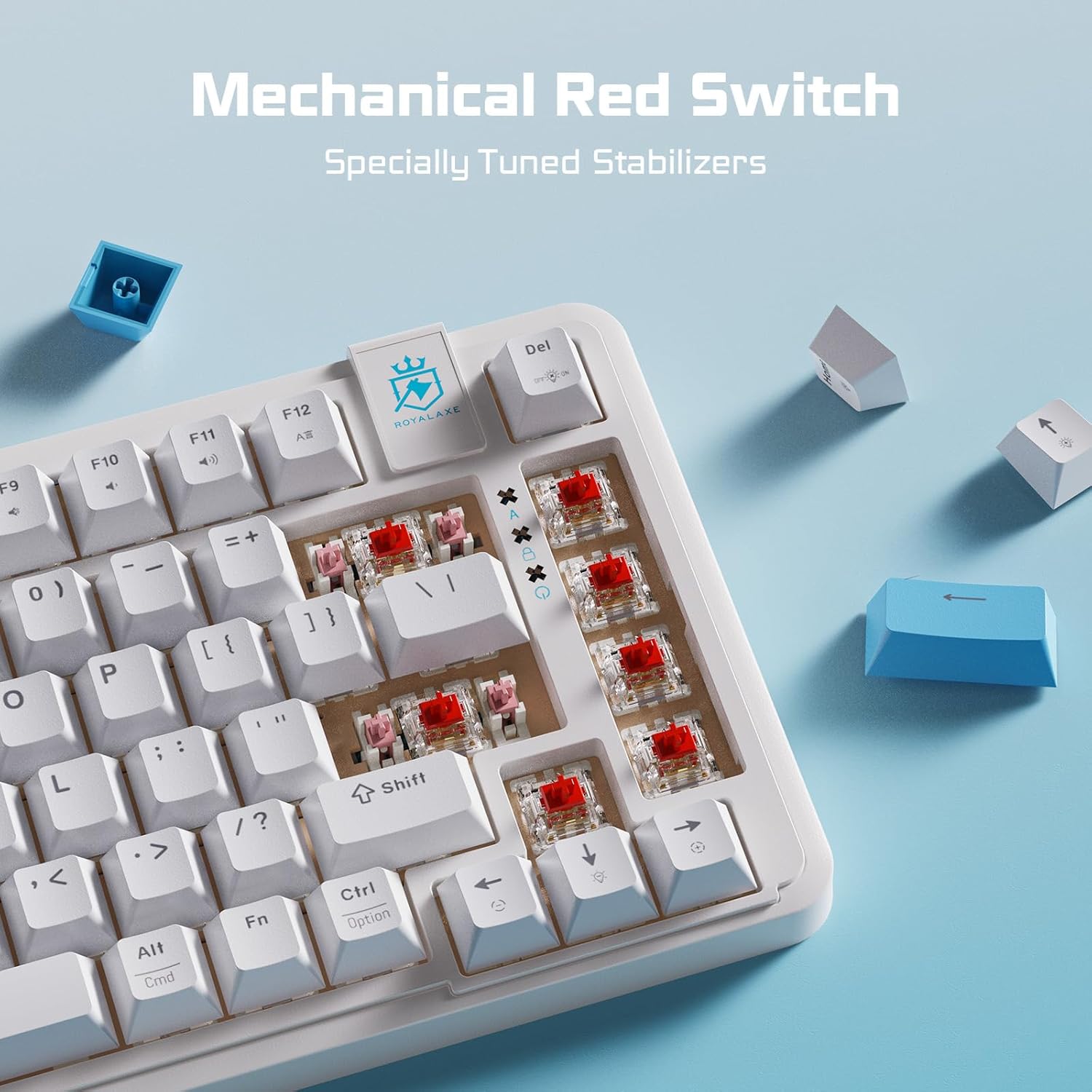
The ROYALAXE F75 comes with a keycap puller and additional keycaps for aesthetic customization. The keyboard features linear red switches.
Gently place the keycap puller over the keycap you wish to remove, ensuring the two loops of the puller are under opposite sides of the keycap.
Apply gentle, even pressure upwards until the keycap detaches from the switch.
To replace a keycap, align it directly over the desired switch and press down firmly until it clicks into place.
Figure 5: Keycap removal using the provided keycap puller.
ട്രബിൾഷൂട്ടിംഗ്
കീബോർഡ് പ്രതികരിക്കുന്നില്ല:
USB-C കേബിൾ കീബോർഡിലേക്കും നിങ്ങളുടെ കമ്പ്യൂട്ടറിലേക്കും സുരക്ഷിതമായി ബന്ധിപ്പിച്ചിട്ടുണ്ടെന്ന് ഉറപ്പാക്കുക.
നിങ്ങളുടെ കമ്പ്യൂട്ടറിലെ മറ്റൊരു USB പോർട്ടിലേക്ക് കീബോർഡ് ബന്ധിപ്പിക്കാൻ ശ്രമിക്കുക.
സിസ്റ്റം-നിർദ്ദിഷ്ട പ്രശ്നങ്ങൾ ഒഴിവാക്കാൻ മറ്റൊരു കമ്പ്യൂട്ടറിൽ കീബോർഡ് പരിശോധിക്കുക.
നിങ്ങളുടെ കമ്പ്യൂട്ടർ പുനരാരംഭിക്കുക.
ബാക്ക്ലൈറ്റ് പ്രവർത്തിക്കുന്നില്ല/തെറ്റാണ്:
Verify that the keyboard is properly connected and receiving power.
Use the FN key combinations (FN + Home, FN + Up/Down Arrow) to cycle through modes and adjust brightness.
If using the software, ensure it is running and settings are correctly applied.
Keys Not Registering/Ghosting:
Ensure the keyboard is clean and free of debris that might obstruct key switches.
Confirm the cable connection is stable.
The keyboard features N-key rollover, so this issue is unlikely for multiple simultaneous presses. If a single key is consistently failing, it may indicate a hardware issue.
System Mode Not Switching (Win/Mac/iOS):
Ensure you are pressing the correct FN + P/O/I combination.
Some operating systems may require a brief moment to recognize the change.
സ്പെസിഫിക്കേഷനുകൾ
ഫീച്ചർ
വിശദാംശങ്ങൾ
മോഡൽ
F75
ബ്രാൻഡ്
റോയലക്സ്
ലേഔട്ട്
75% (82 കീകൾ)
സ്വിച്ച് തരം
ലീനിയർ റെഡ് സ്വിച്ച്
കണക്റ്റിവിറ്റി
വയേർഡ് (USB-A മുതൽ USB-C വരെ)
ബാക്ക്ലൈറ്റ്
Blue LED (approx. 20 modes)
ആൻ്റി-ഗോസ്റ്റിംഗ്
മുഴുവൻ എൻ-കീ റോൾഓവർ
എർഗണോമിക്സ്
3-എസ്tagഇ ക്രമീകരിക്കാവുന്ന അടി
അനുയോജ്യമായ OS
Windows, Mac, iOS
ഉൽപ്പന്ന അളവുകൾ
13.2 x 5.5 x 1.5 ഇഞ്ച്
ഇനത്തിൻ്റെ ഭാരം
1.91 പൗണ്ട്
വാറൻ്റിയും പിന്തുണയും
For warranty information, technical support, and driver downloads, please visit the official ROYALAXE webസൈറ്റിൽ ബന്ധപ്പെടുക അല്ലെങ്കിൽ നിങ്ങളുടെ റീട്ടെയിലർ വഴി ഉപഭോക്തൃ സേവനവുമായി ബന്ധപ്പെടുക.
വാറന്റി ക്ലെയിമുകൾക്കായി നിങ്ങളുടെ വാങ്ങൽ രസീത് സൂക്ഷിക്കുക.
അനുബന്ധ രേഖകൾ - F75
ROYALAXE L75 വയർലെസ് മെക്കാനിക്കൽ കീബോർഡ് യൂസർ മാനുവൽ ROYALAXE L75 വയർലെസ് മെക്കാനിക്കൽ കീബോർഡിനായുള്ള ഉപയോക്തൃ മാനുവൽ, വയർഡ്, 2.4GHz, ബ്ലൂടൂത്ത് കണക്ഷനുകൾ, ചാർജിംഗ്, സാങ്കേതിക സവിശേഷതകൾ, സിസ്റ്റം ആവശ്യകതകൾ, ട്രബിൾഷൂട്ടിംഗ്, സ്വിച്ച് മാറ്റിസ്ഥാപിക്കൽ എന്നിവ ഉൾക്കൊള്ളുന്നു.
L75 വയർലെസ് മെക്കാനിക്കൽ കീബോർഡ് ദ്രുത ഗൈഡ് ബ്ലൂടൂത്ത് അല്ലെങ്കിൽ 2.4G വയർലെസ് വഴി L75 വയർലെസ് മെക്കാനിക്കൽ കീബോർഡ് സജ്ജീകരിക്കുന്നതിനും ബന്ധിപ്പിക്കുന്നതിനുമുള്ള ഒരു ദ്രുത ഗൈഡ്.
ROYALAXE L98 Wireless Mechanical Keyboard FAQ Frequently asked questions and answers for the ROYALAXE L98 Wireless Mechanical Keyboard, covering LCD screen language adjustment, missing keys, time synchronization, RGB bar control, Music Follow mode, and battery status.
ROYALAXE Y68 TKL വയർലെസ് മെക്കാനിക്കൽ കീബോർഡ് ഉപയോക്തൃ മാനുവൽ ROYALAXE Y68 TKL വയർലെസ് മെക്കാനിക്കൽ കീബോർഡിനായുള്ള സമഗ്രമായ ഉപയോക്തൃ മാനുവൽ. അതിന്റെ ഹോട്ട്-സ്വാപ്പ് ചെയ്യാവുന്ന സ്വിച്ചുകൾ, ഇഷ്ടാനുസൃതമാക്കാവുന്ന RGB ലൈറ്റിംഗ്, വൈവിധ്യമാർന്ന കണക്റ്റിവിറ്റി (വയർഡ്, ബ്ലൂടൂത്ത് 5.0, 2.4G) എന്നിവ കണ്ടെത്തുക. വിൻഡോസ്, മാകോസ് എന്നിവയുമായുള്ള സജ്ജീകരണം, ഉപയോഗം, അനുയോജ്യത എന്നിവ പഠിക്കുക. PBT കീക്യാപ്പുകൾ, ഗേറ്ററോൺ ജി യെല്ലോ പ്രോ സ്വിച്ചുകൾ എന്നിവയുടെ സവിശേഷതകൾ.
RoyalAxe Y98 ത്രീ മോഡ് മെക്കാനിക്കൽ ഗെയിമിംഗ് കീബോർഡ് യൂസർ മാനുവൽ റോയൽആക്സ് Y98 മെക്കാനിക്കൽ ഗെയിമിംഗ് കീബോർഡിനായുള്ള ഉപയോക്തൃ മാനുവൽ, അതിന്റെ ത്രീ-മോഡ് കണക്റ്റിവിറ്റി (വയർഡ്, 2.4G, ബ്ലൂടൂത്ത് 5.0), പ്രധാന പ്രവർത്തനങ്ങൾ, കസ്റ്റമൈസേഷൻ ഓപ്ഷനുകൾ, സാങ്കേതിക സവിശേഷതകൾ, സിസ്റ്റം ആവശ്യകതകൾ, ട്രബിൾഷൂട്ടിംഗ്, സുരക്ഷാ പാലിക്കൽ എന്നിവ വിശദീകരിക്കുന്നു.
ROYALAXE R108 വയർലെസ് കീബോർഡ് ക്വിക്ക് ഗൈഡ് ബ്ലൂടൂത്ത്, 2.4G വയർലെസ് കണക്ഷനുകൾ വഴി ROYALAXE R108 വയർലെസ് മെക്കാനിക്കൽ കീബോർഡ് ബന്ധിപ്പിക്കുന്നതിനും ഉപയോഗിക്കുന്നതിനുമുള്ള ഒരു സംക്ഷിപ്ത ഗൈഡ്.