ആമുഖം
This manual provides detailed instructions for the safe and effective use of your Easy@Home EHE080 TENS Unit Muscle Stimulator Machine. Please read this manual thoroughly before operating the device and retain it for future reference.
The Easy@Home EHE080 is a versatile electrotherapy device offering Transcutaneous Electrical Nerve Stimulation (TENS) for pain management, Electrical Muscle Stimulation (EMS) for muscle strengthening, and Massage modes for relaxation. It features dual-channel output, 24 modes, and 20 intensity levels, designed for various body areas including the back, foot, leg, arm, and shoulders.
പ്രധാനപ്പെട്ട സുരക്ഷാ വിവരങ്ങൾ
WARNING: Consult your physician before using this device if you have any medical conditions, including but not limited to:
- Pacemaker or other implanted electronic devices.
- Heart disease or cardiac arrhythmia.
- അപസ്മാരം.
- ഗർഭധാരണം.
- കാൻസർ.
- Skin conditions or open wounds in the treatment area.
Do not use this device while driving, operating machinery, or during any activity where involuntary muscle contractions could put you at risk. Keep out of reach of children. Do not apply electrodes to the head, face, neck, or chest. Discontinue use if you experience any adverse reactions.
പാക്കേജ് ഉള്ളടക്കം
നിങ്ങളുടെ പാക്കേജിൽ എല്ലാ ഇനങ്ങളും ഉണ്ടെന്ന് ഉറപ്പാക്കുക:
- 1 x Easy@Home EHE080 TENS Control Unit
- 1 x Premium Carry Case
- 10 x Electrode Pads (various shapes and sizes)
- 1 x USB കേബിൾ
- 2 x ലീഡ് വയറുകൾ
- 2 x Pad Holders
- 1 x User Manual (English/French)

Image: The Easy@Home EHE080 TENS unit, along with its included accessories: electrode pads, lead wires, USB charging cable, and a protective carry case.
ഉൽപ്പന്ന സവിശേഷതകൾ
- 3-in-1 Modes: TENS for pain management, EMS for muscle strengthening, and Massage for relaxation.
- ഇരട്ട ചാനൽ: Independent control for two separate body areas simultaneously.
- 24 Modes & 20 Intensity Levels: Customizable therapy options.
- ദീർഘകാല ബാറ്ററി: ഒറ്റ ചാർജിൽ 18 മണിക്കൂർ വരെ തുടർച്ചയായ ഉപയോഗം.
- USB റീചാർജ് ചെയ്യാവുന്നത്: Convenient charging via wall charger or laptop USB port.
- ലോക്ക് സ്ക്രീൻ പ്രവർത്തനം: Prevents accidental setting changes during use.
- വലിയ LCD സ്ക്രീൻ: Clear display for mode, intensity, and timer settings.
- പോർട്ടബിൾ ഡിസൈൻ: Compact and lightweight with a high-quality storage box for travel.
- പുനരുപയോഗിക്കാവുന്ന ഇലക്ട്രോഡ് പാഡുകൾ: 10 pads in 3 sizes for various body parts.

Image: A visual representation of the three primary modes: TENS for pain relief, EMS for muscle stimulation, and Massage for relaxation, highlighting the device's versatility.

Image: A detailed diagram of the TENS unit's control panel, indicating the function of each button and display area, including mode type selector, channel intensity controls, and timer adjuster.
സജ്ജീകരണവും ചാർജിംഗും
ഉപകരണം ചാർജ് ചെയ്യുന്നു
- ഉപകരണം ഓഫാണെന്ന് ഉറപ്പാക്കുക.
- Connect the small end of the USB cable to the charging port on the top of the TENS unit.
- Connect the large end of the USB cable to a USB wall adapter (not included) or a computer's USB port.
- The battery indicator on the screen will show charging status. A full charge typically takes a few hours.
- Disconnect the USB cable once fully charged.
Connecting Electrode Pads
- Ensure the device is turned OFF before connecting or disconnecting pads.
- Attach the lead wires to the electrode pads by snapping them onto the connectors.
- Plug the lead wires into the output ports (CH1 and CH2) on the top of the TENS unit.
- Peel the protective film from the electrode pads. Store the film for reapplication after use.
പ്രവർത്തന നിർദ്ദേശങ്ങൾ
- ചർമ്മം തയ്യാറാക്കുക: Clean and dry the skin area where pads will be applied.
- പാഡുകൾ പ്രയോഗിക്കുക: Place the electrode pads firmly on the desired treatment area. Ensure good contact with the skin.
- പവർ ഓൺ: Slide the "ON/OFF" switch located on the top of the device to the "ON" position.

Image: A hand sliding the "ON/OFF" switch on the top of the TENS unit to power on the device.
- ചാനൽ തിരഞ്ഞെടുക്കുക: Short press the rounded button in the middle of the control panel to select the desired output channel (CH1 or CH2).

Image: A finger pressing the central rounded button to switch between Channel 1 and Channel 2 for therapy.
- മോഡ് തിരഞ്ഞെടുക്കുക: Press the "M" button to cycle through the available modes (TENS, EMS, MASSAGE). Once a mode type is selected, use the "<" or ">" buttons to choose a specific program within that mode (1-24).

Image: A hand pressing the "M" button to select the desired mode (TENS, EMS, or Massage), followed by using the arrow buttons to choose a specific program.
- ടൈമർ സജ്ജമാക്കുക: Short press the "T" button to adjust the treatment duration (10-60 minutes).
- തീവ്രത ക്രമീകരിക്കുക: Use the "+" and "-" buttons for each channel to increase or decrease the stimulation intensity. Start at the lowest setting and gradually increase until a comfortable sensation is achieved. Avoid increasinഗ്രാം തീവ്രത അസുഖകരമായ ഒരു തലത്തിലേക്ക്.
- ലോക്ക് സ്ക്രീൻ: Long press the central rounded button for 2 seconds to lock the screen and prevent accidental changes. Long press again to unlock.
- Pause/Restart: Long press the "T" button for 2 seconds to pause or restart the output.
- പവർ ഓഫ്: After your session, slide the "ON/OFF" switch to the "OFF" position.
Electrode Pad Placement
Proper electrode placement is crucial for effective therapy. Always refer to a reliable guide or consult a healthcare professional for specific placement recommendations for your condition. General guidelines:
- വൃത്തിയുള്ളതും വരണ്ടതും കേടുകൂടാത്തതുമായ ചർമ്മത്തിൽ പാഡുകൾ വയ്ക്കുക.
- പാഡുകൾ കുറഞ്ഞത് ഒരു ഇഞ്ച് അകലത്തിലാണെന്ന് ഉറപ്പാക്കുക.
- Do not place pads over joints, directly on bones, or on irritated skin.
- For TENS, place pads around the area of pain.
- For EMS, place pads on the muscle belly to be stimulated.
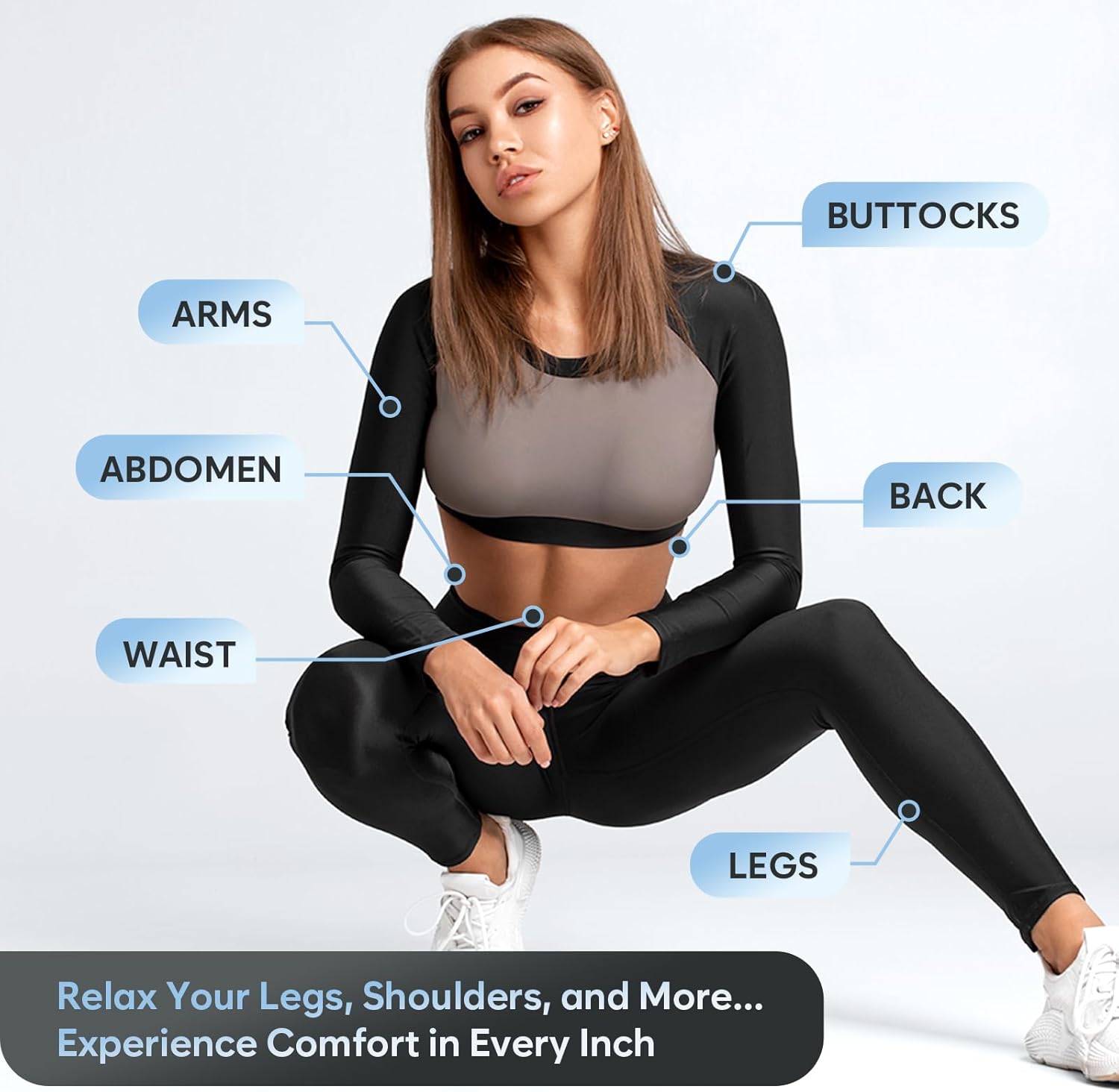
Image: A diagram illustrating suggested electrode pad placements on different body areas such as arms, abdomen, waist, back, buttocks, and legs for targeted therapy.
Modes and Intensity
The EHE080 offers 24 distinct programs across three main modes:
- TENS Modes (1-8): Designed for temporary relief of pain associated with sore and aching muscles.
- EMS Modes (9-16): Intended for muscle stimulation, strengthening, and recovery.
- Massage Modes (17-24): Provides a relaxing massage sensation to help reduce muscle tension.
Each mode has 20 adjustable intensity levels. Begin with the lowest intensity and gradually increase until you feel a comfortable, non-painful sensation. The goal is a strong, comfortable muscle contraction or tingling sensation, not pain.
പരിപാലനവും പരിചരണവും
- ഉപകരണം വൃത്തിയാക്കുന്നു: മൃദുവായ, ഡി ഉപയോഗിച്ച് യൂണിറ്റ് തുടയ്ക്കുകamp തുണി. അബ്രാസീവ് ക്ലീനറുകൾ ഉപയോഗിക്കരുത് അല്ലെങ്കിൽ ഉപകരണം വെള്ളത്തിൽ മുക്കരുത്.
- ഇലക്ട്രോഡ് പാഡ് പരിചരണം:
- After each use, reapply the protective film to the adhesive side of the pads.
- Store pads in a sealed bag or on the pad holders to prevent drying.
- If pads lose their adhesiveness, gently wipe the adhesive surface with a damp cloth and let air dry. Replace pads when they no longer stick effectively.
- സംഭരണം: Store the device and accessories in the provided carry case in a cool, dry place, away from direct sunlight and extreme temperatures.
ട്രബിൾഷൂട്ടിംഗ്
| പ്രശ്നം | സാധ്യമായ കാരണം | പരിഹാരം |
|---|---|---|
| സംവേദനമില്ല അല്ലെങ്കിൽ ദുർബലമായ സംവേദനം |
|
|
| ഉപകരണം അപ്രതീക്ഷിതമായി ഓഫാകുന്നു |
|
|
| പാഡുകൾക്ക് കീഴിലുള്ള ചർമ്മ പ്രകോപനം |
|
|
സ്പെസിഫിക്കേഷനുകൾ
| ഫീച്ചർ | വിശദാംശങ്ങൾ |
|---|---|
| മോഡൽ നമ്പർ | EHE080 (810038636047) |
| മോഡുകൾ | TENS, EMS, Massage (24 programs) |
| തീവ്രത ലെവലുകൾ | 20 |
| ചാനലുകൾ | ഡ്യുവൽ ഇൻഡിപെൻഡന്റ് |
| ടൈമർ | 10-60 മിനിറ്റ് |
| പവർ ഉറവിടം | റീചാർജ് ചെയ്യാവുന്ന ലിഥിയം അയോൺ ബാറ്ററി |
| ബാറ്ററി ലൈഫ് | 18 മണിക്കൂർ വരെ തുടർച്ചയായ ഉപയോഗം |
| ഉൽപ്പന്ന അളവുകൾ | 11L x 5W x 16H സെ.മീ |
| ഇനത്തിൻ്റെ ഭാരം | 0.26 കിലോഗ്രാം |
| മെറ്റീരിയൽ | പ്ലാസ്റ്റിക് |
വാറൻ്റിയും പിന്തുണയും
For warranty information and customer support, please refer to the contact details provided in the physical instruction manual included with your product or visit the official Easy@Home webസൈറ്റ്. വാങ്ങിയതിന്റെ തെളിവായി നിങ്ങളുടെ വാങ്ങൽ രസീത് സൂക്ഷിക്കുക.
Manufacturer: Easy@Home
Place of Business: Burr Ridge, IL 60527, US


