1. ആമുഖം
EBYTE M31-AXXXA000G 16DI റിമോട്ട് IO മൊഡ്യൂളിനുള്ള വിശദമായ നിർദ്ദേശങ്ങൾ ഈ മാനുവലിൽ നൽകിയിരിക്കുന്നു. ഡാറ്റാ ഏറ്റെടുക്കലിനും നിയന്ത്രണത്തിനുമായി മോഡ്ബസ് TCP, മോഡ്ബസ് RTU പ്രോട്ടോക്കോളുകളെ പിന്തുണയ്ക്കുന്ന വ്യാവസായിക ഓട്ടോമേഷൻ ആപ്ലിക്കേഷനുകൾക്കായി ഈ ഉപകരണം രൂപകൽപ്പന ചെയ്തിരിക്കുന്നു. വൈവിധ്യമാർന്ന പ്രവർത്തന ആവശ്യകതകൾ നിറവേറ്റുന്നതിനായി 16 IO എക്സ്പാൻഷൻ മൊഡ്യൂളുകൾ വരെ ബന്ധിപ്പിക്കാൻ അനുവദിക്കുന്ന ഒരു വികസിപ്പിക്കാവുന്ന രൂപകൽപ്പനയാണ് ഇതിന്റെ സവിശേഷത.
2. ഉൽപ്പന്നം കഴിഞ്ഞുview
EBYTE M31-AXXXA000G എന്നത് M31 പരമ്പരയിലെ ഒരു ഹോസ്റ്റ് മൊഡ്യൂളാണ്, ഇത് 16 ഡിജിറ്റൽ ഇൻപുട്ടുകൾ (DI) വാഗ്ദാനം ചെയ്യുകയും RS485, Ethernet (RJ45) ആശയവിനിമയങ്ങളെ പിന്തുണയ്ക്കുകയും ചെയ്യുന്നു. ഇത് 5 ക്ലയന്റുകൾക്ക് വരെ ഒരേസമയം ആക്സസ് സുഗമമാക്കുകയും വിവിധ മോഡ്ബസ് ഫംഗ്ഷൻ കോഡുകളെ പിന്തുണയ്ക്കുകയും ചെയ്യുന്നു (01/02/03/04/05/06/15/16). നിലവിലുള്ള മോഡ്ബസ് സിസ്റ്റങ്ങളിലേക്കുള്ള വിശ്വാസ്യതയ്ക്കും സംയോജനത്തിന്റെ എളുപ്പത്തിനുമായി മൊഡ്യൂൾ നിർമ്മിച്ചിരിക്കുന്നു.

ചിത്രം 2.1: മുൻവശവും വശവും view EBYTE M31-AXXXA000G റിമോട്ട് IO മൊഡ്യൂളിന്റെ, അതിന്റെ പോർട്ടുകളും സൂചകങ്ങളും കാണിക്കുന്നു.

ചിത്രം 2.2: EBYTE M31-AXXXA000G റിമോട്ട് IO മൊഡ്യൂളിന്റെ ഡൈമൻഷണൽ ഡ്രോയിംഗ്, അതിന്റെ നീളം (110mm), വീതി (40mm), ഉയരം (100mm) എന്നിവ സൂചിപ്പിക്കുന്നു.

ചിത്രം 2.3: ഒന്നിലധികം EBYTE റിമോട്ട് IO മൊഡ്യൂളുകൾ ബന്ധിപ്പിച്ചിരിക്കുന്നതിന്റെ ചിത്രീകരണം, അവയുടെ മോഡുലാർ രൂപകൽപ്പനയും വികസിപ്പിക്കാവുന്നതും എടുത്തുകാണിക്കുന്നു.
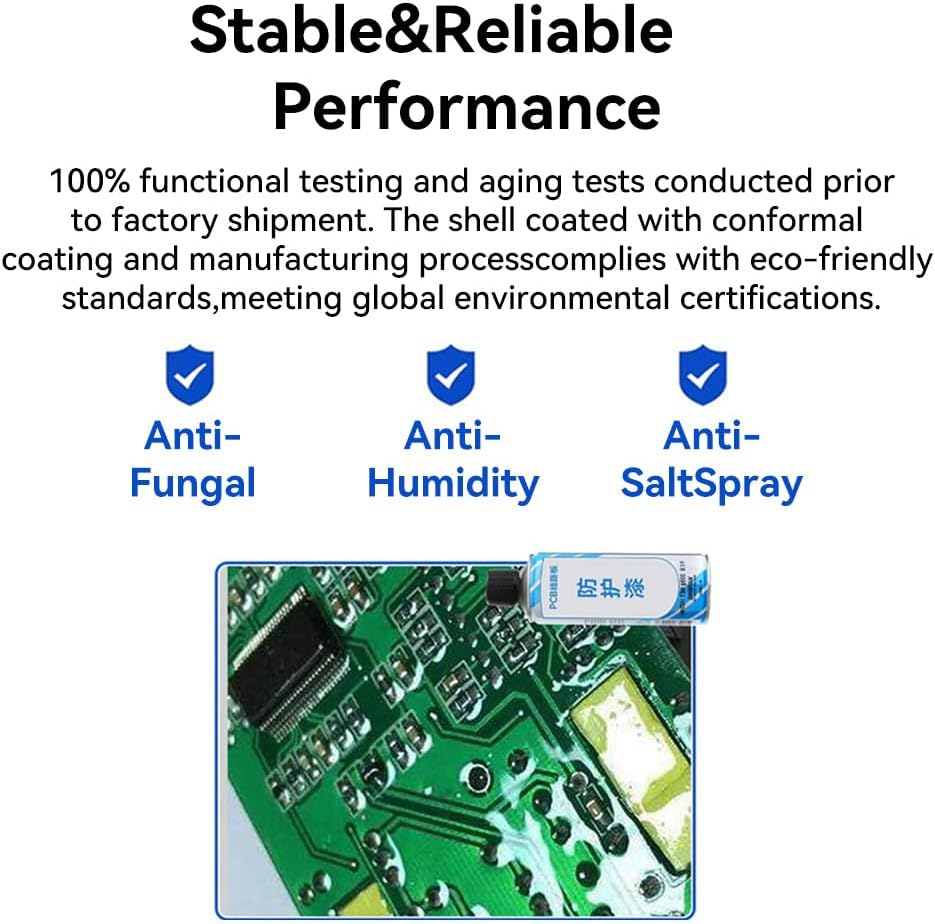
ചിത്രം 2.4: ആന്റി-ഫംഗൽ, ആന്റി-ഹ്യുമിഡിറ്റി, ആന്റി-സാൾട്ട് സ്പ്രേ ഗുണങ്ങളുള്ള മൊഡ്യൂളിന്റെ കരുത്തുറ്റ രൂപകൽപ്പന എടുത്തുകാണിക്കുന്ന ചിത്രം, അതോടൊപ്പം അതിന്റെ സർക്യൂട്ട് ബോർഡിന്റെ ക്ലോസപ്പും.
3. സജ്ജീകരണം
3.1 മൗണ്ടിംഗ്
പൊസിഷനിംഗ് ഹോളുകളോ ഗൈഡ് റെയിലുകളോ ഉപയോഗിച്ചുള്ള ഇൻസ്റ്റാളേഷനെ M31-AXXXA000G മൊഡ്യൂൾ പിന്തുണയ്ക്കുന്നു. മതിയായ വായുസഞ്ചാരവും പാരിസ്ഥിതിക ഘടകങ്ങളിൽ നിന്നുള്ള സംരക്ഷണവും നൽകുന്ന സുരക്ഷിതമായ മൗണ്ടിംഗ് ലൊക്കേഷൻ ഉറപ്പാക്കുക.
3.2 വയറിംഗും കണക്ഷനുകളും
RJ45 ഇതർനെറ്റ് പോർട്ട് വഴി മൊഡ്യൂൾ നിങ്ങളുടെ നെറ്റ്വർക്കിലേക്ക് ബന്ധിപ്പിക്കുക. RS485 ആശയവിനിമയത്തിനായി, ഉചിതമായ ടെർമിനലുകൾ ബന്ധിപ്പിക്കുക. മൊഡ്യൂളിന്റെ സ്പെസിഫിക്കേഷനുകൾക്കനുസൃതമായി എല്ലാ പവർ കണക്ഷനുകളും ശരിയായി നിർമ്മിച്ചിട്ടുണ്ടെന്ന് ഉറപ്പാക്കുക.
3.3 നെറ്റ്വർക്ക് കോൺഫിഗറേഷൻ
മൊഡ്യൂൾ DHCP, സ്റ്റാറ്റിക് IP കോൺഫിഗറേഷനുകളെ പിന്തുണയ്ക്കുന്നു. നിങ്ങളുടെ സിസ്റ്റം ആവശ്യകതകളുമായി പൊരുത്തപ്പെടുന്നതിന് നെറ്റ്വർക്ക് പാരാമീറ്ററുകൾ കോൺഫിഗർ ചെയ്യുന്നതിന് നിർദ്ദിഷ്ട സോഫ്റ്റ്വെയർ ഉപകരണങ്ങൾ അല്ലെങ്കിൽ DIP സ്വിച്ച് ക്രമീകരണങ്ങൾ പരിശോധിക്കുക.
3.4 മോഡ്ബസ് വിലാസ കോൺഫിഗറേഷൻ
മൊഡ്യൂളിനായി ഇഷ്ടാനുസൃത മോഡ്ബസ് വിലാസങ്ങൾ സജ്ജമാക്കാൻ കഴിയും. ഇത് സമർപ്പിത കോൺഫിഗറേഷൻ സോഫ്റ്റ്വെയർ വഴിയോ ഉപകരണത്തിൽ തന്നെയുള്ള സംയോജിത ഡയൽ കോഡുകൾ (ഡിഐപി സ്വിച്ചുകൾ) ഉപയോഗിച്ചോ ചെയ്യാം.

ചിത്രം 3.1: ഹോസ്റ്റ് കമ്പ്യൂട്ടർ ഇല്ലാതെ തന്നെ ദ്രുത മോഡ്ബസ് വിലാസ കോൺഫിഗറേഷനായി EBYTE M31 മൊഡ്യൂളിലെ DIP സ്വിച്ചുകൾ ചിത്രീകരിക്കുന്ന ചിത്രം.
3.5 എക്സ്പാൻഷൻ മൊഡ്യൂളുകൾ
M31-AXXXA000G ഹോസ്റ്റ് മൊഡ്യൂളിന് 16 IO എക്സ്പാൻഷൻ മൊഡ്യൂളുകൾ വരെ ബന്ധിപ്പിക്കാൻ കഴിയും. സിസ്റ്റത്തിന്റെ കഴിവുകൾ വിപുലീകരിക്കുന്നതിന് ഓരോ എക്സ്പാൻഷൻ മൊഡ്യൂളിന്റെയും കൃത്യമായ ഫിസിക്കൽ കണക്ഷനും കോൺഫിഗറേഷനും അതിന്റെ നിർദ്ദിഷ്ട നിർദ്ദേശങ്ങൾക്കനുസൃതമായി ഉറപ്പാക്കുക.
4. പ്രവർത്തന നിർദ്ദേശങ്ങൾ
4.1 മോഡ്ബസ് കമ്മ്യൂണിക്കേഷൻ
മൊഡ്യൂൾ സ്റ്റാൻഡേർഡ് മോഡ്ബസ് ടിസിപി, മോഡ്ബസ് ആർടിയു പ്രോട്ടോക്കോളുകളെ പിന്തുണയ്ക്കുന്നു. വിവിധ കോൺഫിഗറേഷൻ സോഫ്റ്റ്വെയർ, പിഎൽസികൾ, എച്ച്എംഐ ടച്ച് സ്ക്രീനുകൾ എന്നിവയുമായി ഇത് സംയോജിപ്പിക്കാൻ കഴിയും. ഉപകരണം 5 ക്ലയന്റുകൾക്ക് വരെ ഒരേസമയം ആക്സസ് അനുവദിക്കുന്നു കൂടാതെ മോഡ്ബസ് ഫംഗ്ഷൻ കോഡുകൾ 01, 02, 03, 04, 05, 06, 15, 16 എന്നിവയെ പിന്തുണയ്ക്കുന്നു.

ചിത്രം 4.1: ഒരു മോഡ്ബസ് സിസ്റ്റത്തിനുള്ളിലെ HMI ടച്ച് സ്ക്രീനുകൾ, കോൺഫിഗറേഷൻ സോഫ്റ്റ്വെയർ, PLC-കൾ എന്നിവയുമായുള്ള EBYTE M31 മൊഡ്യൂളിന്റെ അനുയോജ്യത കാണിക്കുന്ന ഡയഗ്രം.
4.2 ബോഡ് റേറ്റ് കോൺഫിഗറേഷൻ
RS485 ആശയവിനിമയത്തിനായി മൊഡ്യൂൾ 8 വ്യത്യസ്ത ബോഡ് നിരക്ക് കോൺഫിഗറേഷനുകളെ പിന്തുണയ്ക്കുന്നു. സ്ഥിരതയുള്ള ഡാറ്റാ ട്രാൻസ്മിഷനായി നിങ്ങളുടെ കണക്റ്റുചെയ്ത ഉപകരണങ്ങളുമായി പൊരുത്തപ്പെടുന്നതിന് ഉചിതമായ ബോഡ് നിരക്ക് തിരഞ്ഞെടുക്കുക.
4.3 ഇൻപുട്ട് ശ്രേണി കോൺഫിഗറേഷൻ
മൊഡ്യൂളിന്റെ അനലോഗ് ഇൻപുട്ട് ശ്രേണികൾ കോൺഫിഗർ ചെയ്യാവുന്നതാണ്, ഇത് 0-20mA, 4-20mA സെൻസറുകൾക്കും ട്രാൻസ്മിറ്ററുകൾക്കും അനുയോജ്യമാക്കുന്നു.

ചിത്രം 4.2: മൊഡ്യൂളിനായി ക്രമീകരിക്കാവുന്ന ഇൻപുട്ട് ശ്രേണികൾ ചിത്രീകരിക്കുന്ന ഡയഗ്രം, 0-20mA, 4-20mA സെൻസറുകൾ/ട്രാൻസ്മിറ്ററുകൾ എന്നിവയെ പിന്തുണയ്ക്കുന്നു.
4.4 അപ്പർ കമ്പ്യൂട്ടർ സോഫ്റ്റ്വെയർ ഉപയോഗം
മൊഡ്യൂളിന്റെ ദ്രുത ഡീബഗ്ഗിംഗിനും പാരാമീറ്റർ കോൺഫിഗറേഷനും വേണ്ടി സമർപ്പിത അപ്പർ കമ്പ്യൂട്ടർ സോഫ്റ്റ്വെയർ ഉപയോഗിക്കുക. DI സ്റ്റാറ്റസ്, DO സ്റ്റേറ്റ് സ്വിച്ചിംഗ്, AI ഇൻപുട്ട് അക്വിസിഷൻ, AO ഔട്ട്പുട്ട് ശ്രേണി ക്രമീകരണങ്ങൾ എന്നിവ നിരീക്ഷിക്കുന്നതിനുള്ള ഒരു ഇന്റർഫേസ് ഈ സോഫ്റ്റ്വെയർ നൽകുന്നു.

ചിത്രം 4.3: മുകളിലെ കമ്പ്യൂട്ടർ സോഫ്റ്റ്വെയർ ഇന്റർഫേസിന്റെ സ്ക്രീൻഷോട്ട്, EBYTE M31 സീരീസ് മൊഡ്യൂളുകളുടെ ദ്രുത ഡീബഗ്ഗിംഗിനും പാരാമീറ്റർ കോൺഫിഗറേഷനും അതിന്റെ ഉപയോഗം കാണിക്കുന്നു.
5. പരിപാലനം
EBYTE M31-AXXXA000G മൊഡ്യൂൾ, കുറഞ്ഞ ഉപയോക്തൃ അറ്റകുറ്റപ്പണികളോടെ സ്ഥിരതയുള്ളതും വിശ്വസനീയവുമായ പ്രകടനത്തിനായി രൂപകൽപ്പന ചെയ്തിരിക്കുന്നു. IO മൊഡ്യൂളുകളുടെ ആശയവിനിമയ നില തത്സമയം നിരീക്ഷിക്കുന്ന ഒരു സ്റ്റാറ്റസ് ഡയഗ്നോസിസ് ഫംഗ്ഷൻ ഇതിൽ ഉൾപ്പെടുന്നു, ഇത് സിസ്റ്റം ഹെൽത്ത് പരിശോധനകളെ സഹായിക്കുന്നു.
കയറ്റുമതി ചെയ്യുന്നതിന് മുമ്പ് ഉൽപ്പന്നം 100% പ്രവർത്തനപരവും പ്രായമാകൽ പരിശോധനകൾക്കും വിധേയമാകുന്നു. ഇതിന്റെ ഷെല്ലിൽ ഒരു കൺഫോർമൽ കോട്ടിംഗ് പൂശിയിരിക്കുന്നു, ഇത് ആന്റി ഫംഗൽ, ആന്റി-ഹ്യുമിഡിറ്റി, ആന്റി-സാൾട്ട് സ്പ്രേ ഗുണങ്ങൾ നൽകുന്നു, ഇത് വിവിധ വ്യാവസായിക പരിതസ്ഥിതികളിൽ ഈട് ഉറപ്പാക്കുന്നു.
ഏതെങ്കിലും തരത്തിലുള്ള തേയ്മാനത്തിന്റെയോ കേടുപാടുകളുടെയോ ലക്ഷണങ്ങൾക്കായി പതിവായി ഭൗതിക കണക്ഷനുകൾ പരിശോധിക്കുക. ഒപ്റ്റിമൽ പ്രകടനവും താപ വിസർജ്ജനവും ഉറപ്പാക്കാൻ മൊഡ്യൂൾ പൊടിയിൽ നിന്നും അവശിഷ്ടങ്ങളിൽ നിന്നും മുക്തമായി സൂക്ഷിക്കുക.
6. പ്രശ്നപരിഹാരം
EBYTE M31-AXXXA000G മൊഡ്യൂളിൽ നിങ്ങൾക്ക് പ്രശ്നങ്ങൾ നേരിടുകയാണെങ്കിൽ, ഇനിപ്പറയുന്ന അടിസ്ഥാന ട്രബിൾഷൂട്ടിംഗ് ഘട്ടങ്ങൾ പരിഗണിക്കുക:
- പവർ ചെക്ക്: മൊഡ്യൂളിന് ആവശ്യത്തിന് വൈദ്യുതി ലഭിക്കുന്നുണ്ടെന്നും വൈദ്യുതി കണക്ഷനുകൾ സുരക്ഷിതമാണെന്നും ഉറപ്പാക്കുക.
- കണക്ഷൻ സ്ഥിരീകരണം: ശരിയായ ഇരിപ്പിടത്തിനും സമഗ്രതയ്ക്കും എല്ലാ ഇതർനെറ്റ്, RS485 കേബിൾ കണക്ഷനുകളും പരിശോധിക്കുക.
- നെറ്റ്വർക്ക് ക്രമീകരണങ്ങൾ: നിങ്ങളുടെ നെറ്റ്വർക്കിന്, പ്രത്യേകിച്ച് ഒരു സ്റ്റാറ്റിക് IP ഉപയോഗിക്കുകയാണെങ്കിൽ, IP വിലാസം, സബ്നെറ്റ് മാസ്ക്, ഗേറ്റ്വേ ക്രമീകരണങ്ങൾ എന്നിവ ശരിയാണെന്ന് ഉറപ്പാക്കുക.
- മോഡ്ബസ് വിലാസം: മോഡ്ബസ് വിലാസം ശരിയായി സജ്ജീകരിച്ചിട്ടുണ്ടെന്നും, ഡിഐപി സ്വിച്ചുകൾ വഴിയോ സോഫ്റ്റ്വെയർ വഴിയോ, ബസിലെ മറ്റ് ഉപകരണങ്ങളുമായി വൈരുദ്ധ്യമില്ലെന്നും സ്ഥിരീകരിക്കുക.
- ബോഡ് നിരക്ക്: RS485-ന്, ബന്ധിപ്പിച്ച മാസ്റ്റർ ഉപകരണത്തിന്റേതുമായി ബോഡ് നിരക്ക് പൊരുത്തപ്പെടുന്നുണ്ടെന്ന് ഉറപ്പാക്കുക.
- നില സൂചകങ്ങൾ: ഏതെങ്കിലും പിശക് കോഡുകൾക്കോ അസാധാരണമായ പെരുമാറ്റത്തിനോ വേണ്ടി മൊഡ്യൂളിന്റെ സ്റ്റാറ്റസ് സൂചകങ്ങൾ (PWR, LINK, STA, മുതലായവ) നിരീക്ഷിക്കുക. സൂചക അർത്ഥങ്ങൾക്കായി ഉൽപ്പന്ന ഡോക്യുമെന്റേഷൻ പരിശോധിക്കുക.
- സോഫ്റ്റ്വെയർ ഡയഗ്നോസ്റ്റിക്സ്: ആശയവിനിമയ നില നിരീക്ഷിക്കുന്നതിനും സാധ്യതയുള്ള പ്രശ്നങ്ങൾ തിരിച്ചറിയുന്നതിനും മുകളിലെ കമ്പ്യൂട്ടർ സോഫ്റ്റ്വെയറിന്റെ ഡയഗ്നോസ്റ്റിക് സവിശേഷതകൾ ഉപയോഗിക്കുക.
- വിപുലീകരണ മൊഡ്യൂളുകൾ: എക്സ്പാൻഷൻ മൊഡ്യൂളുകൾ ഉപയോഗിക്കുകയാണെങ്കിൽ, അവ ശരിയായി ബന്ധിപ്പിച്ചിട്ടുണ്ടെന്നും കോൺഫിഗർ ചെയ്തിട്ടുണ്ടെന്നും ഉറപ്പാക്കുക.
ഈ പരിശോധനകൾ നടത്തിയതിനുശേഷവും പ്രശ്നം നിലനിൽക്കുകയാണെങ്കിൽ, നിർമ്മാതാവിന്റെ സാങ്കേതിക പിന്തുണയുമായി ബന്ധപ്പെടുക.
7 സ്പെസിഫിക്കേഷനുകൾ
| ഫീച്ചർ | വിവരണം |
|---|---|
| ബ്രാൻഡ് | EBYTE |
| മോഡൽ നമ്പർ | എം31-എഎക്സ്എഎ000ജി |
| ടൈപ്പ് ചെയ്യുക | റിമോട്ട് IO ഹോസ്റ്റ് മൊഡ്യൂൾ |
| ഡിജിറ്റൽ ഇൻപുട്ടുകൾ (DI) | 16 |
| അനലോഗ് ഇൻപുട്ടുകൾ (AI) | ബാധകമല്ല (ഈ ഹോസ്റ്റ് മോഡലിന്) |
| ഡിജിറ്റൽ ഔട്ട്പുട്ടുകൾ (DO) | ബാധകമല്ല (ഈ ഹോസ്റ്റ് മോഡലിന്) |
| അനലോഗ് ഔട്ട്പുട്ടുകൾ (AO) | ബാധകമല്ല (ഈ ഹോസ്റ്റ് മോഡലിന്) |
| നെറ്റ്വർക്ക് ഇന്റർഫേസ് | RJ45 ഇഥർനെറ്റ് |
| സീരിയൽ പോർട്ട് | RS485 |
| പ്രോട്ടോക്കോളുകൾ പിന്തുണയ്ക്കുന്നു | മോഡ്ബസ് ടിസിപി, മോഡ്ബസ് ആർടിയു |
| ക്ലയൻ്റ് ആക്സസ് | ഒരേസമയം 5 ക്ലയന്റുകൾ വരെ |
| മോഡ്ബസ് ഫംഗ്ഷൻ കോഡുകൾ | 01, 02, 03, 04, 05, 06, 15, 16 |
| ബോഡ് നിരക്ക് കോൺഫിഗറേഷനുകൾ | 8 ഓപ്ഷനുകൾ |
| IP കോൺഫിഗറേഷൻ | ഡിഎച്ച്സിപി, സ്റ്റാറ്റിക് ഐപി |
| വിപുലീകരണ ശേഷി | 16 IO എക്സ്പാൻഷൻ മൊഡ്യൂളുകൾ വരെ പിന്തുണയ്ക്കുന്നു |
| പരിസ്ഥിതി സംരക്ഷണം | ഫംഗസ് വിരുദ്ധം, ഈർപ്പം വിരുദ്ധം, ഉപ്പ് വിരുദ്ധം സ്പ്രേ |

ചിത്രം 7.1: വിവിധ M31 സീരീസ് ഹോസ്റ്റ്, എക്സ്പാൻഷൻ മൊഡ്യൂളുകളിലുടനീളമുള്ള സ്പെസിഫിക്കേഷനുകളും പാരാമീറ്ററുകളും താരതമ്യം ചെയ്യുന്ന പട്ടിക, ഡിജിറ്റൽ ഇൻപുട്ടുകൾ, അനലോഗ് ഇൻപുട്ടുകൾ, ഡിജിറ്റൽ ഔട്ട്പുട്ടുകൾ, അനലോഗ് ഔട്ട്പുട്ടുകൾ, നെറ്റ്വർക്ക്, സീരിയൽ പോർട്ട് ഓപ്ഷനുകൾ എന്നിവ വിശദമാക്കുന്നു.
8. വാറൻ്റിയും പിന്തുണയും
വാറന്റി വിവരങ്ങൾക്ക്, വിൽപ്പനക്കാരൻ നൽകുന്ന നിബന്ധനകളും വ്യവസ്ഥകളും പരിശോധിക്കുക അല്ലെങ്കിൽ EBYTE-യെ നേരിട്ട് ബന്ധപ്പെടുക. ഔദ്യോഗിക EBYTE ചാനലുകൾ വഴിയോ നിങ്ങളുടെ ഉൽപ്പന്ന വിതരണക്കാരൻ വഴിയോ സാങ്കേതിക പിന്തുണയും കൂടുതൽ സഹായവും ലഭിക്കും.