1. ആമുഖം
This manual provides comprehensive instructions for the installation, operation, and maintenance of your TP-Link VIGI NVR1004H 4 Channel Network Video Recorder. Please read this manual thoroughly before using the device to ensure proper setup and functionality. The VIGI NVR1004H is designed to manage and record video streams from up to 4 IP cameras, offering features such as 4K HDMI video output, H.265+ video compression, and remote monitoring capabilities.
2. ഉൽപ്പന്നം കഴിഞ്ഞുview
2.1 പ്രധാന സവിശേഷതകൾ
- 4-ചാനൽ ലൈവ് View and 4K HDMI Video Output: ഒരേസമയം പിന്തുണയ്ക്കുന്നു viewing of up to 4 camera feeds and outputs video in up to 4K resolution via HDMI.
- 2-ch @ 8MP/ 4-ch @ 4MP Decoding Capability: Efficiently decodes high-resolution video streams.
- 4-Channel Synchronous Playback: Allows simultaneous playback of recorded footage from 4 channels.
- 80 Mbps Incoming Bandwidth and 60 Mbps Outgoing Bandwidth: Ensures smooth recording and remote access.
- 1 SATA Interface (up to 16 TB): Supports a single SATA hard drive for extensive video storage.
- H.265+ വീഡിയോ കംപ്രഷൻ: Advanced compression technology to save storage space and bandwidth.
- ONVIF and CGI Compatibility: Ensures broad compatibility with various IP cameras.
- പ്ലഗ് & പ്ലേ: Simplifies camera setup and integration.
- ടു-വേ ഓഡിയോ: Supports audio communication through connected cameras.
- റിമോട്ട് മോണിറ്ററിംഗ്: Access and manage your NVR via the VIGI app or web ഇൻ്റർഫേസ്.
2.2 പാക്കേജ് ഉള്ളടക്കം
പാക്കേജിൽ ഇനിപ്പറയുന്ന ഇനങ്ങൾ അടങ്ങിയിരിക്കണം:
- VIGI Network Video Recorder (NVR1004H)
- പവർ അഡാപ്റ്റർ
- HDD സ്ക്രൂകൾ
- മൗസ്
- റബ്ബർ അടി
- ദ്രുത ഇൻസ്റ്റലേഷൻ ഗൈഡ്
2.3 ഉപകരണ ലേayട്ട്

Figure 1: Front Panel of VIGI NVR1004H
This image displays the front panel of the TP-Link VIGI NVR1004H, showing the USB ports for mouse and external storage, and LED indicators for LAN, HDD, and Power status.
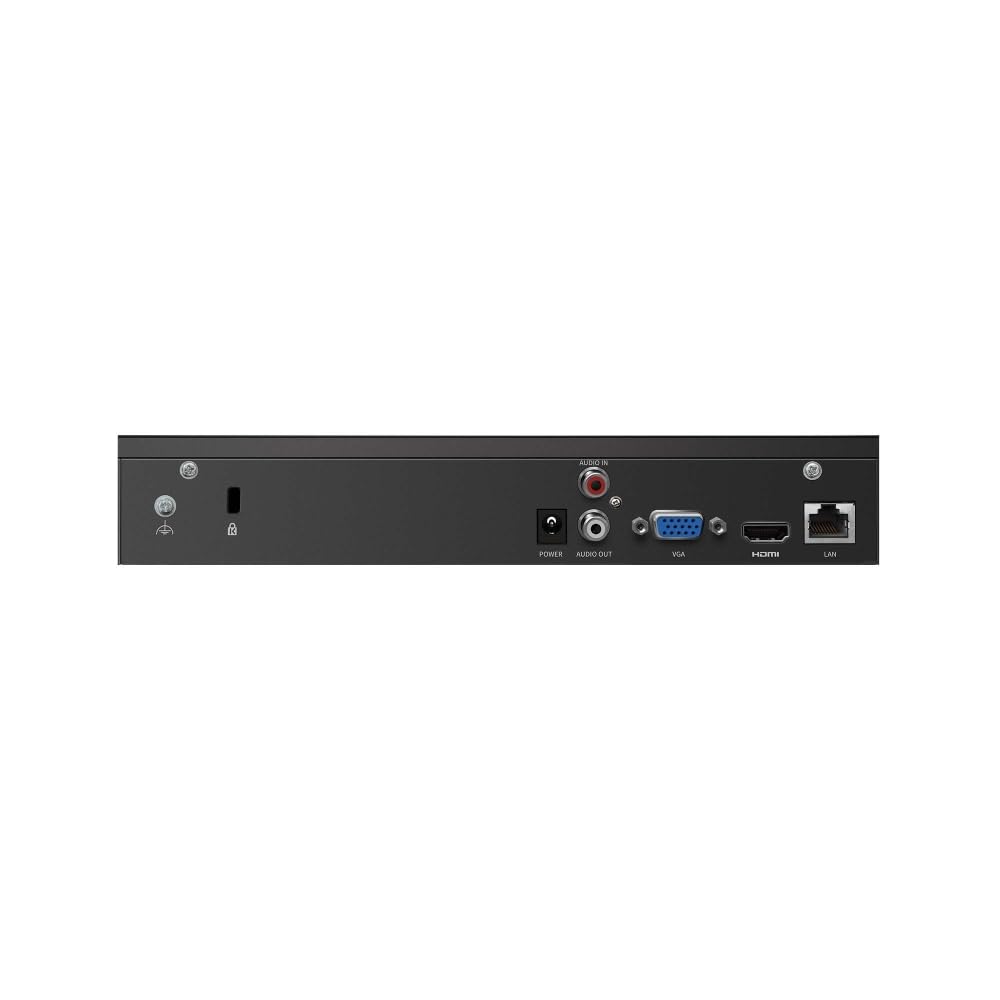
Figure 2: Rear Panel of VIGI NVR1004H
This image illustrates the rear panel connections of the TP-Link VIGI NVR1004H, including the power input, audio input/output, VGA port, HDMI port, and LAN port for network connectivity.
3. സജ്ജീകരണം
3.1 ഹാർഡ്വെയർ ഇൻസ്റ്റലേഷൻ
- ഹാർഡ് ഡിസ്ക് ഡ്രൈവ് (HDD) ഇൻസ്റ്റാൾ ചെയ്യുക:
Unscrew the cover of the NVR. Connect a compatible SATA HDD (up to 16 TB) to the SATA data and power cables inside the NVR. Secure the HDD using the provided screws. Replace the cover.
- പെരിഫറലുകൾ ബന്ധിപ്പിക്കുക:
- Connect a monitor to the NVR's HDMI or VGA port.
- Connect the included mouse to a USB port on the NVR's front panel.
- Connect the NVR to your network router or switch using an Ethernet cable via the LAN port.
- പവർ ഓൺ:
Connect the power adapter to the NVR's power input and then plug it into a power outlet. The NVR will power on automatically.
3.2 Initial Configuration (Auto Initialize)
Upon the first boot, the NVR will guide you through an initial setup process. This includes setting up basic IPC (IP Camera) and hard disk parameters.
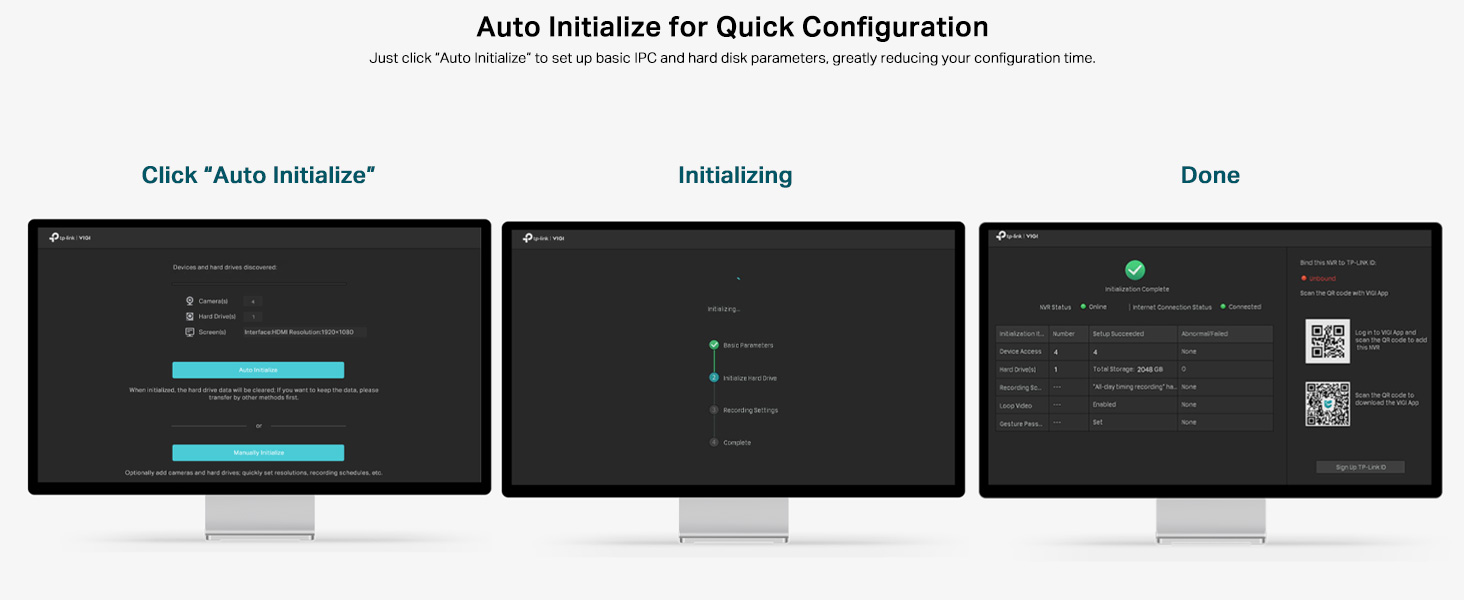
Figure 3: Auto Initialize Process
This image illustrates the three steps of the Auto Initialize process: "Click 'Auto Initialize'", "Initializing", and "Done", showing the on-screen prompts for quick configuration of devices and hard disk settings.
- Follow the on-screen prompts. Click "Auto Initialize" to begin the process.
- The NVR will detect connected devices and configure hard disk settings.
- Once complete, you can proceed to add cameras and further customize settings.
4. പ്രവർത്തന നിർദ്ദേശങ്ങൾ
4.1 തത്സമയം View
After successful setup, the NVR will display the live feeds from connected cameras on the monitor. You can switch between single-camera view മൾട്ടി-ക്യാമറ ഗ്രിഡും view ഓൺ-സ്ക്രീൻ നിയന്ത്രണങ്ങൾ അല്ലെങ്കിൽ മൗസ് ഉപയോഗിച്ച്.
4.2 പ്ലേബാക്ക്
വീണ്ടുംview രേഖപ്പെടുത്തി footage:
- ലൈവിൽ റൈറ്റ് ക്ലിക്ക് ചെയ്യുക view screen to access the main menu.
- Select "Playback".
- Choose the desired camera(s), date, and time range for playback. The NVR supports 4-channel synchronous playback.
4.3 റിമോട്ട് മോണിറ്ററിംഗ്
The VIGI NVR1004H supports remote monitoring via the VIGI app (available for smartphones) or a web ബ്രൗസർ.
- VIGI App: Download the TP-Link VIGI app from your device's app store. Follow the in-app instructions to add your NVR by scanning the QR code or manually entering device details.
- Web ബ്രൗസർ: Access the NVR's web ഇന്റർഫേസ് അതിന്റെ IP വിലാസം a-യിൽ നൽകി web ഒരേ നെറ്റ്വർക്കിലേക്ക് കണക്റ്റുചെയ്തിരിക്കുന്ന കമ്പ്യൂട്ടറിലെ ബ്രൗസർ.
4.4 ടു-വേ ഓഡിയോ
If your connected cameras support two-way audio and you have an external speaker/microphone connected to the NVR's audio ports, you can enable two-way communication through the NVR interface or the VIGI app.
5. പരിപാലനം
5.1 പൊതു പരിചരണം
- അമിതമായി ചൂടാകുന്നത് തടയാൻ നന്നായി വായുസഞ്ചാരമുള്ള സ്ഥലത്ത് NVR സൂക്ഷിക്കുക.
- ഉപകരണം നേരിട്ടുള്ള സൂര്യപ്രകാശം, ഈർപ്പം അല്ലെങ്കിൽ തീവ്രമായ താപനില എന്നിവയിൽ ഏൽക്കുന്നത് ഒഴിവാക്കുക.
- മൃദുവായതും ഉണങ്ങിയതുമായ തുണി ഉപയോഗിച്ച് പുറംഭാഗം വൃത്തിയാക്കുക. ലിക്വിഡ് ക്ലീനറുകൾ ഉപയോഗിക്കരുത്.
5.2 ഫേംവെയർ അപ്ഡേറ്റുകൾ
Regularly check the TP-Link VIGI website for firmware updates. Keeping your NVR's firmware up-to-date ensures optimal performance, security, and access to new features. Follow the instructions provided with the firmware update package carefully.
6. പ്രശ്നപരിഹാരം
6.1 പൊതുവായ പ്രശ്നങ്ങളും പരിഹാരങ്ങളും
- NVR stuck on TP-Link screen during boot:
This can sometimes occur due to a minor software glitch. To resolve, power off the NVR, open the casing, locate the internal reset button (refer to the quick installation guide for exact location), press and hold it for a few seconds, then restart the device. This typically resolves the issue.
- No video output on monitor:
- HDMI/VGA കേബിൾ NVR-ലേക്കും മോണിറ്ററിലേക്കും സുരക്ഷിതമായി ബന്ധിപ്പിച്ചിട്ടുണ്ടെന്ന് ഉറപ്പാക്കുക.
- മോണിറ്റർ ഓൺ ചെയ്തിട്ടുണ്ടെന്നും ശരിയായ ഇൻപുട്ട് ഉറവിടത്തിലേക്ക് സജ്ജീകരിച്ചിട്ടുണ്ടെന്നും ഉറപ്പാക്കുക.
- ലഭ്യമാണെങ്കിൽ മറ്റൊരു കേബിളോ മോണിറ്ററോ പരീക്ഷിച്ചുനോക്കൂ.
- തത്സമയം ദൃശ്യമാകാത്ത ക്യാമറകൾ view:
- Check network connectivity for both the NVR and the cameras.
- Ensure cameras are powered on and properly configured.
- Verify that the cameras are compatible with the NVR (ONVIF/CGI).
- Attempt to re-add the cameras through the NVR's interface.
- റിമോട്ട് ആക്സസ് പ്രവർത്തിക്കുന്നില്ല:
- Ensure the NVR has an active internet connection.
- Verify that the VIGI app is updated to the latest version.
- Check network settings and port forwarding rules on your router if necessary.
7 സ്പെസിഫിക്കേഷനുകൾ
| മോഡൽ | VIGI NVR1004H |
| ഉൽപ്പന്ന അളവുകൾ | 24.6 x 14.8 x 4.5 സെൻ്റീമീറ്റർ |
| ഇനത്തിൻ്റെ ഭാരം | 590 ഗ്രാം |
| കണക്റ്റിവിറ്റി ടെക്നോളജി | വയർഡ് |
| അനുയോജ്യമായ ഉപകരണങ്ങൾ | Camera, Laptop, Personal Computers, Smartphone, Tablet |
| മെമ്മറി സ്റ്റോറേജ് കപ്പാസിറ്റി | Up to 16 TB (1 SATA Interface) |
| ഇൻകമിംഗ് ബാൻഡ്വിഡ്ത്ത് | 80 Mbps |
| Going ട്ട്ഗോയിംഗ് ബാൻഡ്വിഡ്ത്ത് | 60 Mbps |
| വീഡിയോ ഔട്ട്പുട്ട് | 4K HDMI, VGA |
| ഡീകോഡിംഗ് ശേഷി | 2-ch @ 8MP / 4-ch @ 4MP |
| വീഡിയോ കംപ്രഷൻ | H.265 + |
| മാനദണ്ഡങ്ങൾ | ONVIF, CGI |
| നിർമ്മാതാവ് | ടിപി-ലിങ്ക് |
| മാതൃരാജ്യം | ഇന്ത്യ |
8. വാറൻ്റിയും പിന്തുണയും
For warranty information and technical support, please contact TP-Link customer service. You can reach them via the following details:
- ഇറക്കുമതിക്കാരൻ: TP-link India Private ltd.
- വിലാസം: Office no 201, 2nd floor A-wing Time Square Building, Marol naka, Andheri Kurla Road, Andheri East, Mumbai, India
- ടോൾ ഫ്രീ: 1800 2094 168
- ഇമെയിൽ: support.in@tp-link.com
വാറന്റി ക്ലെയിമുകൾക്കായി നിങ്ങളുടെ വാങ്ങൽ രസീത് സൂക്ഷിക്കുക.


