1. ആമുഖം
This user manual provides comprehensive instructions for the SYLVOX 15.6 inch Kitchen Smart TV. It covers setup, operation, maintenance, and troubleshooting to ensure optimal performance and user experience. Please read this manual thoroughly before using the product.
ഉൽപ്പന്നം കഴിഞ്ഞുview
The SYLVOX 15.6 inch Kitchen Smart TV is designed for versatile use in kitchen environments, offering entertainment and smart functionalities. Its compact and foldable design allows for various installation options, including under-cabinet and wall mounting. Featuring a 1080P Full HD display, Google TV with voice assistant, built-in speakers, and multiple connectivity options, it provides a high-quality viewing and interactive experience.
2 സുരക്ഷാ വിവരങ്ങൾ
Always adhere to the following safety guidelines to prevent electric shock, fire, or damage to the device:
- വൈദ്യുതി വിതരണം വോളിയം ഉറപ്പാക്കുകtage ഉൽപ്പന്നത്തിന്റെ ആവശ്യകതകളുമായി പൊരുത്തപ്പെടുന്നു.
- മഴയോ ഈർപ്പമോ ടിവിയെ തുറന്നുകാട്ടരുത്.
- അമിതമായി ചൂടാക്കുന്നത് തടയാൻ വെൻ്റിലേഷൻ ഓപ്പണിംഗുകൾ തടയുന്നത് ഒഴിവാക്കുക.
- ഉപകരണം സ്വയം നന്നാക്കാൻ ശ്രമിക്കരുത്. എല്ലാ സേവനങ്ങളും യോഗ്യതയുള്ള ഉദ്യോഗസ്ഥരെ ഏൽപ്പിക്കുക.
- ടിവി നേരിട്ട് സൂര്യപ്രകാശം ഏൽക്കുന്നതിൽ നിന്നും താപ സ്രോതസ്സുകളിൽ നിന്നും അകറ്റി നിർത്തുക.
3. ബോക്സിൽ എന്താണുള്ളത്?
അൺബോക്സിംഗ് ചെയ്യുമ്പോൾ എല്ലാ ഘടകങ്ങളും ഉണ്ടെന്ന് ഉറപ്പാക്കുക:
- 15.6 ഇഞ്ച് സ്മാർട്ട് ടിവി
- അഡാപ്റ്റർ
- റിമോട്ട് കൺട്രോൾ
- ഉപയോക്തൃ മാനുവൽ
- റിമോട്ട് കൺട്രോൾ ബേസ്
- Fixed Fittings
- ബാറ്ററികൾ (വിദൂര നിയന്ത്രണത്തിനായി)

Image: All items included in the SYLVOX 15.6 inch Kitchen Smart TV package, including the TV, remote, adapter, and mounting accessories.
4. സജ്ജീകരണവും ഇൻസ്റ്റാളേഷനും
മൗണ്ടിംഗ് ഓപ്ഷനുകൾ
The SYLVOX Kitchen TV offers flexible installation to suit your space:
- കാബിനറ്റിന് കീഴിൽ മൗണ്ടിംഗ്: The TV features a foldable bracket that allows it to be neatly tucked away under kitchen cabinets when not in use. It can fold from 0-90 degrees.
- മതിൽ മൗണ്ടിംഗ്: For a fixed position, the TV can be mounted on a wall. The bracket allows for horizontal adjustment of ±45 degrees.
- ടേബിൾ പ്ലേസ്മെൻ്റ്: The TV can also be placed on a countertop or table using its integrated stand.

Image: The SYLVOX Kitchen TV shown with its foldable bracket extended, ready for under-cabinet or wall mounting.

Image: Diagram illustrating the dimensions of the SYLVOX Kitchen TV, including screen size and overall unit measurements.

ചിത്രം: വശം view of the SYLVOX Kitchen TV, highlighting its slim profile and the dimensions of the mounting bracket.

ചിത്രം: പിൻഭാഗം view of the SYLVOX Kitchen TV, displaying the various input and output ports available for connectivity.
പവർ ബന്ധിപ്പിക്കുന്നു
Connect the provided adapter to the TV's power input and then plug it into a standard electrical outlet. Ensure the connection is secure.
5. പ്രവർത്തന നിർദ്ദേശങ്ങൾ
റിമോട്ട് കൺട്രോൾ
The SYLVOX Kitchen TV comes with a Bluetooth remote control featuring voice control capabilities. Insert the provided batteries into the remote control before first use.
- പവർ ബട്ടൺ: ടിവി ഓണാക്കുകയോ ഓഫാക്കുകയോ ചെയ്യുന്നു.
- നാവിഗേഷൻ പാഡ്: Use the directional arrows and center 'OK' button to navigate menus and select options.
- ശബ്ദ നിയന്ത്രണ ബട്ടൺ: Press and hold to activate the voice assistant for commands and searches.
- വോളിയം ബട്ടണുകൾ: ഓഡിയോ വോളിയം ക്രമീകരിക്കുക.
- ചാനൽ ബട്ടണുകൾ: Change TV channels (if connected to an antenna/cable).
- ആപ്പ് കുറുക്കുവഴി ബട്ടണുകൾ: Dedicated buttons for popular streaming services like Netflix and YouTube.
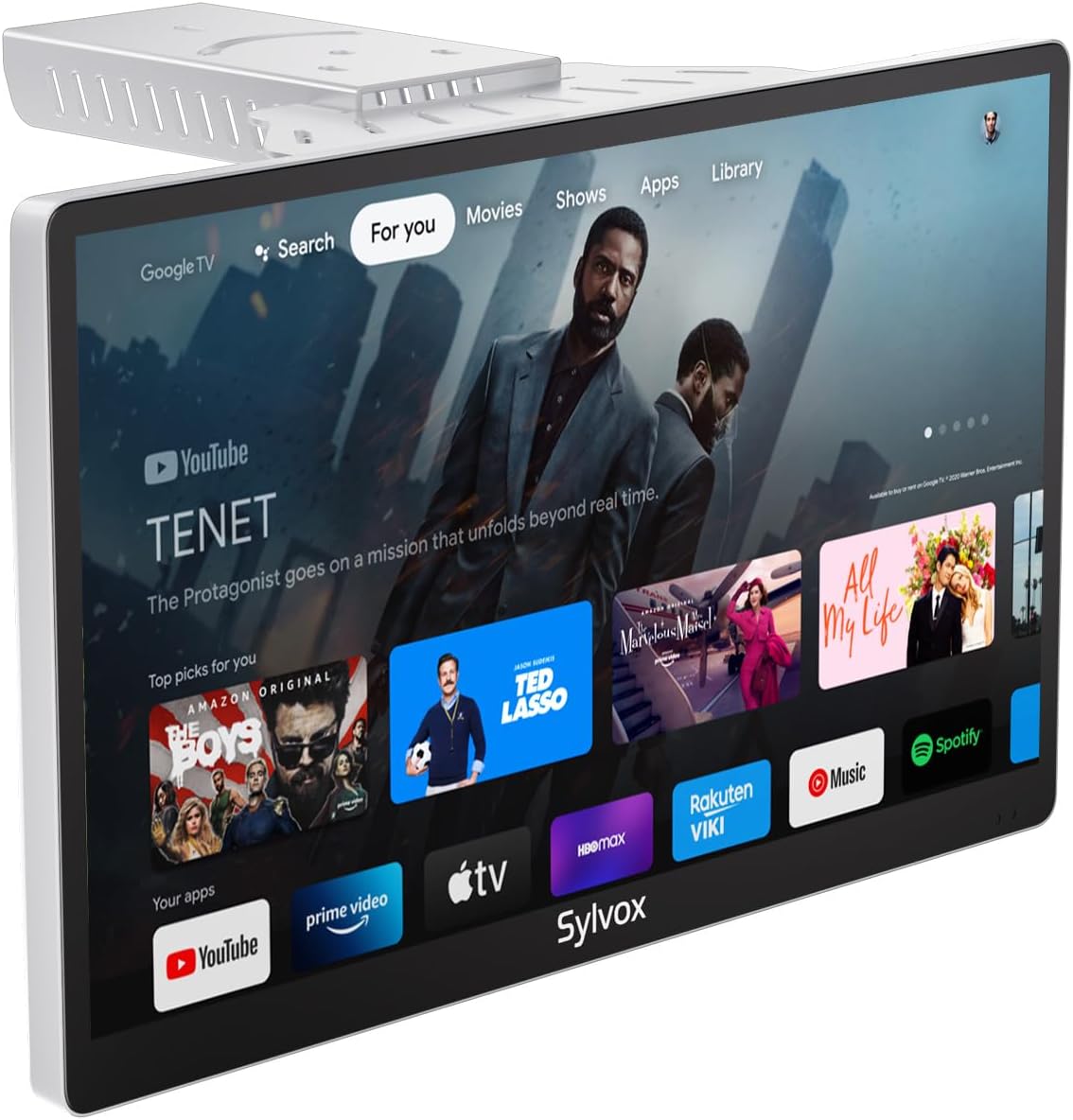
Image: The SYLVOX Kitchen TV screen showing the Google TV interface with various streaming app icons.
ഗൂഗിൾ ടിവി ഇന്റർഫേസ്
The TV runs on Google TV, providing access to a vast library of content and applications. The main interface offers personalized recommendations and easy access to your installed apps.
- നിനക്കായ്: വ്യക്തിപരമാക്കിയ ഉള്ളടക്ക ശുപാർശകൾ.
- തത്സമയം: Access to live TV channels (requires antenna or compatible service).
- അപ്ലിക്കേഷനുകൾ: ഇൻസ്റ്റാൾ ചെയ്ത ആപ്ലിക്കേഷനുകൾ ബ്രൗസ് ചെയ്ത് ലോഞ്ച് ചെയ്യുക.
- ലൈബ്രറി: നിങ്ങൾ വാങ്ങിയതോ വാടകയ്ക്കെടുത്തതോ ആയ ഉള്ളടക്കം ആക്സസ് ചെയ്യുക.
കണക്റ്റിവിറ്റി
ടിവി വിവിധ കണക്റ്റിവിറ്റി ഓപ്ഷനുകളെ പിന്തുണയ്ക്കുന്നു:
- വൈഫൈ: ഇന്റർനെറ്റ് ആക്സസിനും സ്ട്രീമിംഗിനും നിങ്ങളുടെ ഹോം വയർലെസ് നെറ്റ്വർക്കിലേക്ക് കണക്റ്റുചെയ്യുക.
- ബ്ലൂടൂത്ത്: ഹെഡ്ഫോണുകൾ അല്ലെങ്കിൽ സ്പീക്കറുകൾ പോലുള്ള ബാഹ്യ ഓഡിയോ ഉപകരണങ്ങളുമായി ജോടിയാക്കുക.
- Chromecast ബിൽറ്റ്-ഇൻ: നിങ്ങളുടെ സ്മാർട്ട്ഫോണിൽ നിന്നോ ടാബ്ലെറ്റിൽ നിന്നോ ടിവിയിലേക്ക് നേരിട്ട് ഉള്ളടക്കം കാസ്റ്റുചെയ്യുക.
- HDMI പോർട്ടുകൾ: Connect external devices such as gaming consoles, Blu-ray players, or set-top boxes.
- USB പോർട്ടുകൾ: മീഡിയ പ്ലേ ചെയ്യുക fileയുഎസ്ബി ഡ്രൈവുകളിൽ നിന്നുള്ള എസ്.
- Coaxial Antenna Input: ഓവർ-ദി-എയർ പ്രക്ഷേപണ ചാനലുകൾക്കായി ഒരു ആന്റിന ബന്ധിപ്പിക്കുക.

Image: A user casting content from a smartphone to the SYLVOX Kitchen TV, demonstrating the built-in Chromecast feature.
6. പരിപാലനവും പരിചരണവും
- വൃത്തിയാക്കൽ: സ്ക്രീനും പുറംഭാഗവും വൃത്തിയാക്കാൻ മൃദുവായതും ഉണങ്ങിയതുമായ തുണി ഉപയോഗിക്കുക. കഠിനമായ പാടുകൾക്ക്, ചെറുതായി dampതുണിയിൽ വെള്ളം ഒഴിക്കുക. കഠിനമായ രാസവസ്തുക്കളോ ഉരച്ചിലുകളോ ഉള്ള വസ്തുക്കൾ ഒഴിവാക്കുക.
- വെൻ്റിലേഷൻ: Ensure adequate airflow around the TV to prevent overheating. Do not cover ventilation slots.
- സംഭരണം: ടിവി ദീർഘനേരം സൂക്ഷിക്കുകയാണെങ്കിൽ, അത് വൈദ്യുതിയിൽ നിന്ന് വിച്ഛേദിച്ച് തണുത്തതും വരണ്ടതുമായ സ്ഥലത്ത് സൂക്ഷിക്കുക.
7. പ്രശ്നപരിഹാരം
| പ്രശ്നം | സാധ്യമായ കാരണം | പരിഹാരം |
|---|---|---|
| പവർ ഇല്ല | Power cable not connected; Outlet not working. | പവർ കേബിൾ കണക്ഷൻ പരിശോധിക്കുക; മറ്റൊരു ഔട്ട്ലെറ്റ് പരീക്ഷിക്കുക. |
| ചിത്രമില്ല | Incorrect input source; Loose HDMI/antenna cable. | Select correct input source; Secure cable connections. |
| ശബ്ദമില്ല | Volume too low or muted; External audio device issue. | Increase volume/unmute; Check external audio connections. |
| റിമോട്ട് പ്രതികരിക്കുന്നില്ല | Batteries dead; Remote not paired. | Replace batteries; Re-pair remote control (refer to Google TV pairing instructions). |
| Wi-Fi കണക്ഷൻ പ്രശ്നങ്ങൾ | Incorrect password; Router too far; Network issue. | Verify password; Move TV closer to router; Restart router. |
8 സ്പെസിഫിക്കേഷനുകൾ
| ഫീച്ചർ | വിശദാംശങ്ങൾ |
|---|---|
| ബ്രാൻഡ് | സിൽവോക്സ് |
| മോഡൽ | 15.6 inch Kitchen Smart TV |
| സ്ക്രീൻ വലിപ്പം | 15.6 ഇഞ്ച് |
| ഡിസ്പ്ലേ ടെക്നോളജി | എൽഇഡി |
| റെസലൂഷൻ | 1080p ഫുൾ എച്ച്ഡി |
| പുതുക്കിയ നിരക്ക് | 60 Hz |
| ഓപ്പറേറ്റിംഗ് സിസ്റ്റം | Google TV |
| പ്രത്യേക സവിശേഷതകൾ | Google TV, Foldable bracket, Under-cabinet/Wall mountable, Lightweight, Voice Remote Control, Chromecast Built-in, Built-in Speakers |
| കണക്റ്റിവിറ്റി | Ethernet, Wireless, WiFi, Bluetooth, HDMI, USB |
| ഇനത്തിൻ്റെ ഭാരം | 6.25 പൗണ്ട് |
| ഉൽപ്പന്ന അളവുകൾ | 1.4 x 14.28 x 8.76 ഇഞ്ച് |
| ഓൺ-മോഡ് വൈദ്യുതി ഉപഭോഗം | 16.0 വാട്ട്സ് |
| ഊർജ്ജ ഉപഭോഗം (വാർഷികം) | 23040 Watt-hours per year |
9. വാറൻ്റിയും പിന്തുണയും
നിങ്ങളുടെ ഉൽപ്പന്നത്തിന് SYLVOX ഇനിപ്പറയുന്ന പിന്തുണ വാഗ്ദാനം ചെയ്യുന്നു:
- 12-month free defect protection: വാങ്ങിയ തീയതി മുതൽ ഒരു വർഷത്തേക്ക് നിർമ്മാണ വൈകല്യങ്ങൾ പരിരക്ഷിക്കുന്നു.
- Free returns for quality issues: ഉൽപ്പന്നത്തിന് ഗുണനിലവാരവുമായി ബന്ധപ്പെട്ട പ്രശ്നങ്ങളുണ്ടെങ്കിൽ, സൗജന്യ റിട്ടേണുകൾ ലഭ്യമാണ്.
- 30-day hassle-free returns: Returns for any reason are accepted within 30 days, requiring original packaging.
For further assistance, please refer to the official SYLVOX webസൈറ്റ് അല്ലെങ്കിൽ ഉപഭോക്തൃ പിന്തുണയുമായി ബന്ധപ്പെടുക.
10. ഉൽപ്പന്ന വീഡിയോകൾ
Watch these official product videos for visual guides and demonstrations:
ഈ സമയത്ത് ഉൾച്ചേർക്കുന്നതിനായി ഔദ്യോഗിക വിൽപ്പനക്കാരന്റെ വീഡിയോകളൊന്നും ലഭ്യമല്ല.


