ആമുഖം
നിങ്ങളുടെ OMTech 60W CO2 ലേസർ എൻഗ്രേവർ, മോഡൽ SH-G460 ന്റെ സുരക്ഷിതവും കാര്യക്ഷമവുമായ പ്രവർത്തനം, സജ്ജീകരണം, പരിപാലനം എന്നിവയ്ക്കുള്ള അവശ്യ നിർദ്ദേശങ്ങൾ ഈ മാനുവൽ നൽകുന്നു. ശരിയായ ഉപയോഗം ഉറപ്പാക്കാനും കേടുപാടുകൾ അല്ലെങ്കിൽ പരിക്കുകൾ തടയാനും മെഷീൻ പ്രവർത്തിപ്പിക്കുന്നതിന് മുമ്പ് ദയവായി ഈ മാനുവൽ നന്നായി വായിക്കുക.

Image: The OMTech 60W CO2 Laser Engraver (Model SH-G460) shown with its accompanying CW-5200 industrial water chiller. Various engraved items such as a wooden elephant, a coaster, and a map are displayed, demonstrating the machine's capabilities.
സുരക്ഷാ വിവരങ്ങൾ
Operating a laser engraver involves potential hazards. Adhere to all safety guidelines to prevent injury or damage to the equipment.
- നേത്ര സംരക്ഷണം: ലേസർ പ്രവർത്തിക്കുമ്പോൾ എല്ലായ്പ്പോഴും ഉചിതമായ ലേസർ സുരക്ഷാ ഗ്ലാസുകൾ ധരിക്കുക.
- വെൻ്റിലേഷൻ: Ensure adequate ventilation to remove smoke and fumes generated during engraving. The built-in air assist helps, but external exhaust is crucial.
- അഗ്നി സുരക്ഷ: ഒരു അഗ്നിശമന ഉപകരണം സമീപത്ത് സൂക്ഷിക്കുക. പ്രവർത്തന സമയത്ത് യന്ത്രം ശ്രദ്ധിക്കാതെ വിടരുത്, പ്രത്യേകിച്ച് കത്തുന്ന വസ്തുക്കളുമായി പ്രവർത്തിക്കുമ്പോൾ.
- മെറ്റീരിയൽ അനുയോജ്യത: CO2 ലേസറുകൾക്ക് അംഗീകൃത വസ്തുക്കൾ മാത്രം കൊത്തുപണി ചെയ്യുകയോ മുറിക്കുകയോ ചെയ്യുക. വിഷ പുക പുറപ്പെടുവിക്കുന്നതോ ഉയർന്ന പ്രതിഫലനശേഷിയുള്ളതോ ആയ വസ്തുക്കൾ ഒഴിവാക്കുക.
- ഇന്റർലോക്ക് സിസ്റ്റം: The machine features a cover interlock that automatically cuts the laser beam if the viewing window is opened during operation. Do not bypass this safety feature.
- Flame Retardant Window: വീതി കൂട്ടി viewing window is made from flame retardant material for safe observation of the engraving process.
- അടിയന്തരമായി നിർത്തുക: അടിയന്തര സ്റ്റോപ്പ് ബട്ടണിന്റെ സ്ഥാനവും പ്രവർത്തനവും സ്വയം പരിചയപ്പെടുത്തുക.

ചിത്രം: ഒരു ക്ലോസ്-അപ്പ് view of the laser engraver's flame-resistant viewing window, showing the laser beam actively engraving a design onto a wooden surface. This window allows for safe observation of the process.
പാക്കേജ് ഉള്ളടക്കം
അൺപാക്ക് ചെയ്യുമ്പോൾ എല്ലാ ഘടകങ്ങളും ഉണ്ടെന്ന് ഉറപ്പാക്കുക:
- OMTech 60W CO2 Laser Engraver (SH-G460)
- Industrial Water Chiller (CW-5200 or equivalent)
- USB കേബിൾ
- ഇഥർനെറ്റ് കേബിൾ
- യുഎസ്ബി ഫ്ലാഷ് ഡ്രൈവ് (സോഫ്റ്റ്വെയറും ഡ്രൈവറുകളും അടങ്ങിയിരിക്കുന്നു)
- വാട്ടർ പമ്പ്
- Air Assist Compressor/Pump
- എക്സോസ്റ്റ് ഡക്റ്റിംഗ്
- ഉപയോക്തൃ മാനുവൽ
- പവർ കേബിൾ
- തേൻകോമ്പ് വർക്ക്ബെഡ്
- അലുമിനിയം ബ്ലേഡ് വർക്ക്ബെഡ്

Image: A visual representation of the OMTech laser engraver and its accompanying accessories, including a USB cable, USB flash drive, water pump, exhaust ducting, Ethernet cable, and the physical user manual.
സജ്ജമാക്കുക
- അൺപാക്ക് ചെയ്യുന്നു: Carefully remove the laser engraver and all accessories from their packaging. Retain packaging for future transport or storage.
- പ്ലേസ്മെൻ്റ്: Position the machine on a stable, level surface in a well-ventilated area, away from flammable materials. Ensure sufficient space around the machine for access and ventilation.
- വാട്ടർ ചില്ലർ കണക്ഷൻ: Connect the water chiller to the laser engraver using the provided tubing. Fill the chiller with distilled water according to the chiller's specific instructions. Ensure proper water flow before operating the laser.
- എയർ അസിസ്റ്റ് കണക്ഷൻ: Connect the air assist pump to the designated inlet on the laser engraver. This system helps clear debris and smoke from the focal point.
- എക്സ്ഹോസ്റ്റ് സിസ്റ്റം: Attach the exhaust ducting to the machine's exhaust port and route it to an external vent or a suitable air filtration system. Proper exhaust is critical for safety and machine longevity.
- പവർ കണക്ഷൻ: Connect the laser engraver and water chiller to appropriate grounded power outlets.
- സോഫ്റ്റ്വെയർ ഇൻസ്റ്റാളേഷൻ: Install the engraving software and drivers from the provided USB flash drive onto your computer. Refer to the software manual for detailed installation and configuration steps.
പ്രവർത്തന നിർദ്ദേശങ്ങൾ
1 മെറ്റീരിയൽ തയ്യാറാക്കൽ
- Select the appropriate workbed (honeycomb for cutting, aluminum blade for engraving) based on your material and task.
- Place your material securely on the workbed.

Image: A visual comparison of the two included engraving beds: a honeycomb bed, typically used for cutting to minimize back reflection, and an aluminum blade bed, often preferred for engraving to provide stable support. Both are designed for the 16"x24" work area.
2. ലേസർ ഫോക്കസ് ചെയ്യൽ
Accurate focusing is critical for optimal engraving and cutting results.
- Use the manual focus workbed adjustment to raise or lower the work surface until the material is at the correct focal distance from the laser head.
- Refer to your software or a physical focusing tool (if included) for precise focal length measurement.
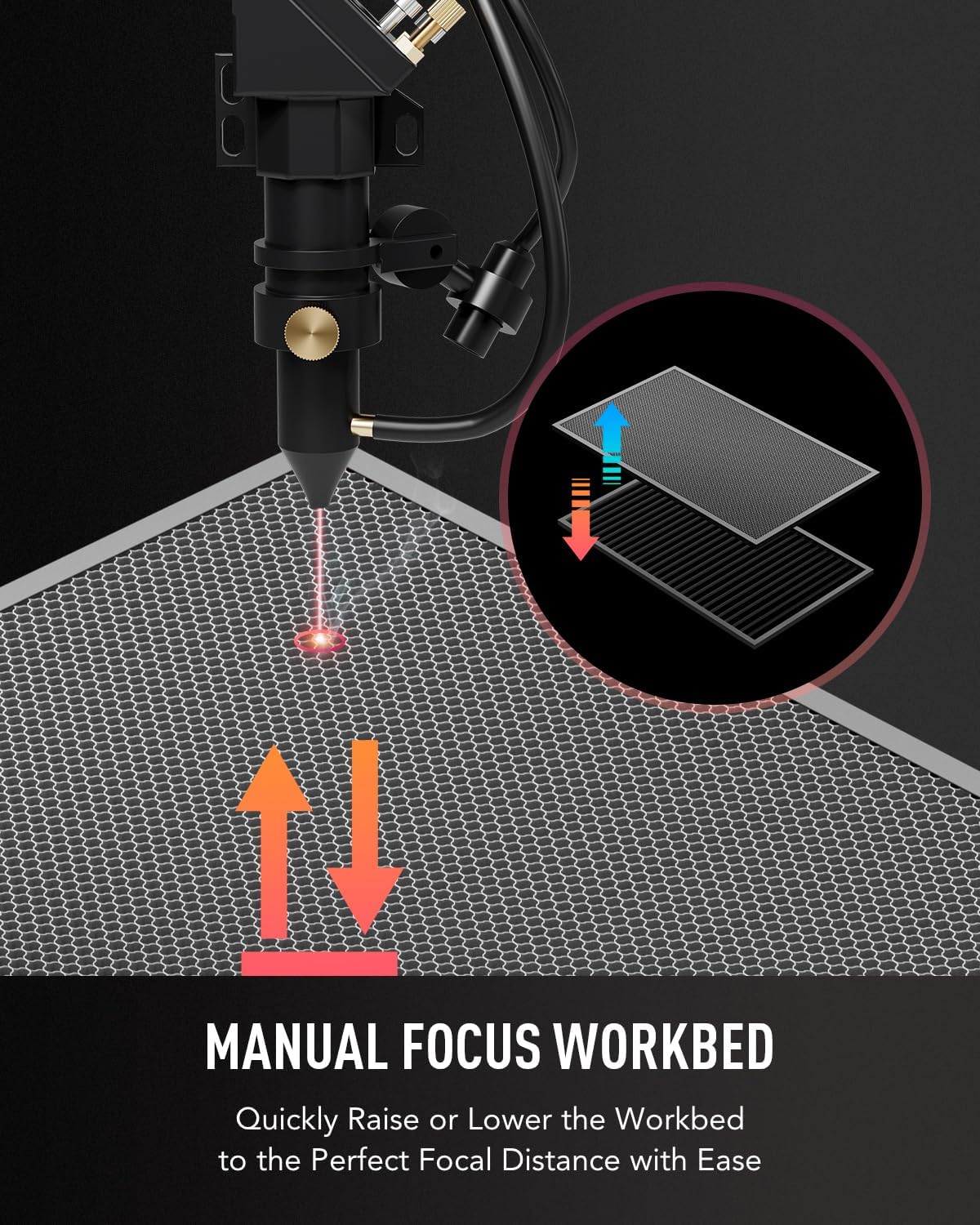
Image: A diagram illustrating the manual focus workbed feature. Arrows indicate the ability to quickly raise or lower the workbed to achieve the perfect focal distance for the laser beam on the material surface.
3. സോഫ്റ്റ്വെയർ പ്രവർത്തനം
- Open your engraving software (e.g., LightBurn, RDWorks).
- നിങ്ങളുടെ ഡിസൈൻ ഇറക്കുമതി ചെയ്യുക അല്ലെങ്കിൽ സൃഷ്ടിക്കുക.
- Set appropriate laser power, speed, and frequency settings for your material. Incorrect settings can lead to poor results or material damage.
- Position your design on the virtual work area to match the physical material placement.
- സോഫ്റ്റ്വെയറിൽ നിന്ന് കൊത്തുപണി അല്ലെങ്കിൽ മുറിക്കൽ പ്രക്രിയ ആരംഭിക്കുക.

Image: An infographic demonstrating the engraving speed capabilities of the OMTech laser engraver, achieving speeds up to 600 mm/s. It compares the time taken to engrave various materials like leather, stone, and acrylic, highlighting efficiency gains.
4. Two-Way Pass-Through Feature
The machine is equipped with front and rear pass-through doors to accommodate larger materials.
- Open the front and/or rear doors to feed longer materials through the work area.
- Ensure the material is properly supported and aligned to prevent movement during operation.
- Exercise caution when using this feature, as it may expose more of the laser path. Always wear safety glasses.

Image: A diagram illustrating the two-way pass-through design of the OMTech laser engraver. The front and rear doors can be opened, allowing for the processing of materials longer than the internal workbed, with dimensions indicated as 28.3 inches wide and 1.9 inches high for the pass-through opening.
മെയിൻ്റനൻസ്
പതിവ് അറ്റകുറ്റപ്പണികൾ ഒപ്റ്റിമൽ പ്രകടനം ഉറപ്പാക്കുകയും നിങ്ങളുടെ ലേസർ എൻഗ്രേവറിന്റെ ആയുസ്സ് വർദ്ധിപ്പിക്കുകയും ചെയ്യുന്നു.
- ലെൻസും കണ്ണാടിയും വൃത്തിയാക്കൽ: Regularly inspect and clean the laser lenses and mirrors using specialized optical cleaning solutions and wipes. Dust and debris can significantly reduce laser power and quality.
- വാട്ടർ ചില്ലർ പരിപാലനം:
- Check water levels daily and refill with distilled water as needed.
- Change the water in the chiller every 1-3 months, or more frequently with heavy use, to prevent algae growth and maintain cooling efficiency.
- Clean the chiller's filter and radiator fins periodically.
- ലേസർ ട്യൂബ് പരിചരണം: The high-performance DC tube delivers 60W of power and has a lifespan of up to 1,000 hours, which can double when consistently used at lower settings. Ensure proper cooling and avoid operating at maximum power for extended periods to prolong its life.
- വർക്ക്ബെഡ് വൃത്തിയാക്കൽ: Clean the honeycomb and blade beds regularly to remove accumulated debris and residue.
- റെയിൽ ആൻഡ് ബെൽറ്റ് ലൂബ്രിക്കേഷൻ: Periodically lubricate the guide rails and inspect the belts for wear and tension.

ചിത്രം: ഒരു ക്ലോസ്-അപ്പ് view of a high-performance DC laser tube, highlighting its internal structure. This component is responsible for generating the laser beam and has a typical lifespan of up to 1,000 hours, extendable with careful usage.
ട്രബിൾഷൂട്ടിംഗ്
| പ്രശ്നം | സാധ്യമായ കാരണം | പരിഹാരം |
|---|---|---|
| ലേസർ ഔട്ട്പുട്ട് ഇല്ല |
|
|
| Poor Engraving/Cutting Quality |
|
|
| മെഷീൻ പ്രതികരിക്കുന്നില്ല |
|
|
സ്പെസിഫിക്കേഷനുകൾ
| ഫീച്ചർ | വിശദാംശങ്ങൾ |
|---|---|
| മോഡൽ നമ്പർ | SH-G460 |
| ലേസർ തരം | CO2 Glass Tube |
| ലേസർ പവർ | 60W |
| വർക്ക് ഏരിയ | 16" x 24" (400 x 600 മിമി) |
| പരമാവധി. കൊത്തുപണി വേഗത | 23.6 ips വരെ (600 mm/s) |
| പരമാവധി. കട്ടിംഗ് ഡെപ്ത് | 0.4" (10 mm) on wood (varies by material) |
| അനുയോജ്യമായ മെറ്റീരിയലുകൾ | Wood, Glass, Acrylic, Leather, Fabric, Rubber, etc. (Non-metallic) |
| ഡാറ്റ ട്രാൻസ്മിഷൻ | യുഎസ്ബി കേബിൾ, ഇതർനെറ്റ് കേബിൾ, യുഎസ്ബി ഫ്ലാഷ് ഡ്രൈവ്, ഓഫ്ലൈൻ |
| ഉൽപ്പന്ന അളവുകൾ | 44.9 x 30.7 x 21.5 ഇഞ്ച് |
| ഇനത്തിൻ്റെ ഭാരം | 158.7 പൗണ്ട് |
| ലേസർ ക്ലാസ് | Class 2, 0.827 output power |

Image: The OMTech ECO60 laser engraver displayed in a workshop setting, accompanied by a summary of its key specifications including maximum engraving speed (600 mm/s), data transmission options, front/back pass size (28.3x1.9 in.), machine dimensions (44.9x30.7x21.5 in.), processing area (16x24 in.), and machine weight (158.7 lb).
വാറൻ്റിയും പിന്തുണയും
OMTech അതിന്റെ ഉൽപ്പന്നങ്ങൾക്ക് സമഗ്രമായ പിന്തുണ നൽകുന്നു:
- പൊതു വാറന്റി: A strong 2-year general warranty covers the laser engraver.
- ഘടക വാറന്റി: The laser tube and power supply are covered by a 6-month warranty.
- കസ്റ്റമർ സർവീസ്: US-based customer service and technical support are available to assist with any questions or issues.
- For warranty claims or technical assistance, please refer to the contact information provided on the OMTech official webസൈറ്റ് അല്ലെങ്കിൽ നിങ്ങളുടെ ഉൽപ്പന്ന ഡോക്യുമെന്റേഷനിൽ.


