ആമുഖം
The PETLIBRO PLAF203 Smart Pet Feeder is designed to provide convenient and reliable feeding for your pets. Equipped with a 1080P HD camera, two-way audio, and smart app control, this feeder allows you to monitor and manage your pet's meals remotely. It supports both 2.4GHz and 5GHz WiFi networks for flexible connectivity.
പ്രധാന സവിശേഷതകളിൽ ഇവ ഉൾപ്പെടുന്നു:
- ആപ്പ് വഴിയുള്ള റിമോട്ട് കൺട്രോൾ: Manage feeding schedules and dispense food from anywhere using the dedicated PETLIBRO app.
- രാത്രി കാഴ്ചയുള്ള 1080P HD ക്യാമറ: Monitor your pet with clear video, even in low light conditions, thanks to infrared night vision.
- ടു-വേ ഓഡിയോ: Communicate with your pet in real-time.
- ചലനവും ശബ്ദവും കണ്ടെത്തൽ: Receive alerts and record videos when your pet is active (TF card required).
- Anti-Jamming Sensor: Prevents food blockages for consistent feeding.
- Low Food Sensor: Notifies you when the food level is low.
- വൃത്തിയാക്കാൻ എളുപ്പമാണ്: Removable and washable components for hygiene.
പാക്കേജ് ഉള്ളടക്കം
- PETLIBRO PLAF203 Smart Pet Feeder
- സ്റ്റെയിൻലെസ്സ് സ്റ്റീൽ ഫുഡ് ബൗൾ
- പവർ അഡാപ്റ്റർ
- ഡെസിക്കന്റ് ബാഗ്
- ഉപയോക്തൃ മാനുവൽ
സജ്ജമാക്കുക
1. അൺപാക്കിംഗും അസംബ്ലിയും
- പാക്കേജിംഗിൽ നിന്ന് എല്ലാ ഘടകങ്ങളും നീക്കം ചെയ്യുക.
- Place the stainless steel food bowl into the designated slot at the base of the feeder.
- Ensure the food tank and lid are securely attached.
2. Powering the Feeder
- Connect the power adapter to the feeder and plug it into a wall outlet.
- ou സമയത്ത് ബാക്കപ്പ് പവറിനായിtages, insert 3 D-cell batteries (not included) into the battery compartment at the bottom of the feeder.
3. ആപ്പ് ഡൗൺലോഡും ഇൻസ്റ്റാളേഷനും
- ഡൗൺലോഡ് ചെയ്യുക 'PETLIBRO' ആപ്പ് സ്റ്റോറിൽ (iOS) നിന്നോ ഗൂഗിൾ പ്ലേ സ്റ്റോറിൽ (ആൻഡ്രോയിഡ്) നിന്നോ ഉള്ള ആപ്പ്. Note: Do not download the 'PETLIBRO LITE' app.
- ഒരു അക്കൗണ്ടിനായി രജിസ്റ്റർ ചെയ്യുക അല്ലെങ്കിൽ നിങ്ങൾക്ക് ഇതിനകം ഒന്ന് ഉണ്ടെങ്കിൽ ലോഗിൻ ചെയ്യുക.
4. Wi-Fi-ലേക്ക് ബന്ധിപ്പിക്കുന്നു
- Open the PETLIBRO app and follow the on-screen instructions to add your device.
- The feeder supports both 2.4GHz and 5GHz Wi-Fi networks. Ensure your smartphone is connected to the same network during setup.
- The app will guide you through the pairing process, which typically involves scanning a QR code on the feeder or entering Wi-Fi credentials.
5. ഭക്ഷണ ടാങ്ക് നിറയ്ക്കൽ
- ഫീഡർ ലിഡ് തുറക്കുക.
- Fill the food tank with dry pet kibble. The feeder has a 5-liter capacity.
- Place the desiccant bag in its designated holder under the lid to maintain food freshness.
- Close the lid securely using the twist-lock mechanism to prevent pets from accessing food.
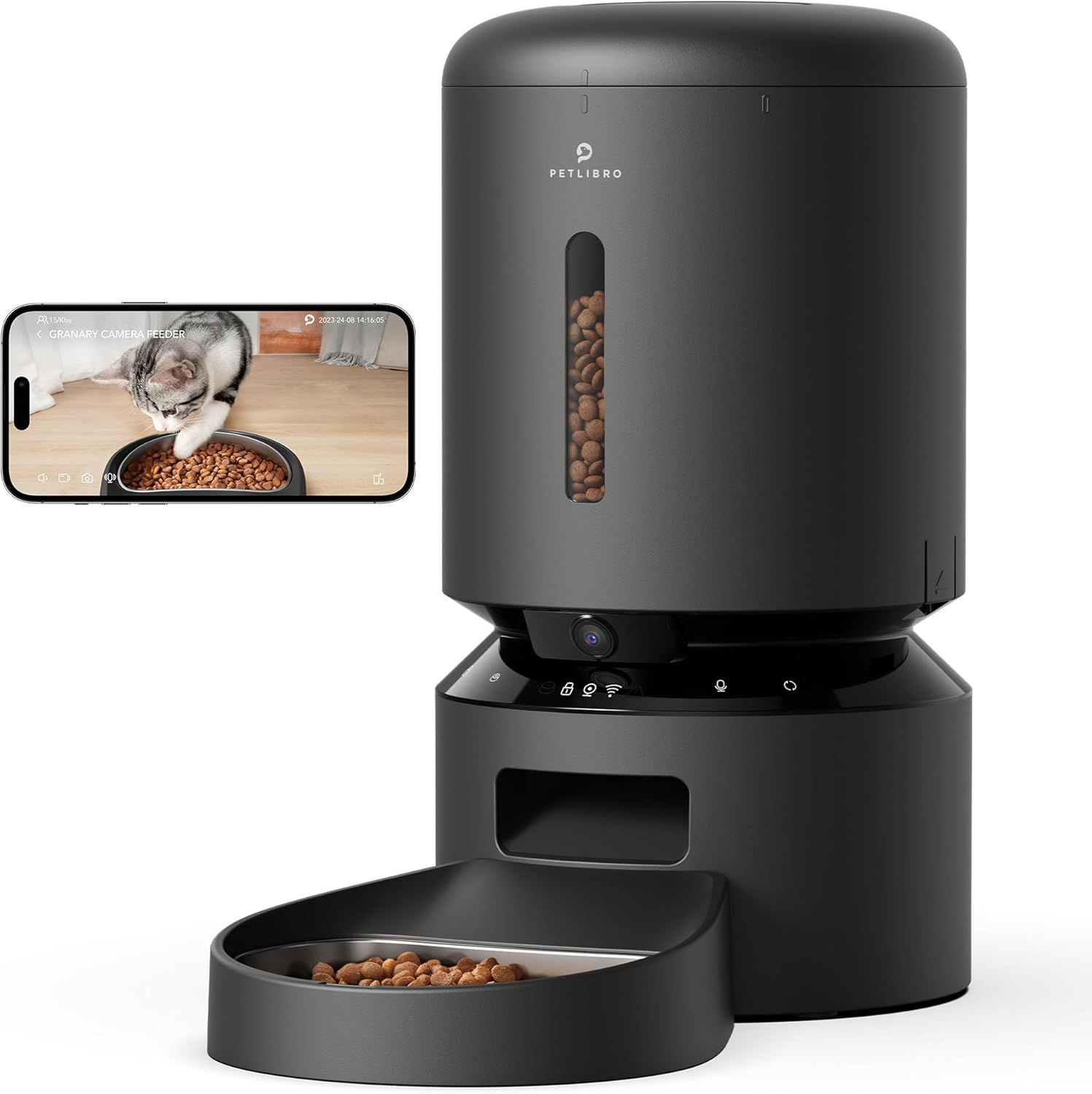
Image: PETLIBRO PLAF203 Smart Pet Feeder with Camera, showing the main unit and food bowl.
പ്രവർത്തന നിർദ്ദേശങ്ങൾ
1. തീറ്റക്രമം ക്രമീകരിക്കൽ
Use the PETLIBRO app to customize your pet's feeding schedule:
- Open the app and select your feeder.
- Navigate to the 'Schedule' section.
- Set desired feeding times and the number of portions for each meal.
- നിങ്ങളുടെ ക്രമീകരണങ്ങൾ സംരക്ഷിക്കുക. പ്രോഗ്രാം ചെയ്ത സമയങ്ങളിൽ ഫീഡർ യാന്ത്രികമായി ഭക്ഷണം വിതരണം ചെയ്യും.

Image: Smartphone screen displaying the PETLIBRO app interface for setting feeding schedules and portion sizes.
2. മാനുവൽ ഫീഡിംഗ്
You can dispense food instantly:
- ആപ്പ് വഴി: On the app's main screen, select the 'Feed Now' option to dispense a single portion.
- ഉപകരണം വഴി: Press and hold the manual feed button on the feeder (refer to device diagram for location) to dispense food.
3. Live Monitoring and Recording
The built-in 1080P HD camera allows you to watch your pet:
- തത്സമയം View: Access the live video stream through the PETLIBRO app to see your pet in real-time. The 145° wide-angle lens provides a broad view.
- രാത്രി കാഴ്ച: The camera automatically switches to infrared night vision in low light, ensuring clear visibility of your pet's activities 24/7.
- വീഡിയോ സംഭരണം: Insert a TF card (up to 256GB, sold separately) into the feeder to record and store videos. You can review playback within the app.

Image: A cat eating from the feeder, with an overlay showing the 1080P camera view from a smartphone, highlighting motion detection.
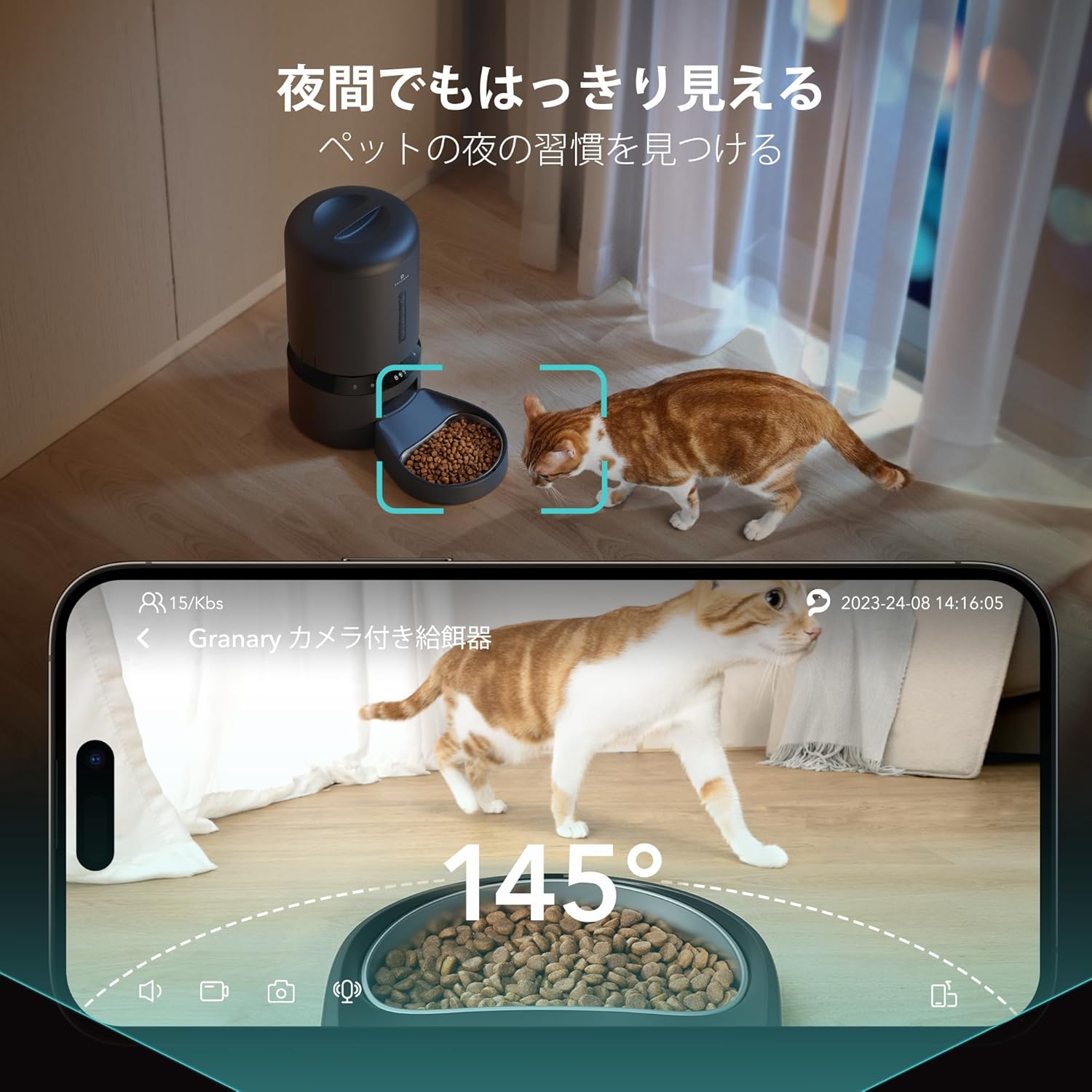
Image: A cat near the feeder at night, demonstrating the clear visibility provided by the 145-degree wide-angle camera with night vision.
4. Two-Way Audio and Voice Recording
- ദ്വിമുഖ സംസാരം: Use the microphone and speaker in the app to speak to your pet and hear their responses in real-time.
- വോയിസ് റെക്കോർഡിംഗ്: Record a 10-second personalized message that will play automatically at each scheduled feeding time, providing comfort to your pet when you're away.

Image: A person interacting with their pet via the feeder's two-way audio feature, showing a smartphone with a live pet view and speech bubbles.
5. സ്മാർട്ട് അലേർട്ടുകൾ
- ചലനവും ശബ്ദവും കണ്ടെത്തൽ: The feeder detects your pet's movements and sounds, automatically saving video clips (with TF card) and sending notifications to your smartphone.
- Low Food Alert: Receive notifications on your smartphone when the food level in the tank is running low, prompting you to refill.
- Anti-Jamming: An infrared sensor monitors the food dispenser. If a jam is detected, feeding will automatically pause to prevent issues.
മെയിൻ്റനൻസ്
Regular cleaning ensures hygiene and optimal performance of your feeder.
1. ഫീഡർ വൃത്തിയാക്കൽ
- നീക്കം ചെയ്യാവുന്ന ഘടകങ്ങൾ: The feeder lid, food tank, and stainless steel food bowl are designed to be easily removed for cleaning.
- കഴുകൽ: Wash these components with mild soap and water. Rinse thoroughly and ensure they are completely dry before reassembling.
- പ്രധാന യൂണിറ്റ്: പരസ്യം ഉപയോഗിച്ച് പ്രധാന യൂണിറ്റ് മായ്ക്കുകamp തുണി. പ്രധാന യൂണിറ്റ് വെള്ളത്തിൽ മുക്കരുത്.
2. Desiccant Bag Replacement
The desiccant bag helps keep the food fresh. Replace it periodically (e.g., monthly) for best results.
ട്രബിൾഷൂട്ടിംഗ്
| പ്രശ്നം | സാധ്യമായ കാരണം | പരിഹാരം |
|---|---|---|
| ഫീഡർ വൈഫൈയിലേക്ക് കണക്റ്റ് ചെയ്യുന്നില്ല | Incorrect app used; incorrect Wi-Fi band; weak signal. | Ensure you are using the 'PETLIBRO' app (not 'PETLIBRO LITE'). Verify your router supports 2.4GHz or 5GHz and your phone is connected to the correct band during setup. Move the feeder closer to your router. |
| ഭക്ഷണം വിതരണം ചെയ്യുന്നില്ല | Food jam; empty food tank; power issue. | Check for food blockages in the dispenser. Refill the food tank if empty. Ensure the feeder is powered on and connected to a power source. The anti-jamming sensor should prevent continuous issues. |
| Camera not showing clear image/night vision not working | Low light conditions; camera lens obstructed. | Night vision is infrared and activates automatically in low light. Ensure the camera lens is clean and unobstructed. |
| അറിയിപ്പുകളൊന്നും ലഭിച്ചില്ല. | App notification settings disabled; feeder not connected to Wi-Fi. | Check your smartphone's notification settings for the PETLIBRO app. Ensure the feeder has a stable Wi-Fi connection. |
| വീഡിയോ റെക്കോർഡിംഗ് പ്രവർത്തിക്കുന്നില്ല | No TF card inserted; TF card full or faulty. | Insert a compatible TF card (up to 256GB). Check if the TF card is full and delete old recordings or replace the card. |
സ്പെസിഫിക്കേഷനുകൾ
| ഫീച്ചർ | വിശദാംശങ്ങൾ |
|---|---|
| മോഡൽ നമ്പർ | PLAF203 |
| ബ്രാൻഡ് | പെറ്റ്ലിബ്രോ |
| ശേഷി | 5 ലിറ്റർ |
| നിറം | കറുപ്പ് |
| വളർത്തുമൃഗങ്ങളുടെ തരം | Medium/Small Dogs, Cats |
| ലൈഫ് എസ്tage | ഓൾ ലൈഫ് എസ്tages |
| ക്യാമറ റെസല്യൂഷൻ | 1080P HD |
| ക്യാമറ ആംഗിൾ | 145° വൈഡ് ആംഗിൾ |
| നൈറ്റ് വിഷൻ | ഇൻഫ്രാറെഡ് |
| Wi-Fi കണക്റ്റിവിറ്റി | 2.4GHz & 5GHz |
| അപ്ലിക്കേഷൻ അനുയോജ്യത | iOS, Android (PETLIBRO App) |
| വീഡിയോ സംഭരണം | TF Card (up to 256GB, sold separately) |
| പ്രത്യേക സവിശേഷതകൾ | Motion Detection, Voice Detection, Two-Way Audio, Voice Recording, Feeding Schedule, Anti-Jamming Sensor, Low Food Sensor, BPA-Free |
| പവർ ഉറവിടം | AC Adapter, 3x D-cell Batteries (backup, not included) |
| ഉദ്ദേശിച്ച ഉപയോഗം | ഇൻഡോർ |
വാറൻ്റിയും പിന്തുണയും
For warranty information, please refer to the product packaging or contact PETLIBRO customer support directly. Keep your purchase receipt for warranty claims.
If you encounter any issues or have questions regarding your PETLIBRO PLAF203 Smart Pet Feeder, please contact PETLIBRO customer support through their official website or the PETLIBRO app. Provide your model number (PLAF203) and a detailed description of the issue for efficient assistance.


