1. ആമുഖവും അവസാനവുംview
The Zapco HB-DSP-R is an optional remote control designed to provide convenient access to key audio adjustments and settings for compatible Zapco DSP amplifiers. This remote control is specifically compatible with the Zapco Charlie (HB 46 ADSP), Duke (HB 48 ADSP), and Louis (HB 410 ADSP) models.
It allows users to manage various functions directly, enhancing the control over their audio system without needing to access the main ampലൈഫ് യൂണിറ്റ്.
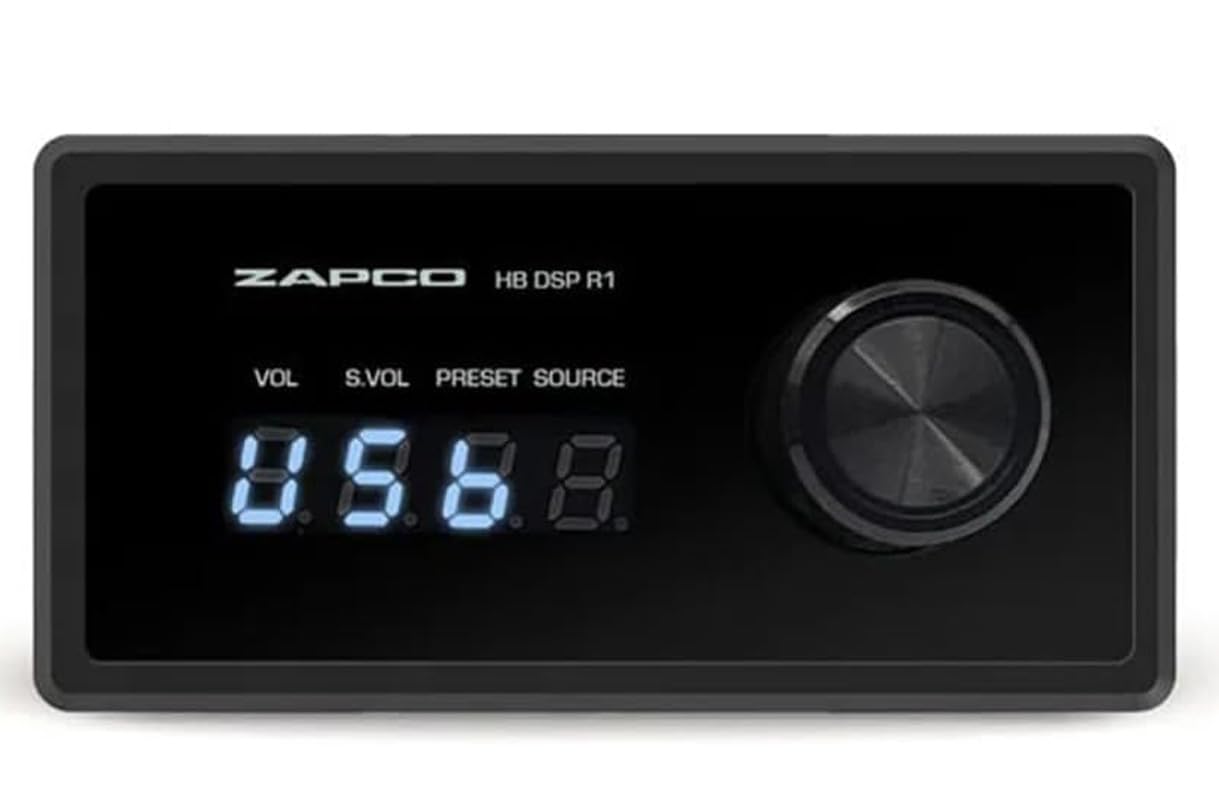
An image showing the Zapco HB-DSP-R remote control, a rectangular black unit with a digital display and a rotary knob on the right. A long black cable with an RJ-style connector extends from the left side of the unit.
2. സജ്ജീകരണവും ഇൻസ്റ്റാളേഷനും
Follow these steps to properly connect your Zapco HB-DSP-R remote control to your compatible Zapco DSP ampജീവപര്യന്തം:
- Identify the Remote Port: Locate the dedicated remote control port on your Zapco DSP amplifier (Charlie HB 46 ADSP, Duke HB 48 ADSP, or Louis HB 410 ADSP). This port typically resembles an RJ-style (Ethernet-like) connector.
- കേബിൾ ബന്ധിപ്പിക്കുക: Insert the RJ-style connector of the HB-DSP-R cable firmly into the identified remote control port on the ampജീവൻ.
- സുരക്ഷിത കണക്ഷൻ: Ensure the cable is securely seated in the port to prevent intermittent connection issues.
- ശക്തി: The HB-DSP-R remote control is powered directly by the amplifier through the connection cable. No external power source is required for the remote.
- പ്ലേസ്മെൻ്റ്: Position the remote control in a location that is easily accessible and visible for operation within your vehicle or audio setup.
3. പ്രവർത്തന നിർദ്ദേശങ്ങൾ
The Zapco HB-DSP-R remote control provides intuitive control over several key functions of your Zapco DSP amplifier. The unit features a digital display and a multi-function rotary knob.
- പ്രധാന വോളിയം നിയന്ത്രണം: The primary function of the rotary knob is to adjust the overall system volume. Rotate the knob clockwise to increase volume and counter-clockwise to decrease volume. The digital display will show the current volume level.
- സബ് വൂഫർ ലെവൽ നിയന്ത്രണം: This function allows you to manage the output level specifically for the subwoofer channel. Press the rotary knob briefly to cycle through available control modes until 'S.VOL' (Subwoofer Volume) is indicated on the display. Then, rotate the knob to adjust the subwoofer level.
- DSP Preset Selection: To select different Digital Sound Processor (DSP) presets, press the rotary knob briefly until 'PRESET' is indicated on the display. Rotate the knob to cycle through the stored DSP presets. The display will show the preset number.
- ഉറവിട തിരഞ്ഞെടുപ്പ്: To switch between available audio input sources, press the rotary knob briefly until 'SOURCE' is indicated on the display. Rotate the knob to select the desired input source.
- Song Selection (Music Player Mode): When the connected amplifier is operating in a music player mode, this function allows navigation through tracks. Press the rotary knob briefly until 'SONG' is indicated (if applicable for your amplifier's mode). Rotate the knob to select the next or previous song.
Always refer to your specific Zapco DSP amplifier's manual for detailed information on how these functions interact with the amplifier's settings and capabilities.
4. സവിശേഷതകൾ
The Zapco HB-DSP-R remote control offers the following key features:
- പ്രധാന വോളിയം നിയന്ത്രണം
- സബ് വൂഫർ ലെവൽ നിയന്ത്രണം
- DSP Preset selection
- ഉറവിട തിരഞ്ഞെടുപ്പ്
- Song selection (Music Player mode)
- Integrated digital display for clear feedback
5 സ്പെസിഫിക്കേഷനുകൾ
| മോഡൽ നമ്പർ | HB DSP R |
| ബ്രാൻഡ് | സാപ്കോ |
| അനുയോജ്യമായ ഉപകരണങ്ങൾ | Zapco Charlie (HB 46 ADSP), Duke (HB 48 ADSP), Louis (HB 410 ADSP) DSP Ampജീവപര്യന്തം |
| പിന്തുണയ്ക്കുന്ന ഉപകരണങ്ങളുടെ പരമാവധി എണ്ണം | 1 |
| പ്രത്യേക ഫീച്ചർ | ഡിജിറ്റൽ ഡിസ്പ്ലേ |
| നിറം | കറുപ്പ് |
| അളവുകൾ (L x D) | 90 mm x 45 mm (approximately 3.54 inches x 1.77 inches) |
| ഇനത്തിൻ്റെ ഭാരം | 1 pound (approximately 0.45 kg) |
6. പരിപാലനം
To ensure the longevity and proper functioning of your Zapco HB-DSP-R remote control, observe the following maintenance guidelines:
- വൃത്തിയാക്കൽ: Use a soft, dry cloth to clean the surface of the remote control. Avoid using abrasive cleaners, solvents, or harsh chemicals, as these can damage the finish or internal components.
- പരിസ്ഥിതി വ്യവസ്ഥകൾ: Do not expose the remote control to extreme temperatures, direct sunlight for extended periods, or high humidity. Keep it away from liquids.
- കേബിൾ കെയർ: Ensure the connection cable is not kinked, pinched, or subjected to excessive tension. Damaged cables can lead to intermittent operation or complete failure.
- സംഭരണം: If storing the remote control for an extended period, disconnect it from the ampഒരു തണുത്ത, ഉണങ്ങിയ സ്ഥലത്ത് സൂക്ഷിക്കുക.
7. പ്രശ്നപരിഹാരം
If you encounter issues with your Zapco HB-DSP-R remote control, consider the following troubleshooting steps:
- റിമോട്ട് പ്രതികരിക്കുന്നില്ല:
- Check the cable connection between the remote control and the Zapco DSP amplifier. Ensure it is firmly seated at both ends.
- Verify that the Zapco DSP ampലൈഫയർ ഓണാക്കി ശരിയായി പ്രവർത്തിക്കുന്നു.
- Digital Display Not Lighting Up:
- Confirm the cable connection is secure.
- If the issue persists, there might be a power delivery problem from the amplifier or a fault with the remote. Consult your amplifier's manual or contact Zapco support.
- Incorrect Function or Unresponsive Controls:
- Ensure the remote control is compatible with your specific Zapco DSP amplifier model (HB 46 ADSP, HB 48 ADSP, or HB 410 ADSP).
- Try disconnecting and reconnecting the remote control cable.
- എങ്കിൽ amplifier has a reset function, performing a soft reset might resolve communication issues.
For persistent issues or problems not covered here, please contact Zapco customer support or consult a qualified audio technician.
8. വാറൻ്റിയും പിന്തുണയും
For detailed information regarding the warranty coverage for your Zapco HB-DSP-R remote control, please refer to the warranty documentation included with your Zapco DSP amplifier or visit the official Zapco website. The warranty terms and conditions are typically provided with the main product.
For technical assistance, product support, or service inquiries, please contact Zapco customer support through their official channels. Ensure you have your product model number (HB DSP R) and amplifier model information available when seeking support.


