1. ആമുഖം
Thank you for choosing the iJoy Disney Lilo & Stitch Expressions Bluetooth Over-Ear Headphones. These wireless headphones are designed to provide a comfortable audio experience with the added charm of Lilo & Stitch designs. This manual will guide you through the setup, operation, and maintenance of your new headphones.

Image: iJoy Disney Lilo & Stitch Bluetooth Over-Ear Headphones.
2. ഉൽപ്പന്നം കഴിഞ്ഞുview
പ്രധാന സവിശേഷതകൾ:
- വയർലെസ് ബ്ലൂടൂത്ത് കണക്ഷൻ: Enjoy audio without tangled cords.
- ബിൽറ്റ്-ഇൻ മൈക്രോഫോൺ: For clear communication during calls.
- LED സൂചകങ്ങൾ: Provide battery and connection status.
- മടക്കാവുന്ന ഡിസൈൻ: എളുപ്പത്തിലുള്ള പോർട്ടബിലിറ്റിക്കും സംഭരണത്തിനും.
- Micro SD Card Plug-in: Play music directly from a Micro SD card.
- Built-in Radio Receiver: നിങ്ങളുടെ പ്രിയപ്പെട്ട റേഡിയോ സ്റ്റേഷനുകളിലേക്ക് ട്യൂൺ ചെയ്യുക.
- Aux Cable Included: Option for wired listening when battery is low or Bluetooth is not available.
ബോക്സിൽ എന്താണുള്ളത്:
- iJoy Disney Lilo & Stitch Expressions Bluetooth Over-Ear Headphones
- സംരക്ഷണ കേസ്
- ചാർജിംഗ് കേബിൾ (USB)
- Auxiliary Audio Cable with Microphone
3. സജ്ജീകരണം
3.1 ഹെഡ്ഫോണുകൾ ചാർജ് ചെയ്യുന്നു
Before initial use, fully charge your headphones. Connect the provided USB charging cable to the charging port on the headphones and to a compatible USB power source. The LED indicator will show charging status and turn off or change color when fully charged. A full charge provides approximately 15 hours of playtime.

Image: Headphones highlighting 15 hours of playtime.
3.2 ബ്ലൂടൂത്ത് ജോടിയാക്കൽ
- ഹെഡ്ഫോണുകൾ ഓഫാണെന്ന് ഉറപ്പാക്കുക.
- ജോടിയാക്കൽ മോഡ് സൂചിപ്പിക്കുന്ന LED ഇൻഡിക്കേറ്റർ നീലയും ചുവപ്പും നിറങ്ങളിൽ മിന്നുന്നത് വരെ പവർ ബട്ടൺ അമർത്തിപ്പിടിക്കുക.
- നിങ്ങളുടെ ഉപകരണത്തിൽ (സ്മാർട്ട്ഫോൺ, ടാബ്ലെറ്റ് മുതലായവ), ബ്ലൂടൂത്ത് പ്രവർത്തനക്ഷമമാക്കി ലഭ്യമായ ഉപകരണങ്ങൾക്കായി തിരയുക.
- Select "iJoy Stitch Headphones" (or similar name) from the list.
- കണക്ട് ചെയ്തുകഴിഞ്ഞാൽ, LED ഇൻഡിക്കേറ്റർ സാധാരണയായി ഒരു കടും നീല വെളിച്ചം അല്ലെങ്കിൽ ഫ്ലാഷ് നീല സാവധാനം കാണിക്കും.

Image: Headphones demonstrating universal compatibility with Apple and Android devices.
4. പ്രവർത്തന നിർദ്ദേശങ്ങൾ
4.1 നിയന്ത്രണങ്ങൾ കഴിഞ്ഞുview
The headphone controls are located on the ear cup. Refer to the diagram below for button functions:
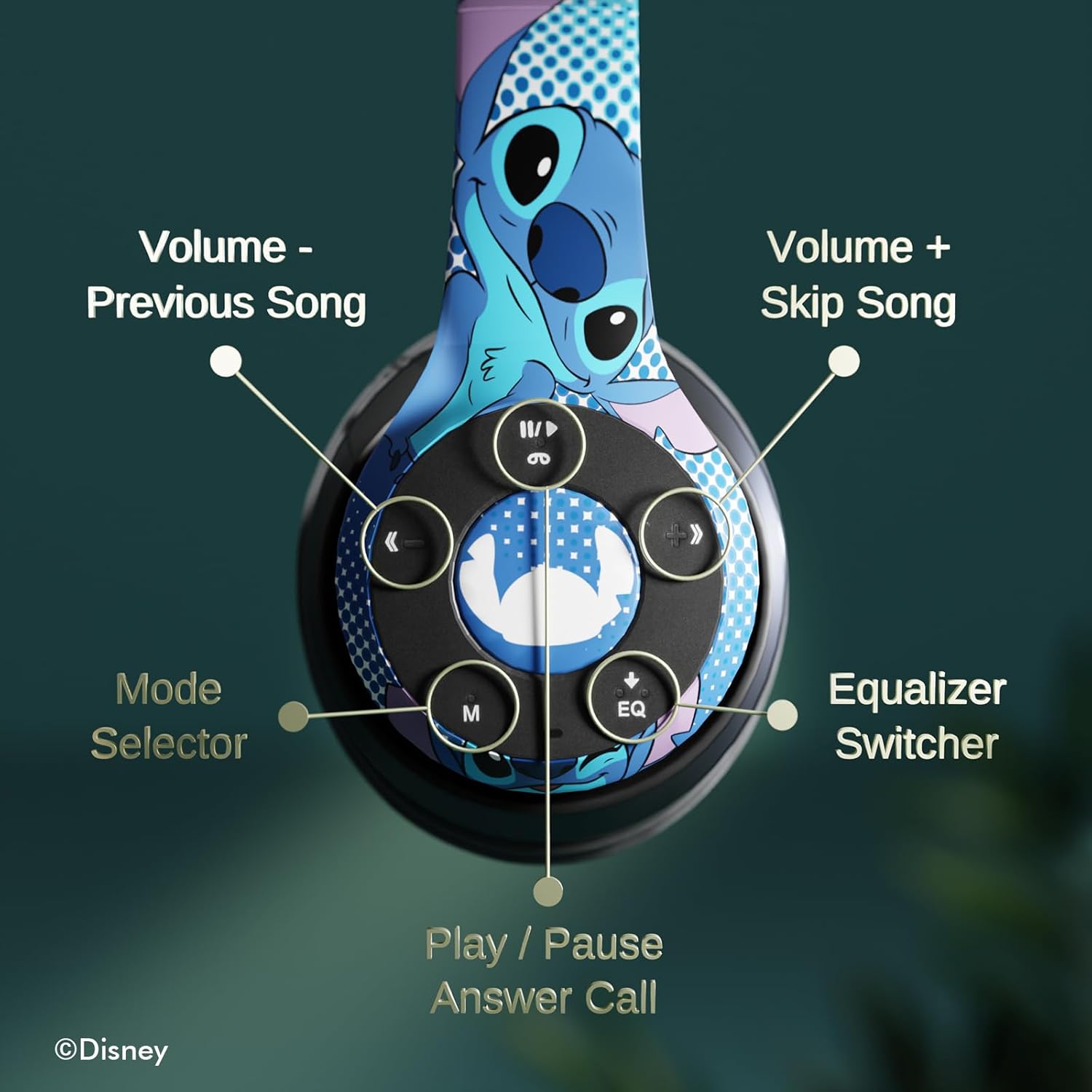
ചിത്രം: വിശദമായത് view of the headphone controls, including Volume -, Previous Song, Volume +, Skip Song, Mode Selector, Equalizer Switcher, and Play/Pause/Answer Call buttons.
- Play/Pause/Answer Call Button: Press once to play/pause music or answer/end a call. Press and hold to reject a call.
- Volume + / Skip Song Button: Press once for Volume Up. Press and hold to skip to the next song.
- വോളിയം - / മുൻ ഗാന ബട്ടൺ: Press once for Volume Down. Press and hold to go to the previous song.
- Mode Selector (M): Press to switch between Bluetooth, Micro SD card, and FM Radio modes.
- Equalizer Switcher (EQ): Press to cycle through different equalizer presets.
4.2 കോളുകൾ ചെയ്യലും സ്വീകരിക്കലും
With the built-in microphone, you can make and receive calls when connected via Bluetooth:
- ഉത്തരം/അവസാന കോൾ: Press the Play/Pause/Answer Call button once.
- കോൾ നിരസിക്കുക: Press and hold the Play/Pause/Answer Call button.
4.3 മ്യൂസിക് പ്ലേബാക്ക്
- ബ്ലൂടൂത്ത് മോഡ്: After pairing, music from your connected device will play through the headphones. Use the controls to manage playback.
- മൈക്രോ എസ്ഡി കാർഡ് മോഡ്: Insert a Micro SD card with MP3 files into the designated slot. Press the 'M' button to switch to Micro SD card mode. The headphones will automatically begin playing music from the card.
4.4 എഫ്എം റേഡിയോ മോഡ്
Press the 'M' button to switch to FM Radio mode. Use the Volume +/- buttons to scan for stations or adjust volume.
5. പരിപാലനം
- വൃത്തിയാക്കൽ: ഹെഡ്ഫോണുകൾ വൃത്തിയാക്കാൻ മൃദുവായതും ഉണങ്ങിയതുമായ തുണി ഉപയോഗിക്കുക. കഠിനമായ രാസവസ്തുക്കളോ ഉരച്ചിലുകളോ ഉള്ള വസ്തുക്കൾ ഉപയോഗിക്കരുത്.
- സംഭരണം: When not in use, store the headphones in the provided protective case. The foldable design allows for compact storage.
- ഈർപ്പം ഒഴിവാക്കുക: ഹെഡ്ഫോണുകൾ വെള്ളത്തിൽ നിന്നും അമിതമായ ഈർപ്പത്തിൽ നിന്നും അകറ്റി നിർത്തുക.
- താപനില: തീവ്രമായ താപനിലയിൽ ഹെഡ്ഫോണുകൾ തുറന്നുകാട്ടുന്നത് ഒഴിവാക്കുക.

Image: Headphones demonstrating their foldable design for easy storage.
6. പ്രശ്നപരിഹാരം
| പ്രശ്നം | സാധ്യമായ പരിഹാരം |
|---|---|
| ഹെഡ്ഫോണുകൾ ഓണാക്കുന്നില്ല. | ഹെഡ്ഫോണുകൾ പൂർണ്ണമായും ചാർജ്ജ് ചെയ്തിട്ടുണ്ടെന്ന് ഉറപ്പാക്കുക. |
| ഉപകരണവുമായി ജോടിയാക്കാൻ കഴിയില്ല. | Ensure headphones are in pairing mode (flashing blue/red LED). Turn off and on Bluetooth on your device. Move closer to the device. |
| ശബ്ദമില്ല. | Check volume levels on both headphones and connected device. Ensure headphones are correctly paired. Try using the auxiliary cable. |
| മോശം ശബ്ദ നിലവാരം. | Move closer to the connected device to avoid interference. Check audio source quality. |
| മൈക്രോഫോൺ പ്രവർത്തിക്കുന്നില്ല. | Ensure headphones are properly connected. Check microphone settings on your device. |
7 സ്പെസിഫിക്കേഷനുകൾ
| ഫീച്ചർ | വിശദാംശങ്ങൾ |
|---|---|
| മോഡലിൻ്റെ പേര് | Disney Lilo & Stitch Expressions |
| മോഡൽ നമ്പർ | DS20137 |
| കണക്റ്റിവിറ്റി ടെക്നോളജി | വയർലെസ് (ബ്ലൂടൂത്ത്) |
| വയർലെസ് കമ്മ്യൂണിക്കേഷൻ ടെക്നോളജി | ബ്ലൂടൂത്ത് |
| ബ്ലൂടൂത്ത് പതിപ്പ് | 4.0 |
| ബ്ലൂടൂത്ത് ശ്രേണി | 10 മീറ്റർ |
| ചെവി പ്ലേസ്മെൻ്റ് | ചെവിക്ക് മുകളിൽ |
| ഫോം ഫാക്ടർ | ചെവിക്ക് മുകളിൽ |
| ശബ്ദ നിയന്ത്രണം | സൗണ്ട് ഐസൊലേഷൻ |
| നിയന്ത്രണ തരം | വോളിയം നിയന്ത്രണം, ടച്ച് |
| പ്രത്യേക സവിശേഷതകൾ | Built-in Radio Receiver, Foldable and Adjustable headband, Micro SD Card Plug-in, Microphone Included |
| അനുയോജ്യമായ ഉപകരണങ്ങൾ | Bluetooth-enabled devices (e.g. smartphones, tablets, laptops) |
| മെറ്റീരിയൽ | Memory Foam, Plastic |
| ഇനത്തിൻ്റെ ഭാരം | 0.29 കിലോഗ്രാം (10.2 ഔൺസ്) |
| ബാറ്ററികൾ | 1 ലിഥിയം പോളിമർ ബാറ്ററി (ഉൾപ്പെടുത്തിയിരിക്കുന്നു) |
| പാക്കേജ് അളവുകൾ | 8.78 x 6.26 x 3.62 ഇഞ്ച് |
| യു.പി.സി | 810116712489 |
8. ഔദ്യോഗിക ഉൽപ്പന്ന വീഡിയോ
വീഡിയോ: ഒരു ഔദ്യോഗിക ഉൽപ്പന്ന വീഡിയോ പ്രദർശനംasing the Disney Lilo & Stitch Bluetooth Headphones, highlighting their features and design.
9. വാറൻ്റിയും പിന്തുണയും
For warranty information and customer support, please refer to the documentation included with your product or visit the official iJoy webസൈറ്റ്. വാറൻ്റി ക്ലെയിമുകൾക്കായി നിങ്ങളുടെ വാങ്ങൽ രസീത് സൂക്ഷിക്കുക.


