ആമുഖം
The WANBO Mini Pro is a compact and versatile portable LED projector designed for a wide range of entertainment and presentation needs. Featuring Android 9.0, native 720p resolution with 1080p support, and a bright 250 ANSI lumens output, it delivers a clear and vibrant viewing experience up to a 176-inch screen size. Its integrated Wi-Fi and Bluetooth capabilities, along with multiple connectivity options, make it suitable for both home and outdoor use.
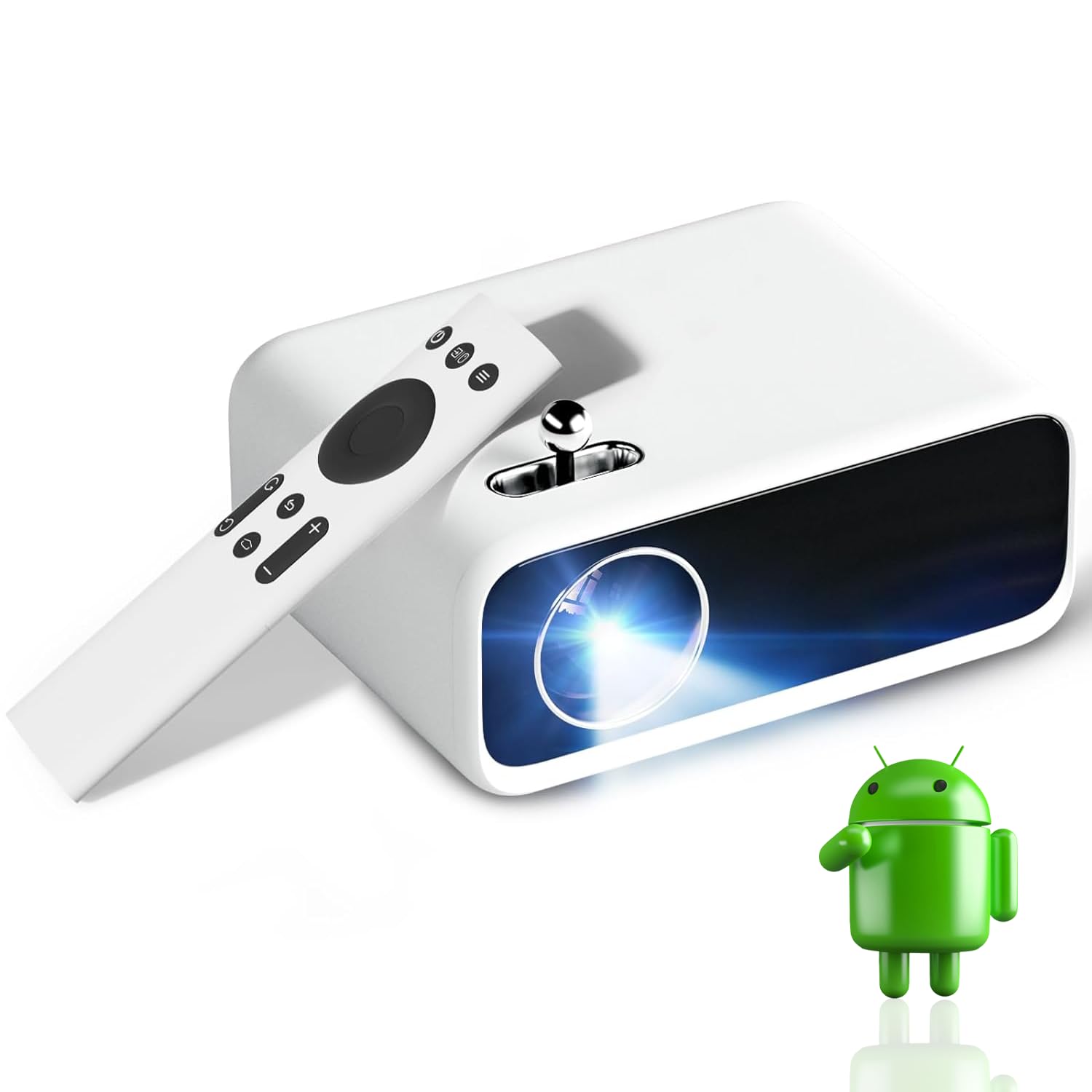
Image: The WANBO Mini Pro projector, a compact white device, is shown alongside its remote control. An Android logo is visible in the foreground, indicating its smart capabilities.
ബോക്സിൽ എന്താണുള്ളത്
Upon unboxing your WANBO Mini Pro projector, please ensure all the following items are present:
- മിനി പ്രൊജക്ടർ
- റിമോട്ട് കൺട്രോൾ
- പവർ അഡാപ്റ്റർ
- ഉപയോക്തൃ മാനുവൽ
- വാറൻ്റി കാർഡ്
ഉൽപ്പന്ന സവിശേഷതകൾ
The WANBO Mini Pro is equipped with advanced features to enhance your viewഅനുഭവം:
- ഡിസ്പ്ലേ: Native 720p HD resolution with 1080p support, 1500:1 contrast ratio, 250 ANSI lumens brightness, LTPS Display Technology, High Transmission Glass Lens, and a lamp life of up to 50,000 hours. Supports a maximum screen size of 176 inches.
- കണക്റ്റിവിറ്റി: Integrated 2.4G WiFi and Bluetooth 5.1. Features HDMI, USB, VGA, AV, Audio Out, and SD Card ports. Supports wireless screen mirroring from compatible devices.
- ഓഡിയോ: Built-in 3 Watt Hi-Fi speaker. Includes a 3.5mm audio jack for connecting external speakers or headphones. Bluetooth connectivity allows pairing with wireless audio devices.
- സ്മാർട്ട് സവിശേഷതകൾ: Runs on Android 9.0 OS with preloaded applications such as Netflix, Prime Video, and Hotstar. Includes 4D Digital Keystone correction, wireless screen sharing, Bluetooth, and zoom function.

Image: A diagram highlighting the key features of the WANBO Mini Pro projector, including 1280x720P resolution (1080P Support), 250 ANSI Lumens, Android 9.0 (1GB+8GB), Manual Focus, 4P/4D Keystone, 2.4G WiFi & Bluetooth, 120" Screen support, 3W high-quality speaker, and 50,000 hours lamp ജീവിതം.
സജ്ജമാക്കുക
1. പ്ലേസ്മെന്റ്
Position the projector on a stable, flat surface or mount it using a compatible tripod or ceiling mount. Ensure the projector lens is facing the projection surface (wall or screen) directly. For optimal image quality, place the projector perpendicular to the screen.

Image: Illustrations demonstrating various placement options for the WANBO Mini Pro projector: Tripod Installation, Ceiling Mount, and Table Placement.
2. പവർ കണക്ഷൻ
Connect the provided power adaptor to the projector's power input port, then plug the adaptor into a power outlet. The projector will power on or enter standby mode.
3. ഫോക്കസ് അഡ്ജസ്റ്റ്മെന്റ്
To achieve a clear image, manually adjust the focus knob located on the top of the projector until the projected image appears sharp and clear on the screen.

Image: A hand is shown adjusting the focus knob on the top of the WANBO Mini Pro projector, indicating the manual focus adjustment feature.
4. കീസ്റ്റോൺ തിരുത്തൽ
If the projected image appears trapezoidal, use the 4D Digital Keystone correction feature to adjust the image shape. This can be accessed through the projector's settings menu to ensure a perfectly rectangular image.

Image: An illustration demonstrating the 4D/4P Keystone correction feature of the WANBO Mini Pro projector, showing how it corrects distorted images to maintain a square projection even at random placements.
പ്രൊജക്ടർ പ്രവർത്തിപ്പിക്കുന്നു
1. Navigating the Android OS
The WANBO Mini Pro runs on Android 9.0. Use the provided remote control to navigate the user interface. The home screen provides access to pre-installed apps like Netflix, Prime Video, and Hotstar, as well as settings and other functionalities.

Image: A screenshot of the WANBO Mini Pro's Android 9.0 interface, showcasing various content categories like Cartoons, Knowledge courses, Variety shows, Movies, Documentaries, and TV series, along with logos of streaming services like Hulu, Netflix, YouTube, Prime Video, and Disney+.
2. ബാഹ്യ ഉപകരണങ്ങൾ ബന്ധിപ്പിക്കുന്നു
The projector supports various external devices via its multiple ports:
- എച്ച്ഡിഎംഐ: Connect set-top boxes, gaming consoles (PS4, PS5, Switch), laptops, PCs, or DVD players.
- USB: മീഡിയ പ്ലേ ചെയ്യാൻ USB ഡ്രൈവുകൾ ബന്ധിപ്പിക്കുന്നതിന് files.
- വി.ജി.എ: പഴയ കമ്പ്യൂട്ടറുകളോ ലാപ്ടോപ്പുകളോ ബന്ധിപ്പിക്കുന്നതിന്.
- ഓഫ്: For connecting legacy video devices.
- SD കാർഡ്: ഒരു SD കാർഡിൽ നിന്ന് നേരിട്ട് മീഡിയ പ്ലേ ചെയ്യുന്നതിന്.

Image: A diagram illustrating the multiple device connection capabilities of the WANBO Mini Pro projector, showing connections for HDMI, USB, iPhone/Android devices, Laptops/PCs, TV sticks, PS4/PS5, Nintendo Switch, USB drives, headsets, earphones, and DVD players.
3. വയർലെസ് സ്ക്രീൻ മിററിംഗ്
The projector supports wireless screen mirroring from smartphones (iPhone/Android) and other compatible devices. Ensure both the projector and your device are connected to the same Wi-Fi network, then select the screen mirroring option from the projector's menu and follow the on-screen instructions on your device.

Image: A scene depicting wireless projection for gaming with the WANBO Mini Pro projector, showing a large projected image of a game and a smartphone mirroring its screen to the projector via Bluetooth and WiFi.
ഡിസ്പ്ലേയും ഓഡിയോയും
ഡിസ്പ്ലേ ക്വാളിറ്റി
The WANBO Mini Pro offers a native 720p resolution with support for 1080p input, providing clear and detailed images. Its 250 ANSI lumens brightness and 1500:1 contrast ratio contribute to vivid colors and good distinction between bright and dark areas.

Image: A comparison image highlighting the upgraded brightness of the WANBO Mini Pro projector, showing a detailed image of an iguana with vibrant colors and clear distinction, emphasizing the 25% increase in brightness and 20% increase in lens light efficiency.
ഓഡിയോ പ്രകടനം
The projector includes a 3W built-in Hi-Fi speaker for integrated audio. For enhanced sound, connect external speakers or headphones via the 3.5mm audio jack or wirelessly through Bluetooth 5.1.

ചിത്രം: ഒരു ചിത്രീകരണ പ്രദർശനംasing the 3W speaker of the WANBO Mini Pro projector, emphasizing its independent digital sound effect for crisp, full, and transparent audio, along with its low noise level (less than 30dB).
മെയിൻ്റനൻസ്
To ensure the longevity and optimal performance of your WANBO Mini Pro projector, follow these maintenance guidelines:
- ലെൻസ് വൃത്തിയാക്കൽ: Use a soft, lint-free cloth specifically designed for optical lenses to gently wipe the projector lens. Avoid using abrasive materials or harsh chemicals.
- പൊടി നീക്കം: Regularly clean the projector's vents to prevent dust buildup, which can affect cooling and performance. Use a can of compressed air to gently blow dust away from the vents.
- സംഭരണം: ദീർഘനേരം ഉപയോഗിക്കാത്തപ്പോൾ, പ്രൊജക്ടർ തണുത്തതും വരണ്ടതുമായ സ്ഥലത്ത് സൂക്ഷിക്കുക, നേരിട്ടുള്ള സൂര്യപ്രകാശത്തിൽ നിന്നും കടുത്ത താപനിലയിൽ നിന്നും അകറ്റി നിർത്തുക. പൊടിയും കേടുപാടുകളും തടയാൻ യഥാർത്ഥ പാക്കേജിംഗ് അല്ലെങ്കിൽ ഒരു സംരക്ഷണ കേസ് ഉപയോഗിക്കുക.
- Lamp ജീവിതം: പ്രൊജക്ടറിന്റെ എൽ.ഇ.ഡിamp is designed for a long lifespan of up to 50,000 hours, reducing the need for frequent lamp മാറ്റിസ്ഥാപിക്കൽ.

Image: An image highlighting the massive 50,000 hours lamp life of the WANBO Mini Pro projector, indicating that its high-efficiency light source means no need to change the lamp for approximately 15 years.
ട്രബിൾഷൂട്ടിംഗ്
If you encounter issues with your WANBO Mini Pro projector, refer to the following common troubleshooting steps:
- ശക്തിയില്ല: Ensure the power adapter is securely connected to both the projector and a working power outlet. Try a different outlet.
- ചിത്രമില്ല: Check that the correct input source is selected in the projector's menu. Verify all cables (HDMI, VGA, etc.) are securely connected to both the projector and the source device.
- മങ്ങിയ ചിത്രം: Adjust the manual focus knob until the image is sharp. If the image is distorted, use the 4D Digital Keystone correction feature in the settings.
- ശബ്ദമില്ല: Check the volume level on both the projector and the connected source device. Ensure external speakers or headphones are properly connected if used. If using Bluetooth audio, ensure the device is paired correctly.
- വൈഫൈ/ബ്ലൂടൂത്ത് കണക്റ്റിവിറ്റി പ്രശ്നങ്ങൾ: Ensure the projector is within range of your Wi-Fi router or Bluetooth device. Restart both the projector and the network device.
- അമിത ചൂടാക്കൽ: Ensure the projector's ventilation vents are not blocked. Operate the projector in a well-ventilated area.
സ്പെസിഫിക്കേഷനുകൾ
| ഫീച്ചർ | വിശദാംശങ്ങൾ |
|---|---|
| ബ്രാൻഡ് | WANBO |
| മോഡൽ | മിനി പ്രോ |
| ഡിസ്പ്ലേ ടെക്നോളജി | എൽസിഡി |
| നേറ്റീവ് റെസല്യൂഷൻ | 1280 x 720 Pixels (720p HD) |
| പിന്തുണയുള്ള റെസല്യൂഷൻ | 1920 x 1080 Pixels (1080p) |
| തെളിച്ചം | 250 ആൻസി ലുമെൻസ് |
| കോൺട്രാസ്റ്റ് റേഷ്യോ | 1500:1 |
| പരമാവധി സ്ക്രീൻ വലിപ്പം | 176 ഇഞ്ച് |
| Lamp ജീവിതം | 50,000 മണിക്കൂർ |
| ഓപ്പറേറ്റിംഗ് സിസ്റ്റം | ആൻഡ്രോയിഡ് 9.0 |
| വൈഫൈ | 2.4G വൈഫൈ |
| ബ്ലൂടൂത്ത് | ബ്ലൂടൂത്ത് 5.1 |
| സ്പീക്കർ | 3 Watt inbuilt Hi-Fi speaker |
| കണക്റ്റിവിറ്റി പോർട്ടുകൾ | HDMI, USB, VGA, AV, Audio Out, SD Card |
| പ്രത്യേക സവിശേഷതകൾ | 4D Digital Keystone, Wireless Screen Sharing, Zoom function |
| ഉൽപ്പന്ന അളവുകൾ | 16.5 x 12.2 x 8.6 സെ.മീ |
| ഇനത്തിൻ്റെ ഭാരം | 600 ഗ്രാം |
| പവർ ഉറവിടം | AC |
| വാല്യംtage | 15 വോൾട്ട് (DC) |
വാറൻ്റിയും പിന്തുണയും
WANBO India provides a 1-Year warranty from the date of purchase for the WANBO Mini Pro projector. Product registration is mandatory to avail warranty benefits. Enjoy free home pickup and drop service throughout the warranty period for any warranty-related queries.
For additional details or support, please visit the official WANBO India website or contact their customer care at 709209011.


