1. ആമുഖം
Thank you for choosing the Olympia Vitus 2G Senior Mobile Phone. This device is designed with ease of use in mind, featuring a foldable design, large buttons, and essential functions to keep you connected. It is also hearing aid compatible for enhanced accessibility.

Image 1.1: The Olympia Vitus 2G phone in both open and closed positions, alongside its charging dock.

Image 1.2: A selection of Olympia Vitus 2G phones, showcasing available colors and their charging docks.
2 സുരക്ഷാ വിവരങ്ങൾ
- ഉപകരണം ഉപയോഗിക്കുന്നതിന് മുമ്പ് എല്ലാ നിർദ്ദേശങ്ങളും ശ്രദ്ധാപൂർവ്വം വായിക്കുക.
- ജലത്തിൽ നിന്നും ഈർപ്പത്തിൽ നിന്നും ഉപകരണം അകറ്റി നിർത്തുക.
- ഉപകരണത്തെ അങ്ങേയറ്റത്തെ താപനിലയിൽ തുറന്നുകാട്ടരുത്.
- അംഗീകൃത ബാറ്ററികൾ, ചാർജറുകൾ, ആക്സസറികൾ എന്നിവ മാത്രം ഉപയോഗിക്കുക.
- ഉപകരണം താഴെയിടുകയോ ഗുരുതരമായ ആഘാതത്തിന് വിധേയമാക്കുകയോ ചെയ്യുന്നത് ഒഴിവാക്കുക.
- Consult a qualified service professional for any repairs.
- പ്രാദേശിക നിയന്ത്രണങ്ങൾ അനുസരിച്ച് ഉപകരണവും അതിന്റെ ബാറ്ററിയും ഉത്തരവാദിത്തത്തോടെ നിർമാർജനം ചെയ്യുക.
3. സജ്ജീകരണം
3.1. അൺബോക്സിംഗും പാക്കേജ് ഉള്ളടക്കങ്ങളും
Carefully unpack your Olympia Vitus 2G phone. The package should contain:
- Olympia Vitus 2G Senior Mobile Phone
- ചാർജിംഗ് ഡോക്ക്
- USB-C ചാർജിംഗ് കേബിൾ
- പവർ അഡാപ്റ്റർ
- ബാറ്ററി
- ഉപയോക്തൃ മാനുവൽ (ഈ പ്രമാണം)
3.2. ബാറ്ററി ഇൻസ്റ്റാളേഷനും ചാർജിംഗും
- ഫോണിൻ്റെ പിൻ കവർ നീക്കം ചെയ്യുക.
- Insert the battery, ensuring the gold contacts align with the phone's terminals.
- പുറംചട്ട മാറ്റിസ്ഥാപിക്കുക.
- Connect the USB-C charging cable to the phone or place the phone in the charging dock.
- Connect the other end of the cable to the power adapter and plug it into a wall outlet.
- Allow the phone to charge fully before first use. The battery indicator on the display will show charging status.
The Vitus 2G offers a standby time of up to 240 hours and a talk time of up to 3.5 hours. An automatic SMS notification will alert you when the battery level is low, prompting timely charging.

Image 3.1: The Olympia Vitus 2G phone securely placed in its charging dock, indicating the charging process.
3.3. സിം കാർഡ് ഇൻസ്റ്റാളേഷൻ
- ഫോൺ ഓഫാണെന്ന് ഉറപ്പാക്കുക.
- പിൻ കവറും ബാറ്ററിയും നീക്കം ചെയ്യുക.
- Locate the SIM card slot(s). This phone supports 2G cellular technology.
- Carefully insert your SIM card(s) into the designated slot(s) with the gold contacts facing down, following the diagram usually found near the slot.
- ബാറ്ററി വീണ്ടും തിരുകുക, പിൻ കവർ മാറ്റിസ്ഥാപിക്കുക.
3.4. പവർ ഓൺ/ഓഫ്
- പവർ ഓൺ ചെയ്യാൻ: അമർത്തിപ്പിടിക്കുക പവർ/എൻഡ് കോൾ സ്ക്രീൻ പ്രകാശിക്കുന്നത് വരെ ബട്ടൺ.
- പവർ ഓഫ് ചെയ്യാൻ: അമർത്തിപ്പിടിക്കുക പവർ/എൻഡ് കോൾ ബട്ടൺ അമർത്തി, സ്ക്രീനിലെ ഓപ്ഷനുകളിൽ നിന്ന് "പവർ ഓഫ്" തിരഞ്ഞെടുക്കുക.
4. പ്രവർത്തന നിർദ്ദേശങ്ങൾ
The Olympia Vitus 2G is designed for straightforward operation with its intuitive user interface and large, easy-to-press buttons.

Image 4.1: A user demonstrating the ease of making a call with the Olympia Vitus 2G, highlighting its large buttons and clear display.
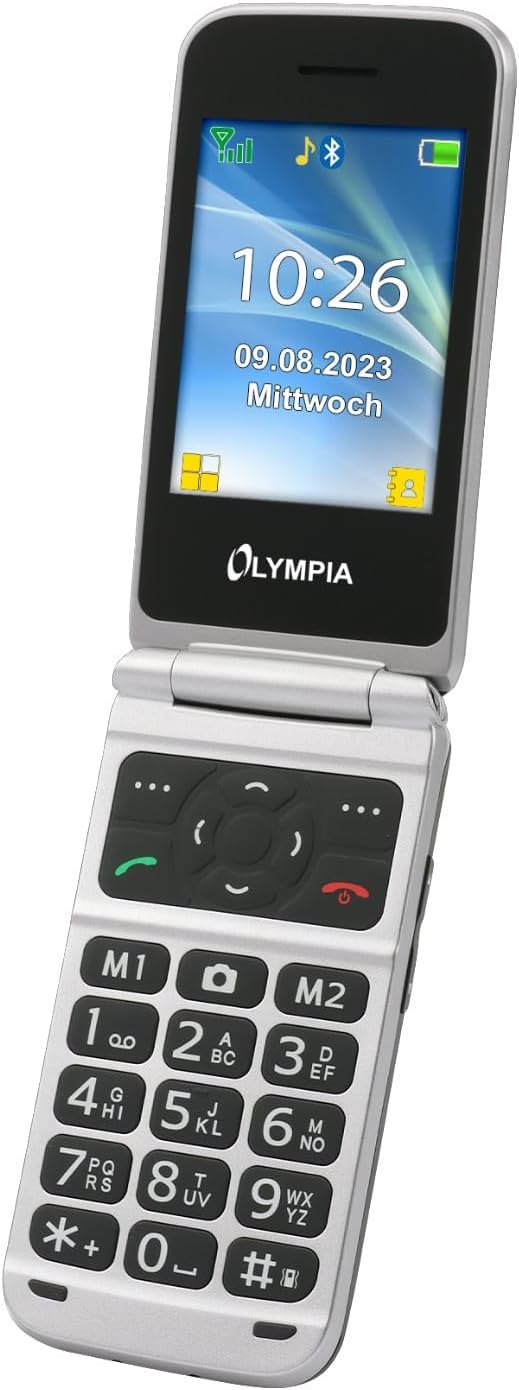
ചിത്രം 4.2: വിശദമായ view of the Olympia Vitus 2G's keypad, emphasizing the large, well-spaced, and clearly labeled buttons for easy dialing and navigation.
4.1. കോളുകൾ ചെയ്യലും സ്വീകരിക്കലും
- To make a call: Dial the number using the large keypad and press the വിളിക്കൂ ബട്ടൺ (പച്ച റിസീവർ ഐക്കൺ).
- To answer a call: Press the വിളിക്കൂ ഫോൺ റിംഗ് ചെയ്യുമ്പോൾ ബട്ടൺ അമർത്തുക.
- To end a call: Press the കോൾ അവസാനിപ്പിക്കുക button (red receiver icon).
4.2. Emergency Call Button (SOS Function)
The Vitus 2G features a dedicated SOS button for emergencies. When activated, it can trigger an SOS sound alarm, send SOS SMS messages, and initiate calls to pre-programmed emergency contacts.

ചിത്രം 4.3: പിൻഭാഗം view of the Olympia Vitus 2G, clearly showing the prominent red SOS emergency call button.
- സജീവമാക്കാൻ: അമർത്തിപ്പിടിക്കുക SOS ബട്ടൺ on the back of the phone for a few seconds.
- Ensure emergency contacts are set up in the phone's settings for this feature to function correctly.
4.3. Speed Dial and Direct Dial Buttons
The phone supports image speed dialing and includes two direct dial buttons (M1, M2) for quick access to important contacts.
- To set up: Refer to the phone's menu for "Speed Dial" or "Direct Dial" settings to assign contacts to M1, M2, or other number keys.
- To use: Simply press the assigned M1 or M2 button, or hold down a number key for speed dial.
4.4. Multimedia and Extra Features
Your Vitus 2G phone includes several useful features:
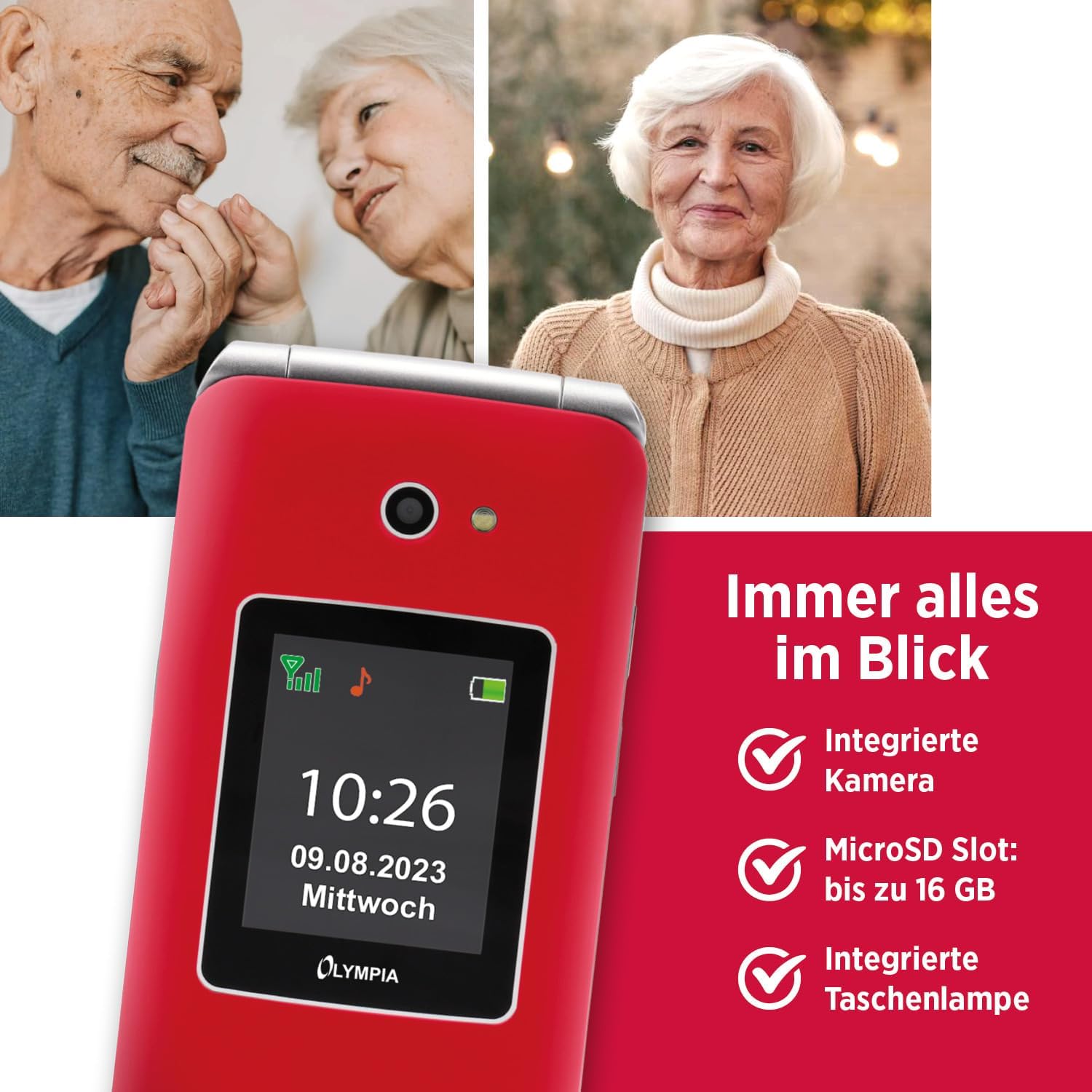
Image 4.4: The Olympia Vitus 2G phone, showcasing its integrated camera, microSD card slot for expandable storage, and built-in torch.
- ക്യാമറ: Capture photos using the integrated camera. Access it via the main menu.
- എഫ്എം റേഡിയോ: Listen to your favorite radio stations. Headphones may be required for optimal reception.
- ടോർച്ച്: Activate the built-in torch for illumination in dark environments.
- മൈക്രോ എസ്ഡി സ്ലോട്ട്: Expand storage up to 16GB for photos, music, and other files.
- Calendar, Calculator, Alarm Clock: Access these utility functions from the main menu.
- ബ്ലൂടൂത്ത്: Connect wirelessly to compatible devices such as headsets or other phones.
4.5. ഹിയറിംഗ് എയ്ഡ് കോംപാറ്റിബിലിറ്റി (HAC)
The Olympia Vitus 2G is designed to be compatible with hearing aids, reducing interference and improving call clarity for users with hearing devices.

Image 4.5: The Olympia Vitus 2G phone in its closed state, featuring the Hearing Aid Compatible (HAC) logo, indicating its suitability for users with hearing aids.
- When using a hearing aid, position the phone near your hearing aid to find the optimal listening position.
- Adjust the volume on both your phone and hearing aid for the best experience.
5. പരിപാലനം
5.1. നിങ്ങളുടെ ഫോൺ വൃത്തിയാക്കൽ
- ഫോണിന്റെ പുറംഭാഗം വൃത്തിയാക്കാൻ മൃദുവായതും ഉണങ്ങിയതും ലിന്റ് രഹിതവുമായ തുണി ഉപയോഗിക്കുക.
- കഠിനമായ രാസവസ്തുക്കൾ, ക്ലീനിംഗ് ലായകങ്ങൾ അല്ലെങ്കിൽ ശക്തമായ ഡിറ്റർജന്റുകൾ ഉപയോഗിക്കരുത്.
- ഏതെങ്കിലും ദ്വാരങ്ങളിൽ ഈർപ്പം കയറുന്നത് ഒഴിവാക്കുക.
5.2. ബാറ്ററി പരിചരണം
- ബാറ്ററി ലൈഫ് വർദ്ധിപ്പിക്കാൻ, ബാറ്ററി ഇടയ്ക്കിടെ പൂർണ്ണമായും ഡിസ്ചാർജ് ചെയ്യുന്നത് ഒഴിവാക്കുക.
- Charge the phone regularly, especially when the low battery notification appears.
- ദീർഘനേരം ഉപയോഗിക്കാത്തപ്പോൾ ഫോൺ തണുത്തതും വരണ്ടതുമായ സ്ഥലത്ത് സൂക്ഷിക്കുക.
5.3. സോഫ്റ്റ്വെയർ അപ്ഡേറ്റുകൾ
Periodically check for software updates in the phone's settings menu. Updates can improve performance, add new features, and enhance security.
6. പ്രശ്നപരിഹാരം
| പ്രശ്നം | സാധ്യമായ പരിഹാരം |
|---|---|
| ഫോൺ ഓൺ ആകുന്നില്ല. | Ensure the battery is correctly installed and charged. Connect to charger and try again. |
| കോളുകൾ വിളിക്കാനോ സ്വീകരിക്കാനോ കഴിയില്ല | Check SIM card installation. Ensure you have network signal. Contact your service provider. |
| മോശം കോൾ നിലവാരം | Move to an area with better network reception. If using a hearing aid, adjust phone position. |
| ബാറ്ററി പെട്ടെന്ന് തീരുന്നു | സ്ക്രീൻ തെളിച്ചം കുറയ്ക്കുക. ഉപയോഗിക്കാത്ത ആപ്ലിക്കേഷനുകൾ അടയ്ക്കുക. പശ്ചാത്തല ഡാറ്റ ഉപയോഗം പരിമിതപ്പെടുത്തുക. |
| SOS ബട്ടൺ പ്രവർത്തിക്കുന്നില്ല. | ഫോണിന്റെ ക്രമീകരണങ്ങളിൽ അടിയന്തര കോൺടാക്റ്റുകൾ ശരിയായി സജ്ജീകരിച്ചിട്ടുണ്ടെന്ന് ഉറപ്പാക്കുക. |
7 സ്പെസിഫിക്കേഷനുകൾ
The following are the technical specifications for the Olympia Vitus 2G Senior Mobile Phone:

ചിത്രം 7.1: ഒരു ഓവർview of the Olympia Vitus 2G's key features and specifications, including its SOS button, USB-C, FM Radio, Bluetooth, and battery life.
- മോഡലിൻ്റെ പേര്: VITUS 2G
- ഇനം മോഡൽ നമ്പർ: 2225
- ബ്രാൻഡ്: ഒളിമ്പിയ
- ഓപ്പറേറ്റിംഗ് സിസ്റ്റം: KaiOS
- സിപിയു മോഡൽ: സ്നാപ്ഡ്രാഗൺ
- ഡിസ്പ്ലേ: 1.7 inches (outer), 2.88 inches (inner)
- റെസലൂഷൻ: 240 x 320 പിക്സലുകൾ
- വയർലെസ് കാരിയർ: എല്ലാ കാരിയറുകൾക്കുമായി അൺലോക്കുചെയ്തു
- സെല്ലുലാർ ടെക്നോളജി: 2G
- കണക്റ്റിവിറ്റി ടെക്നോളജി: USB-C, ബ്ലൂടൂത്ത്
- നിറം: Red (other colors may be available)
- ബാറ്ററി സ്റ്റാൻഡ്ബൈ സമയം: 240 മണിക്കൂർ വരെ
- ബാറ്ററി സംസാര സമയം: 3.5 മണിക്കൂർ വരെ
- MicroSD Support: 16 ജിബി വരെ
- അളവുകൾ (WxHxD): 56 x 19 x 106 mm (closed)
- ഭാരം: 115 ഗ്രാം
8. വാറൻ്റി വിവരങ്ങൾ
Your Olympia Vitus 2G Senior Mobile Phone comes with a standard manufacturer's warranty. Please refer to the warranty card included in your package for specific terms, conditions, and duration. Keep your proof of purchase for warranty claims.
9. ഉപഭോക്തൃ പിന്തുണ
For technical assistance, troubleshooting, or further inquiries regarding your Olympia Vitus 2G, please contact Olympia customer support. Contact details can typically be found on the manufacturer's webസൈറ്റ് അല്ലെങ്കിൽ വാറന്റി കാർഡിൽ.
ദയവായി ശ്രദ്ധിക്കുക: ഉൽപ്പന്ന സവിശേഷതകളും സവിശേഷതകളും മുൻകൂർ അറിയിപ്പ് കൂടാതെ മാറ്റത്തിന് വിധേയമാണ്.


